Building a Coding Agent from Scratch, Part 5: Making Local LLMs First-Class Citizens. Getting Two 16GB GPUs to Build a Web System Unattended
Starting on a single RTX A5000 (24GB), seven local models were all wiped out. Configuration and pitfalls on the way to two RTX A4000 (16GB) cards running Qwen3.6-35B-A3B in AWQ 4-bit with an fp8 KV cache and a 98k context, building an authenticated web system three times in a row at 93.8 to 96.5.

Hello!
Every experiment in this series runs on local LLMs on our own GPUs.
What we started with was a single RTX A5000 (24GB) card.
We tried seven models that fit on it and had them build a task-management web app with authentication. The result: all seven disqualified.
Keeps writing things that won't start. Installs forbidden external packages. Gets the database API wrong every time. Output collapses into the same word repeated.
To put the conclusion first, we now have exactly one local configuration confirmed on our machines that can "build a web system from scratch, unattended."
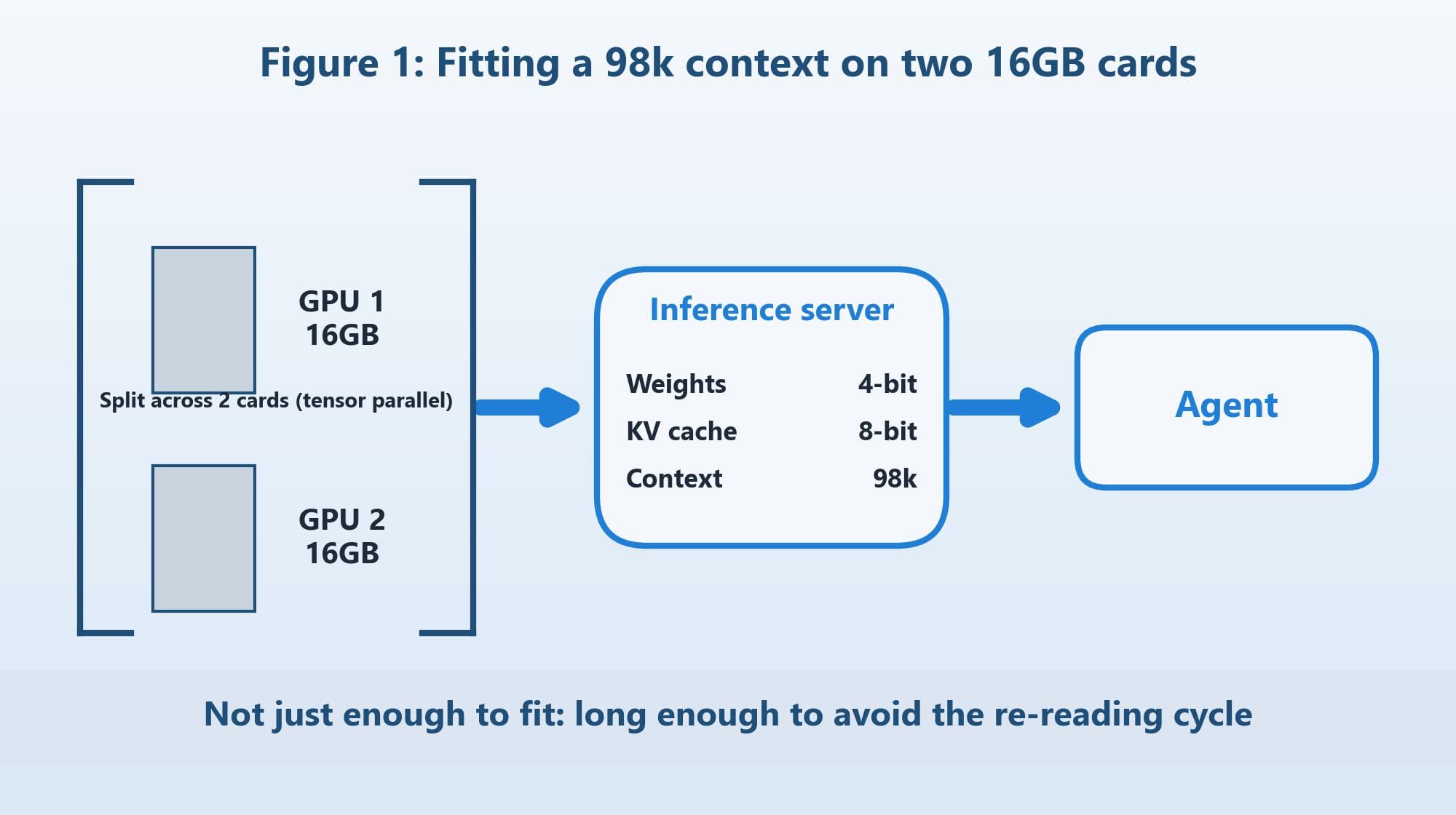
It is two RTX A4000 (16GB) cards running Qwen3.6-35B-A3B (MoE, 3B active) in AWQ 4-bit, with an 8-bit KV cache to secure a 98k context.
Three runs of the same task: 94.9, 93.8, 96.5. But by the time this configuration was confirmed, we had fixed 64 defects on the harness side. Changing the model alone did not get us there.
This article is Part 5 of the series "Building a Coding Agent from Scratch." This time we focus on local LLMs: model quirks, GPU memory, context length, and how to repair broken tool calls, all with measured numbers.
| Part | Theme |
|---|---|
| Part 1 | Why "finishing the job" is hard. Separating the turn runner from the stop decider |
| Part 2 | "Done" means "it runs," not "it's written." The completion gate and how to write a pushback |
| Part 3 | "It didn't stop" is not "it made progress." Count idle turns, and cap them without cutting the thinking |
| Part 4 | Autonomy rules are for when nobody is around. If a human is present, stop and ask |
| Part 5 (this post) | Making local LLMs first-class citizens. Getting two 16GB GPUs to build a web system |
| Part 6 | How to build the evaluation. Have it build something that runs, auto-grade it, and doubt the grader itself |
| Part 7 | Logging and regression. Everything is found in the event log. And building with zero dependencies |
Why a Small Model and Small GPUs
First, let me explain why this combination. What we are aiming for with this agent is a coding agent that builds a web system all the way to the end on a single machine at hand. If all we wanted was something that runs on a large cloud model, Parts 1 through 4 would suffice. What this part tackles, on top of that, is making sure that "a small model and small GPUs can do the same thing properly."
There are three reasons.
The first is that there are workplaces where code cannot leave the building. In development that handles customer source code, or data that contracts forbid sending outside the company, you cannot simply hand it to a cloud API. With an agent that runs entirely on an in-house workstation, the problem never arises in the first place.
The second is the shape of the cost. An autonomous agent runs 40 to 144 turns on a single task, and each time it loads the whole, ever-longer history into the input. It is obvious when you think about it, but with a pay-as-you-go API this repetition piles straight onto the bill. With your own GPUs, the hardware is a fixed cost at the time of purchase, and there is no charge per run. And since these are small GPUs, they are within reach of individuals too.
The third is that running a small model exposes every weakness in the harness. A smart model fills the holes in the harness with its own judgment, so the defects stay hidden. A small model does not fill them. Many of the "64 harness defects fixed" that appear in this part were found because a small model fell through them. Fixes for defects found with a small model are not wasted when you load a large model either, because completion judgment, idle detection, and tool-call validation are mechanisms you need regardless of how smart the model is.
Settling the hardware on "two 16GB cards" was for the same reason. Not data-center GPUs, but cards you can plug into a workstation under the desk: we wanted to find out what can and cannot be done within that range.
The RTX A4000 is a single-slot card whose power and cooling needs are met by an ordinary PC. With two of them, this part presents one configuration that can build a web system with authentication all the way through with nobody watching.
1. "First-Class Citizen" Means the Core Knows No Provider's Vocabulary
First, just one point about design.
When putting a local LLM on board, the very first thing we decided was that the agent's core knows no particular provider's vocabulary. The core deals only with three kinds of normalized blocks: "text," "tool call," and "tool result." Cloud APIs and local inference servers each get an adapter that converts to and from their own wire format in both directions.
(pseudocode) The boundary between core and adapters
core  --> ModelClient (abstract)
             |-- adapter for cloud A
             |-- adapter for OpenAI-compatible APIs   <- local inference servers go here
             |-- adapter for cloud B
             `-- fake adapter for tests (no network needed)
Adding a new provider means adding one adapter class. Not a single line of the core or the tools changes. If you feel the urge to change them, the abstraction is leaking.
Why did we decide this first? Because local models return "broken responses" more often than cloud models. JSON cut off midway. Thinking mixed into the body. Tool call arguments in a different order. Unless handling of these quirks is confined to the adapters, the core gets polluted with the quirks of specific models.
2. The Local Models We Tried, and One Control
These are the results of running the same task (a task-management web app with authentication, 12 APIs, SQLite, a UI, and tests). The seven models first tried on a single RTX A5000 (24GB) were all disqualified: the six in the table other than the 35B-A3B, plus the previous-generation Qwen3-30B-A3B, which is not in the table (its habit of installing forbidden external packages never went away). Of those, the 27B, the Coder variant, and Gemma 4 were rerun on two RTX A4000s, while the main candidate, the 35B-A3B, was tried for the first time on two 16GB cards. The table includes the results from both configurations.
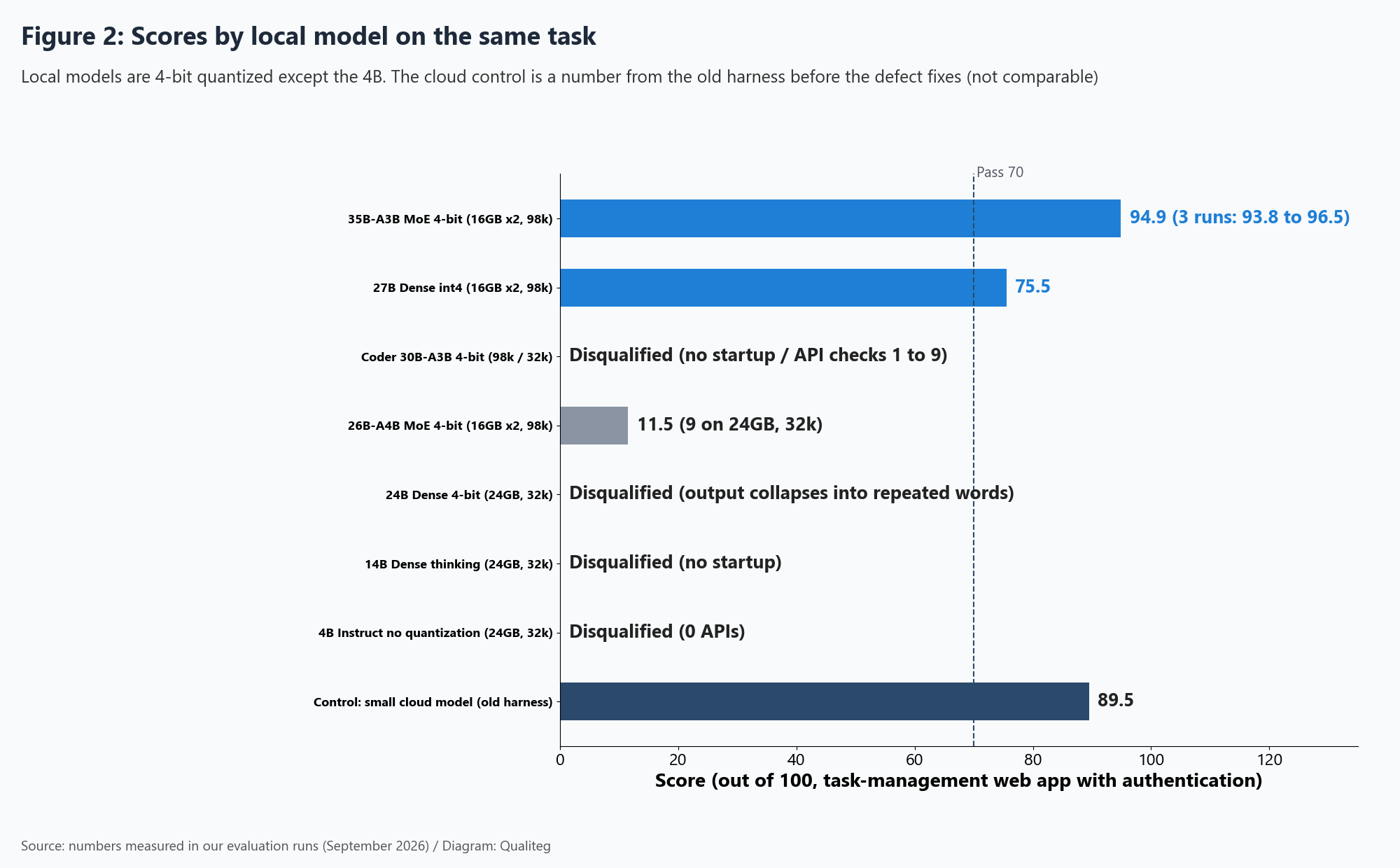
| Model | Quantization / shape | GPU | Context | Score | Per turn | In a word |
|---|---|---|---|---|---|---|
| Qwen3.6-35B-A3B | AWQ 4-bit / MoE | 16GB x2 | 98k | 94.9 / 93.8 / 96.5 | 25 to 36 s | The main candidate. Reads the fine print of the spec |
| Qwen3.6-27B | int4 / Dense | 16GB x2 | 98k | 75.5 | 54 s | Passes, but slow |
| Qwen3-Coder-30B-A3B | AWQ 4-bit / MoE | 16GB x2, 24GB | 98k, 32k | Disqualified x9 | 14 to 24 s | Fast, but gets the DB API wrong every time |
| Gemma 4 26B-A4B | AWQ 4-bit / MoE | 24GB, 16GB x2 | 32k, 98k | 9 / 11.5 | Varies | Keeps writing things that won't start |
| Devstral-Small-2 24B | AWQ 4-bit / Dense | 24GB | 32k | Disqualified | Varies | Output collapses into the same word repeated |
| Qwen3-14B | AWQ / Dense (thinking) | 24GB | 32k | Disqualified | Varies | Thinking took up 93% of the history |
| Qwen3-4B-Instruct | None | 24GB | 32k | Disqualified | Varies | Startup and UI work. APIs: 0 |
| Control: a small paid cloud model | API | None | API side | 89.5 | Not measured | Completed in 33 turns. Old harness, before the defect fixes |
One caveat about the cloud control model. This 89.5 is a number from the old harness at the stage when 16 harness defects had been fixed. On that same old harness, the local models were wiped out with at best 6.4 of the 35 points allotted to APIs. The local 35B's three runs (94.9 / 93.8 / 96.5) are numbers from the harness at the stage when 64 defects had been fixed. On the latest harness, after continued fixes brought the total to 105, the same task scored 98.3. Since the versions differ, this is not a comparison of model quality. What can be read from it is rather that "loading a smart model alone does not get you there."
2-1. The main candidate, 35B-A3B, reads the specification
It implements even the default value of status and the sort order of queries that other models drop. On the third run, all 22 API checks passed.
It has weaknesses, though. It re-saves the same TODO for 11 turns. It tries to write 27KB in one go and gets cut off. It forgets to write the README. Turn counts vary from 40 to 144, but scores stay within ±1.5 of the average (Part 3).
2-2. The Coder variant is "fast but doesn't know"
The Coder variant is 1.5 to 2 times faster (14 to 24 s/turn), but it got the API of Node.js's built-in SQLite module wrong in all nine attempts (there is no function open; the correct one is the DatabaseSync class), and never produced something that worked. A gap in knowledge cannot be filled by the harness.
Change the shape of the task, though, and a different face appears. Fixing a bug in existing code: 12 turns, 35 seconds, 92.5 points. Adding a feature to existing code: 20 turns, 70 seconds, 96.7. Building a CLI from scratch: 70. A server with background processing: 24.3 (reported done without the worker ever running).
It splits into four tiers by task shape (Web 0 / background processing 24 / CLI 70 / fixes and feature additions 92 to 97). Declaring a model "usable" or "unusable" from the score on one task is dangerous; even a weak model is practical for "work where the structure already exists." Part 6 returns to this as "adding more kinds of tasks."
2-3. Quantization degradation looks like "a bad model"
The 4-bit version of Devstral collapsed into repeating the same words: "Let me create files are files as files are files..." Looking only at the 33% idle rate, it appears to lack ability, but the cause is the interaction between quantization and long outputs. A different quantization of the same model used up the whole 24GB on weights alone and could not start.
As written in Part 3, do not blame the model's ability for a low score on a run whose idle rate exceeds 30%. Simply changing the quantization build can change the result.
3. Fitting a 98k Context on Two 16GB Cards
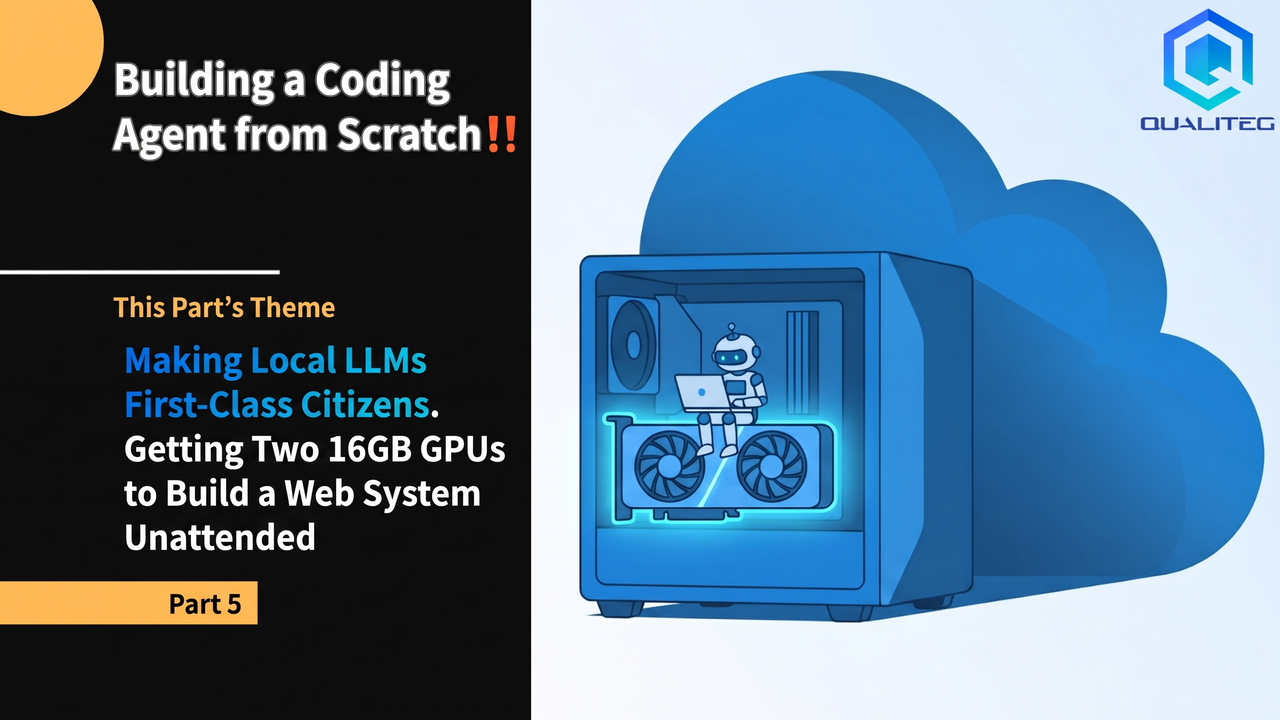
This is the main configuration (Figure 1 at the top).
The model is cyankiwi's AWQ 4-bit build. Qwen's official quantized versions are BF16 and FP8 only, with no 4-bit, so fitting it on two 16GB cards means using a third-party quantization. cyankiwi is an account specializing in quantization that has continuously published AWQ builds of Qwen and Gemma, and the same model is used in NVIDIA's Jetson AI Lab instructions. The weights are distributed in safetensors format, so loading them requires no custom Python code.
# Starting the inference server (vLLM 0.28). 16GB x 2, Ubuntu on WSL2
export NCCL_P2P_DISABLE=1 NCCL_SHM_DISABLE=1 NCCL_CUMEM_ENABLE=0 NCCL_IB_DISABLE=1
vllm serve cyankiwi/Qwen3.6-35B-A3B-AWQ-4bit \
  --tensor-parallel-size 2 --kv-cache-dtype fp8 \
  --max-model-len 98304 --gpu-memory-utilization 0.92 \
  --max-num-batched-tokens 2048 --max-num-seqs 4 \
  --compilation-config '{"cudagraph_capture_sizes":[1,2,4]}' \
  --reasoning-parser qwen3 --tool-call-parser qwen3_coder --enable-auto-tool-choice
The weights are 4-bit and split across two cards (tensor parallel), the KV cache is 8-bit, and the context is 98,304 tokens. Here is a table of the pitfalls we stepped on along the way.
| Pitfall | What happens | Fix |
|---|---|---|
--enforce-eager (disabling CUDA graphs) | 6.8 tokens/s, 63 s/turn. Unusable | Keep CUDA graphs on but narrowed. Concurrency 4, capture sizes 1/2/4. Graph memory fits in 0.51GiB, 30 to 39 tokens/s |
| Memory utilization 0.95 | Won't start (14.77/16GiB free) | 0.92 |
| 0.92 with default CUDA graphs | "No memory for KV" | The narrowing above |
| Context length 131072 | KV needs 3.0GiB and won't fit | 98304 (KV 2.42GiB) |
| Default PyPI wheel (cu130) | "driver too old" on our driver (CUDA 12.8) | Specify the cu129 wheel |
| Tensor parallel on WSL2 | NCCL hangs | NCCL_P2P_DISABLE=1 NCCL_SHM_DISABLE=1 NCCL_CUMEM_ENABLE=0 NCCL_IB_DISABLE=1 |
| Triton JIT | Missing headers | python3-dev |
| Starting in the background | nohup dies when the WSL session ends | Create the process from the Windows side and keep a foreground |
The first row mattered most. When memory is short and you disable CUDA graphs, speed drops to one fifth. Instead of disabling them, narrow the concurrency and capture sizes and keep them on. That difference took a turn from 63 seconds to around 30.
The NCCL problem on WSL2 is covered in detail in an earlier article (see Related Articles).
4. Context Length Matters Not Just to "Fit" but to "Avoid the Cycle"
We ran the same 27B model with a 16k context on a single 24GB card and with a 98k context on two 16GB cards.
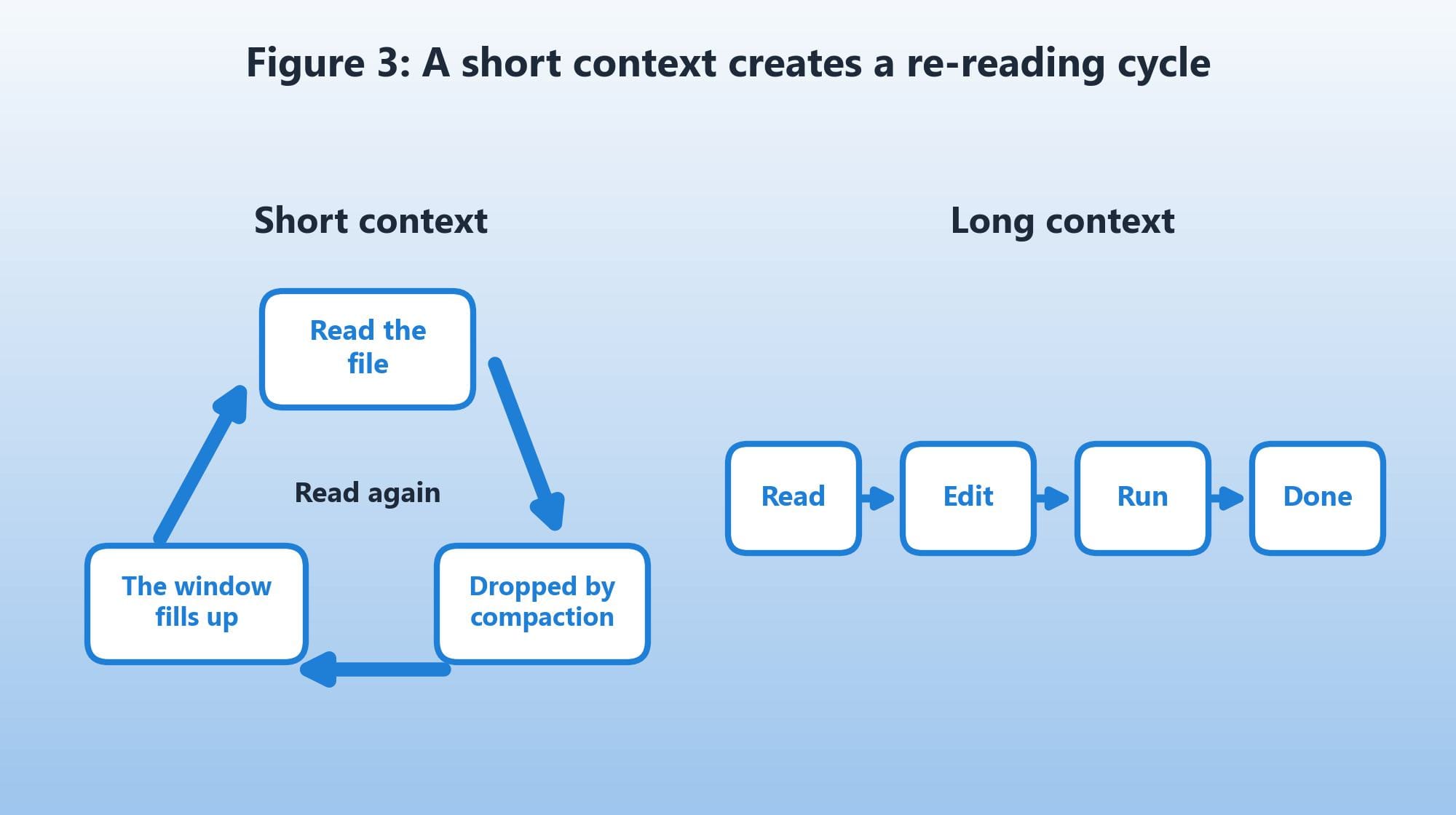
At 16k, it entered a compaction cycle re-reading four files 48 times each and was cut off. At 98k it passed with 75.5.
The mechanism is as described in Part 3. Read results accumulate in the window, compaction drops them, and since they were dropped, it reads again. On the single 24GB card at 32k, compaction ran 6 to 54 times in 300 turns; at 98k, 0 to 5 times. Context length is not only about "whether the model fits" but about whether the length avoids the re-reading cycle.
One more unglamorous pitfall. The inference server was listening at 98,304, but the harness side was using the 32,768 from the model catalog. Compaction started at one third. We changed it to read the context length not from the catalog but from /v1/models returned by the server's max_model_len, and swap it in at startup. The output window is widened to match the window too.
5. The Thinking-Model Pitfall: Before Comparing, Check That Both Get the Same Treatment
This is from when we loaded a model of the type that emits reasoning.
The inference server separates thinking from the body into its own field only when --reasoning-parser is specified. Without it, the <think> tags arrive mixed into the body. The first version did not know this, and thinking took up 93% of the history. Most of the model's response was thinking, all of it was appended to the history, and it became the input for the next turn.
To avoid depending on the server's configuration, we added a layer on the harness side that strips <think> from the body.
The important point here is to check, before comparing, that both sides of the comparison are getting the same treatment. In this case only the thinking model was being disadvantaged. The conclusion "14B is weak" was a conclusion manufactured by a harness defect.
6. A Broken Tool Call Cannot Be Detected by the Shape of Its Arguments
This is where the handling of local and cloud models differed the most.
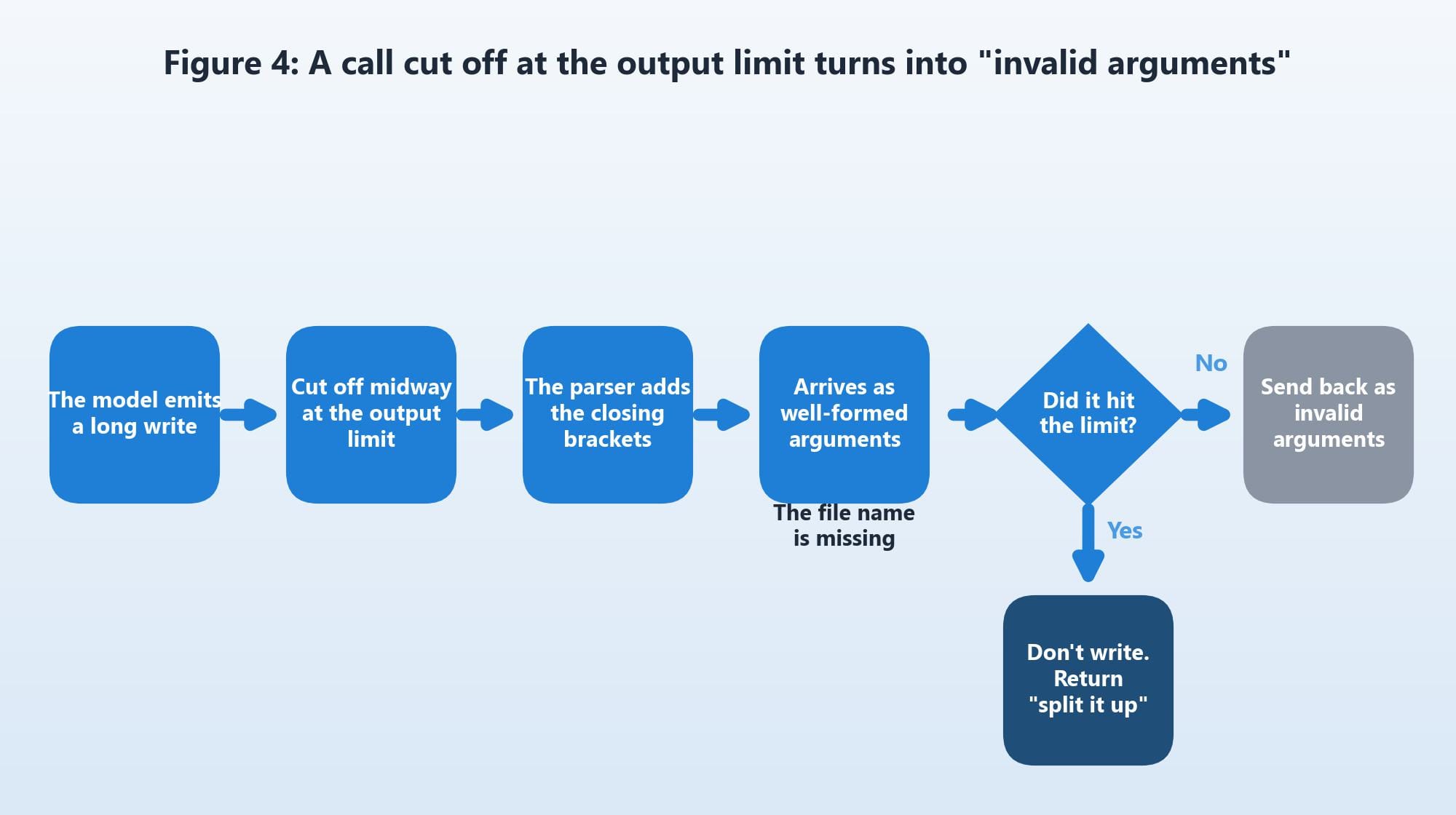
One model had a habit of emitting content (the body) first and file_path (the path) afterwards in the arguments of a file write. When it is cut off at the output limit (4096 at the time), the path is lost. So far, expected.
What we did not expect was that the inference server's parser closes the truncated JSON and returns it. It arrives at the harness as well-formed arguments "without a path." The harness sends it back as "invalid arguments," and the model repeated a write of the same size 18 times. The fact that it had been cut off was recorded nowhere.
The fix is to judge "did the whole response hit the limit" not from the shape of the arguments but from finish_reason and the output token count. If it did, write-type tools do not write and instead return "split it up, and put the short arguments first."
We made one decision here. We do not repair arguments cut off mid-value. Closing them and treating them as success would look like it worked, but it would write the truncated body to the file and fabricate the contents. Return broken as broken, and have the model redo it.
Two other fixes that helped with local models are worth noting.
The edit tool falls back through matching modes in order: exact match, then tolerating whitespace differences, then searching by surrounding anchors. Local models wobble on indentation, so with exact match alone the edit failure rate jumps.
We narrowed the tool count to 19. The implementation we referenced had 42, but a small model with many options gets the selection itself wrong.
Summary: You Need Both the Model and the Harness
| What to look at | What we measured |
|---|---|
| GPU memory | Two 16GB cards: 4-bit 35B-A3B + fp8 KV + 98k context. Narrow CUDA graphs, don't disable them |
| Context length | Re-reading cycle at 16k, pass at 98k. Ask the server and swap it in |
| Model shape | MoE 35B (3B active) is the main candidate. Dense 27B passes but is twice as slow. The Coder variant fails on missing knowledge |
| Quantization | Some builds collapse into repeated words. Don't blame the model for a low score with idle rate over 30% |
| Thinking models | Without the parser setting, thinking mixes into the body. Strip it on the harness side |
| Tool calls | Calls cut off at the output limit arrive well-formed. Judge by whether the limit was hit, and don't repair truncated arguments |
| Task shape | Same model: Web 0 / background processing 24 / CLI 70 / fixes and additions 92 to 97 |
It was neither "load a smart model and it works" nor "train the harness and even a weak model works." Both were needed. The two-16GB configuration was confirmed only after 64 harness defects had been fixed.
Next time: the evaluation rig that produces every number in this series. The mechanism that has the agent build something that runs and grades it automatically, the pass/fail criteria of running five kinds of tasks three times each, and the story of the grader itself being broken for three whole days.
See you next time!
Related Articles
- Building a Coding Agent from Scratch, Part 3: "It Didn't Stop" Is Not "It Made Progress"
- NCCL error: unhandled cuda error — Getting Stuck (and Unstuck) with WSL2 + Multi-GPU + vLLM
- Native FP8 and FP4 Support, and "fp8" Quantization with vLLM
- PagedAttention for More Efficient LLM Serving
- Building a GPU PC, Part 0: Starting Our GPU Machine Build Journal