
The State and Future of Coding Agents, Part 1: The Landscape and Fundamentals


Hello!
This time, we present a grand tour of the more than 20 flourishing AI coding tools out there—introduced and explained all in one go!
AI-assisted coding is by now simply how things are done, and new tools appear at a dizzying pace. We use several tools in our own software development—including an AI coding tool we built in-house—and while each impressive new arrival is exciting, honestly, keeping up is a struggle.
"So which one should I actually use?" "What's the difference between Claude Code and Cursor?" "Are there open-source ones worth using?"—many of you probably have questions like these.
So in this series, we set out to thoroughly organize the AI coding tool landscape as of December 2025. Comparing more than 20 tools, from commercial services to open source, we will give you an honest, practitioner's-eye view of each one's characteristics, where it shines, and its current limits.
*"AI coding tools" are more fashionably called "coding agents" these days, so that is the term we will use in this article.
1-1. Introduction: Why Coding Agents, Why Now
In 2025, AI tools called "AI coding tools" or "coding agents" are spreading rapidly through software development. These tools go beyond mere code completion: they can autonomously read and write files, send commands to bash, run tests, and even manage Git workflows.
GitHub Copilot, Cursor, Windsurf, Devin, and other commercial services—through to Anthropic's Claude Code, OpenAI's Codex CLI, Google's Gemini CLI, Microsoft's Amplifier, as well as Cline, OpenCode, OpenHands, Aider, Plandex, and more on the open-source side—the field is in full bloom.
As you use these tools in earnest, however, several fundamental challenges come into view.
In this series, we organize the current state of coding agents from a technical perspective, examine the differences in each tool's approach, and consider the issues that still need solving.
The Series at a Glance
This series is planned as a three-part deep technical dive into coding agents, a field that has developed rapidly through 2025.
| Part | Theme | Contents |
|---|---|---|
| Part 1 | The Landscape and Fundamentals | What coding agents are, the 2025 tool landscape, the four-category classification, and the basic architecture |
| Part 2 | Comparing Major Tools and Structural Challenges | Detailed comparison of Claude Code, Codex CLI, Aider, and others; the context-limit problem, memory loss, and the benchmark-vs-real-world gap |
| Part 3 | Amplifier and the Road Ahead | Microsoft Amplifier's design philosophy, old vs. new versions and the pricing question, approaches to persistent memory, and open questions |
1-2. What Is a Coding Agent?
1-2-1. The basic definition
At its core, a coding agent is an orchestration system centered on an LLM (large language model). When the user says "fix this bug," the agent reads the codebase, locates the problem, generates a fix, actually edits the files, and tests and verifies the result—performing the whole sequence autonomously.
1-2-2. The basic architecture
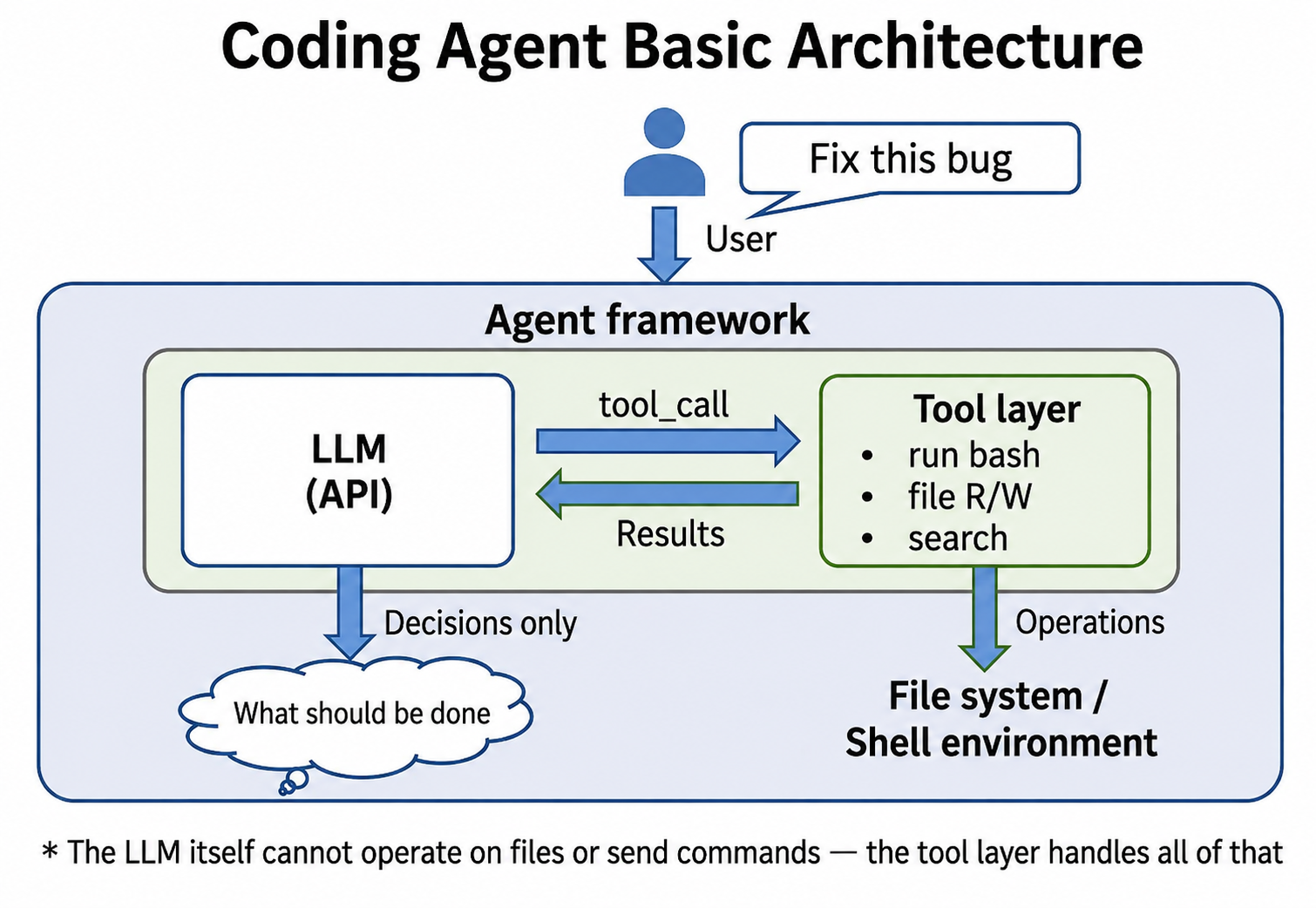
Technically, all of these tools share the same basic architecture.
Tool definitions (sending commands to bash, reading and writing files, search, and so on) are passed to the LLM as JSON Schema; the framework parses the LLM's "tool_call" responses, performs the actual file saves and command execution, returns the results to the LLM, and the loop continues.
The important point is that the LLM itself cannot operate on files or send commands.
The LLM's role is to generate code and decide what should be done; actually saving files and sending commands to bash is handled by tools on the agent-framework side (Claude Code, Codex CLI, and so on).
These tools are like external APIs invoked by the LLM. In coding agents they run locally (or in some cases remotely), and the protocol itself has recently become a de facto standard in the form of MCP. We have covered MCP on this blog as well.
 Qualiteg プロダクト開発部
1-3. The 2025 Coding Agent Landscape
Now let's survey the major coding agents and AI coding assistants as of December 2025.
Even counting only the major players there is a profusion of them, but broadly they split into commercial services and open source.
1-3-1. Commercial services
| Tool | Provider | Form | Price (monthly) | Key characteristics |
|---|---|---|---|---|
| Claude Code | Anthropic | CLI/Web | Generally no extra charge (shared with Claude.ai chat) | 200K context, developer-driven, hooks extensibility, optional pay-as-you-go beyond Claude.ai usage limits |
| GitHub Copilot | Microsoft/GitHub | IDE extension | Free–$39 | VS Code/JetBrains integration, Agent Mode, PR assistance |
| Cursor | Cursor Inc | AI-native IDE | $20–$200 | VS Code fork, Background Agents, Tab completion |
| Windsurf | Codeium | AI-native IDE | Free–$60 | Cascade AI, Flow concept, VS Code fork |
| Devin | Cognition AI | Autonomous agent | $20–$500 | Fully autonomous, cloud IDE, parallel processing |
| Amazon Q Developer | AWS | IDE extension + CLI | Free–$19 | AWS integration, security scanning, code transformation |
| OpenAI Codex | OpenAI | CLI + cloud | Included with ChatGPT Plus | GPT-5-Codex, async tasks, IDE extension |
1-3-2. Research and experimental frameworks
| Tool | Provider | License | Price | Key characteristics |
|---|---|---|---|---|
| Amplifier (old version) | Microsoft Research | OSS | Included with Claude Max | Piggybacks on Claude Code hooks, no extra charge |
| Amplifier (new version) | Microsoft Research | OSS | LLM API billed separately | Independent framework, free operation possible via Ollama, 20+ specialized agents, Knowledge Graph |
1-3-3. Open source: CLI-based agents
| Tool | License | GitHub Stars | Key characteristics |
|---|---|---|---|
| OpenCode | MIT | 39.1K+ | Claude Code alternative, 75+ providers, LSP integration |
| Aider | Apache 2.0 | 39K+ | Git integration, auto-commit, multi-LLM |
| Plandex | OSS | 14.8K+ | 2M tokens, tree-sitter, diff sandbox |
| Gemini CLI | Apache 2.0 | 87.5K+ | Generous free tier (1,000 requests/day), 1M context |
| GPT-Pilot | Fair Source | 33.7K+ | Multi-agent collaboration, step-by-step |
| GPT-Engineer | MIT | 55.1K+ | Natural language → app generation, predecessor of Lovable.dev |
1-3-4. Open source: IDE-extension agents
| Tool | License | GitHub Stars | Key characteristics |
|---|---|---|---|
| Cline | Apache 2.0 | 56.2K+ | VS Code extension, Plan/Act modes, raised $32M |
| Roo Code | OSS | 21.2+ | Cline fork, multiple modes, custom personas |
| Continue | Open Source | 30.3K | IDE extension, customizable |
1-3-5. Open source: autonomous and research-oriented
| Tool | License | GitHub Stars | Key characteristics |
|---|---|---|---|
| OpenHands | MIT | 65.7K+ | Formerly OpenDevin, Devin alternative, multi-agent |
| SWE-agent | MIT | 18K+ | Academic project from Princeton, specialized for SWE-bench |
| Goose | Open Source | 24.5K+ | Developed by Block (Square), runs locally |
| Bolt.diy | MIT | 18.7K+ | OSS version of Bolt.new, in-browser development |
With this many tools, it is hard to know where to begin—so let's start by classifying them.
1-4. Tool Categories
We classify coding agents into the following four categories, and will walk through each agent along these lines.
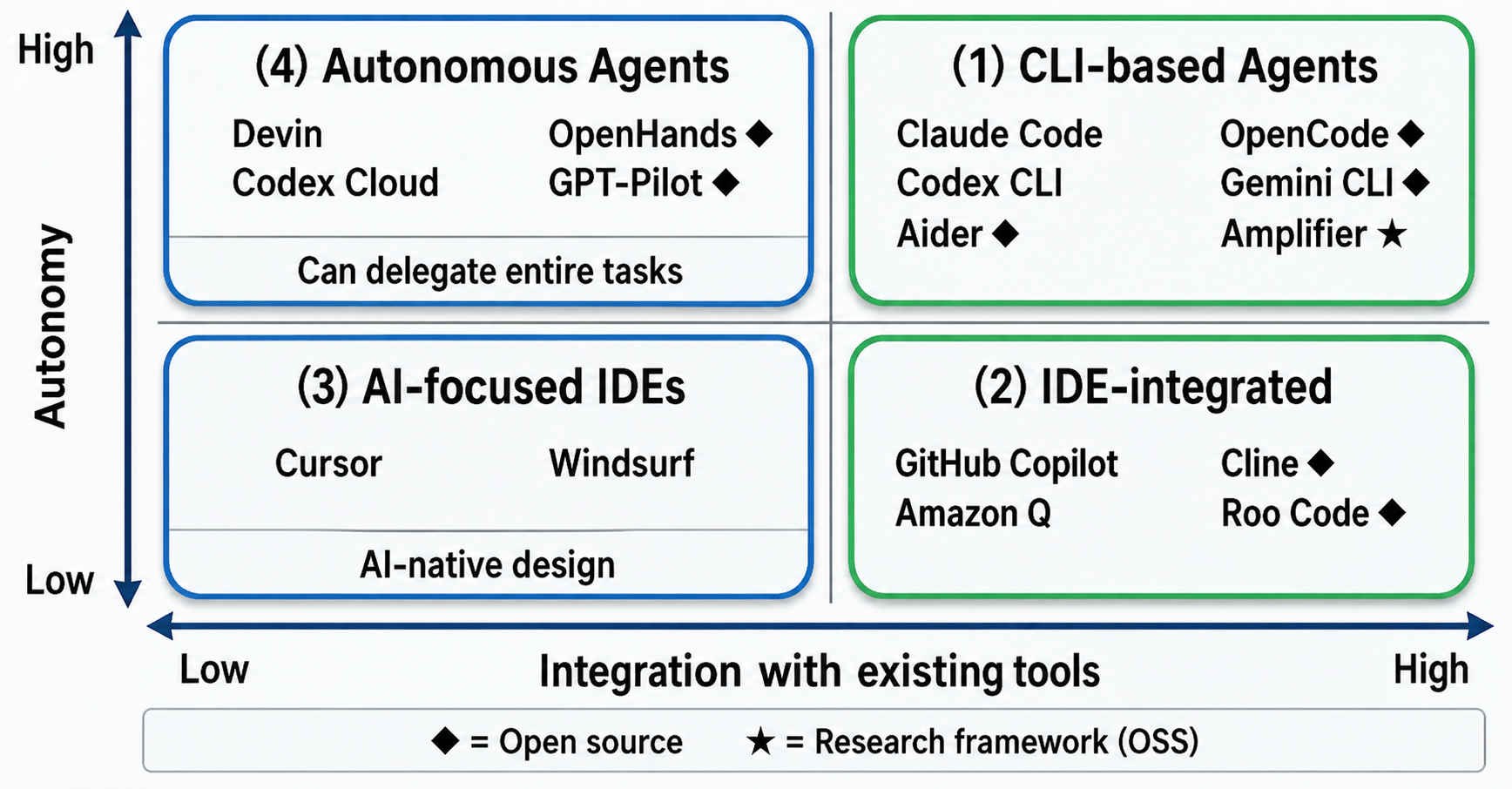
① CLI-based agents
The CLI-based category includes Claude Code, OpenAI Codex CLI, Aider, and Amplifier.
CLI-based agents let you talk to the AI directly from the terminal, operating on files and executing bash commands. Untethered from any particular IDE, they integrate naturally into existing CLI-centric development workflows.
That said, even within the CLI category, tools differ in how "agentic" they really are.
Aider, for example, is strongly diff-driven and human-led—in practice closer to pair programming in the terminal. Claude Code and Codex CLI, by contrast, are premised on the AI as the executor of tools, with a more agentic design philosophy.
Claude Code initially required local setup such as installing Node.js, which made it feel somewhat harder to adopt. Recently, however, it has become usable from the web with no environment setup—a big improvement in accessibility. The web version does constrain direct local-file operations and free-form bash execution compared with the CLI, so the division of labor is roughly "web for convenience, CLI for control."
Within the CLI-based group, one somewhat different animal is Microsoft's Amplifier.
Amplifier is not merely a tool but a framework designed for research purposes. It aims to solve, at the root, the structural pain points of existing coding agents—for example, the way sessions fragment every time the context size is exceeded, so past experience never carries over.
Crucially, Amplifier is not just trying to build "an agent with memory." Rather than treating the LLM as a one-shot inference engine, it holds state, history, and abstracted experience as external structures, positioning itself as a program-synthesis system capable of long-term growth. We sense in this philosophy real potential to push coding agents to the next stage.
The old Amplifier used Claude Code as its front end, hooking the exchanges between the user and Claude Code from a layer above. The current new version has been redesigned as an independent OSS framework, supporting not only Claude Code but also commercial LLMs and local models such as Ollama. We will return to the details in Part 3.
② IDE-integrated
Representative IDE-integrated examples include GitHub Copilot and Amazon Q Developer.
Their hallmark is adding AI assistance while preserving your existing IDE workflow in VS Code, JetBrains, and the like. Affinity with the Microsoft/GitHub ecosystem is especially strong, and the psychological and institutional barriers to enterprise adoption are low.
GitHub Copilot was one of the earliest AI coding assistants, and I adopted it myself right after launch. My first impression was of extremely smart code completion—in Microsoft-flavored terms, truly a "next-generation IntelliSense."
Today's Copilot has expanded well beyond completion into task assistance and conversational operation, with Copilot Chat and Copilot Workspace. Its design center of gravity remains the IDE, however, with the AI integrated as the IDE's assistant. That is the big difference from the AI-native IDE category described next.
③ AI-native IDEs
The AI-native IDE category—AI-first IDEs, you might say—is exemplified by Cursor and Windsurf.
Both attracted passionate followings on arrival. While forking VS Code, they fundamentally redesign the UI and workflow around AI.
Features like Agent Mode, Background Agents, and Tab completion are natively integrated, enabling whole-project code understanding and manipulation at a level no mere extension can reach. Superficially they resemble VS Code; in substance they are something else entirely.
These IDEs are optimized less for "writing code together with AI" than for treating the AI as a first-class development actor. Rather than the human dictating the details, you convey intent and the AI autonomously edits, proposes, and revises—a development style these designs embrace naturally.
④ Autonomous agents
The autonomous category includes Devin and OpenAI Codex (the cloud version).
These approaches aim to minimize human intervention and take on entire tasks by delegation. Devin caused a sensation at launch and drew great expectations.
At present, however, reliability on complex tasks remains a challenge. High scores on benchmarks like SWE-bench do not, by themselves, guarantee real-world performance.
To be fair, Devin is not uniquely weak on complex tasks. Every coding agent, once the codebase passes a certain size, will sometimes produce code that makes you go "huh?"—losing consistency, or suddenly forgetting the house style.
As for SWE-bench, it targets tasks with clear problem definitions and relatively bounded fix scopes. Real-world development, by contrast, is full of ambiguous requirements and situations with no single right answer, demanding deep understanding of human intent and context. This structural difference is what creates the gap between benchmark performance and how these tools feel in practice.
1-5. Where Open-Source Coding Agents Stand in 2025
To close out this installment, let's look at open-source coding agents.
Open-source options have filled out rapidly in 2025. OSS agents were often dismissed at first as "experimental" or "toys," but they are now becoming genuinely realistic, practical choices—from personal projects up to startup production work.
To survey today's OSS scene, we organized the interface differences and project lineages into a single chart.
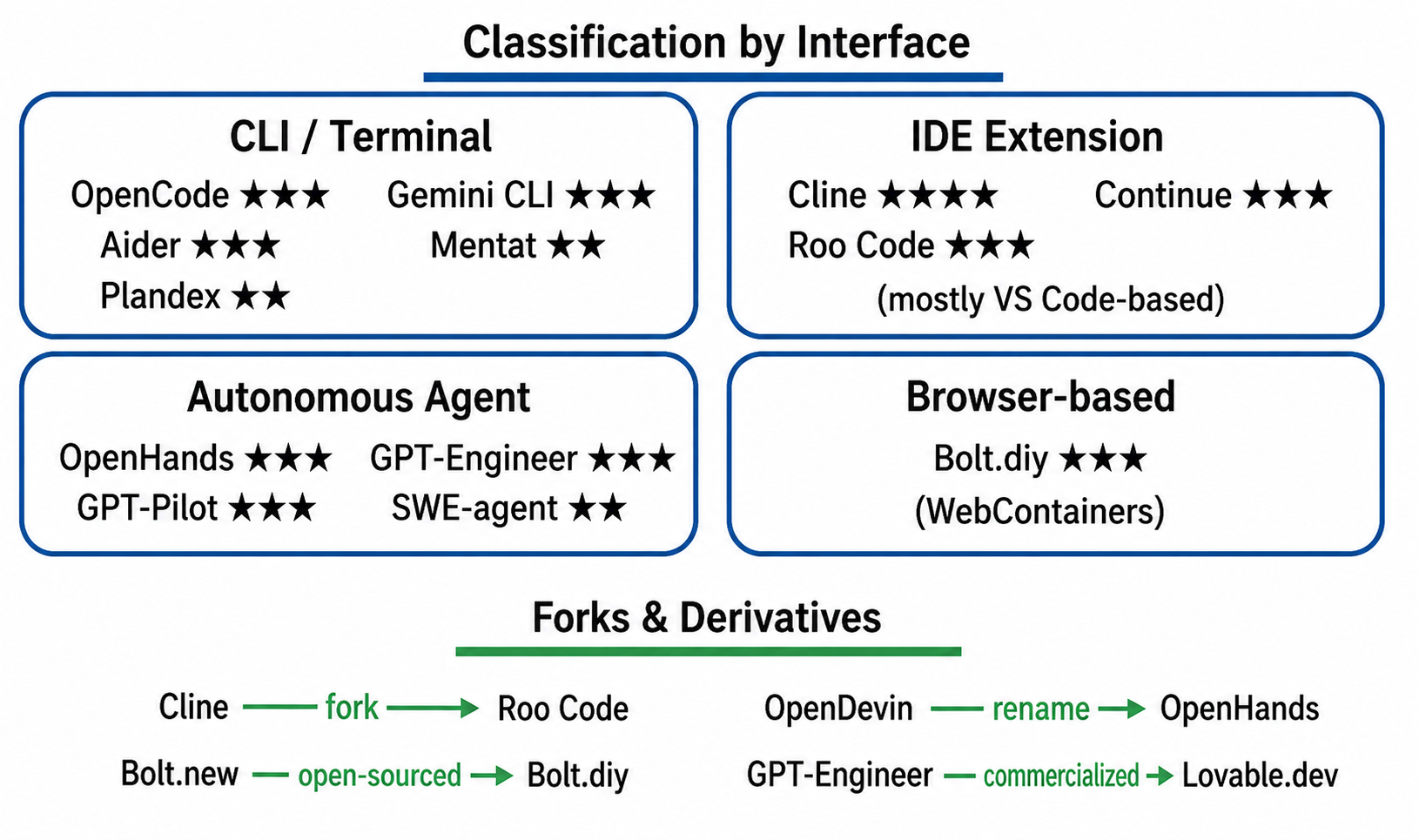
CLI / Terminal type
tools drive the AI directly from the terminal. The leading example is OpenCode, which has rapidly gained adoption as an open-source alternative to Claude Code. It is often introduced that way, but in truth it is more than a compatible reimplementation: it was designed from the start around an abstraction layer supporting 75+ LLM providers, and its flexibility in environments mixing commercial APIs with local LLMs is a strength only OSS can offer.
Aider is also popular, suiting developers who want to stay in the driver's seat and review diffs as they go. Beyond that, Plandex is favored by developers who prefer a more human-led workflow.
Google's Gemini CLI also belongs in this category, and stands out as an easy option to try. Is Gemini CLI really OSS? Google publishes it under the Apache 2.0 license, so the CLI itself is OSS, but at runtime it uses the commercial Gemini API. At present it is closer to a high-performance CLI client than a strongly autonomous agent, but the licensing freedom and the reassurance of being an official Google project make its future evolution worth watching.
IDE Extension type
tools embed into an IDE such as VS Code.
In this space, Cline stands head and shoulders above the rest: despite being OSS, it has many real-world production users and is the first name that comes up. Cline, the archetype of the IDE-extension category, has logged over 4 million cumulative downloads as a VS Code extension and raised about $32 million. For an open-source project, its completeness—tool execution, whole-project context understanding, model-agnostic design—brings it close to de facto standard status. Its offshoot Roo Code likewise carries forward Cline's philosophy while evolving in its own direction. Also widely used is Continue, which offers a comparatively simple experience.
Autonomous Agent type
In the autonomous-agent category, OpenHands (formerly OpenDevin) draws particular attention. With more than 30K GitHub stars, it is widely recognized as the open-source alternative to the commercial Devin. Note that "autonomous" here does not mean fully automatic: in practice it assumes human review and intervention while delegating task decomposition and tool execution to the agent as much as possible. Today, OpenHands functions less as a production-ready workhorse and more as a proving ground for the latest autonomous-agent architectures and implementation patterns.GPT-Pilot and GPT-Engineer also belong in this category and are used by people who want to experiment with autonomous-agent behavior.
Browser-based type
tools run entirely in the browser. The leading example is Bolt.diy, the open-source version of Bolt.new. Because it runs with no environment setup, it is popular for learning and light prototyping; for complex production development it has its limits.
All of these OSS coding agents are fundamentally free to use; all you pay for is LLM API usage. For individual developers and startups, that makes them an attractive way to get a state-of-the-art development experience while keeping upfront costs down. On the flip side, operational design, evaluation, and safety are your own responsibility—"convenient" does not mean "drop it straight into production." That, too, is the OSS reality worth understanding.
Conclusion
In this article, we surveyed the overall landscape of the major coding agents as of December 2025.
Key Points
- A coding agent is an orchestration system of "LLM + tool layer"
- The LLM only generates code and makes decisions; the framework saves files and sends commands
- The tools fall into four categories
→ IDE-integrated, AI-native IDE, autonomous, and CLI-based - More than 20 tools, commercial and OSS combined, crowd a field in full bloom
- Amplifier is experimenting with advanced capabilities as a research framework
Coming Next — Part 2: Comparing Major Tools and Structural Challenges
In Part 2, we compare the major CLI-based agents (Claude Code, Codex CLI, Aider, and others) in detail and dig technically into the structural challenges of today's coding agents—the limits of the context window, memory loss between sessions, and the gap between benchmarks and the real world.
Beyond comparing 20 agents: how to choose them, and how to master them.
Once you have the big picture, the next step is working these tools into your own development. In agent-first development, there is still no settled "right answer."
Through our own product development, we have worked extensively with multiple AI coding agents and systematized an AI-first approach to software development—from design and implementation to review and operations.
Explore our AI software development transformation services →In particular, we will look concretely at the challenges you actually hit in the field—context overflowing after roughly 50 tool uses, and 70% SWE-bench Verified scores falling to the 20% range in the real world.
See you in the next installment!



