
What Are Claude's Limit Resets? What a Fable Reset and a Weekly Reset Give Back, and How They Differ from ChatGPT's
Claude handed out limit resets to paid users for the Fable 5.2 launch. What a Fable reset and a weekly reset give back, how many you get, when they expire, what to check before pressing, and how they differ from ChatGPT's resets, from the official help pages and real screens.


Hello! This is the Qualiteg Product Development Team.
To mark the release of Claude Fable 5.2, Anthropic handed out limit resets to users on paid plans.
We received quite a few ourselves.
In this article we walk through what these resets are.
A limit reset is the right to refill usage you have already spent, on the spot, without waiting for the next scheduled reset.
There are several kinds, and each kind refills a different scope. A Fable reset, for example, gives back only what you used on Fable.
We cover what each kind refills and what it leaves alone, how many you get, the expiry dates and caveats, and when it makes sense to use one, based on Anthropic's official help pages and the actual screens.
This is for people on Claude's paid plans. Pay-as-you-go API billing is out of scope.
For Fable 5.2 itself, see our earlier article Claude Fable 5.2 Complete Guide.
A limit reset refills usage you have already spent, on the spot
The official help page keeps it short. Resets are handed out to eligible plans from time to time, and using one refills your usage. You find them in claude.ai under Settings, then Usage, below a heading that reads "Limit resets." It lists how many you hold, what kind they are, and when each one expires.
The help page names three kinds.
| Kind | What it refills | Source |
|---|---|---|
| 5-hour reset | Refills the 5-hour session limit to full | Official help |
| Weekly reset | Refills the weekly usage limit to full | Official help |
| Fable reset | Gives back what you used on Fable this week. On accounts that have a 5-hour limit, that limit is refilled to full, including usage on other models | Official help and the on-screen description |
On our screen, three Fable resets and one weekly reset are listed, four in total.
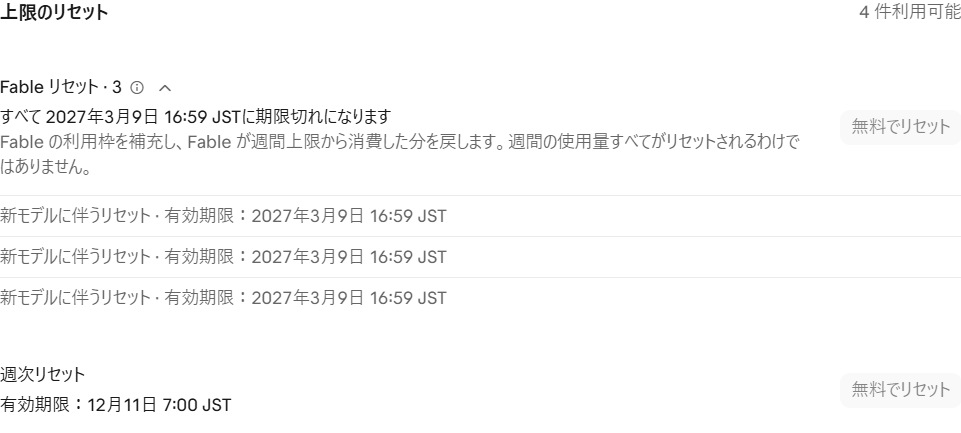
We will look at these two kinds in turn.
A Fable reset gives back only what you used on Fable
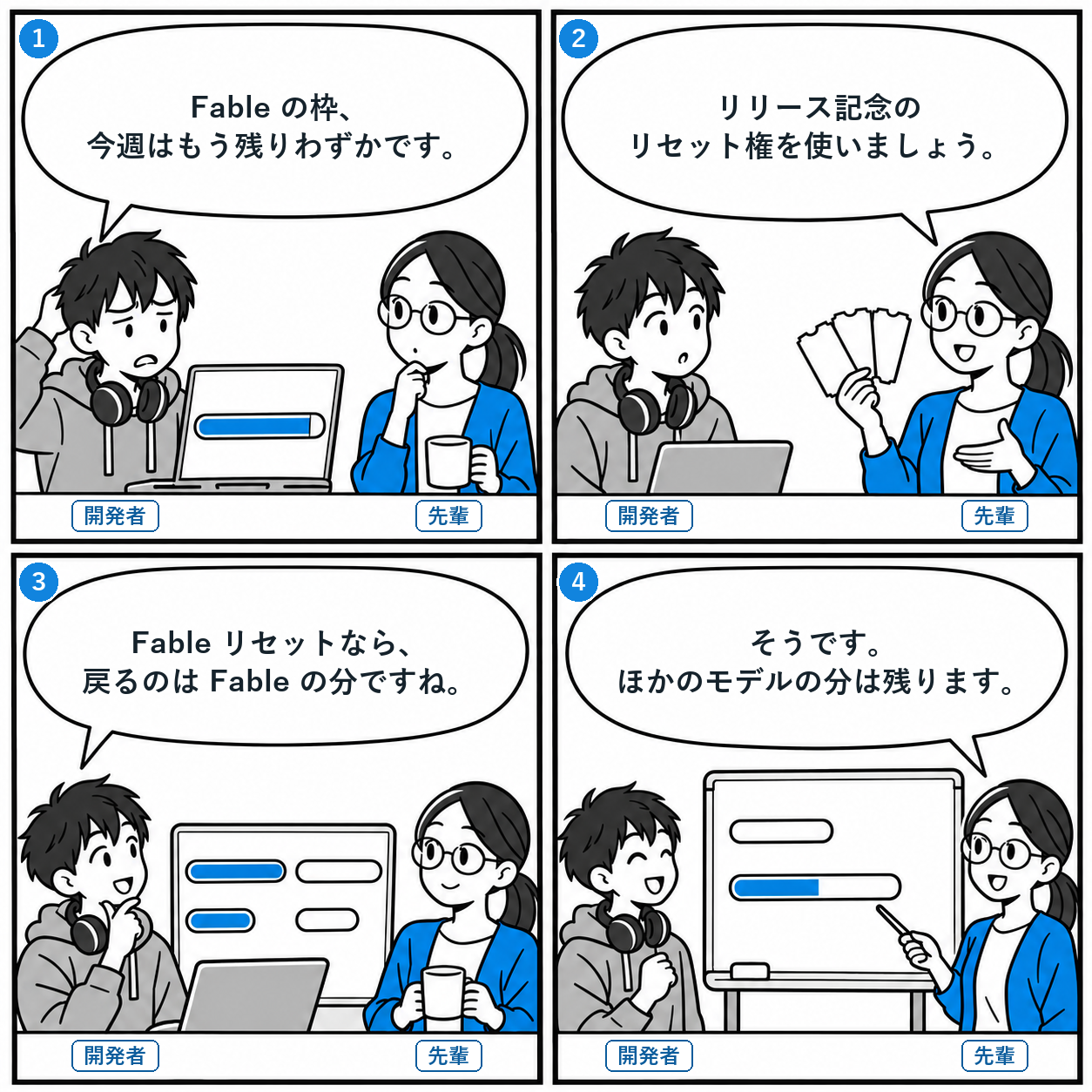
- Developer: Our Fable limit is nearly used up for this week.
- Senior: Let's use one of the launch resets.
- Developer: With a Fable reset, what comes back is the Fable usage, right?
- Senior: Right. Usage on the other models stays as it is.
The Usage page shows two bars for the weekly limit. "This week" is the total across all models, and "Fable" is the share within it. The Fable bar is labeled "up to 50% of the weekly usage limit," and using Fable moves both bars.
The Fable reset row comes with this description.
Replenishes your Fable usage and gives back the portion of the weekly limit that Fable consumed. Not all of your weekly usage is reset.
The info button next to the row has a shorter version.
"Resets your Fable limit and excludes this week's Fable usage from the weekly limit calculation."
So two things happen. First, the Fable bar goes back to 0%. Second, the "This week" bar drops by exactly the amount you used on Fable.
Usage on Opus and other non-Fable models stays where it is. The help page says the same, that usage on other models is unchanged. The phrase "Not all of your weekly usage is reset" refers to this.
Here is a concrete example. At one point our screen showed "This week" at 54% used and "Fable" at 97% used. Using a Fable reset here takes Fable back to 0% and subtracts the Fable portion from that 54%. How far it drops depends on how much Fable you used that week.
One more point worth keeping in mind. A reset gives back what you spent. It does not raise the limit itself. The help page states this explicitly.
The 5-hour limit is handled differently from the weekly one.
On accounts that have a 5-hour limit, a Fable reset refills the entire 5-hour limit, including usage on other models. On another team member's screen, the 5-hour limit (the current session) was shown, and the description began with "the 5-hour limit and."
According to the help page, verified Ultra accounts have no 5-hour limit to begin with. In that case a Fable reset only affects the weekly limit.
A weekly reset refills the whole weekly limit
For the weekly reset, the help page has a single line. It refills the weekly usage limit to full. On screen there is no description or info button, unlike the Fable reset. Only the expiry date is shown.
Whether using a weekly reset also brings the Fable bar back, or affects the 5-hour limit, is not stated officially.
Here is how the two kinds compare, bar by bar on the Usage page.
| Where to look | Fable reset | Weekly reset |
|---|---|---|
| "Fable" bar | Back to 0% | Not stated officially |
| "This week" bar | Drops by the Fable portion only. Usage on other models stays | Back to full |
| 5-hour limit | On accounts that have one, refilled to full including other models | Not stated officially |
| On-screen description | Description text and an info button | Expiry date only |
How many you get depends on your plan and how long you have been subscribed
Fable resets were handed out as a launch offer for Fable 5.2. According to the offer page in the help center, the count depends on your plan and on how long it has been since your first paid subscription. Even if you cancelled and came back, the clock starts at your first paid billing date. For Team and Enterprise, the organization's first billing date is used.
| Plan | Number of Fable resets |
|---|---|
| Pro, Team standard seats | 1 |
| Max, Ultra, Team premium seats, legacy Enterprise premium seats | 1 if your paid subscription is under 6 months old, 2 if 6 to 12 months, 3 if over 12 months |
The condition is that billing began before a set time on the Fable 5.2 release day. The Free plan and some Enterprise plans are excluded. Within our team, members with longer subscriptions had more resets, exactly as the help page describes.
Expiry dates differ by plan. This is where you can lose out if you are not paying attention.
Pro and Team standard seats: until 23:59 Pacific Time on November 16, 2026.
Max, Ultra, Team premium seats, and legacy Enterprise premium seats: until 23:59 Pacific Time on March 8, 2027. Our screen shows the latter date in local time.
There is a reason the Pro and Team standard window is short. On those plans, for one week after the Fable 5.2 launch, you can use Fable at no extra charge for up to 50% of the weekly usage limit, and the reset exists for that one week. When the period ends, Fable goes back to being billed through usage credits, and unused resets expire.
Before you use one, check the expiry date shown on your Usage page.
As for the weekly reset, the help page only says it is handed out to eligible plans from time to time. It does not say when or under what conditions. We have one, and its expiry is much nearer than the Fable resets, about a month out.
Once used, it cannot be undone. Things to know before you press
Everything here is from the official help page. Many of these cannot be reversed after the fact, so it is worth reading first.
| Point | What the help page says |
|---|---|
| Not reversible | A reset, once used, cannot be undone |
| Scheduled resets are unchanged | The weekly limit still resets on its usual day and time |
| They expire | Unused resets expire on the date shown under Settings, then Usage |
| Lost on cancel or downgrade | If you cancel or downgrade before using them, they become unavailable |
| No refunds | Extra usage already billed is not refunded, and your usage credit balance does not change |
| Not available inside Claude Code | No button appears in Claude Code in the terminal or IDE. Use the browser, the desktop app, or the mobile app |
The last point is easy to miss if you mostly work in Claude Code. That said, the limit is shared across your account, so usage refilled in the browser is available in Claude Code right away.
To use one, press "Reset for free" and confirm
The help page gives these steps. Open Settings, then Usage, find the kind you want under "Limit resets," press "Reset for free," and confirm. The same button also appears on the screen you see when you hit the limit.
You do not have to wait until you hit the limit. You can use it any time before it expires.
In a week where you have not used Fable yet, the button shows a note that there is currently no Fable usage to reset. The screen tells you when there is nothing to give back.
ChatGPT has similar resets. The difference is what happens to the scheduled reset
OpenAI also offers "resets" that refill the Codex and Work usage limits on ChatGPT's paid plans. For those who use both, here is how they compare.
According to OpenAI's help pages, there are three kinds. The first is a free reset that is granted to your account, kept until it expires, and used by you whenever you choose. This is the closest to Claude's limit resets. The second is a reset OpenAI applies directly to eligible accounts, with no action on your part and nothing to store. The third is a reset that eligible Plus and Pro individual accounts can buy, applied on the spot.
| Aspect | Claude's limit resets | ChatGPT's resets (Codex, Work) |
|---|---|---|
| Limits covered | Claude usage limits (5-hour, weekly, Fable) | Codex and Work usage limits (5-hour and weekly. Monthly on the Go plan) |
| Free reset you use yourself | Yes (limit resets) | Yes (stored resets) |
| When you can use the free reset | Even before you hit the limit | When used from usage settings, one of the covered limits must be below 80% remaining |
| What it refills | Depends on the kind. A Fable reset refills Fable usage | Stored resets depend on the plan. Go: monthly. Plus and Business Standard: 5-hour and weekly. Pro: weekly. Purchased resets: 5-hour and weekly |
| Scheduled reset time | Unchanged | When a period restarts, the next renewal time moves too |
| Reset applied by the operator | Not mentioned in the help pages we checked | Yes (automatic resets) |
| Paid reset | Not mentioned in the help pages we checked | Yes (eligible Plus and Pro individual accounts) |
| Where you can use it | Browser, desktop app, mobile app. Not from inside Claude Code | Stored resets: desktop app, web, Codex CLI. Not from the mobile app |
The biggest difference is the timing of the scheduled reset. With Claude, using a limit reset leaves the weekly limit resetting on its usual day and time. On the ChatGPT side, when a reset restarts the usage period, the next renewal time moves as well. With a purchased reset, for example, a new weekly period begins at your first Work or Codex request after it is applied, and the next scheduled reset falls seven days later.
This is not about which is better. The limits are divided differently and the conditions for use differ. OpenAI's help page also states that free resets are a perk with no guarantee of availability or timing. Claude's are described as handed out from time to time, so in both cases the sensible approach is to use them well when you have them.
When to use one, in our view
From here on this is our view, based on the above, rather than the official description.
A Fable reset pays off when only the Fable limit runs out mid-week and the scheduled reset is still days away. Because the Fable portion is also subtracted from the "This week" bar, the more Fable-centric your usage, the more you get back.
Using one right before the scheduled reset is a waste. If you wait, the limit comes back at its usual time anyway.
A weekly reset suits a week where the weekly limit is running low across models, not just Fable. Since it expires sooner than the Fable resets, we plan to use our weekly reset first.
As of this writing we are still holding on to ours. Neither kind can be undone, so before you press, compare the "This week" and "Fable" bars on the Usage page, the scheduled reset time, and the expiry date of each reset.
Summary: which reset for which situation
| Situation | What to do |
|---|---|
| Only the Fable limit is gone and the scheduled reset is days away | Use a Fable reset |
| The weekly limit is running out across models, not just Fable | Use a weekly reset |
| The scheduled reset is coming soon | Wait, do not use one |
| You hold a reset that expires soon | Use it in a week where usage has dropped, before it expires |
| You ran out while working in Claude Code | Open the Usage page in the browser or the app and use it there |
A limit reset is a one-time right that cannot be taken back. Know what it refills and when it expires, and use it where it counts the most.
See you next time!
Sources and references
- What is a limit reset? (Claude Help Center)
- Claude Fable 5.2 launch offers (Claude Help Center)
- How resets work in Codex (OpenAI Help Center)
- Paid weekly Work and Codex rate limit resets (OpenAI Help Center)