
When Building Python from Source in Docker Makes GCC Segfault


Hello! This is the Qualiteg Product Development team!
Today we would like to share a case of a GCC internal compiler error (Segmentation fault) that occurred while building Python from source in a Docker environment.
At first glance it looks like "insufficient resources" or a "Docker-specific issue," but it was actually a case where GCC itself crashes when PGO (Profile Guided Optimization) and LTO (Link Time Optimization) are enabled at the same time.
We also noticed that Docker tends to hide this kind of problem, so we decided to walk through this Python source build and GCC crash — based on a real incident — in a setup that deliberately involves Docker.
We hope this helps anyone building with a similar configuration.
TL;DR
- When you build Python from source inside Docker with
--enable-optimizations --with-ltoenabled,
GCC can crash with an internal compiler error (Segmentation fault) - The cause is that GCC's optimization passes can crash during the PGO build (the profile-generation stage)
- It is not a resource shortage, but an internal compiler error (ICE)
- The fix is to remove the optimization flags.
The runtime performance difference is roughly a few percent to about 20% (workload-dependent), so in CI or Docker, prioritizing stability is the safe choice
The Problem
While building Python from source inside a Docker image, make suddenly failed partway through.
Extracting the essentially important parts of the log, it looked like this:
during RTL pass: sched2
In function 'zlib_Compress_flush':
internal compiler error: Segmentation fault
make[1]: *** [Makefile: profile-gen-stamp] Error 2
make: *** [Makefile: profile-run-stamp] Error 2
The key points are as follows.
- internal compiler error
→ It is GCC itself that crashed, not user code - during RTL pass: sched2
→ A failure inside GCC's backend optimization passes - The profile-gen-stamp failure
→ The build stopped at PGO's "profile-generation build" stage
An Important Fact: It Crashed in "PGO Stage 1"
At first we suspected it had failed in the second PGO pass (-fprofile-use), but
a close look at the actual log shows it was the stage with -fprofile-generate attached — in other words,
PGO's "profile-generation build"
— where GCC hit the Segmentation fault.
This means the following:
- It is not a bug in the Python code
- The build never even reached the execution phase
- With PGO + LTO enabled, GCC's optimization machinery is most likely breaking down
Why Was There No Problem Until Now?
Incidentally, this problem appeared to show up suddenly one day.
In reality, however, it may have been lurking there all along.
The Effect of Docker's Build Cache
Docker caches build results per RUN instruction.
- As long as the Dockerfile is unchanged
→ The Python build steps are restored from cache - If you change the Dockerfile even slightly
→ Every cached layer from that line onward is invalidated
Why the Cache Was Invalidated
When you make any change to a Dockerfile, all cached layers from that line onward are invalidated.
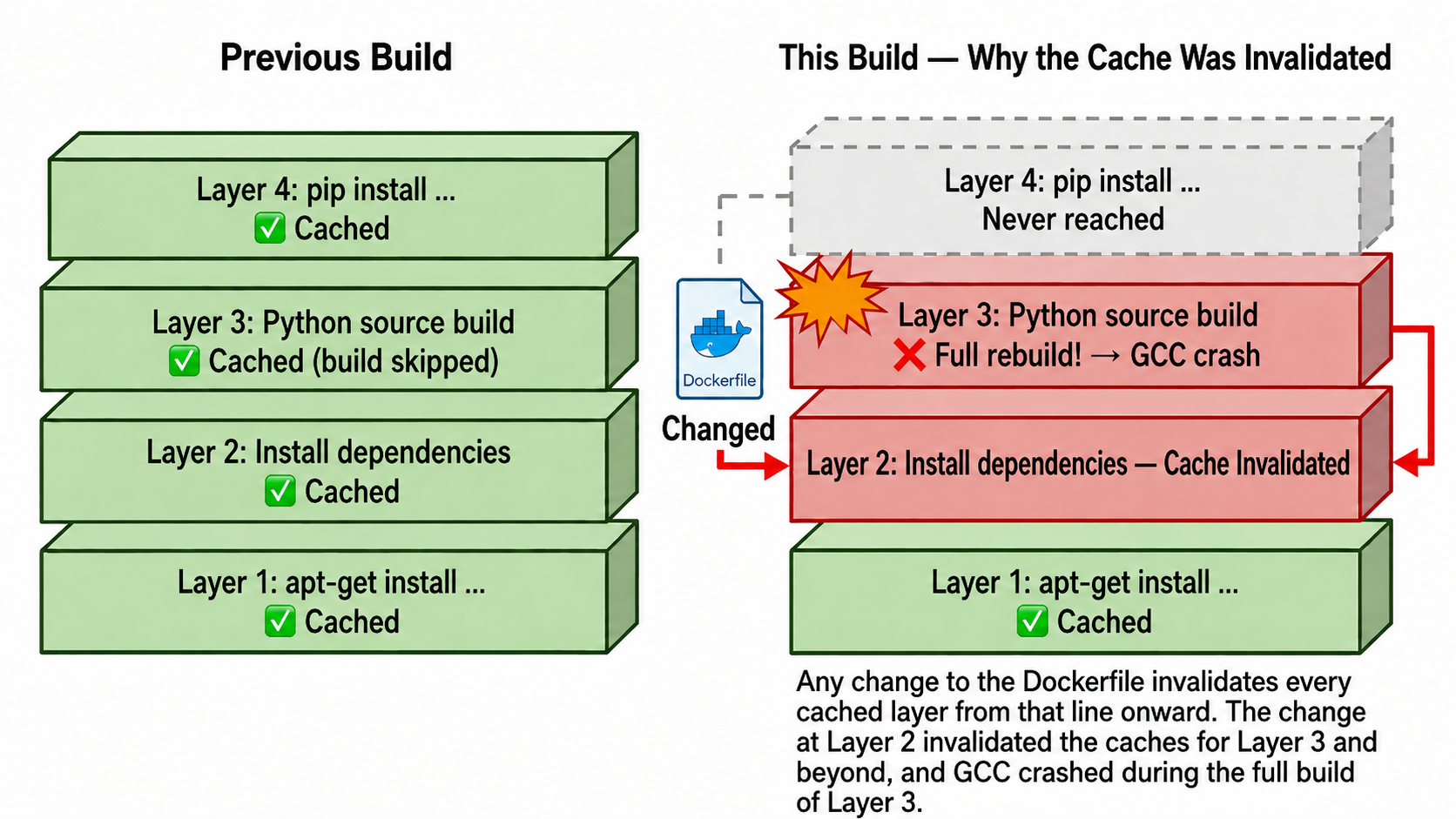
In other words,
"the cache just happened to be doing the work,
while a broken build procedure had been lurking there the whole time"
— that was the actual state of affairs.
What Is PGO (Profile Guided Optimization)?
PGO is a mechanism that optimizes a program based on how it actually runs.
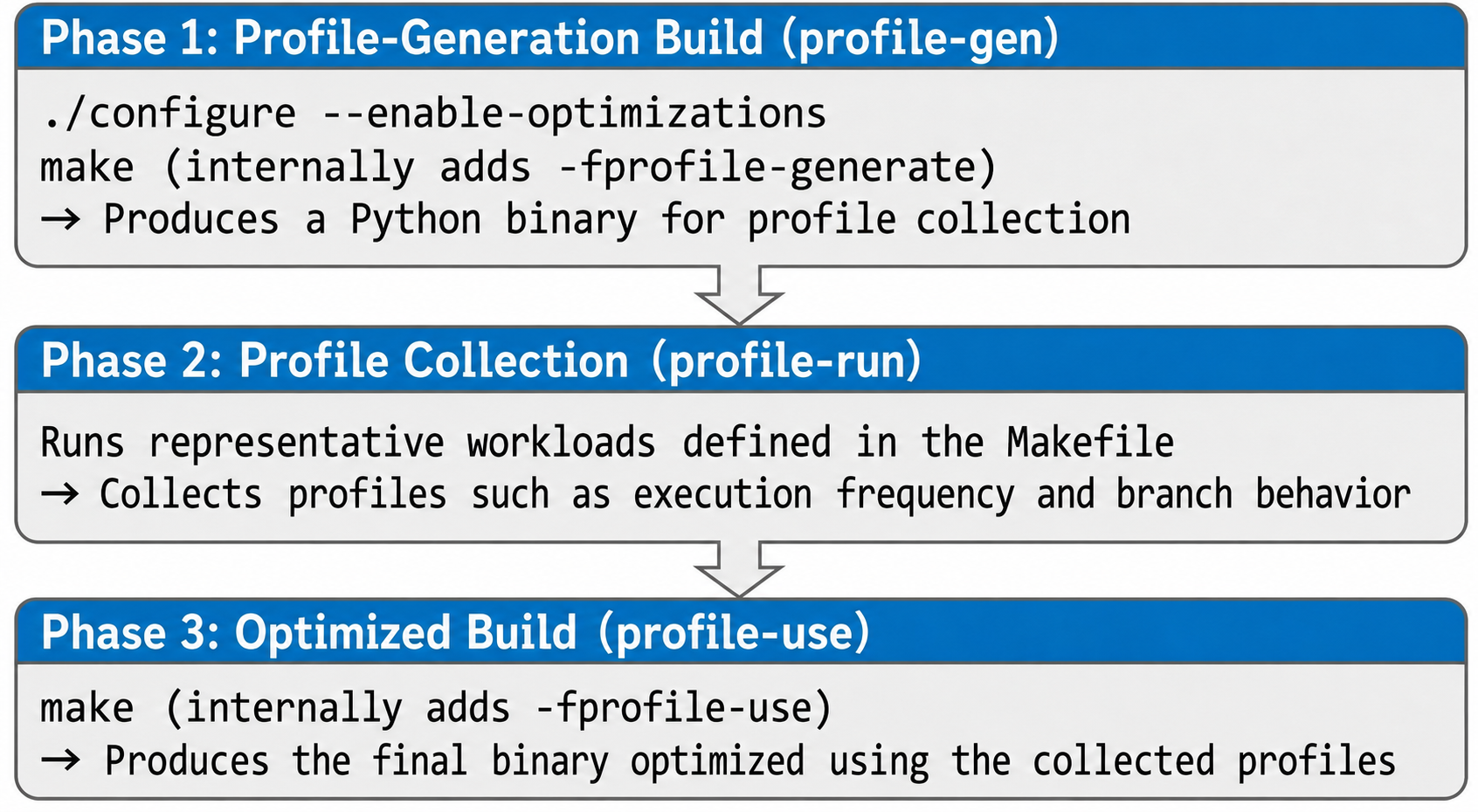
Python's --enable-optimizations internally proceeds as follows.
- Build for profile generation(
-fprofile-generate) - Run the resulting Python to collect a profile
- Rebuild using the collected information(
-fprofile-use)
In our case, GCC crashed already at stage 1.
The PGO Build Flow
The Combination with LTO (Link Time Optimization)
On top of that, this build also specified --with-lto.
Enabling LTO brings:
- Optimization across compilation units
- A large increase in what GCC has to analyze internally
.
Furthermore,
enabling PGO + LTO at the same time means that
- profile information
- intermediate representation (RTL)
- complex optimization passes
all pile up, putting you in a state where you can easily trip over known and unknown bugs inside GCC — which is what ended up happening.
The segfault in the sched2 pass in our case was a textbook example of exactly that.
Solutions
Here are several possible solutions to this kind of problem.
Option 1: Disable PGO and LTO (recommended)
To cut to the chase, this is the option we adopted.
Here is the change to the configure options.
Before
./configure --enable-optimizations --with-lto
After
./configure
Advantages
- The build reliably succeeds
- Build time drops significantly (PGO builds twice)
- Stable in CI/CD and Docker environments
Disadvantages
- Runtime performance may drop by a few percent to about 20%
(though this depends heavily on the workload and benchmark)
For most server and batch workloads, this is rarely a problem in practice.
Option 2: Disable Only LTO
./configure --enable-optimizations
- Keeps PGO
- Avoids the added complexity from LTO
However, GCC's PGO-related bugs themselves remain, so the issue may recur depending on the environment.
Option 3: Reduce Build Parallelism (not recommended)
make -j2
- May relieve memory pressure in some cases
- However, it does not fundamentally fix the ICE
- Build time increases dramatically
Option 4: Avoid Building from Source
# Install from the deadsnakes PPA
RUN add-apt-repository ppa:deadsnakes/ppa \
    && apt-get install -y python3.13
- A distribution-provided Python
- A trusted pre-built package
Using either of these avoids this entire class of problems.
Recommended Dockerfile Example (stability first)
If you go with Option 1 and want a stable build, do the following. Since we are using Docker here, the Dockerfile looks like this:
# ===========================================
# Python (source build, stable variant)
# ===========================================
# Note:
# Do not use --enable-optimizations / --with-lto,
# as they can trigger a GCC internal compiler error (ICE)

ARG PYTHON_VERSION=3.13.5

RUN wget https://www.python.org/ftp/python/${PYTHON_VERSION}/Python-${PYTHON_VERSION}.tgz \
    && tar xzf Python-${PYTHON_VERSION}.tgz \
    && cd Python-${PYTHON_VERSION} \
    && ./configure \
    && make -j$(nproc) \
    && make install \
    && cd .. \
    && rm -rf Python-${PYTHON_VERSION} Python-${PYTHON_VERSION}.tgz
Lessons Learned
1. Docker's cache hides problems
The cache is convenient, but sometimes a broken procedure is simply never being executed.
Periodic --no-cache builds are important.
2. Optimization flags trade off against stability
PGO and LTO are powerful, but prioritizing stability in Docker and CI is the pragmatic choice.
3. Treat internal compiler errors with suspicion
Segmentation fault + internal compiler error is
almost certainly a problem on the compiler's side.
Before suspecting your code, suspect your build flags.
See you next time!



