
GPU Memory Optimization in Depth: Efficient AI Image Processing and the Peculiarities of the First and Last Batches


Introduction
Hello! This is the Qualiteg Product Development Team.
At Qualiteg, we research and develop AI characters and AI humans built on LLM technology. When reproducing virtual humans with "human-like" qualities such as facial expressions and gestures, AI-powered image processing—image generation and image editing—becomes essential.
AI humans and virtual humans that converse with people need to generate expressions and gestures in a timely manner, so motion built by chaining multiple images into frames (simply put, video) must be generated in a short amount of time.
In situations like this, unlike AI training or simple inference, the key lies in how well you can draw out the GPU's capabilities—the art of mastering the GPU.
Speaking of mastering the GPU, we previously discussed continuous batching and dynamic batching in the context of LLM inference on this blog. Today, we would like to explore GPU memory optimization in image processing—specifically, the somewhat niche topic of how to handle the "first and last" batches during inference.
Image Processing and GPUs
In GPU-based image processing and machine learning tasks, efficient memory usage is a critical factor that determines performance.
Especially when working with large datasets, you need to understand the dynamic behavior of GPU memory and handle it appropriately.
As mentioned at the outset, this article focuses on the special characteristics of the first and last batches in batch processing, and presents detailed strategies for efficient GPU memory usage.
A Concrete Example
To deepen our understanding, let's work through a concrete example.
This time, let's consider a case where we process a video one frame at a time.
Suppose this video has 120 frames in total. In other words, it consists of 120 images.

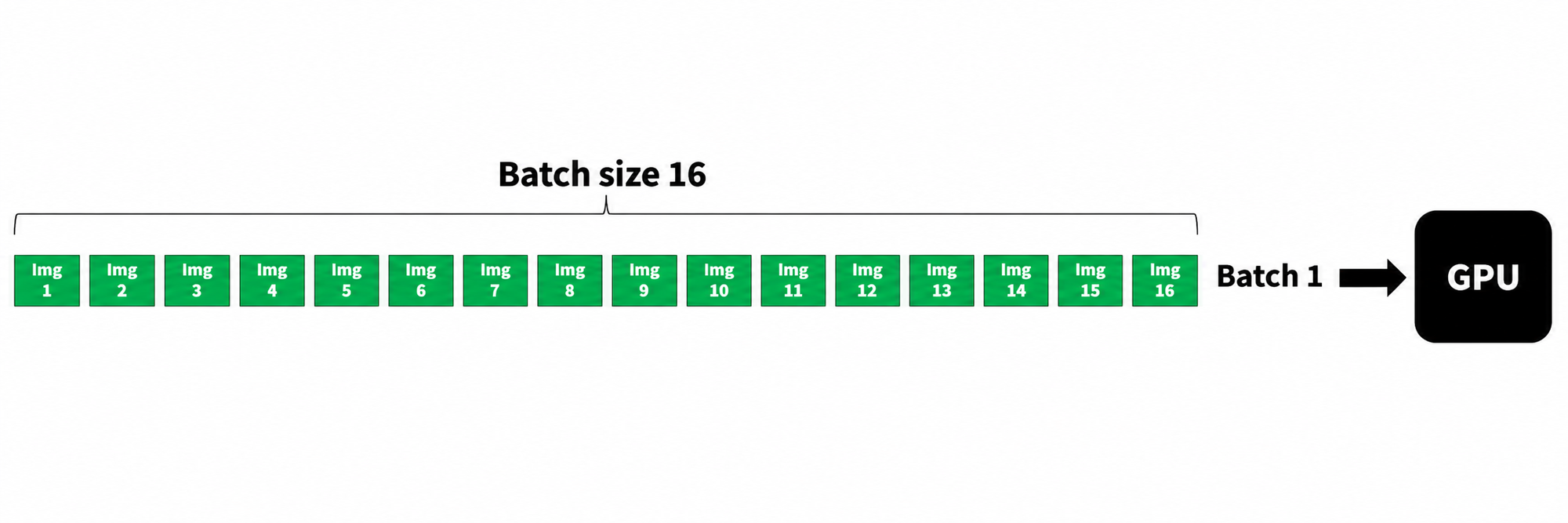
Processing one image at a time would be slow, so we have the GPU process 16 images simultaneously.
In other words, let's consider an example of running GPU inference with a batch size of 16.
1. The Peculiarity of the First Batch: Unexpected Memory Consumption
Symptom
During the first batch, significantly more GPU memory may be consumed than during subsequent normal inference.
For example, you may observe something like this: the first inference alone consumes 2000 MB of GPU memory, but from the second run onward it stays fixed at 80 MB.
Causes
- CUDA optimization: On the first run, CUDA tries out various algorithms and determines the optimal execution path.
- Memory pool allocation: Frameworks such as PyTorch allocate a relatively large memory pool on the first run and reuse it in subsequent processing.
- JIT (Just-In-Time) compilation: For some operations, code is compiled on the GPU during the first run.
Countermeasures and Optimization
In cases like this, add a warm-up step.
If you are serving GPU processing as a server, you can wake the GPU up by running a warm-up—a single dry run of the processing to come—at server startup. The first run is typically when CUDA optimization and PyTorch memory allocation take place. When configuring multiple servers into a cluster as well, inserting one dry run as an initialization step at server startup improves stability.
def warmup_gpu(model, input_shape):
    dummy_input = torch.randn(input_shape).cuda()
    model(dummy_input)  # Run warm-up
    torch.cuda.empty_cache()  # Clear the cache

# Run warm-up before production processing
warmup_gpu(model, (1, 3, 224, 224))
Benefits
- Hides the abnormal memory consumption of the first batch
- Stabilizes the performance of production processing
2. The Peculiarity of the Last Batch: The Trap of Fresh Memory Allocation
Symptom
When the dataset size is not evenly divisible by the batch size, the last batch can trigger unexpectedly large memory consumption.
As in our example, when processing a 120-frame video with a batch size of 16,
120 ÷ 16 = 7 with a remainder of 8. So batches 1 through 7 can each process 16 images, but the final, eighth batch (batch 8) can only take 8 images—short of the batch size. In other words, in the last iteration of the loop, 8 slots go unfilled.
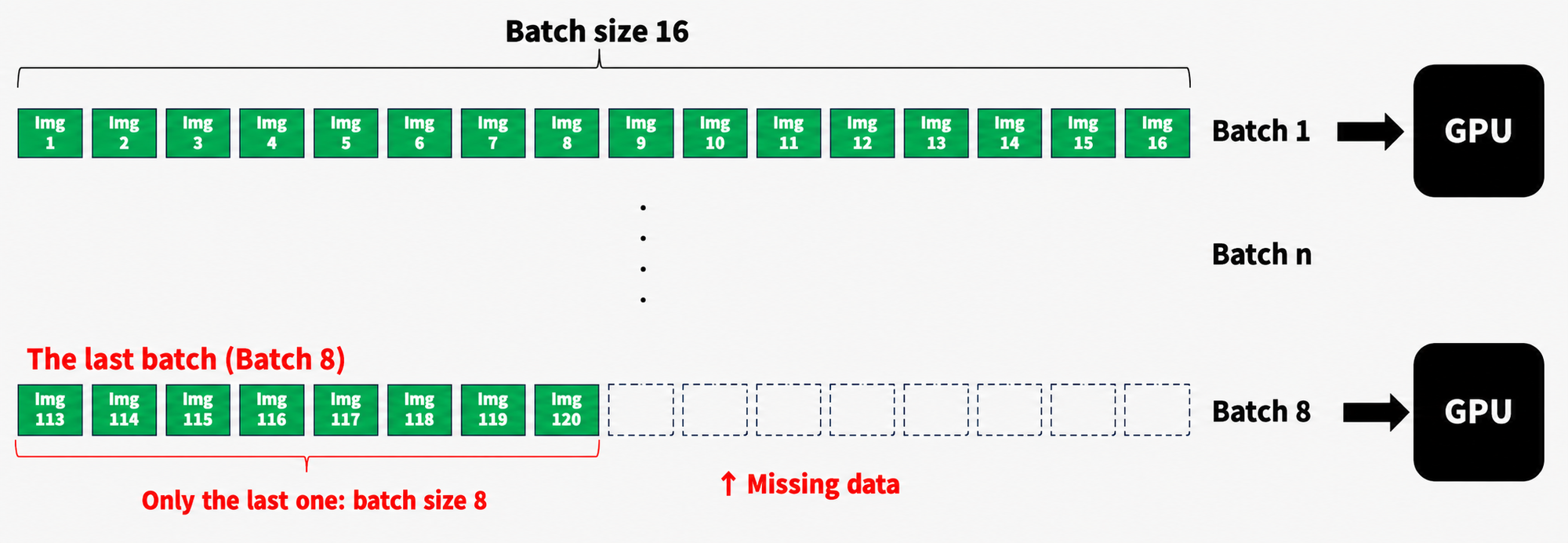
At first glance this looks harmless, but in fact it causes a problem.
When only the last batch has a different batch size, a CUDA kernel recompilation occurs (CUDA tries to redo its optimization). As a result, another large chunk of fresh memory may end up being allocated.
So, even when the final batch falls short of the batch size, if you pad it up to the same batch size before feeding it to the GPU, you can avoid the CUDA kernel recompilation.
Causes
- Non-uniform batch size: When the last batch has a different size from the other batches, a new memory region needs to be allocated.
- CUDA kernel recompilation: For inputs of a different size, a CUDA kernel recompilation may occur.
- Memory fragmentation: Over successive processing, small unused memory regions can become scattered, making a fresh, larger memory allocation necessary.
Countermeasures and Optimization
For example, as shown below, when the last batch is smaller than the batch size, you can fill in the missing portion to maintain the batch size fed to the GPU.
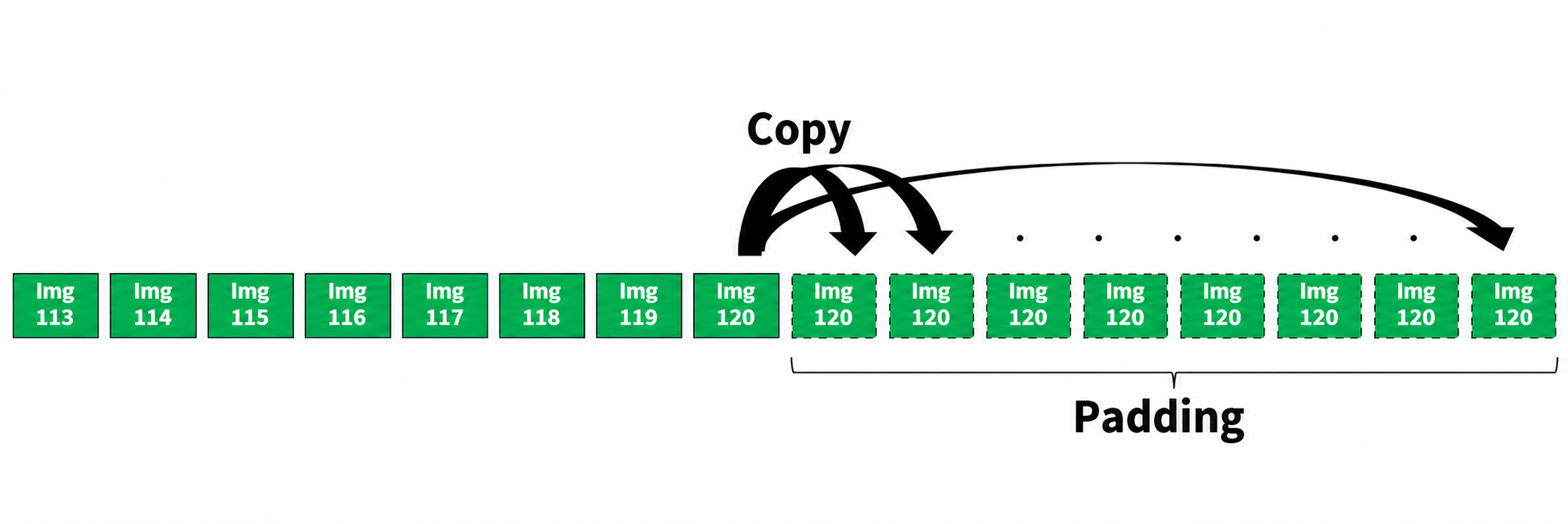
For example, as shown above, you can fill the remainder with the last element.
Filling the data with something to even out its length like this is called "padding". In the example above we simply filled with the last element, but you could also fill with zero tensors—what to pad with should be decided based on the characteristics of your model.
This is a simple example of a countermeasure, but depending on your combination and versions of CUDA and PyTorch, this alone can suppress the phenomenon of large fresh memory allocations.
This technique is known as "last-batch padding".
def process_batch(batch, model, batch_size):
    if len(batch) < batch_size:
        # Pad with the last element
        padding = [batch[-1]] * (batch_size - len(batch))
        batch += padding

    results = model(batch)

    # Remove the padded portion
    return results[:len(batch)]

def process_dataset(dataset, model, batch_size):
    results = []
    for i in range(0, len(dataset), batch_size):
        batch = dataset[i:i+batch_size]
        batch_results = process_batch(batch, model, batch_size)
        results.extend(batch_results)
    return results
Benefits
- Stable memory usage through a consistent batch size
- Avoids CUDA kernel recompilation
- Reduces memory fragmentation
3. Detailed Memory Usage Monitoring and Analysis
As introduced above, once your model is complete, you move on to optimizing inference on each node. When you do, take advantage of PyTorch's advanced memory tracking features to get a detailed picture of memory usage.
import torch

def detailed_memory_stats():
    print("\n===== GPU Memory Stats =====")
    print(f"Allocated: {torch.cuda.memory_allocated() / 1e6:.2f} MB")
    print(f"Cached: {torch.cuda.memory_reserved() / 1e6:.2f} MB")
    print(f"Peak Allocated: {torch.cuda.max_memory_allocated() / 1e6:.2f} MB")
    print(f"Peak Cached: {torch.cuda.max_memory_reserved() / 1e6:.2f} MB")

def process_with_memory_tracking(batch, model):
    torch.cuda.reset_peak_memory_stats()
    detailed_memory_stats()

    results = model(batch)

    detailed_memory_stats()
    return results

# Usage example
for i, batch in enumerate(dataloader):
    print(f"\nProcessing batch {i}")
    results = process_with_memory_tracking(batch, model)
Using this code, you can track in detail how memory usage changes before and after each batch is processed.
This lets you clearly identify the special behavior of the first and last batches and adjust your optimization strategy as needed.
Summary
We have explained how, in optimizing GPU-based image processing—memory management in particular—understanding and properly handling the peculiarities of the first and last batches enables efficient use of GPU memory.
By applying the techniques introduced in this article, you can gain the following benefits:
- Stable GPU memory usage
- Avoidance of unexpected memory errors
- Faster, more stable processing
- Greater transparency in resource usage
The effectiveness of these optimization techniques can vary depending on your hardware, software framework, and the specific task at hand. Continuous monitoring and tuning in your actual production environment is therefore essential.
This time we focused on batch inference with a single GPU on a single node; in future posts, we hope to cover GPU memory efficiency for multi-GPU and multi-node setups as well.
Thank you for reading, as always!



