
The "Unknown Error" Problem on Production PyTorch + CUDA Servers and How to Address It


Hello! This is the Qualiteg Product Development team.
Today's topic is a headache familiar to anyone running commercial GPU services: the "CUDA error: unknown error" that suddenly appears after long periods of operation, even though every test passes.
Running into it is disheartening, but in the world of commercial GPU services it is actually quite common.
To investigate the cause seriously, you would need to trace everything down to the source—the CUDA version, the PyTorch version and how they are combined, and even your actual application code. In most cases, however, the practical answer is to manage it operationally.
Here is why: even if you find and fix one cause, CUDA versions are updated all the time, and PyTorch is updated frequently to keep up. Worse still, the system may look perfectly stable for a day, two days, even a week—and then the error suddenly appears weeks later, which makes verifying any fix extremely difficult.
So today, we will look at the causes of this CUDA unknown error—which tends to occur in "production" rather than in development or experimental environments—and practical countermeasures against it.
What the Problem Looks Like
A typical error appears as a stack trace like this:
RuntimeError: CUDA error: unknown error
CUDA kernel errors might be asynchronously reported at some other API call, so the stacktrace below might be incorrect.
For debugging consider passing CUDA_LAUNCH_BLOCKING=1
Compile with `TORCH_USE_CUDA_DSA` to enable device-side assertions.
One especially common case is an error raised when converting a NumPy array to a PyTorch tensor:
img = torch.from_numpy(img.copy()).to(device, dtype=torch.float32)
Why This Problem Occurs
The main reasons this problem occurs are thought to include the following.
1. Version Compatibility Issues Between CUDA and PyTorch
In many cases, this kind of error suddenly appears after upgrading the CUDA and PyTorch versions.
Even minor updates can introduce unknown compatibility issues through changes in internal implementations. For example, problems often arise after upgrading from CUDA 12.4 to 12.8, then upgrading PyTorch to match, and then upgrading the Python version along with it.
2. GPU Memory Management and Leaks
PyTorch employs a caching mechanism to use GPU memory efficiently, but this cache is not perfect.
Over long periods of execution, small memory leaks accumulate and memory fragmentation progresses.
Moreover, PyTorch's memory management cannot be controlled in detail from the application layer.
You can issue rough release commands or GC requests, but no finer control is available—freeing memory, releasing reserved regions, and so on cannot easily be touched from the application layer, and in a sense you are leaving it all to PyTorch.
3. The Asynchronous Nature of CUDA
Many CUDA operations run asynchronously, so the place an error actually occurs and the place it is reported can differ.
As the error message itself notes, the actual error may be quietly reported asynchronously at some other API call.
This makes debugging even harder.
4. The Effects of Long-Running Execution
Commercial server applications typically keep running for days to weeks (or longer).
During that time, small problems can gradually accumulate and eventually surface as a critical error.
5. Model Complexity and Load
Complex models such as face detection and image recognition—which our own services run frequently—require large amounts of GPU resources, and sustained high load increases the likelihood of triggering this problem.
Practical Countermeasures
Here are several practical approaches for dealing with this problem.
0. Long-Duration Testing Before Any Version Upgrade
Before upgrading your CUDA or PyTorch version, it is essential to run long-duration tests under the same conditions as production.
Key points to watch are as follows:
- Validate under real load conditions. Run tests under the same load as actual operation.
- Run continuously for at least 24 hours. Issues such as memory leaks emerge over time and cannot be caught by short tests.
- Repeat the workload. Repeating the same processing thousands of times confirms stability.
# Run continuously under the same load for at least 24 hours to confirm stability
for i in {1..10000}; do
    python your_processing_script.py --batch-size 32
    sleep 5
done
- Monitor resource usage. During testing, continuously monitor GPU memory and CPU usage and check for gradual upward trends.
For this, we recommend monitoring periodically not only with PyTorch and Python built-ins but also with NVML (NVIDIA Management Library), which lets you obtain memory usage across processes more accurately. - Monitor error logs. Watch the logs carefully so that even minor warning messages are not missed.
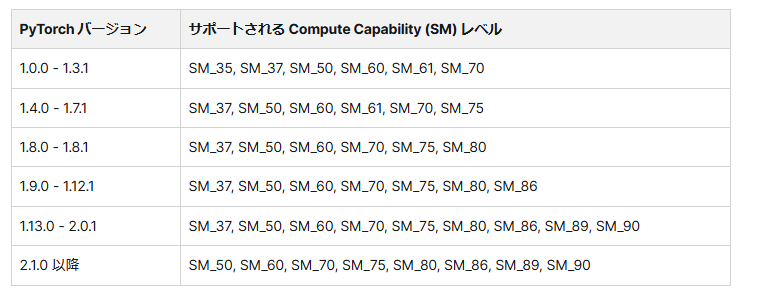
Check the Compatibility Matrix
Check the version compatibility between PyTorch and CUDA in advance. The official PyTorch site publishes a compatibility matrix, but compatibility in your actual application may vary depending on the environment.
1. Operational Countermeasures
Automate Periodic Restarts
The simplest and most effective countermeasure is to schedule periodic restarts of the service.
# crontab example: restart the service every day at 3 a.m.
0 3 * * * systemctl restart your_service
Health Checks and Automatic Restarts
In addition to periodic restarts, monitor the application's state and restart it automatically when an error occurs.
try:
    # Main processing
    process_images()
except RuntimeError as e:
    if "CUDA error" in str(e):
        # Log the event
        logging.error("CUDA error detected, restarting service")
        # Restart the process
        os.execv(sys.executable, ['python'] + sys.argv)
Monitor GPU Resources
Use NVML to monitor GPU utilization and memory consumption periodically and detect early signs of trouble.
import pynvml

def monitor_gpu():
    pynvml.nvmlInit()
    handle = pynvml.nvmlDeviceGetHandleByIndex(0)
    info = pynvml.nvmlDeviceGetMemoryInfo(handle)
    used_percent = info.used / info.total * 100

    # Warn when usage exceeds 90%
    if used_percent > 90:
        logging.warning(f"GPU memory usage high: {used_percent:.2f}%")
        # Take countermeasures (clear the cache, restart the process, etc.)
2. Code-Level Countermeasures
Let us also cover some general code-level countermeasures.
These are not a prescription for the deep-rooted problem discussed here, but we present them as general practice.
Clear the CUDA Cache
Periodically clearing PyTorch's CUDA cache can reduce the impact of memory leaks.
def clear_gpu_memory():
    torch.cuda.empty_cache()

# Clear the cache every fixed number of iterations
for i, batch in enumerate(data_loader):
    process_batch(batch)
    if i % 100 == 0:
        clear_gpu_memory()
Optimize the Batch Size
This is also general advice, but large batch sizes put pressure on GPU memory. Using a smaller batch size can sometimes alleviate memory problems.
# Use a smaller batch size
data_loader = DataLoader(dataset, batch_size=8, shuffle=True)
Implement a CPU Fallback
Implementing logic that automatically falls back to the CPU when GPU processing fails improves service continuity.
def process_with_fallback(image):
    try:
        # Process on the GPU
        return process_on_gpu(image)
    except RuntimeError as e:
        if "CUDA error" in str(e):
            logging.warning("Falling back to CPU processing")
            # Process on the CPU
            return process_on_cpu(image)
        else:
            raise
Use the Debug Flag
As the error message suggests, setting the CUDA_LAUNCH_BLOCKING=1 flag makes it easier to pinpoint the exact location of asynchronous errors.
CUDA_LAUNCH_BLOCKING=1 python your_script.py
3. Architectural Countermeasures
Microservices and Horizontal Scaling
Splitting a monolithic application into small microservices allows the overall service to keep running even when part of it fails.
It also lets you implement a restart strategy for each individual service.
Our own services are broken into small microservices, with services providing the same functionality deployed horizontally. By scheduling the periodic restarts of these microservices so they do not overlap, you can improve service continuity.
In other words, by load balancing across multiple server instances, other instances can handle requests even when some instances fail.
Container orchestration tools such as Kubernetes make it possible to manage this kind of configuration efficiently.
Conclusion
"CUDA error: unknown error" is a common problem on long-running servers that use PyTorch and CUDA.
Because it often appears suddenly after a version upgrade—on a system that had been stable until then—thorough validation and long-duration testing in advance are essential.
While this problem is difficult to prevent completely, combining sound operational strategies with preventive measures can minimize its impact.
The key is to combine multiple approaches—careful validation of version compatibility, automated periodic restarts, resource monitoring, code optimization, and appropriate architectural design—to build reliable GPU-backed services.
Above all, running stability tests for several days before deploying to production, and catching long-running issues ahead of time, is the key to preventing unexpected downtime.
With these countermeasures in place, you should be able to operate your deep learning and computer vision server applications with much greater stability.
We also offer GPU technical consulting and advisory services for businesses that are considering a commercial GPU service, or that are already operating one and facing challenges—please feel free to get in touch.



