
Tensor Operations Worth Mastering: 5 Approaches to Vertically Merging NumPy Arrays


Hello!
Today, let's take a look at vertically merging arrays in NumPy.
As you know, NumPy is a powerful library for scientific computing in Python.
We will walk through five different approaches to vertically merging multiple NumPy arrays into a single larger array.
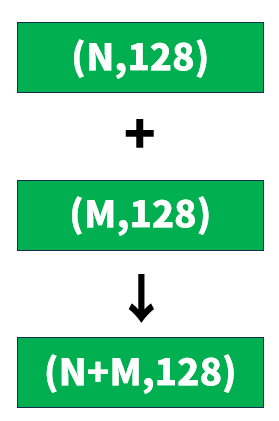
Specifically, we will look at how to take a Python list containing multiple NumPy arrays with shapes (N,128) and (M,128) and create a single NumPy array with shape (N+M,128).
1. Using np.vstack()
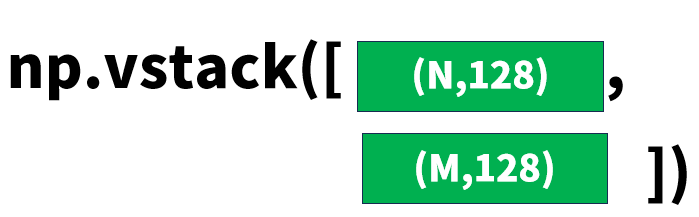
np.vstack() is a function for stacking arrays vertically (row-wise).
import numpy as np

list_of_arrays = [
    np.random.rand(3, 128),
    np.random.rand(2, 128)
]

merged_array = np.vstack(list_of_arrays)
print(merged_array.shape)  # (5, 128)
Characteristics
- The name is simple and intuitive: "v" for vertical, plus "stack".
When to use it
- The common case of vertically concatenating multiple 2D arrays
- When memory efficiency and speed matter
2. Using np.concatenate()
np.concatenate() also comes up frequently when merging arrays. It is more general-purpose than vstack, joining arrays along a specified axis.
One of the key parameters of this function is axis.
That said, you may find yourself wondering, "What exactly is an axis?" at first, so let's take a closer look at axes.
import numpy as np

list_of_arrays = [
    np.random.rand(3, 128),
    np.random.rand(2, 128)
]

merged_array = np.concatenate(list_of_arrays, axis=0)
print(merged_array.shape)  # (5, 128)
A closer look at axis=0
In NumPy, axis is a parameter that specifies a dimension of the array.
For example, in the case of a 2D array:
axis=0operates along the first dimension (rows).axis=1operates along the second dimension (columns).
For example, specifying axis=0 results in the following behavior:
- The arrays are joined "vertically".
- The first dimension (number of rows) increases.
- The second dimension (number of columns) stays the same.
Visually, it looks like this:
Array1 (3x128):  [ ][ ][ ]
                 [ ][ ][ ]
                 [ ][ ][ ]

Array2 (2x128):  [ ][ ][ ]
                 [ ][ ][ ]

Merged (5x128):  [ ][ ][ ]    (Array1)
                 [ ][ ][ ]
                 [ ][ ][ ]
                 [ ][ ][ ]    (Array2)
                 [ ][ ][ ]
Comparison with axis=1
In contrast, axis=1 works as follows:
- The arrays are joined "horizontally".
- The first dimension (number of rows) stays the same.
- The second dimension (number of columns) increases.
# Note: in this example, the shapes of the input arrays have been changed
array1 = np.random.rand(3, 64)
array2 = np.random.rand(3, 64)
merged_horizontal = np.concatenate([array1, array2], axis=1)
print(merged_horizontal.shape)  # (3, 128)
Visually:
Array1 (3x64):  [ ][ ][ ]
                [ ][ ][ ]
                [ ][ ][ ]

Array2 (3x64):  [ ][ ][ ]
                [ ][ ][ ]
                [ ][ ][ ]

Merged (3x128): [ ][ ][ ][ ][ ][ ]
                [ ][ ][ ][ ][ ][ ]
                [ ][ ][ ][ ][ ][ ]
Points to keep in mind
axis=0requires that the arrays being joined have the same number of columns (the second dimension).axis, when omitted, defaults toaxis=0.- For arrays with three or more dimensions, the
axisvalues and their effects become more complex.
Characteristics
- Its key strength is flexibility (you can specify the axis). By specifying axis, it extends to three or more dimensions.
When to use it
- When you want to change the concatenation axis dynamically
- When you need to perform concatenation across multiple dimensions
- When you want flexibility to adapt to your data structure and processing requirements
(Bonus) 3. Using a list comprehension with np.row_stack()
np.row_stack() is an alias for np.vstack(), but combined with a list comprehension it lets you write more expressive code.
import numpy as np

list_of_arrays = [
    np.random.rand(3, 128),
    np.random.rand(2, 128)
]

merged_array = np.row_stack([arr for arr in list_of_arrays])
print(merged_array.shape)  # (5, 128)
Characteristics
- For those who prefer a more Pythonic style.
When to use it
- When you want to apply an operation to the arrays before concatenating them.
(Bonus) 4. Using np.r_
np.r_ provides a concise syntax for joining arrays row-wise.
import numpy as np

list_of_arrays = [
    np.random.rand(3, 128),
    np.random.rand(2, 128)
]

merged_array = np.r_[tuple(list_of_arrays)]
print(merged_array.shape)  # (5, 128)
Characteristics
- The syntax is very compact, but from a readability standpoint you may not need to go out of your way to use it.
When to use it
- When you simply find this style irresistibly elegant.
(Bonus) 5. Joining manually with a loop
This method is useful when you want complete control over the concatenation process.
import numpy as np

list_of_arrays = [
    np.random.rand(3, 128),
    np.random.rand(2, 128)
]

total_rows = sum(arr.shape[0] for arr in list_of_arrays)
merged_array = np.zeros((total_rows, 128))

current_row = 0
for arr in list_of_arrays:
    n_rows = arr.shape[0]
    merged_array[current_row:current_row+n_rows] = arr
    current_row += n_rows

print(merged_array.shape)  # (5, 128)
Summary
We covered five approaches, bonuses included. In practice, np.vstack() and np.concatenate() are the most efficient and the ones you will encounter most often.
See you next time!



