
Building a GPU PC, Part 2: How the CPU, Chipset, and PCI Express Relate

Hello! Today I would like to learn about the CPU and the chipset.
Our ultimate goal is to build a GPU machine that can be used for AI development, but where exactly in a PC does the GPU go?

The answer: it plugs into a PCI Express slot on the PC.
I can hear some of you saying, "I already knew that."
Well done.
Then here is the next question.
Where do the lanes of the PCI Express slot that the GPU plugs into connect to?
1. The chipset
2. The CPU
The correct answer is 2, the CPU.
If the answer came to you instantly, feel free to skip this article.
If your reaction was a question mark, you may find some useful parts in this article.
So, you may already know that a GPU is used by plugging it into an expansion slot called PCI Express, but how is PCI Express connected internally? This actually turns out to be quite important when building a GPU PC.
This knowledge will also matter later, when we build serious GPU machines with two or four GPUs installed, so it is well worth learning now.
Let's get started!
Picking up where the earlier question left off:
there are two kinds of PCI Express, those connected directly to the CPU and those connected through the chipset.
First, let's take a closer look at the transmission paths that connect PCI Express to the CPU or chipset, which are called "lanes."
The Lanes Connecting PCI Express and the CPU
As mentioned above, some PCI Express connections come directly from the CPU and others come from the chipset.
-
PCI Express ⇔ CPU
-
PCI Express ⇔ Chipset
Let's look at a concrete example.
For the lanes connecting the CPU and PCI Express, in the case of a 12th Gen Intel Core series CPU, for instance, there are 20 lanes
connected directly from the CPU to PCI Express.
They break down as follows:
- 16 lanes of PCIe gen 5
- 4 lanes of PCIe gen 4
"So there are 16 gen5 lanes and 4 gen4 lanes? The lanes running from the CPU to PCI Express differ in both count and standard?"
Yes, exactly.
Each lane has its own standard: this lane is PCIe gen5 (meaning the fifth generation of PCI Express, as we saw), that lane is PCIe gen4, and so on.
The first key point is that not all of the PCI Express lanes connected to the CPU and chipset inside a PC follow the same standard.
Now let's deepen our understanding by looking at the block diagram of the Z690 chipset, which supports 12th Gen Intel CPUs.
(A block diagram is a diagram that shows the components that make up a system.)
Below is the block diagram of the Z690 chipset.
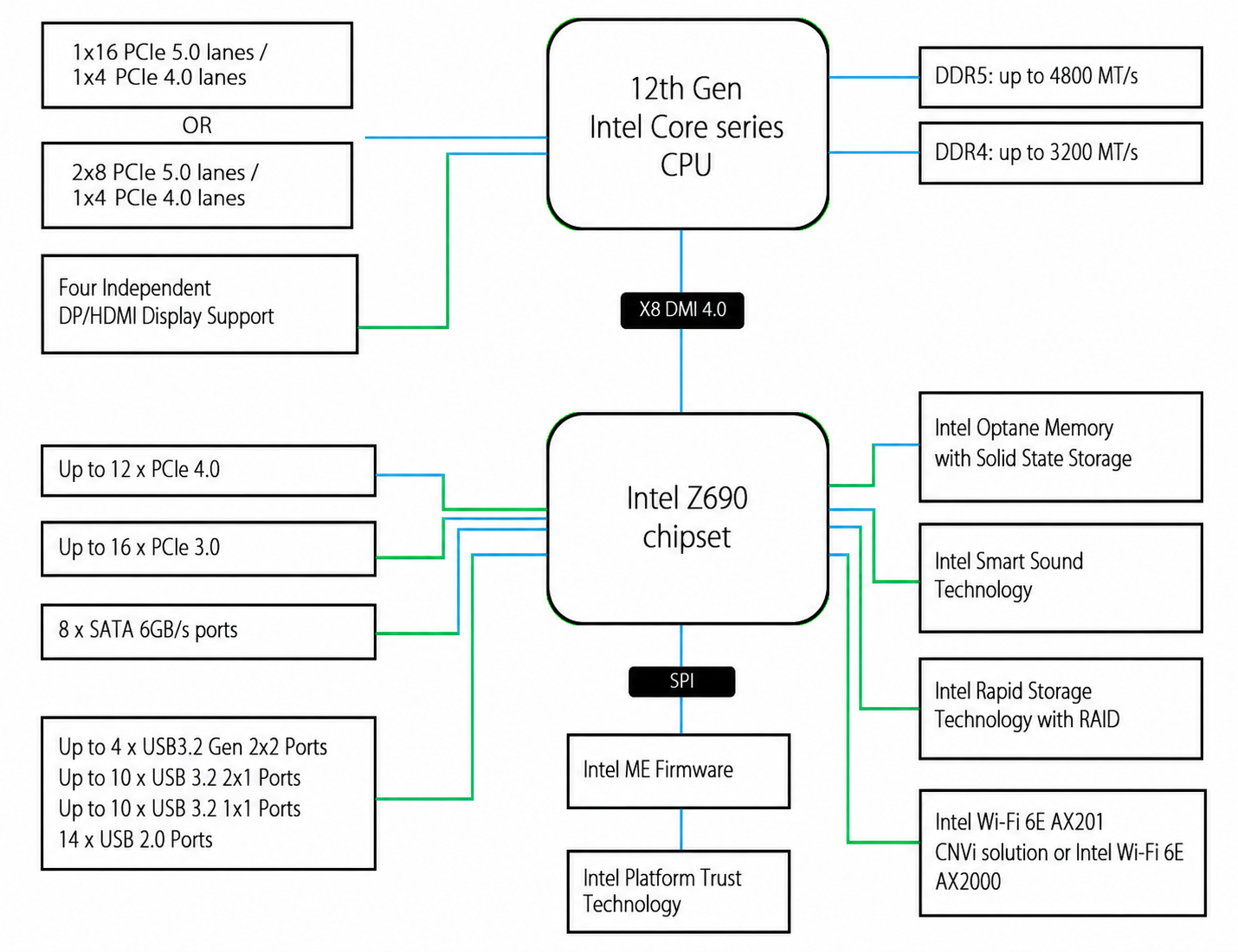
There is no need to understand this whole block diagram right away.
We are building a "GPU-equipped machine" rather than an ordinary PC, so we will learn only the parts that matter for a GPU machine.
What matters for the GPU is the upper left of this block diagram. I have marked it in red.
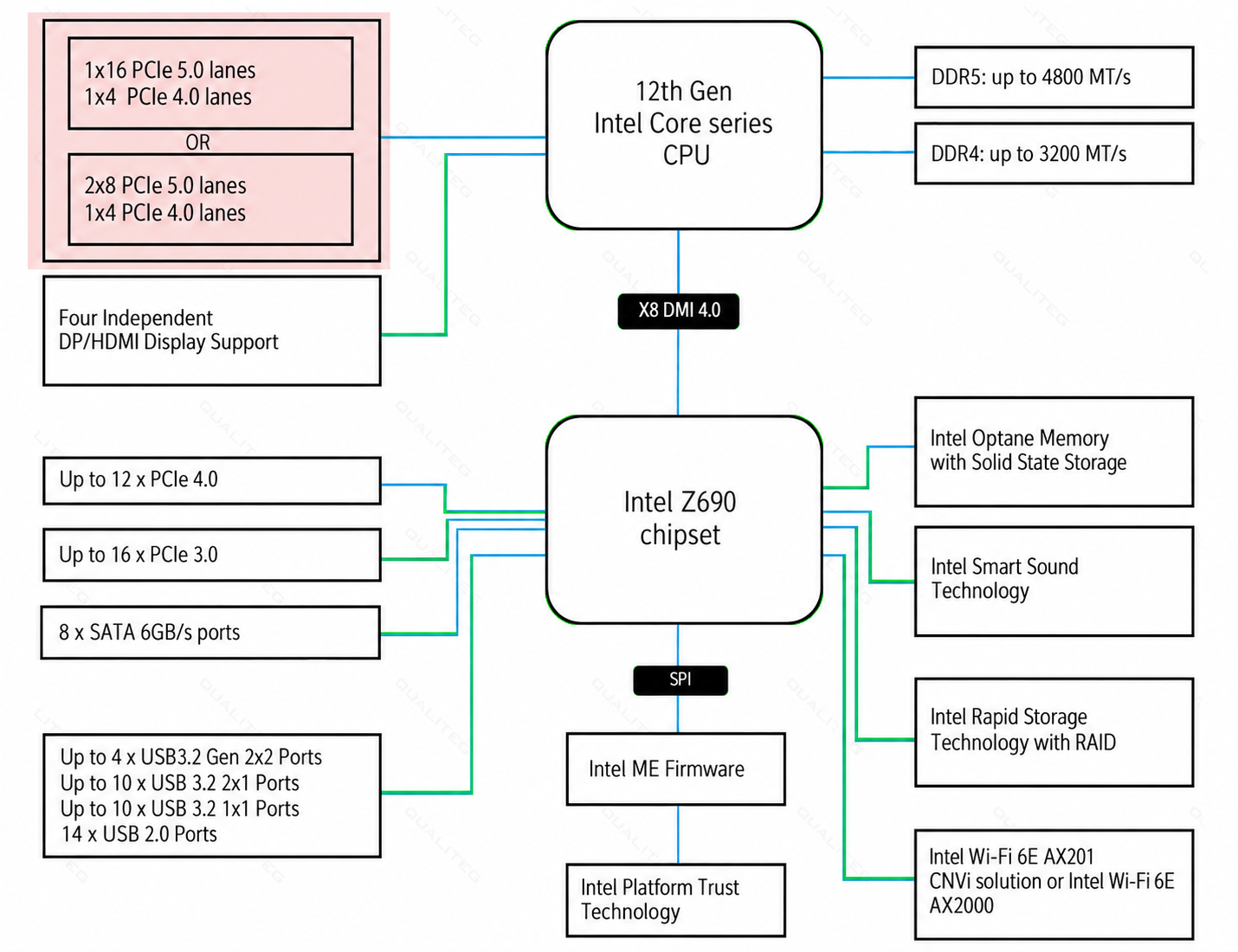
Let's start by decoding this part.
Zoomed in, it looks like this.
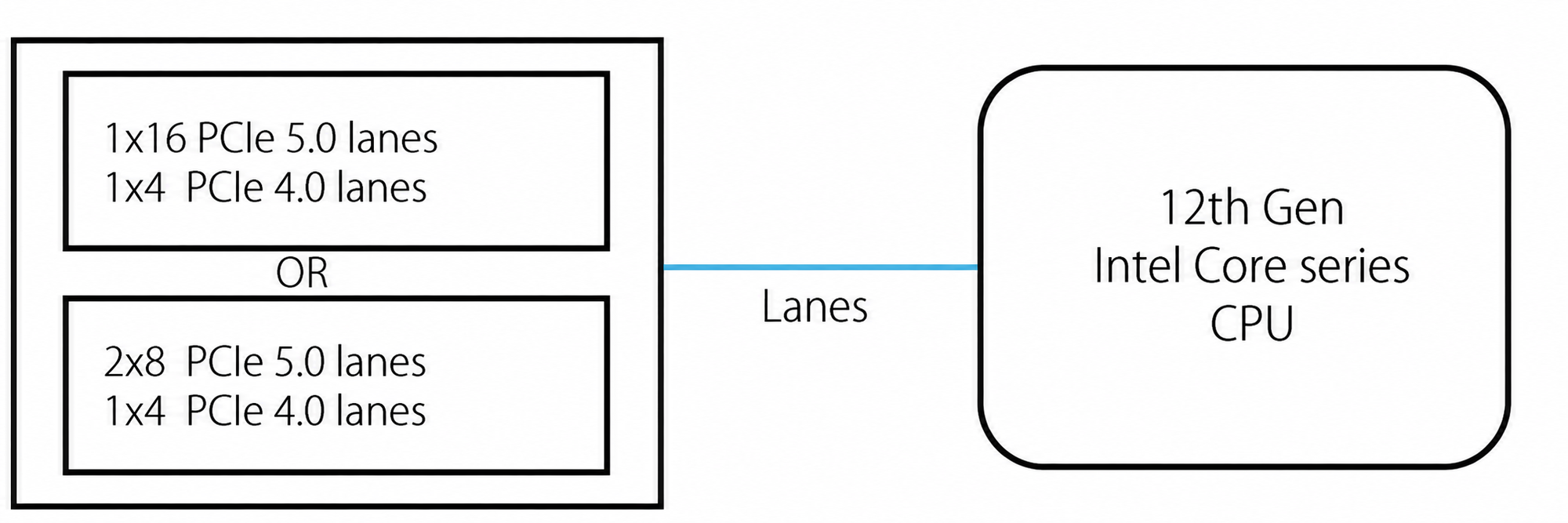
This describes the PCI Express connections that are directly attached to the CPU.
Looking at the upper left area, you can see the following:

That is what is written there.
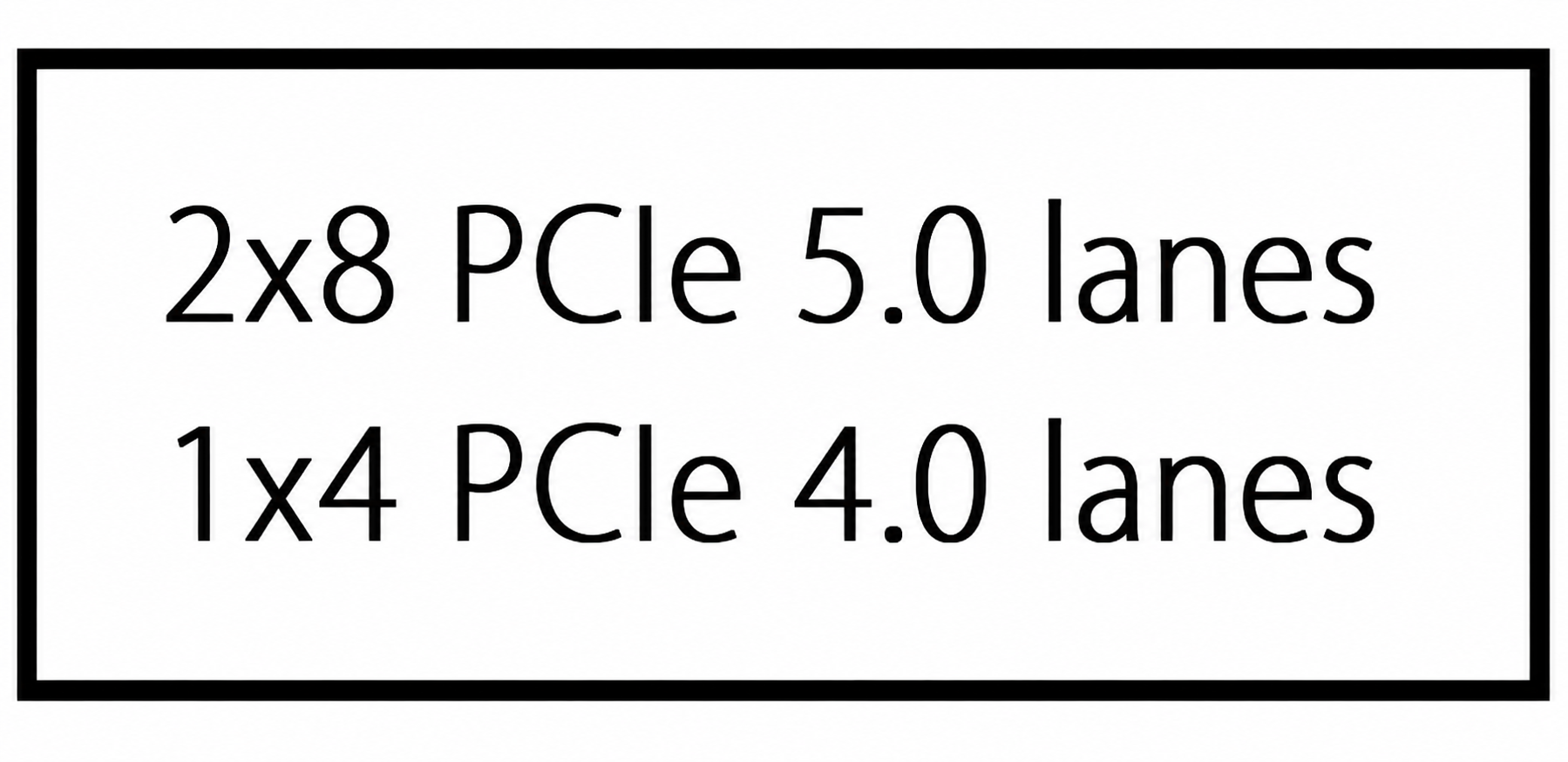
This is the point I mentioned at the beginning: 20 PCI Express lanes extend from the CPU. A total of 20 lanes, 16 PCIe 5.0 lanes and 4 PCIe 4.0 lanes, are connected directly to the CPU.
In other words, out of the 20 lanes in total,
- a slot that bundles 16 gen5 PCI Express lanes
- a slot that bundles 4 gen4 PCI Express lanes
are available for use. That is what the diagram is telling us.
And normally, this slot that bundles 16 gen5 PCI Express lanes extending from the CPU is the one used for the graphics card (GPU).
As shown in the previous article, PCIe 5.0 is extremely fast, which makes it well suited to applications like GPUs that demand high-speed data transfer.
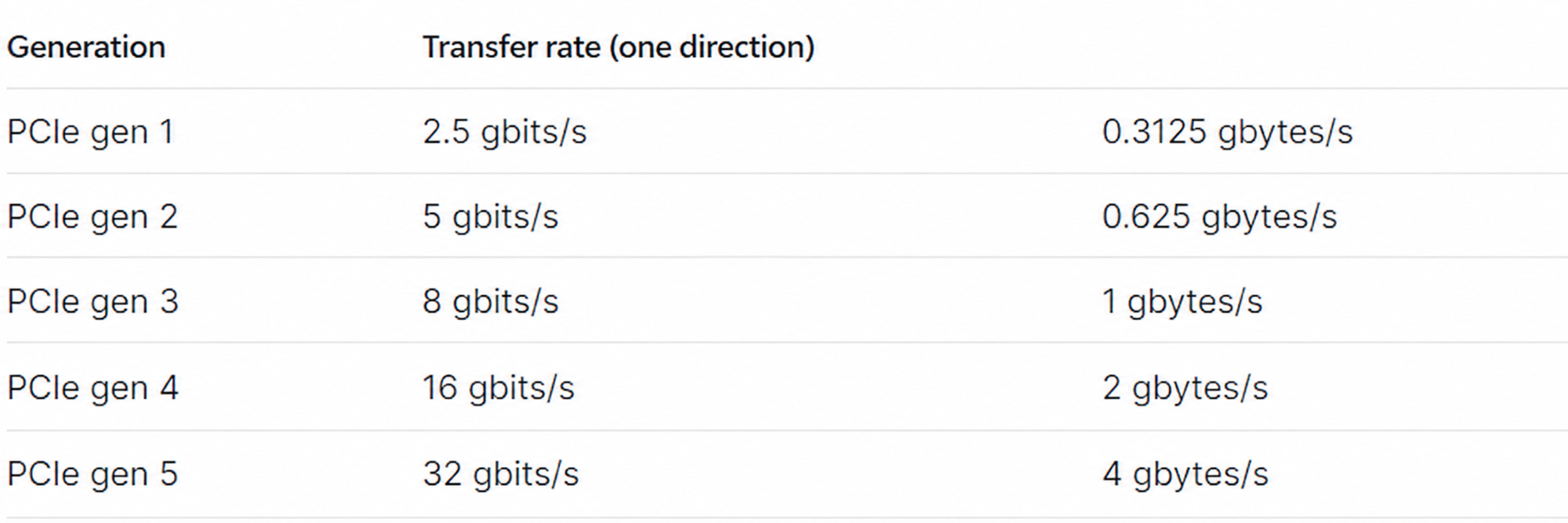
To deepen our understanding further, here is a visual representation of each individual lane.
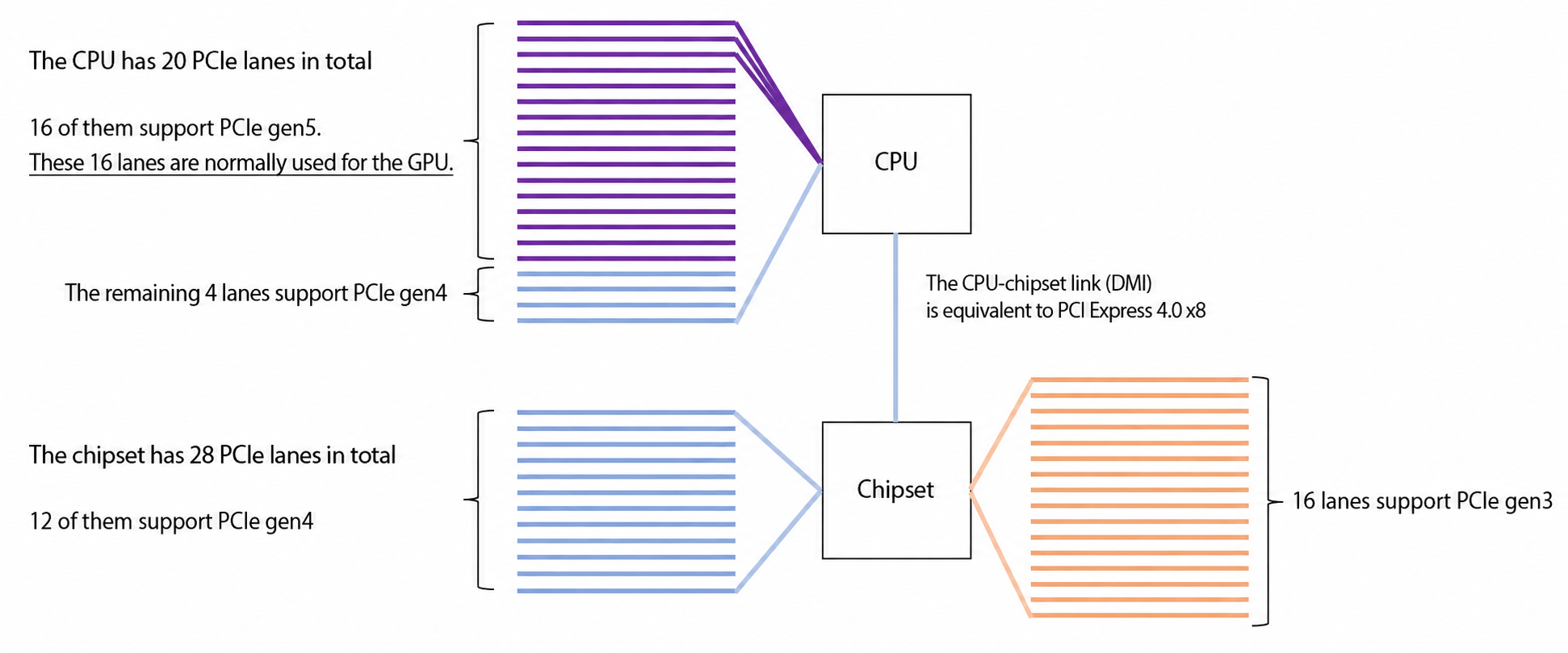
Since our focus is the GPU, we concentrated on the CPU ⇔ PCI Express connection where the GPU attaches, but the other lanes work basically the same way.
PCI Express also has lanes connected on the chipset side, as shown in the diagram above.
Once you understand this mechanism, you will be able to read and interpret motherboard and chipset spec sheets.
Now, the upper left of the block diagram we saw earlier also contained the notation shown below. What does this mean?
Looking beyond DIY builds toward GPU environments for research and business?
The know-how gained from building your own GPU machine carries over directly to infrastructure choices for research, PoCs, and production.
We build and operate our own GPU cluster in-house and develop LLM products on it. We can also support a wide range of needs, from procuring GPU workstations for research to Intel Core and Intel Xeon architectures, covering everything from consumer to professional use. Beyond helping you procure and build workstations, we advise on what comes next, from setting up training environments to selecting the right GPUs, optimizing inference, and designing distributed configurations, all based on hands-on operational experience.
See our LLM infrastructure and platform technology services →I will explain that in the next installment.
It is also relevant to running two graphics cards, so stay tuned!
See you next time.
navigation



