
Building a GPU PC, Part 7: Choosing a GPU for AI

This time, we select a graphics board (GPU) suited to AI work.
Before getting into the main story, let's sort out the difference between a graphics board and a GPU.
A graphics board is a key piece of hardware that handles image processing and AI computation in a computer, and it is typically used by inserting it into a PCI Express slot on the PC.
The GPU, on the other hand, is one of the main components of a graphics board. A graphics board is made up of components such as the following.
- GPU chip - The heart of graphics processing, executing complex mathematical calculations at high speed.
- VRAM (video RAM) - Dedicated memory that the GPU accesses directly. In deep learning, it holds parameters (weights and biases) and intermediate computations, and it operates at very high speed.
- Cooling system - Fans and heatsinks that effectively dissipate the heat generated by the GPU.
Many articles treat "graphics board" and "GPU" as the same thing, and we don't draw a strict line between them either, but in reality the picture is as described above.
Now then, let's continue following Jun on his shopping trip.
The Niku no Mansei main restaurant was as great as ever.
I had a hamburger steak on the second floor, but once I get promoted I'd like to try the restaurants on the third and fourth floors too. I also want to try the pork-cutlet ramen on the first floor someday. That display where the noodles go up and down is fun, too.
(For some reason, I always end up on the second floor.)
Now that I'm full, it's time to go buy today's main event: the GPU.
But first, let me take stock of what I've bought so far.
- Motherboard: ASRock Z690 Steel Legend approx. 40,000 yen
- Memory: Crucial desktop DDR5 32GB x 2 = approx. 30,000 yen
- CPU: Intel Core i7 12700 approx. 50,000 yen
- Lunch: Mansei Combo + Japanese set, approx. 2,000 yen
I've spent roughly 125,000 yen, so I have about 325,000 yen left. Looks like I can afford a good GPU!
Off to the Store for a GPU!
If you're doing AI, an NVIDIA GPU is the obvious choice.
I started browsing, wondering which one to pick, but the decision turned out to be almost anticlimactically easy.
The reason is simple.
For deep learning, and LLMs in particular, the single most important factor is the amount of VRAM, that is, the GPU's memory capacity.
And the GPUs sold here in Akihabara are normally consumer GPUs, so there is a hard ceiling on VRAM.
That's right: graphics boards with an NVIDIA GeForce 3090 or GeForce 4090 top out at 24 GB of VRAM. In other words, you could say the choice comes down to one of these two.
Step down even one model and the VRAM suddenly drops to 16 GB.
Consumer GPUs are, after all, made mostly for 3D gaming, so 24 GB of VRAM is presumably considered plenty.
So I decided it would be either the 3090 or the 4090.
Choosing between the two was also nearly a no-brainer.
I had a little under 300,000 yen left, but the 4090 boards were priced at 300,000 yen and up across the board. If I spent all of my remaining budget, I couldn't buy the power supply and the other remaining parts.
So, under the practical criteria of "the most memory available in a consumer GPU at a price I can actually afford," I bought the following graphics board equipped with a GeForce 3090.
MSI SUPRIM X GeForce RTX 3090 Ti
I bought it for about 200,000 yen. It's the most expensive purchase of the day.
I brought a giant Costco bag for the shopping trip, but with the motherboard box and the graphics board box it's already getting pretty tight.
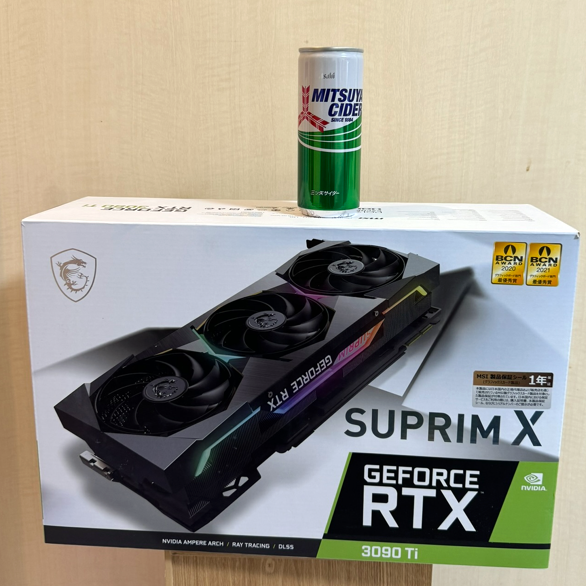
As you can see from the comparison with the can of Mitsuya Cider, the box is quite big, and it really feels like I bought something expensive.
Here's roughly what's in the bag.
In the Costco bag
- Motherboard: ASRock Z690 Steel Legend approx. 40,000 yen
- Memory: Crucial desktop DDR5 32GB x 2 = approx. 30,000 yen
- CPU: Intel Core i7 12700 approx. 50,000 yen
- GPU: MSI SUPRIM X GeForce RTX 3090 Ti approx. 200,000 yen
In my stomach
Mansei Combo + Japanese set, approx. 2,000 yen
Remaining budget: 450,000 - 125,000 - 200,000 = 125,000 yen.
I'll head back to the office to drop off my purchases for now,
and then use the remaining budget to buy the remaining parts: the power supply, SSD, and case.
Looking beyond DIY builds toward GPU environments for research and business?
The know-how gained from building your own GPU machine carries over directly to infrastructure choices for research, PoCs, and production.
We build and operate our own GPU cluster in-house and develop LLM products on it. We can also support a wide range of needs, from procuring GPU workstations for research to Intel Core and Intel Xeon architectures, covering everything from consumer to professional use. Beyond helping you procure and build workstations, we advise on what comes next, from setting up training environments to selecting the right GPUs, optimizing inference, and designing distributed configurations, all based on hands-on operational experience.
See our LLM infrastructure and platform technology services →How was this installment? Jun managed to get his GPU.
Next time, we plan to buy the power supply, SSD, and case. Stay tuned!
navigation



