
Building a GPU PC, Part 8: Power Supply, SSD, and Case

Today it's time to buy the power supply, SSD, and case.
Jun here.
Once I pick up the power supply, SSD, and case, I should have everything I need.
Let me take another look at the note that was left for me.
(6) SSD: 1 TB or larger.
(7) Power supply: 800 W or more, 80 Plus Titanium.
(8) Case: make sure the graphics card actually fits!
Choosing the SSD
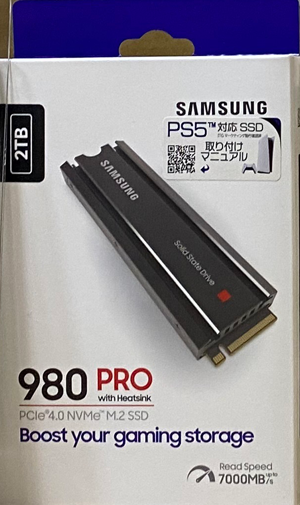
For the SSD, the requirement was 1 TB or larger, so I bought a 30,000-yen SAMSUNG 980 PRO 2T.
Choosing the power supply
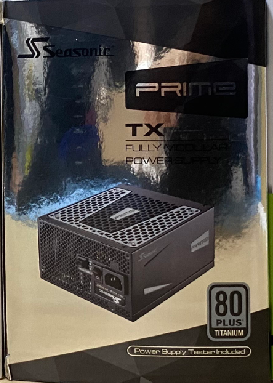
For the power supply, the requirement was 800 W or more, so I went with the 850W OWLTECH PC Power Supply 850W / ATX / Titanium PRIMETX850S, purchased for 45,000 yen.
Choosing the case
Now, all that remains is the case.
(8) Case: make sure the graphics card actually fits!
I wasn't quite sure what this meant, so I decided to ask a store clerk.
I was planning to buy an ATX-size case, but apparently "ATX size" covers a wide range of dimensions, and if the graphics card is large, in the worst case it may not fit in the case at all.
I see. So if you pick a case carelessly, you can get burned.
The graphics card I bought this time, the GeForce RTX 3090 Ti SUPRIM X 24G , is huge: 338 x 140 x 71 mm. A full-size PCI Express board is 31 cm, so at 34 cm this card is beyond full size.
Clearly, I would need to search carefully for a case that can accommodate this giant graphics card.
And then I found a case that looked promising.
Fractal Design Focus G White Window is the one.
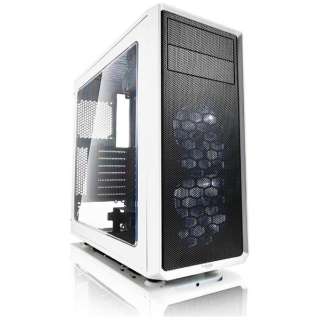
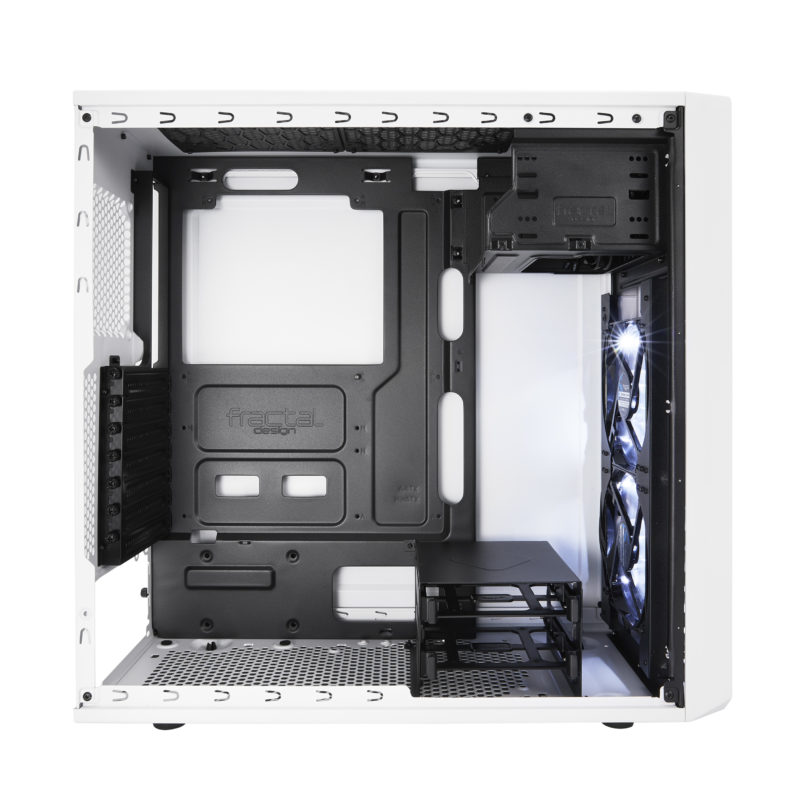
This case supports graphics cards up to 38 cm, so the GeForce RTX 3090 Ti SUPRIM X 24G I bought, at 34 cm, should fit with room to spare.
Incidentally, the GeForce RTX 3090 Ti SUPRIM X 24G is also remarkably thick, taking up 4 slots.
In other words, it occupies the space of 4 PCI Express slots, so any PCI Express slots in that occupied area become unusable.
(If you find yourself thinking "a giant graphics card that hogs 4 slots is unacceptable!", you might want to consider the internal-exhaust type of graphics card described in Column: The Difference Between Consumer GPUs and Professional GPUs. High-end internal-exhaust cards with blower fans mostly occupy 2 slots or fewer. The trade-off is that they are expensive.)
Oh, and one more thing: the Fractal Design Focus G White Window not only looks great and provides ample living space for the components, it also supports six fans and a liquid-cooling radiator, and yet I picked it up for only about 10,000 yen! I was sure this was a great purchase.
There is actually one more reason I chose this case: it has a 5.25-inch bay. Why is having a 5.25-inch bay important? You'll find out in about three minutes.
And with that, I have everything!
- Motherboard: ASRock Z690 Steel Legend approx. 40,000 yen
- Memory: Crucial Desktop DDR5 32 GB x 2 = approx. 30,000 yen
- CPU: Intel Core i7 12700 approx. 50,000 yen
- GPU:MSI SUPRIM X GeForce RTX 3090 Ti approx. 200,000 yen
- SSD:SAMSUNG 980 PRO 2T approx. 30,000 yen
- Power supply:850W OWLTECH PC Power Supply 850W / ATX / Titanium approx. 45,000 yen
- Case:Fractal Design Focus G White Window approx. 10,000 yen
That comes to exactly 405,000 yen in total. Half of it is the graphics card!
Now, I'm going to do a little more shopping.
What? Haven't you already spent 400,000 yen?
You may well be thinking that, and yes, I have. But the company budget still has 45,000 yen left, and there is something I want to do, so I'm going to buy just a bit more.
What I want to do is set up a dual boot.
The OS on the research GPU machine is Linux (Ubuntu), but since I want to use Microsoft Office for documentation and so on, I would like to have Windows installed too. My ambition is to use this GPU machine both for AI research and for everyday work.
So I'm going to spend just 10,000 yen more to set up a dual-boot environment.
I additionally purchased the following:
- OWLTECH Direct Removable Drive Enclosure for 5.25-inch Bay approx. 5,000 yen
- Silicon Power SSD 512 GB SATA 2.5-inch approx. 5,000 yen
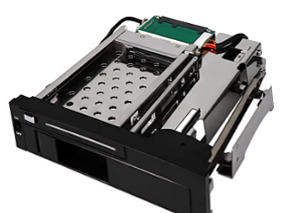
The reason it was important that the case have a 5.25-inch bay, as I mentioned when choosing the case, was that I wanted to install this removable drive enclosure.
Now I have everything!
Jun has finally managed to purchase all of the parts.
One additional note about SSDs:
Recent motherboards come with a small slot called M.2. If you have built a PC in the past, you may remember plugging a SATA cable into an SSD, but these days the M.2 slot is the mainstream. That's because storage media are no longer bulky like the HDDs of old; they have shrunk to the point where they can be mounted directly on the surface of the motherboard.
There are also two kinds of M.2: SATA-connected and NVMe-connected. The connector shape is M.2 in both cases, but NVMe offers dramatically higher transfer speeds. The SSD Jun bought this time is NVMe-capable, so it delivers access speeds that SATA simply can't compare with. Choosing an M.2 NVMe SSD like this lets you add compact, fast storage, but it is generally more expensive.
Jun innocently bought a 2 TB M.2 NVMe drive, but if cost is a concern, buying a regular SATA SSD is another option. The additional SSD Jun bought is a regular 512 GB SATA SSD, which can be had for around 5,000 yen. If you can compromise on speed, going with a SATA-SSD-only configuration could cut costs by tens of thousands of yen.
That's all for now. See you next time!
navigation



