
Emoji Length Differs Between Python and JavaScript: A Surrogate Pair Misalignment Bug

Hello!
This is the Qualiteg product development team!
While building a PII (personally identifiable information) detection demo app, we were implementing a feature that highlights the positions of detected entities.
The stack is Python (FastAPI) on the backend and JavaScript on the frontend.
One day, when we used the following email text as test data, we ran into a bug where the highlight positions start drifting subtly off partway through the text.
鈴木一郎 様

いつもお世話になっております。
サンプル商事の佐藤でございます。

先日の件、確認が取れましたのでご連絡いたします。

お忙しいところ恐縮ですが、ご確認のほど宜しくお願い致します。

💻 #オンラインでのお打ち合わせ、お気軽に声がけください!
――――――――――――――――――――――――――――――
サンプル商事株式会社
営業部 第一課
山田 太郎 (Yamada Taro)
〒100-0001 東京都千代田区千代田1-1-1 サンプルビル 3F
tel: 03-1234-5678
https://example.com/contact
When we rendered the detection results as highlights, the first half was perfect, but partway through they started to drift.
What Happened
The Python backend returns each entity's start_position and end_position as the detection result. The frontend uses those positions with text.substring(start, end) to cut out the part to highlight.
The highlights in the first half were accurate:
鈴木一郎→ highlighted correctlyサンプル商事→ highlighted correctly佐藤→ highlighted correctly
But once we reached the email signature section, every highlight was shifted one character to the left:
- The phone number
03-1234-5678→03-1234-567was highlighted instead (a leading space included, the trailing 8 missed) - The person name
山田→\n山was highlighted instead (the newline was included and 田 was missed) - URL
https://example.com/contact→https://example.com/contacwas highlighted instead (a leading space included, the trailing t missed)
Drifting Only Partway Through? Why?
If everything were shifted, it would simply be an offset calculation bug. But here, the first half is correct and only the second half drifts. And the drift is uniformly one character.
Our first thought was: is there some process that resets the position calculation midway? But rereading the code, the positions are returned in one batch from the backend, with no recalculation along the way.
Next, we looked for the exact boundary where the drift begins. What sits between the last correctly highlighted entity and the first misaligned one?
...ご確認のほど宜しくお願い致します。    ← fine up to here

💻 #オンラインでの...                   ← right at this boundary

サンプル商事株式会社                     ← drift starts here
...💻? This emoji... could it be?
Checking in the browser's developer tools:
"💻".length // => 2 ...wait, what?
💻 should be a single character, yet .length returns 2. Here was the cause of the bug.
The Cause: Code Points vs. Code Units in Unicode
Strings in Python
Python 3 strings are sequences of Unicode code points.
text = "💻オンライン"
print(len(text))        # => 6
print(text[0])          # => "💻"
print(text[1])          # => "オ"
💻 (U+1F4BB) is a single code point, so in Python its length is 1.
Strings in JavaScript
JavaScript strings are sequences of UTF-16 code units.
const text = "💻オンライン";
console.log(text.length);    // => 7
console.log(text[0]);        // => "\uD83D"  (half of a surrogate pair; cannot be displayed alone)
console.log(text[1]);        // => "\uDCBB"  (half of a surrogate pair; cannot be displayed alone)
console.log(text[2]);        // => "オ"
💻 (U+1F4BB) lies outside the BMP (Basic Multilingual Plane, U+0000-U+FFFF), so in JavaScript it is represented as a surrogate pair "\uD83D\uDCBB", two code units. Its length is therefore 2.
How the Drift Works
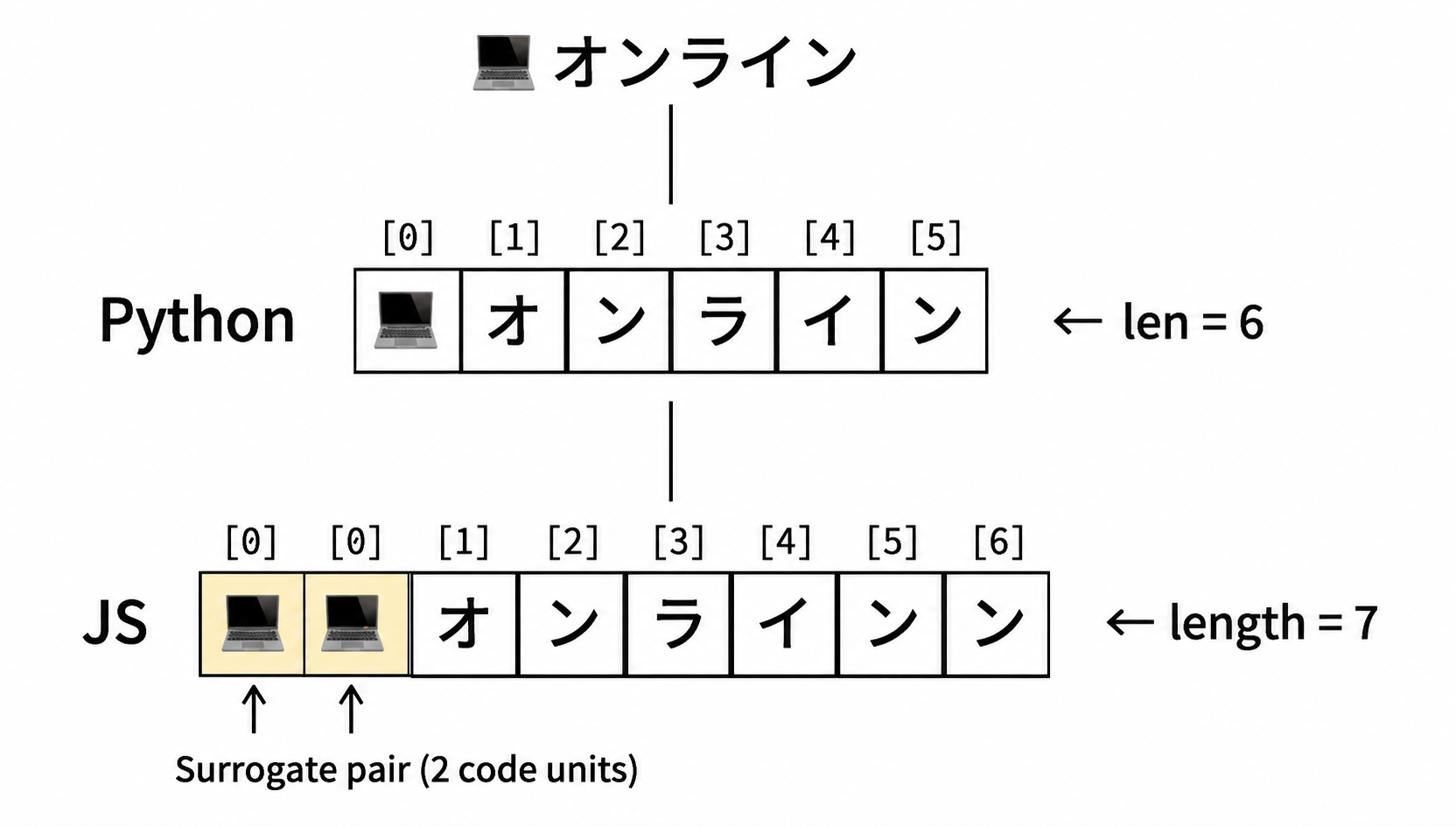
Even if Python returns start_position=1 (= "オ"), JavaScript's text[1] points to the second half of the surrogate, \uDCBB. To access "オ" in JavaScript, you need text[2].
In other words, each non-BMP character shifts every subsequent position by one more.
The Fix: Array.from() to Switch to Code Point Units
JavaScript's Array.from() walks the string via its iterator, so it splits into code point units.
const text = "💻オンライン";
const codePoints = Array.from(text);

console.log(codePoints.length);  // => 6  ← matches Python!
console.log(codePoints[0]);      // => "💻"
console.log(codePoints[1]);      // => "オ"
Now Python's position indexes can be used as-is.
Before the fix (buggy)
// NG: UTF-16 code unit basis → drifts when emoji are present
const entityText = text.substring(start, end);
After the fix
// OK: code point basis → matches Python
const codePoints = Array.from(text);
const entityText = codePoints.slice(start, end).join("");
In the actual fix, we also replaced text.length with codePoints.length.
Other Solutions
Spread syntax
Array.from() splits into code point units in the same way.
const codePoints = [...text];
console.log(codePoints.length);  // => 6
Returning UTF-16 offsets from the Python side
You can also fix it on the backend. Python can compute the UTF-16 positions.
def to_utf16_offset(text: str, cp_offset: int) -> int:
    """Convert a code point offset to a UTF-16 code unit offset"""
    prefix = text[:cp_offset]
    # bytes after UTF-16 encoding / 2 = number of code units
    # 'utf-16' prepends a BOM (2 bytes), so use the BOM-less 'utf-16-le'
    return len(prefix.encode('utf-16-le')) // 2
text = "💻オンライン"
print(to_utf16_offset(text, 1))  # => 2  ← usable with JS substring
Note, however, that you must make it explicit to API consumers that these positions are UTF-16 offsets. They will no longer match Python indexes, which can cause confusion.
A Side Note: Code Point Count ≠ Perceived Character Count
This bug was resolved by using Array.from() to align on code point units. Because Python and JavaScript then both count in code points, even when the text contains ZWJ sequences (composite emoji) or combining characters, the positions on both sides still match. In other words, for this implementation the fix is perfectly sufficient.
That said, it is useful to know that the code point count does not always match the number of characters as perceived by the eye.
// ZWJ sequence: looks like 1 character but is 7 code points
const family = "👨👩👧👦";
console.log(Array.from(family).length); // => 7 (👨 + ZWJ + 👩 + ZWJ + 👧 + ZWJ + 👦)
// NFD combining character: looks like 1 character but is 2 code points
const ga = "か\u3099"; // "か" + combining dakuten = "が"
console.log(Array.from(ga).length); // => 2
If you need to work accurately in units of "one visible character" (cursor positions, text editor implementations, and the like), you can use the grapheme-cluster-based Intl.Segmenter. It is available in modern browsers and Node.js 16+.
const segmenter = new Intl.Segmenter("ja", { granularity: "grapheme" });
const family = "👨👩👧👦";
const segments = [...segmenter.segment(family)];
console.log(segments.length); // => 1 ← matches what you see!
Which Characters Are Affected
Every character outside the BMP (U+10000 and above) becomes a surrogate pair. The ones you are most likely to encounter in practice:
| Category | Examples | Code Points |
|---|---|---|
| Emoji | 💻 😀 🎉 | U+1F4BB, U+1F600, U+1F389 |
| CJK Unified Ideographs Ext. B and beyond | 𠮷 (a variant of 吉, "yoshi") | U+20BB7 |
| Mathematical symbols | 𝔸 𝕏 | U+1D538, U+1D54F |
| Musical symbols | 𝄞 | U+1D11E |
Conversely, the following are inside the BMP and never become surrogate pairs:
- Japanese kanji, hiragana, and katakana (almost all of them)
- Full-width alphanumerics (A, 1, etc.)
- ASCII characters
Summary
| Python 3 | JavaScript | |
|---|---|---|
| Internal string unit | Unicode code points | UTF-16 code units |
len("💻") / .length |
1 | 2 |
"💻"[0] |
"💻" |
"\uD83D" (half of a surrogate pair) |
| Handling of non-BMP characters | 1 character | Surrogate pair (2 units) |
Whenever you exchange string position information between Python and JavaScript, you should always account for the presence of non-BMP characters such as emoji.
On the JavaScript side, using Array.from() or [...str] to convert to a code point array before index access keeps you consistent with Python. If you also need to handle ZWJ sequences and combining characters, consider Intl.Segmenter.
This bug had gone unnoticed because our test data contained no emoji. In any implementation that shares string positions across languages, make sure your test cases include non-BMP characters (emoji, CJK extension ideographs, and so on).
See you next time!



