
[ChatStream] The Queueing System and Concurrency Limits

![[ChatStream] The Queueing System and Concurrency Limits](/content/images/size/w1200/2024/04/queueing_system_cover.gif)
Hello from the Product Development Department at Qualiteg Inc.
In this article, we explain the queueing system in ChatStream.
What Is the Queueing System?
When ChatStream receives a large number of simultaneous access requests,
it can queue those requests and limit the number of text generations that run at the same time.
By limiting the number of concurrent text-generation processes according to the performance of your GPU or CPU, you can maintain good response performance.
When the number of requests exceeds the concurrency limit, the excess requests are queued (added to a waiting line)
and executed in order, keeping the load under proper control.
What "Simultaneous Execution" Means
When running on a single GPU, "simultaneous execution" is, strictly speaking, not truly simultaneous but concurrent execution.
When you set a concurrency limit, that many requests are executed concurrently.
For example, suppose the maximum concurrency is set to 2 and two users, User 1 and User 2, send requests at the same moment.
Both requests enter the processing queue (the queue representing generations in progress), and text is generated alternately, one token at a time.
For a Japanese-language model, one token corresponds roughly to one character, so after adding one character to User 1's text, one character is added to User 2's text.
This repeats until generation is complete.
If User 3 comes in partway through, User 1's and User 2's texts are still being generated, so User 3's request goes into the request queue (the waiting line).
When generation for either User 1 or User 2 finishes, User 3's request in the request queue moves into the processing queue,
and text generation begins.
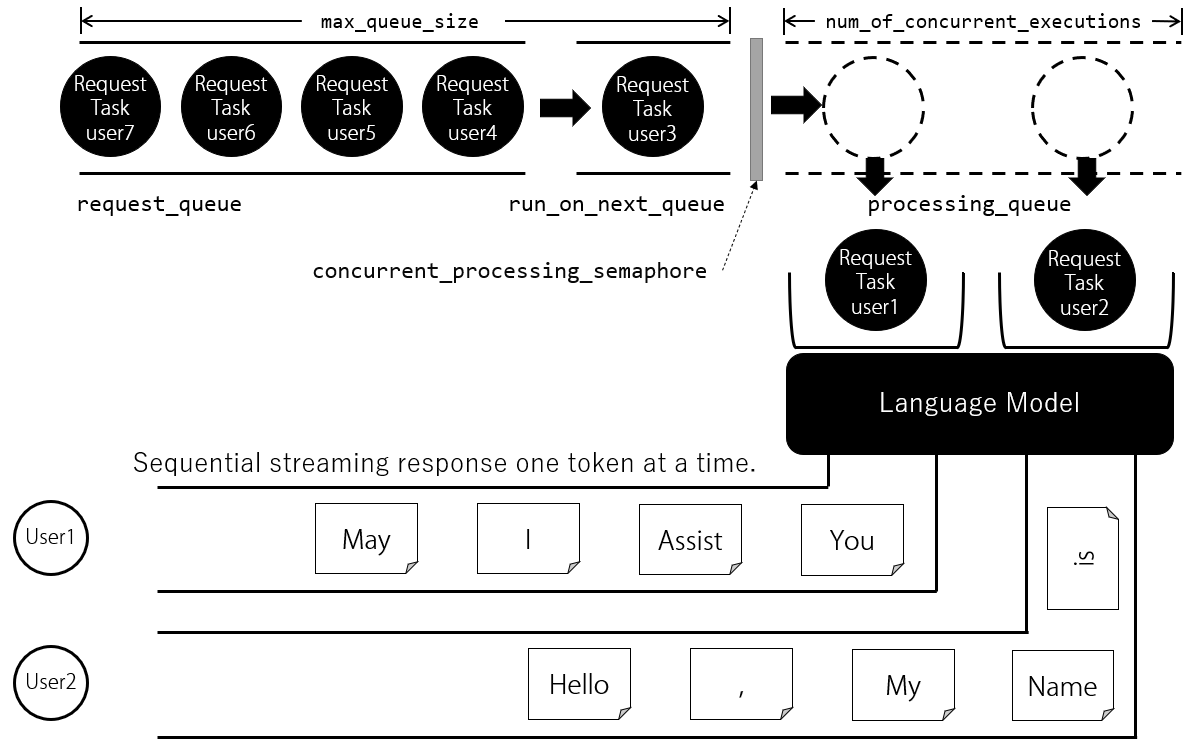
Column: Asynchronous I/O and Concurrent Execution
FastAPI supports asynchronous I/O, which gives it the ability to handle multiple requests concurrently.
Python's asynchronous I/O achieves concurrency using special functions called coroutines.
Concurrency here means that only one task makes progress at any given moment, but while waiting on an I/O operation (an HTTP request, token generation from the model, and so on) other tasks can be advanced.
This style is called "cooperative multitasking."
Each request is handled as a separate "asynchronous task," and these tasks are switched on the same thread.
Within these asynchronous tasks, access to the model for multiple requests appears to be concurrent,
but in reality only one request is using the model at any given instant.
As a result, the period during which each request blocks for token generation by the model is limited,
and, in terms of sequential output-token generation, control can be handed back to other requests after each new token is generated.
Therefore, while one request is generating text, until a stop token or stop string appears,
all other requests are not blocked; each request can generate tokens from the model sequentially
while other requests continue to make progress as well.
Starting the Queueing
You can start the queue worker by calling start_queue_worker when the web application starts up.
Starting the queue worker starts the request processing queue and begins the queueing loop, which inserts requests into the request queue and executes them in order through the processing queue.
chatstream#start_queue_worker



