Ubuntu 24.04 GPU Server Freezes on Shutdown. The Culprit Was the HWE Kernel
A GPU inference server on Ubuntu 24.04 froze on shutdown. The previous boot journal showed a page-management anomaly right after a CUDA process got SIGKILL, on HWE kernel 7.0 with NVIDIA 595 open. Switching the kernel and module pair to GA 6.8 fixed it, plus four layers against drifting back.

Hello!
To move a GPU inference server running Ubuntu 24.04 to another rack, I ran shutdown -h now.
Ten-plus minutes later, the machine still had not powered off.
SSH got as far as the TCP handshake but never reached a login. The console on the machine showed the last target of the shutdown sequence.
It still would not go down. In the end I held the power button.
The culprit was the combination of the HWE kernel 7.0 series and the NVIDIA 595 open driver.
Right after a process using CUDA was sent SIGKILL, the kernel logged an anomaly in its page bookkeeping. After that, ext4 writeback and several processes stopped making progress, and the shutdown sequence never completed.
This article walks through, in the order I actually did it, the diagnosis from the previous boot's journal, the reproduction test in which only the kernel and its matching NVIDIA module pair were switched to the GA 6.8 series, pinning that configuration, and the four layers of defense that keep the machine from drifting back to HWE.
If you are walking over to a power button for the same symptom, I hope this saves you some time.
1. What happened. The same trigger froze the machine twice
Here is the environment.
| Item | Value |
|---|---|
| OS | Ubuntu 24.04.5 LTS (installed from the Desktop ISO, where the HWE kernel is the default) |
| Kernel (at the time) | 7.0.0-42-generic (linux-generic-hwe-24.04) |
| NVIDIA | nvidia-driver-595-open 595.99.02 (linux-modules-nvidia-595-open-7.0.0-42-generic, signed by Canonical, Secure Boot enabled) |
| GPU | NVIDIA RTX 2000 Ada ×2 |
| Workload | GPU inference containers on Docker (NVIDIA Container Toolkit), using CUDA and cuDNN |
| Kernel (after recovery) | 6.8.0-147-generic (GA, linux-generic) |
The first time was an ordinary shutdown -h now.
The shutdown sequence progressed, but Docker, NetworkManager and wpa_supplicant would not die even on SIGKILL, and everything stopped at the final stage. SSH behaved differently as time passed. At first it was "Connection closed": ssh.socket accepted the connection but sshd could not be started. After a while it became "Connection refused", with only the kernel's IP stack still alive. Nothing could be done remotely, and I held the power button.
The second time happened in the middle of the countermeasures.
While I was stopping the CUDA containers one at a time with docker stop -t 300, a container that did not respond to SIGTERM was sent SIGKILL after 300 seconds, and the same breakage reproduced right away. SSH got through the TCP connection and the banner, but the login that followed, that is, the disk wait in user space, made no progress. The power button again.
Twice, from the same trigger. This was a reproducible defect, not "a machine having a bad day".
2. Start the diagnosis with journalctl -b -1 -k
After the reboot, the kernel log of the previous boot still held the whole sequence.
journalctl -b -1 -kjournalctl -k only shows the current boot, so the record of the boot that froze is read with -b -1, which selects the previous boot.
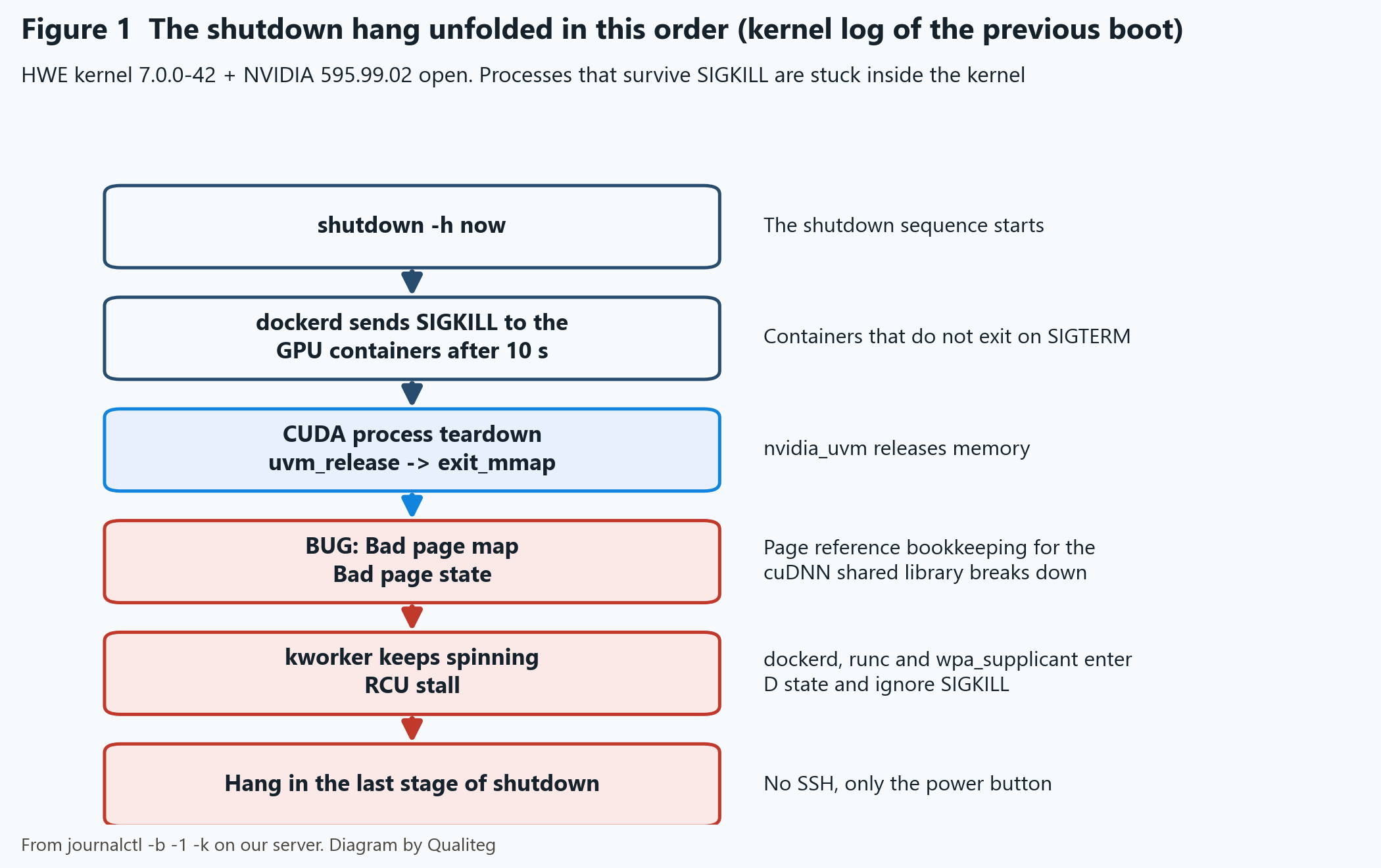
About 10 seconds after shutdown started, dockerd sent SIGKILL to several of the GPU containers because they "did not exit within 10 s". Up to this point, that is Docker working as designed.
The problem came right after. In the teardown path of the python process using CUDA, do_exit → uvm_release [nvidia_uvm] → exit_mmap → zap_present_ptes, these lines appeared in the log (excerpt, with timestamps and the hostname removed).
WARNING: fs/ext4/inode.c ext4_dirty_folio
BUG: Bad rss-counter state (dockerd)
BUG: Bad page map in process python
Bad page state
rcu: INFO: rcu_preempt detected expedited stalls
Processes still around after SIGKILL
The anomaly was recorded on pages belonging to the cuDNN shared library libcudnn_engines_precompiled.so.9. The mapcount was -1, meaning the bookkeeping of page mapping references had broken down.
From then on, the kworker responsible for ext4 writeback kept spinning, and dockerd, runc, wpa_supplicant and the CUDA threads entered D state. SIGKILL has no effect on a process in D state. systemd went through stop-sigterm timeout, SIGKILL, "Processes still around after SIGKILL" and final SIGKILL for docker.service, and then stalled at the final stage of shutdown.
What the log preserves is this order of events. I concluded that this chain of anomalies led to the shutdown hang.
The Tainted flags were G B W O. EDAC and MCE showed only the initialization lines for a non-ECC configuration, with no memory errors recorded.
A process that survives SIGKILL is stuck inside the kernel.
A user-space problem goes away with SIGKILL. If it does not, the kernel side is the suspect. Keep this pattern in mind and you will not hesitate the next time it happens.
3. "The other machines are fine" came down to version differences
Three machines of the same model, built with the same procedure, had been running for weeks. Comparing them answered the question "why only this one" in two parts.
First, none of the three had ever been through a "shutdown while force-killing GPU containers" up to that point. Their logs held zero docker force-kill records. The trigger itself had never been pulled.
Second, the problem machine alone had a newer kernel, a newer driver and a newer GPU generation. The three ran 7.0.0-34 and 7.0.0-38 with 595.91.07. The problem machine ran 7.0.0-42 with 595.99.02. The build procedure was the same, but a machine built later gets whatever versions are current. The older versions had disappeared from the archive, and the newer ones went in.
Here are the conditions side by side.
| Item | Problem machine | The 3 older-config machines |
|---|---|---|
| Kernel | 7.0.0-42 | 7.0.0-34 on two, 7.0.0-38 on one |
| NVIDIA | 595.99.02 open | 595.91.07 |
| GPU | NVIDIA RTX 2000 Ada ×2 | Previous-generation GPU |
| Secure Boot | Enabled | Enabled on one, disabled on two |
| Went through a forced kill of GPU containers? | Yes (hung twice) | Two of them did, during the rollout shutdown (Section 7) |
From here, "a version combination problem" looked far more likely than "a hardware fault in one unit".
4. Recovery and prevention. Switch the kernel configuration to the GA 6.8 series
There were three candidates: switch the driver to the proprietary build, go back to the GA kernel, or run a memory test.
Change several things at once and you lose track of what worked. So I first moved only the kernel from 7.0.0-42 back to GA 6.8.0-147 and kept the 595.99.02 open driver as it was.
4-1. Install the GA metapackages and the signed NVIDIA modules for 6.8
With Secure Boot enabled I did not use DKMS; I used the prebuilt modules signed by Canonical. First, check that modules for 6.8 are published. At the time they existed for 595-open, 595, 580, 580-open and 615-open, and not for the 590 series.
apt-cache policy linux-modules-nvidia-595-open-6.8.0-147-generic
apt-get install linux-generic linux-image-generic linux-headers-generic linux-modules-nvidia-595-open-generic
4-2. Pin the GRUB default to the actual 6.8 entry name and reboot
The 7.0 side stays installed until the tests pass. With a way back secured, only the default is changed to 6.8.
First, check the menu names GRUB actually generates.GRUB_DEFAULT has no effect unless it matches this output exactly.
grep -E "submenu |menuentry " /boot/grub/grub.cfgNext, in /etc/default/grub, rewrite the GRUB_DEFAULT line with the actual entry name you just confirmed.
GRUB_DEFAULT="Advanced options for Ubuntu>Ubuntu, with Linux 6.8.0-147-generic"After the edit, apply the configuration and confirm that the target kernel has the NVIDIA modules before rebooting.
cp /etc/default/grub /etc/default/grub.bak
grep '^GRUB_DEFAULT=' /etc/default/grub
update-grub
modinfo -k 6.8.0-147-generic -F filename nvidia
systemctl reboot
modinfo returns a path such as /lib/modules/6.8.0-147-generic/kernel/nvidia-595-open/nvidia.ko, the modules are present for the target kernel. If it reports ERROR, install the modules for that version before rebooting. In my case, I confirmed that nvidia.ko and the other modules were placed at that path right after the apt-get install in 4-1, and then rebooted. This pre-reboot check was built into the verification script for the rollout described later, and all four machines passed it.
4-3. Three rounds of start and kill -9. Each exited within a second, with zero warnings
In a conda environment on the host (the CUDA build of PyTorch), I started a python process running cuDNN convolutions on both GPUs and killed it with kill -9, three rounds in total. This deliberately reproduces the very trigger that was hit on the 7.0 series.
All three rounds exited within a second. Zero kernel warnings, zero processes in D state, GPU memory normal, and no effect on the running containers.
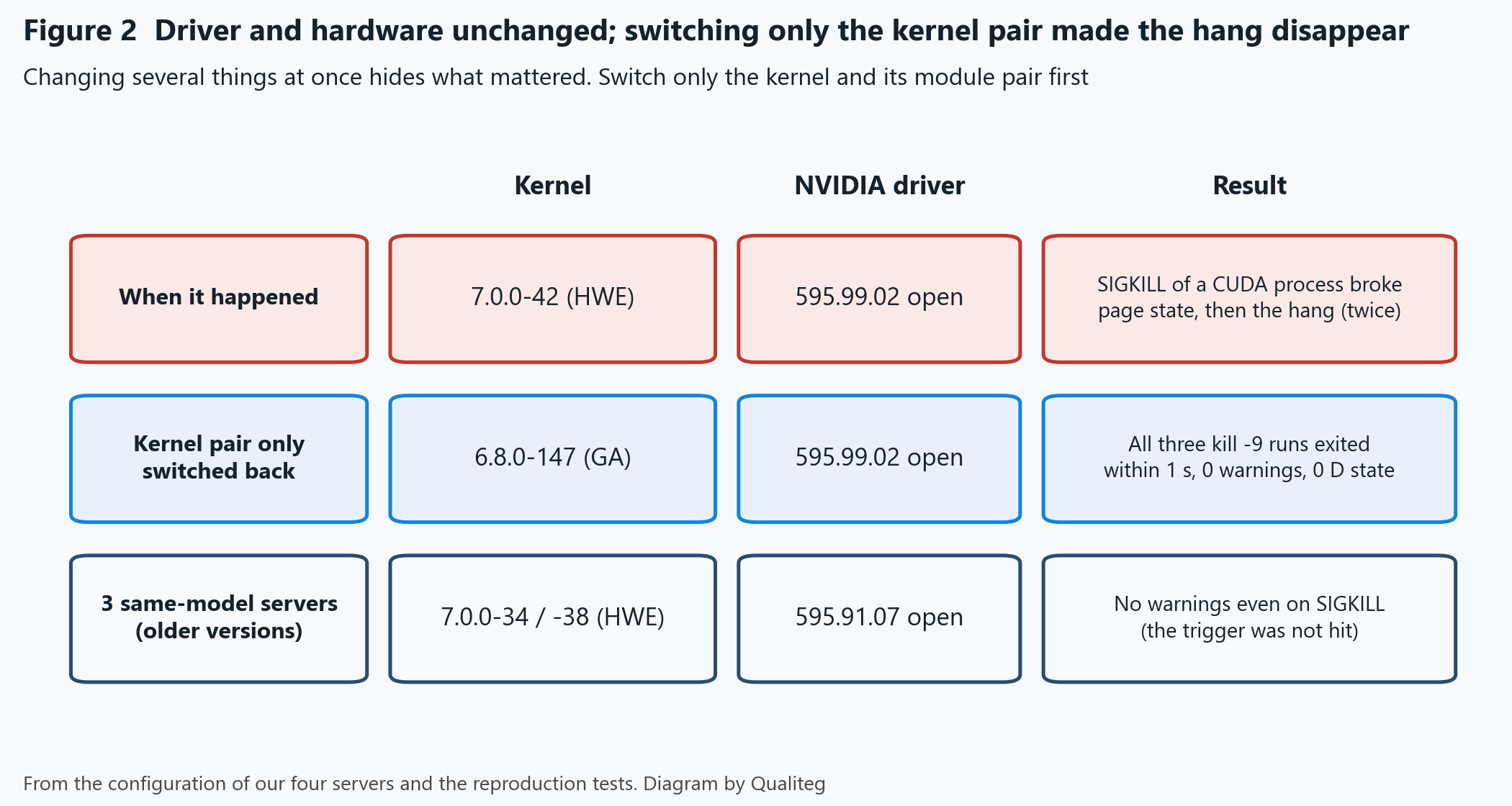
With the hardware and the driver untouched, going back only on the kernel made the same SIGKILL test run clean. Changing the kernel configuration was effective at avoiding this failure, which strongly supports the combination of 7.0.0-42 and 595.99.02 open as the cause.
Note that changing the kernel also swaps the NVIDIA kernel modules for the 6.8 builds. What was switched is the pair of the kernel and its matching NVIDIA kernel modules.
5. Four layers to keep from drifting back to 7.0
Stop here, and the next apt upgrade brings HWE right back. So I put the defense in four layers.
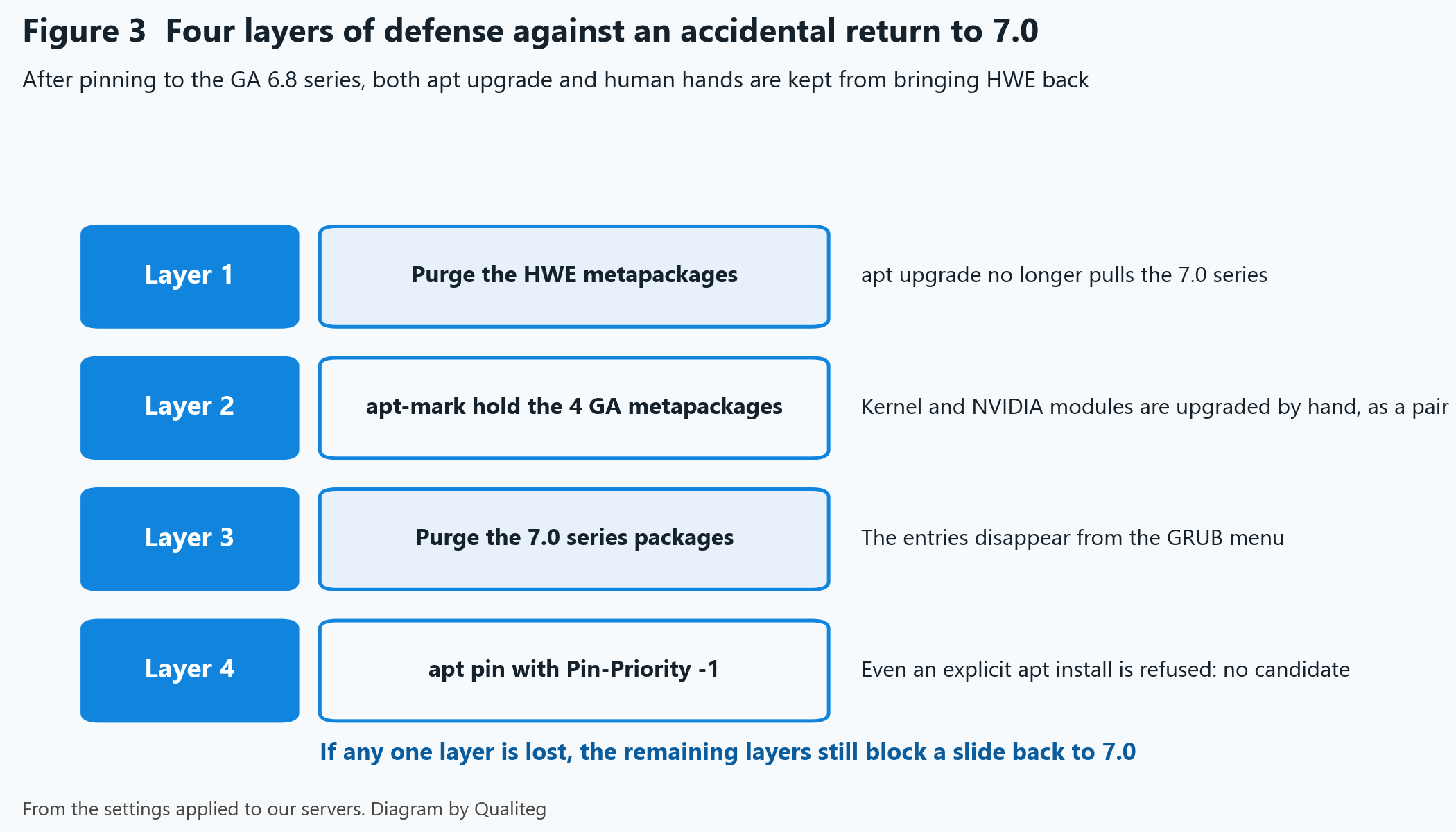
Layer 1 removes the HWE metapackages. List the installed HWE metapackages, purge them, and apt upgrade no longer pulls in 7.0.
dpkg -l | awk '/^ii/ && $2 ~ /^linux-.*-hwe-[0-9.]+$/ {print $2}'
apt-get purge linux-generic-hwe-24.04 linux-image-generic-hwe-24.04 linux-headers-generic-hwe-24.04 linux-modules-nvidia-595-open-generic-hwe-24.04
Layer 2 holds the four GA metapackages. The kernel and the NVIDIA modules are then upgraded by a person, as a pair.
apt-mark hold linux-generic linux-image-generic linux-headers-generic linux-modules-nvidia-595-open-genericWhat is pinned here is not "the 6.8 series" as a line but the 6.8.0-147 ABI whose behavior was verified. GA 6.8 is a continuously maintained kernel, so this hold also stops the GA security updates. When applying an update, upgrade the kernel and the matching NVIDIA modules together, run the same SIGKILL test and reboot test as in 4-3, and then hold again.
Layer 3 purges the 7.0 series packages themselves. Rather than deleting blindly with a wildcard, list the installed 7.0 series packages and purge those. The entries disappear from the GRUB menu, and once you set GRUB_DEFAULT=0 back and run update-grub, 6.8 is at the top.
dpkg -l | awk '/^ii/ && $2 ~ /7\.0\.0-/ {print $2}'
apt-get purge <the 7.0 series packages listed above>
apt-get autoremove
Layer 4 is an apt pin. Even an explicit apt install linux-generic-hwe-24.04 ends with "has no installation candidate".
# /etc/apt/preferences.d/qualiteg-no-hwe-kernel
Package: linux-generic-hwe-24.04 linux-image-generic-hwe-24.04 linux-headers-generic-hwe-24.04 linux-modules-nvidia-*-hwe-24.04 linux-tools-generic-hwe-24.04
Pin: release *
Pin-Priority: -1

Package: linux-image-7.* linux-modules-7.* linux-modules-extra-7.* linux-headers-7.* linux-tools-7.* linux-modules-nvidia-*-7.* linux-objects-nvidia-*-7.* linux-signatures-nvidia-7.* linux-hwe-7.*
Pin: release *
Pin-Priority: -1
Checking that it works takes one command. If Candidate is (none), it worked.
apt-cache policy linux-generic-hwe-24.04This setting went into all four machines. On all four, Candidate became (none) and an explicit apt install linux-generic-hwe-24.04 stopped with "has no installation candidate". That is what I measured.
The apt_preferences(5) man page shows Pin: version * as the way to say "any version" of a specific package. The form above works on my machines; to follow the man page, change the two Pin: lines to Pin: version *.
The state with all four layers in place can be checked with the following commands.uname -r is checked after rebooting into 6.8.
uname -r
dpkg -l | grep -E 'linux-(image|headers|modules).*7\.0'
apt-mark showhold
apt-cache policy linux-generic-hwe-24.04
If any one layer is lost, the remaining layers still stop the slide back. I wanted to be able to answer "yes" when asked whether it was double- and triple-protected.
6. Rebooted with containers running. Back unattended in 59 seconds
To finish, I ran systemctl reboot with the containers still running.
The shutdown sequence took 29 seconds, and SSH was back 59 seconds after the command, with nobody at the machine. Later, when the same machine was taken down with shutdown -h now, the shutdown sequence took 14 seconds to power off.
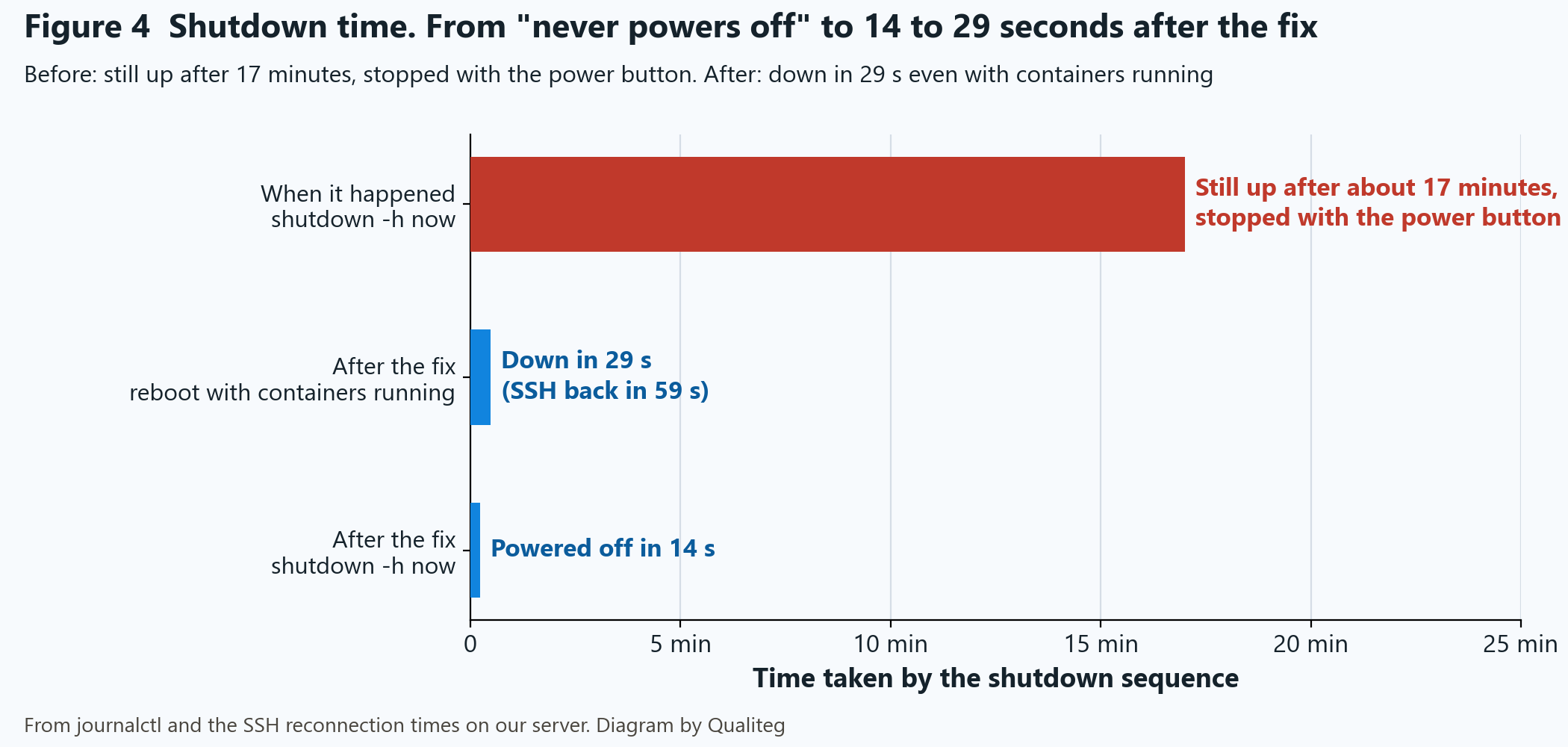
The gap from "ten-plus minutes, then the power button" is itself the evidence of recovery.
7. A trap hit during the rollout. A held HWE metapackage gets in the way
The same countermeasures went into the remaining three machines. Same procedure, but with one trap.
| Trap | Fix |
|---|---|
The held HWE metapackage linux-modules-nvidia-595-open-generic-hwe-24.04 blocks installing the 595 modules for GA. apt stops with "Depends: linux-modules-nvidia-595-open-7.0.0-38-generic (= …) but it is not going to be installed" | apt-mark unhold the two HWE metapackages first, then install. As a side effect a newer 7.0 comes in as well, but pin the GRUB default to the actual 6.8 entry name, reboot, and purge the 7.x series together after verification |
journalctl -k covers the current boot only | Read the boot that froze with journalctl -b -1 -k. It cannot be used for a comparison such as "zero Bad page across all boots" |
| With a worker that ignores SIGTERM, every shutdown goes through the SIGKILL path | On my machines I set shutdown-timeout to 120 seconds for the Docker daemon's shutdown (daemon.json) and TimeoutStopSec=180s for docker.service on the systemd side. The per-container SIGTERM grace period is separate and is managed with default-stop-timeout or the container's own stop timeout. The real fix is for the application to handle SIGTERM |
The rollout's own shutdown work doubled as a test of the old configuration. Before moving to the GA 6.8 series, that is, still on 7.0.0-34 and 595.91.07, I stopped the containers with docker stop. On two machines, containers that ignored SIGTERM were sent SIGKILL after the 120-second grace period, with zero kernel warnings and no hang. On the remaining machine (7.0.0-38), every container stopped on SIGTERM, so the SIGKILL path was never taken.
All three were then moved to the GA 6.8 series. The same "start and kill -9, three rounds" test as in 4-3 produced zero warnings, and a reboot with the containers running took 14 to 20 seconds to shut down.
On the pre-migration combination of 7.0.0-34 and 595.91.07, sending SIGKILL to a container that ignored SIGTERM produced no kernel warning. I take this to be behavior specific to the 7.0.0-42 and 595.99.02 combination. The three machines each had pending updates that would have put them on that very combination at the next apt upgrade and reboot, so pinning was the right call.
8. What changed in our operations
This incident changed five of our standards for GPU servers.
| Change | Why |
|---|---|
| Stop the CUDA containers gracefully before a shutdown or reboot | The SIGKILL path was the trigger. Containers that do not handle SIGTERM get fixed on the application side. Extending the grace period at the OS level only treats the symptom |
| GPU servers built from the Desktop ISO get a "revert to GA" step in the build procedure | The Desktop ISO defaults to HWE. For server use, the GA 6.8 series is sufficient |
Check the versions that will be installed with apt-cache policy first, record them as the standard, and pin them with hold | The same procedure yields different versions depending on when the machine is built |
| Review GA series updates on a schedule | The hold pins the 6.8.0-147 ABI, so it also stops security updates. When applying one, upgrade the kernel and the NVIDIA modules together, run the same tests, and pin again |
| Add a hardware watchdog and automatic reboot on panic | Being unable to recover remotely when a machine freezes is a real risk. That is covered in a separate article |
The three lessons from this incident: when you see a process that survives SIGKILL, suspect the kernel; switch only the kernel and module pair to confirm the effect; and pin the configuration that worked with four layers.
Next time, I will write about adding a hardware watchdog and automatic reboot on panic, so that a frozen machine no longer means a walk to the power button.
See you in the next article!
References
- Ubuntu, "Kernel lifecycle" (primary source; how the GA and HWE kernels are positioned) https://ubuntu.com/kernel/lifecycle
- Ubuntu manpage, "apt_preferences(5)" (primary source; Pin-Priority semantics) https://manpages.ubuntu.com/manpages/noble/man5/apt_preferences.5.html
- Ubuntu manpage, "journalctl(1)" (primary source; the
-boption) https://manpages.ubuntu.com/manpages/noble/man1/journalctl.1.html - Our article: Ubuntu's Automatic Updates Bumped the Kernel Alone, and the GPU Vanished After a Reboot https://journal.qualiteg.com/ubuntu-kernel-update-nvidia-driver-lost/
![[AI×CAD] Part 6: Show What Changed in 3D — Compare and Share STEP and STL Revisions in Your Browser](/content/images/size/w600/2026/10/ai-cad-step-viewer-part6-en-1.png)