TensorRT 10 × Blackwell Migration Guide (Part 3): Passing 5D grid_sample Through a Custom Plugin


Hello!
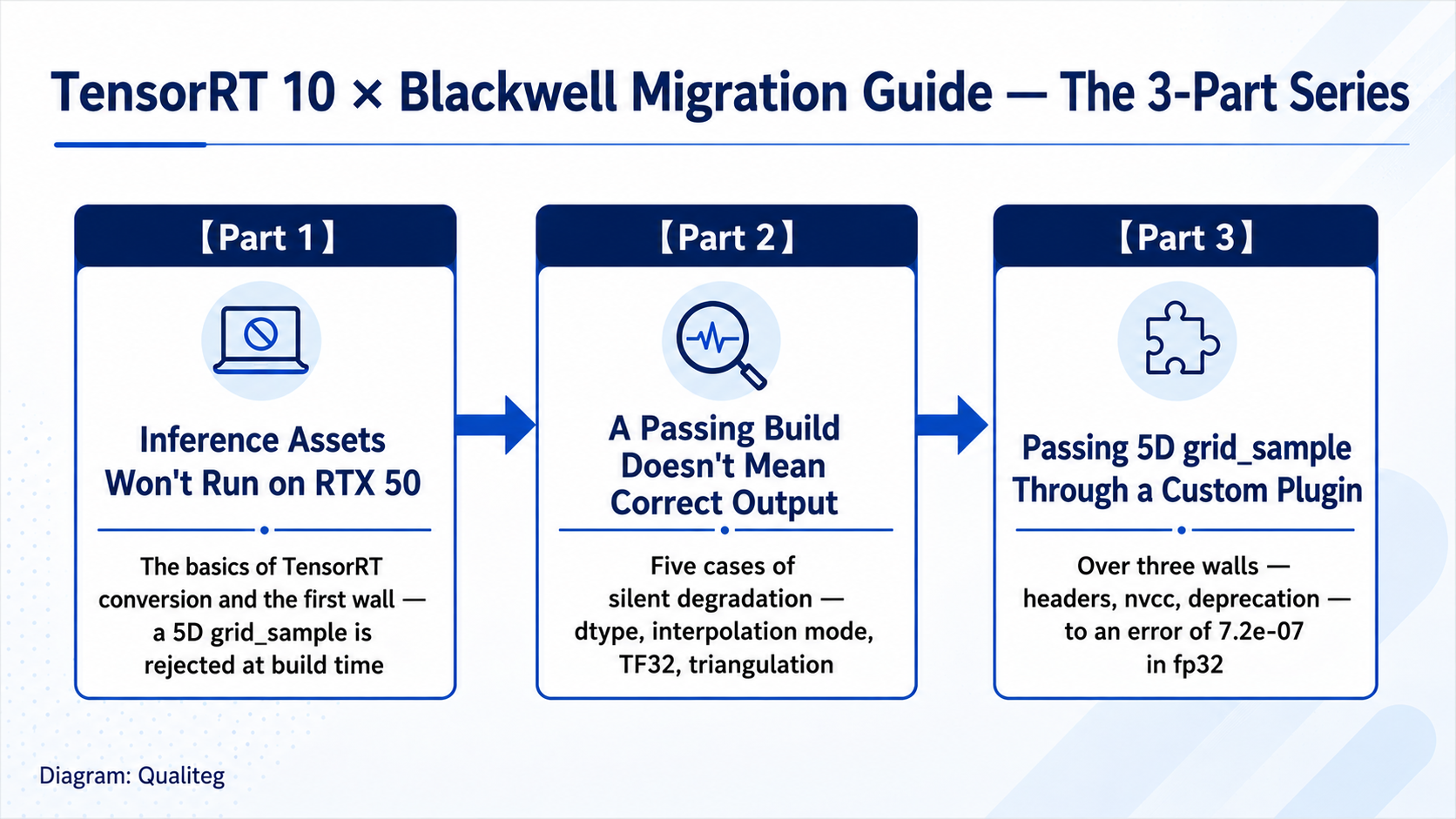
"TensorRT 10 × Blackwell Migration Guide" series has reached its final installment.Part 1 covered the basics of converting to TensorRT and the wall where a 5D (volumetric) grid_sample is rejected at build time, and Part 2 walked through the many forms of silent degradation where "a passing build does not mean correct output."
| Part | Topic |
|---|---|
| Part 1 | Inference Assets Won't Run on RTX 50 — The Basics and the First Walls |
| Part 2 | A Passing Build Does Not Mean Correct Output — Five Cases of Silent Degradation |
| Part 3 | Passing 5D grid_sample Through a Custom Plugin (this article) |
Part 3 takes on the biggest piece of homework we set aside in Part 1: passing the 5D grid_sample that TensorRT does not support natively through a custom plugin. The goal is clear-cut: take an ONNX file exported from the same model and the same inputs that produced the error in Part 1, replace only the 5D GridSample node with a plugin node, and build and run it all the way through.
INetworkDefinition::addGridSample: Error Code 3: API Usage Error
(Parameter check failed, condition: input.getDimensions().nbDims == 4. ...)
To give away the ending: it works. We now have an engine that matches PyTorch's F.grid_sample (5D) with a maximum absolute error of 7.2e-07. Getting there, however, means climbing over several walls that are specific to the Blackwell generation. This article shares each wall and how to get past it, in order, with logs from real hardware.
Environment used in this article WSL2 Ubuntu 24.04 / NVIDIA RTX PRO 4000 Blackwell and GeForce RTX 5060 Ti (both Compute Capability 12.0 = sm_120) / PyTorch 2.11.0 + cu128 / TensorRT 10.16.1.11 / system nvcc is CUDA 12.0 (deliberately left old; the reason is explained in the article). The plugin we work with is the open-source grid-sample3d-trt-plugin (Apache License 2.0). The repository has no formal release, so we note the exact commit used in this article (f964750). If you redistribute modified sources or the.so, follow the terms of that license (including the license text and copyright notice). All code, logs, and figures in this article are measured on real hardware.
Part I: How plugins work — what TensorRT does with an op it doesn't know
As we saw in Part 1, TensorRT's ONNX parser refuses to build on the spot when the input to a GridSample node has five dimensions, because no native implementation exists.
The official extension mechanism for exactly this situation is the custom plugin. Here is how it works.
- You write the CUDA kernel for the operation plus an adapter for TensorRT (the plugin class) in C++ and build them into a shared library (
.so) - When the process starts and loads that
.so, the plugin registers itself in TensorRT's plugin registry - When the ONNX parser encounters an unknown op_type, it searches the plugin registry, and if a plugin with the same name is found, it is incorporated as a layer
So there are two things to do.(a) Build a 5D grid_sample plugin in a form that runs on Blackwell. (b) Rewire the ONNX GridSample node to the plugin's op name.
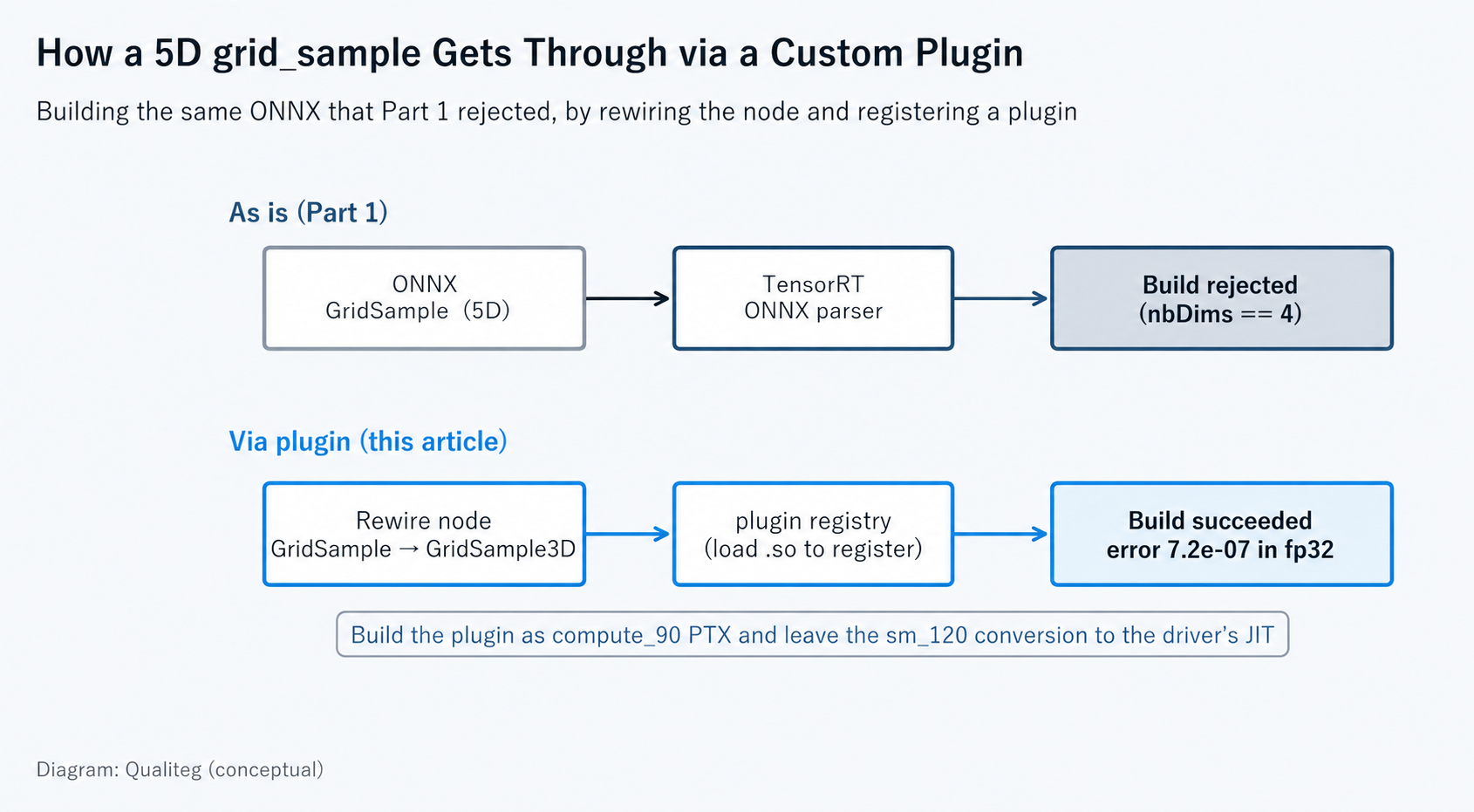
Fortunately, there is no need to write the kernel in (a) from scratch. The open-source implementation grid-sample3d-trt-plugin has been in use since the TensorRT 8 era and already provides both the CUDA kernel and the plugin class for 5D grid_sample. The difficulty is concentrated in rebuilding it for a TensorRT 10 × Blackwell environment.
Part II: Three build walls in a row
First, fetch the plugin itself at the same source revision used in this article.
git clone https://github.com/SeanWangJS/grid-sample3d-trt-plugin.git
cd grid-sample3d-trt-plugin
git checkout f964750
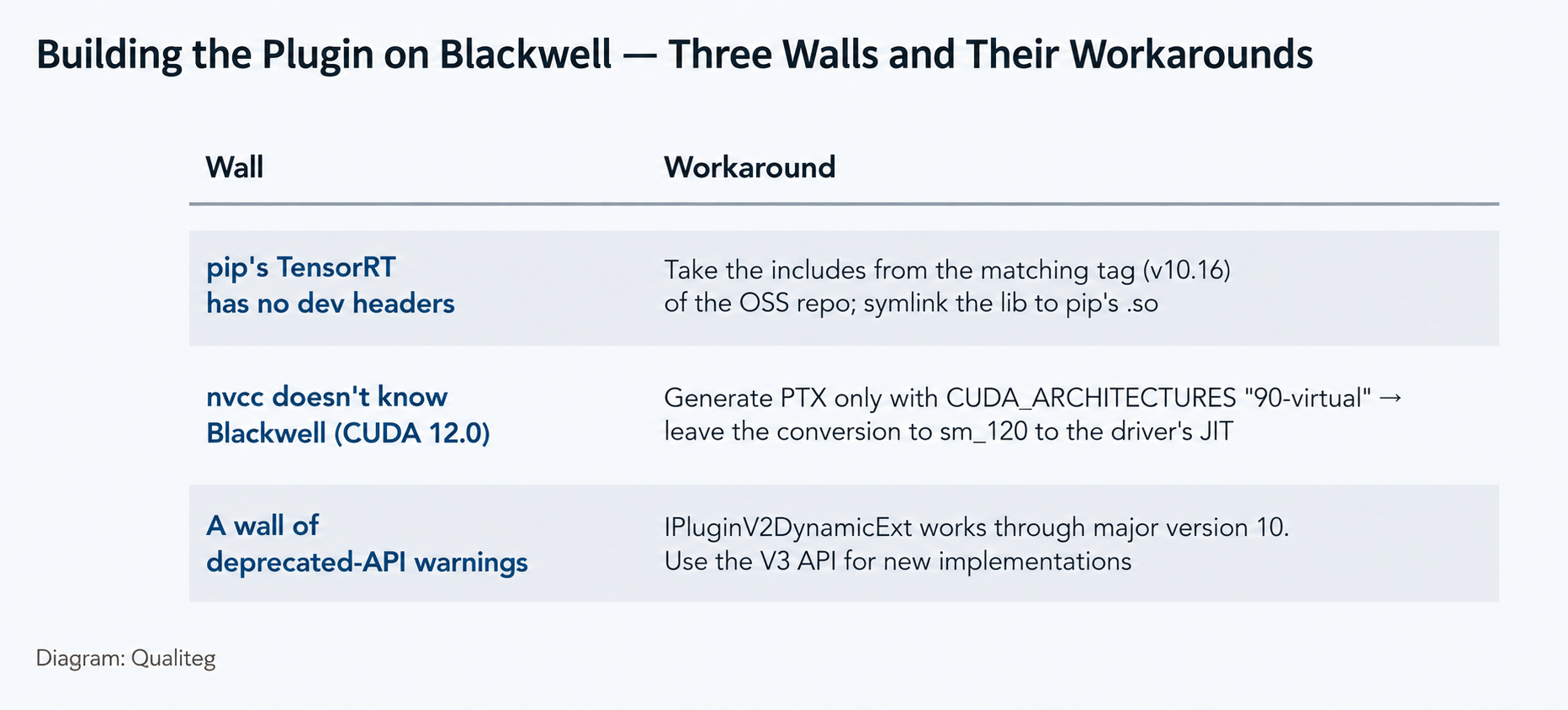
Wall 1: TensorRT installed via pip ships no development headers
Building the plugin requires TensorRT's C++ headers (NvInfer.h and others) and the libnvinfer.so to link against. However, the pip tensorrt-cu12 package contains only the runtime .so files and no headers at all.
The officially recommended route from NVIDIA is to use a distribution that includes the headers, such as the tar, Debian, or RPM packages. Treat what follows as a workaround we verified in our own environment for the case where you do not want to maintain two parallel pip environments.The approach is to fetch only the public headers that match the pip version from the NVIDIA/TensorRT OSS repository.
# Headers: lightweight clone of the matching OSS tag (v10.16) with blob:none
git clone --depth 1 --branch v10.16 --filter=blob:none \
    https://github.com/NVIDIA/TensorRT.git ~/trt_headers
# -> only ~/trt_headers/include/ is used

# Link library: symlink to the runtime .so that pip installed
# (the linker looks for libnvinfer.so via -lnvinfer, so point it at the versioned file)
# The .so location differs per environment, so asking Python is the reliable way
TRT_LIB_DIR="$(python -c "import pathlib, tensorrt_libs; print(pathlib.Path(tensorrt_libs.__file__).parent)")"
mkdir -p ~/trt_link
ln -sf "$TRT_LIB_DIR/libnvinfer.so.10" ~/trt_link/libnvinfer.so
TensorRT's public API and ABI follow semantic versioning, so pairing the v10.16 tag headers with pip's closely matching 10.16.1.11 is a sound combination, and we confirmed it builds and runs on real hardware. (Mixing different minor series — especially linking newer headers' APIs against an older library — may not work, so verify the actual combination you use.)
One more thing: the original repository's CMakeLists.txt does not reference these two locations as is. Add the following changes so they can be passed in from outside (the CUDA_ARCHITECTURES line is explained under the next wall).
# Added: use the TensorRT headers/lib passed in from outside
target_include_directories(${PROJECT_NAME} PRIVATE
    "./src" ${CUDAToolkit_INCLUDE_DIRS} ${TensorRT_INCLUDE_DIR})
target_link_directories(${PROJECT_NAME} PRIVATE ${TensorRT_LIB_DIR})
target_link_libraries(${PROJECT_NAME} PRIVATE nvinfer CUDA::cudart)
The build command looks like this.
mkdir build && cd build
cmake .. -DCMAKE_BUILD_TYPE=Release \
  -DTensorRT_INCLUDE_DIR="$HOME/trt_headers/include" \
  -DTensorRT_LIB_DIR="$HOME/trt_link"
cmake --build . --parallel
Wall 2: the local nvcc has never heard of Blackwell
The next wall is the climax of this article. When you try to compile the plugin's CUDA kernel, you run into the following situation.
- Native code for Blackwell (sm_120) can only be emitted by nvcc from CUDA 12.8 or later
- But the local system nvcc is CUDA 12.0 (
nvcc --list-gpu-archtops out at compute_90) - Replacing the CUDA toolkit would solve it, but the impact on the existing environment is large
What saves the day here is PTX forward compatibility. CUDA compilation has two stages: nvcc lowers the source to PTX (an intermediate representation for a virtual architecture), and then the PTX is lowered to native code (SASS) for the actual GPU. The latter step can also be done by the GPU driver as a JIT compilation at run time.
In other words, if we split the work as "have nvcc produce PTX only up to compute_90, and leave the final conversion to sm_120 to a Blackwell-aware driver," we can build with the old nvcc untouched. In CMake it is written like this.
# Embed only compute_90 PTX ("90" alone would also try to generate SASS and fail).
# At run time the driver JIT-compiles PTX -> sm_120
set_target_properties(${PROJECT_NAME} PROPERTIES CUDA_ARCHITECTURES "90-virtual")
You can confirm that the built .so really contains nothing but PTX with cuobjdump.
$ cuobjdump libgrid_sample_3d_plugin.so | grep -E "arch|Fatbin" | sort | uniq -c
      1 Fatbin ptx code:
      1 arch = sm_90
There is no line for native code (Fatbin elf code), and exactly one PTX entry. Loading this on an sm_120 GPU makes the driver JIT-compile it and run (the numerical match shown later is the proof that the JIT worked correctly). The first run incurs the PTX JIT compilation time (we did not measure that time for this article).
As an aside, CUDA_FORCE_PTX_JIT=1 (an environment variable that forces every kernel to be JIT-compiled from PTX) is also known as a way to verify JIT. When we tried it in our environment, however, it applies to the whole process, so the PyTorch side — which includes kernels that only carry SASS — failed first with no kernel image is available. It cannot be used in a script that coexists with PyTorch, so in practice it is better to verify the plugin on its own with the cuobjdump check above and the numerical comparison.
Wall 3: a mountain of deprecation warnings
The build log is lined with deprecation warnings for the IPluginV2DynamicExt family of APIs. These APIs were deprecated in TensorRT 10.0, and the V3 family is recommended for new implementations. With TensorRT 10.16.1.11 as used in this article, they remain warnings only, and the plugin builds and runs. However, TensorRT 11 removes the V2 plugin API entirely, so this plugin cannot be carried over to the 11 series as is. Since our policy here is to use the OSS implementation without modification, we accept the warnings and move on (if you are writing a plugin from scratch, use the V3 API).
Summarizing the three walls so far:
Part III: Rewire the ONNX node and get the build through
With the plugin built, the next step is (b), the rewiring. We export the 5D dummy model VolumetricWarp from Part 1 in exactly the same way.
class VolumetricWarp(nn.Module):
    """Minimal module containing a 5D (volumetric) grid_sample (same as Part 1)"""
    def forward(self, vol, grid):
        return F.grid_sample(vol, grid, align_corners=False)

torch.manual_seed(0)
vol = torch.randn(1, 32, 16, 64, 64, device="cuda")
grid = torch.rand(1, 16, 64, 64, 3, device="cuda") * 2 - 1
model = VolumetricWarp().eval().cuda()

torch.onnx.export(model, (vol, grid), "vol_warp.onnx",
                  input_names=["vol", "grid"], output_names=["y"],
                  opset_version=20, dynamo=True)
We rewire the GridSample node in this ONNX to the plugin's op name GridSample3D. The attributes are also replaced with the form the plugin expects (three int-typed attributes).
import onnx
from onnx import helper

def swap_gridsample(src_onnx, dst_onnx):
    """Rewire the ONNX GridSample (5D) node to the plugin op 'GridSample3D'"""
    m = onnx.load(src_onnx, load_external_data=False)
    n = 0
    for node in m.graph.node:
        if node.op_type != "GridSample":
            continue
        ins, outs, name = list(node.input), list(node.output), node.name
        del node.attribute[:]
        node.op_type = "GridSample3D"
        node.domain = ""      # non-standard op -> the parser goes looking in the plugin registry
        node.attribute.extend([
            helper.make_attribute("interpolation_mode", 0),   # 0 = linear
            helper.make_attribute("padding_mode", 0),         # 0 = zeros
            helper.make_attribute("align_corners", 0),        # 0 = False
        ])
        del node.input[:]
        node.input.extend(ins)
        del node.output[:]
        node.output.extend(outs)
        node.name = name
        n += 1
    onnx.save(m, dst_onnx)
    return n
Note that this swap_gridsample unconditionally replaces every GridSample in the graph. The dummy in this article assumes "exactly one 5D GridSample," so we check that before using it (for a real model that mixes 4D and 5D, either check the input rank via shape inference or allow target node names to be specified).
count = swap_gridsample("vol_warp.onnx", "vol_warp_plugin.onnx")
if count != 1:
    raise RuntimeError(f"expected exactly one GridSample node, found {count}")
There is one more important caveat about loading the plugin. In the setup used in this article, the plugin's shared library is not serialized into the plan (TensorRT does offer a mechanism for bundling plugins into a version-compatible engine, but we do not use it here), so loading the .so is required not only at build time but also before deserializing a saved engine in a separate process. Let's define a shared loader function.
import ctypes
from pathlib import Path

_PLUGIN_HANDLES = []   # keep references for the life of the process so GC does not unload them

def load_grid_sample_plugin(plugin_path):
    # Load the plugin .so with RTLD_GLOBAL. As a side effect of loading (the registration
    # code inside the library), the plugin registers itself in TensorRT's plugin registry.
    # Call this both before building and before deserializing
    handle = ctypes.CDLL(str(Path(plugin_path).resolve()), mode=ctypes.RTLD_GLOBAL)
    _PLUGIN_HANDLES.append(handle)
The build side looks like this. It is the loader above that registers GridSample3D in the registry; init_libnvinfer_plugins is the initialization API for NVIDIA's standard plugin set (it is not what registers our custom plugin).
import tensorrt as trt

def build_engine_with_plugin(onnx_path, engine_path, fp16=False):
    load_grid_sample_plugin("./libgrid_sample_3d_plugin.so")
    trt.init_libnvinfer_plugins(TRT_LOGGER, "")   # initialize NVIDIA's standard plugins (just in case)

    builder = trt.Builder(TRT_LOGGER)
    network = builder.create_network(1 << int(trt.NetworkDefinitionCreationFlag.EXPLICIT_BATCH))
    parser = trt.OnnxParser(network, TRT_LOGGER)
    if not parser.parse_from_file(onnx_path):
        errs = [str(parser.get_error(i)) for i in range(parser.num_errors)]
        raise RuntimeError("ONNX parse failed:\n" + "\n".join(errs))
    config = builder.create_builder_config()
    config.set_memory_pool_limit(trt.MemoryPoolType.WORKSPACE, 2 << 30)
    if fp16:
        config.set_flag(trt.BuilderFlag.FP16)
    plan = builder.build_serialized_network(network, config)
    if plan is None:
        raise RuntimeError("build failed")
    with open(engine_path, "wb") as f:
        f.write(plan)
    return engine_path
With the function defined, build the engine from the rewired ONNX.
build_engine_with_plugin("vol_warp_plugin.onnx", "vol_warp_plugin.plan", fp16=False)
On the execution side (the process that uses the saved engine), load the plugin before deserializing.
load_grid_sample_plugin("./libgrid_sample_3d_plugin.so")
runner = TRTRunner("vol_warp_plugin.plan")   # deserialize comes after the load
And then — the very same compute graph that was rejected in Part 1 (with only the plugin-node replacement) builds successfully. Here are the results of running it and comparing against PyTorch's F.grid_sample (5D). The comparison protocol is the same as in Parts 1 and 2: the same model and inputs used for the export, with fp32 as the reference.
| Comparison / measurement | Result |
|---|---|
Max absolute error, plugin (fp32) vs F.grid_sample (5D) | 7.2e-07 |
| Same, nRMSE | 7.4e-08 |
| Speed (enqueue window, median) | torch 0.33 ms / plugin engine 0.28 ms |
Measurement conditions: GeForce RTX 5060 Ti / fixed shape [1,32,16,64,64], batch=1 / fp32 on both sides / 30 warm-up runs, 200 measured runs, median of CUDA Events / on the TensorRT side, input/output buffers pre-allocated and only the enqueue window timed / results from a single build. The roughly 15% gap can easily change with the model and GPU, so read it as "this is what we saw for this single op in our environment."The error against the fp32 reference is very small. The point of this article is that these numbers come from compute_90 PTX JIT-compiled by the Blackwell driver. The speed is only marginally faster for the single op, but the real value is that a module containing a 5D grid_sample — which until now had to stay in PyTorch — can become a single, self-contained TensorRT engine. The boundary between torch and TensorRT itself disappears.
Part IV: Applying the lesson of Part 2 here too — verifying a configuration that accepts fp16
Now, stopping here would betray the lesson of Part 2: "a passing build does not mean correct output" — so we put the plugin through the same verification.
This OSS plugin also implements an fp16 kernel, and its supportsFormatCombination (the method that tells TensorRT whether a given precision and format is acceptable) accepts both fp32 and fp16. So we built a separate .so from the unmodified implementation that accepts fp16, built an engine with FP16 tactics allowed, and measured it. (We did not confirm via logs that the fp16 path was actually chosen inside the plugin, so strictly speaking these are results for "an engine whose configuration accepts fp16.")
| Configuration | Max absolute error vs F.grid_sample (5D) | nRMSE |
|---|---|---|
| Accepts fp32 only | 7.2e-07 | 7.4e-08 |
| Also accepts fp16 (FP16 tactics allowed) | 0.128 | 2.1e-02 |
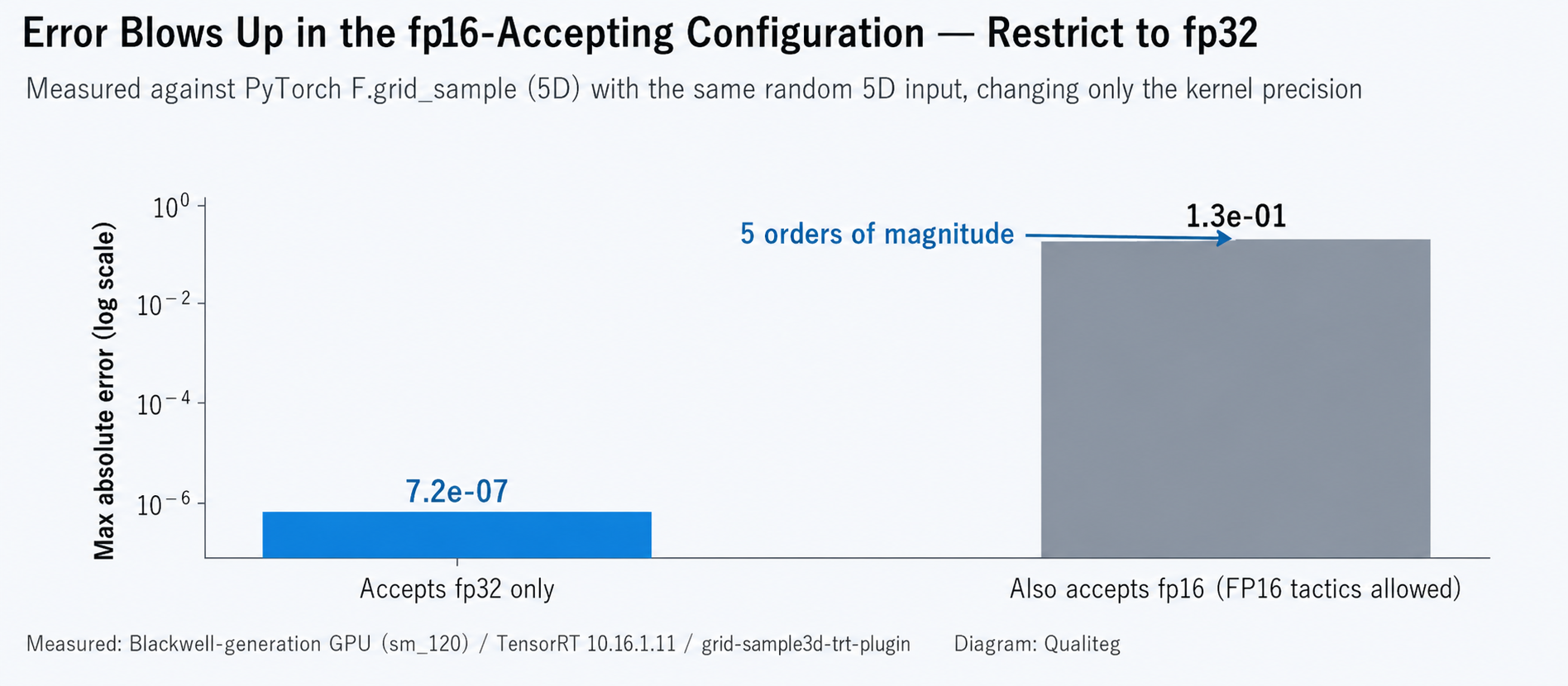
In the fp16-accepting configuration, the error got five orders of magnitude worse than fp32. An nRMSE of 2.1% is far larger than the fp16 rounding unit of a single operation, and at least for our use case it is unacceptable. (In interpolation, error can be amplified through coordinate quantization, weight computation, and multiply-accumulate, but we have not pinpointed which stage is responsible.) Moreover, when we used an fp16-accepting configuration inside a production model, we also experienced a complete numerical breakdown where outputs were off by hundreds (the damage varies greatly with the input distribution — another example of "don't trust results from random inputs").
The fix — make the plugin "not accept" fp16
The fix is simple: remove fp16 from the plugin's supportsFormatCombination and make it fp32-only.
bool GridSample3DPlugin::supportsFormatCombination(int32_t pos,
                                                   PluginTensorDesc const* inOut,
                                                   int32_t nbInputs,
                                                   int32_t nbOutputs) noexcept {
    assert(nbInputs == 2 && nbOutputs == 1 && pos < (nbInputs + nbOutputs));
    bool condition = inOut[pos].format == TensorFormat::kLINEAR;
    // fp32-only: do not accept kHALF, because the fp16-accepting configuration
    // showed unacceptable error. Even inside an engine built with FP16 tactics
    // allowed, TensorRT automatically inserts reformat (type conversion) layers
    // around this layer and runs just this op in fp32
    condition &= inOut[pos].type == DataType::kFLOAT;
    condition &= inOut[pos].type == inOut[0].type;
    return condition;
}
Here is the interesting part: even after this change, there is no need to make the entire engine fp32. When you build with FP16 tactics allowed, TensorRT looks at what the plugin declares and can automatically insert type conversions (reformats) only around this layer. As a result, a configuration of "grid_sample in fp32, surrounding layers chosen from fp16 candidates" can exist within a single engine. That said, re-verify the reformat cost, the precisions actually chosen, and the numerics of the whole engine on the finished engine (as we wrote in Parts 1 and 2, "allowed" and "actually used" are two different things).
What we have not yet verified
- The root cause of the error in the fp16-accepting configuration — we have not confirmed via logs that the fp16 path was actually selected inside the plugin, nor identified which stage amplifies the error (this article stops at the operational countermeasure: "verify, and if it's dangerous, don't accept it")
- The first-run cost of JIT compilation — we did not measure the JIT time at first load. Depending on the deployment form, it could affect startup time
- Migration to the new-generation plugin API (V3) — this article runs on the old API (IPluginV2DynamicExt). Future major versions of TensorRT may remove the old API
- Behavior with dynamic shapes — all verification in this article uses fixed shapes
Conclusion — closing out the series
Key takeaways from Part 3:
- An operation TensorRT doesn't know can be passed through with a custom plugin plus rewiring of the ONNX node
- pip's TensorRT has no headers → take the includes from the matching tag of the OSS repo, and symlink the lib to pip's .so
- Even if nvcc doesn't know the new GPU, there is the option of building PTX (virtual architecture) and leaving the rest to the driver's JIT (
CUDA_ARCHITECTURES "90-virtual") - Apply the verification from Part 2 to plugins as well. Any type that produces unacceptable error should be excluded via
supportsFormatCombination. Because TensorRT can insert reformats automatically, you can protect just that op while leaving the surrounding layers as fp16 candidates (confirm the actually selected precisions and numerics on the finished engine)
If we had to sum up what we wanted to convey across the three articles in one sentence, it would be this: "Converting to TensorRT is not 'done once it's converted and faster' — it is complete only when export, build, execution, and numerics have all been verified by measurement." The new Blackwell generation has raised the importance of that verification by a notch, and we hope the procedures and checklists in this series serve as a map for your own migration work.
See you next time!
References (primary and main sources)
- SeanWangJS/grid-sample3d-trt-plugin (OSS implementation of the 5D grid_sample plugin, Apache-2.0; commit f964750 used)
- NVIDIA/TensorRT (OSS repository; source of the public headers)
- NVIDIA TensorRT documentation (Plugins / Developer Guide)
- CUDA C++ Programming Guide: PTX and JIT compilation (forward compatibility)
- NVIDIA/TensorRT issue #3890: feature request for native 5D GridSample support
- Related articles from Qualiteg: Part 1 / Part 2 / 2026 NVIDIA GPU Quick Search Tool