GPT-6.2 Astra and Sol Complete Guide: Model Specs, API Pricing, Claude and Gemini Comparison, and Codex Operations
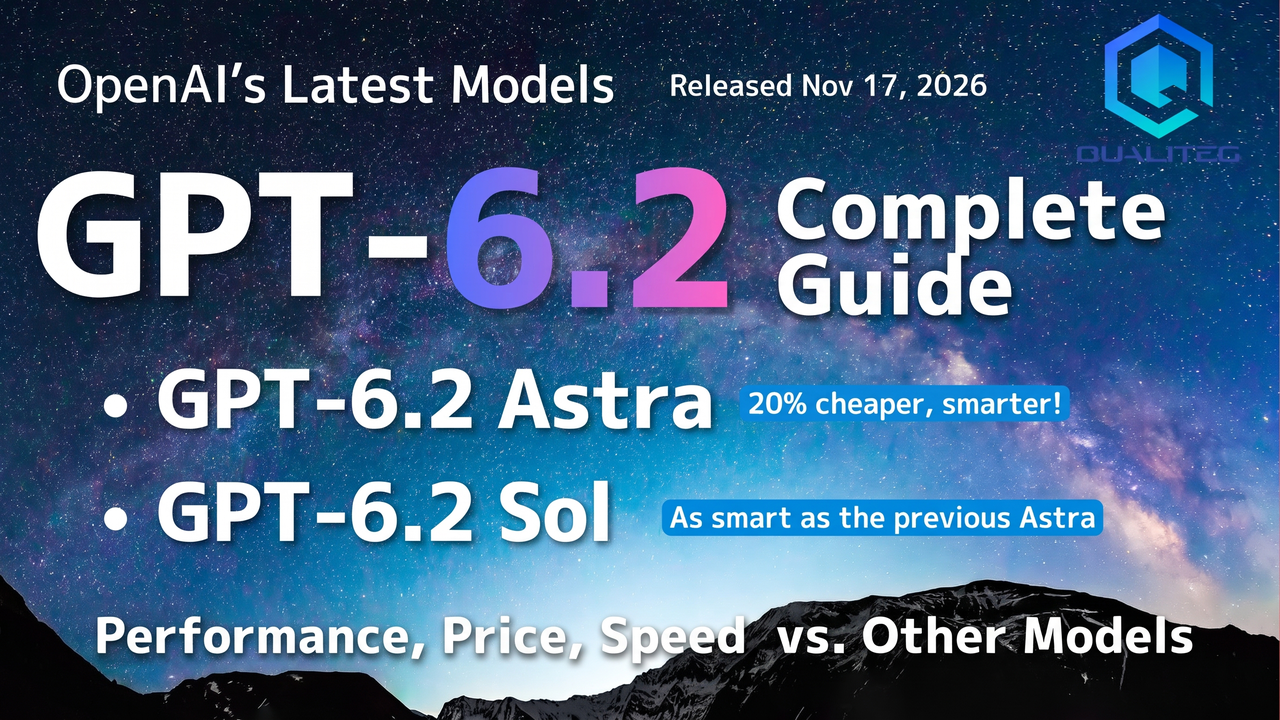
GPT-6.2 Astra is 20% cheaper than GPT-6 Astra and gains 5 points on an independent index. Sol keeps its price and reaches the previous Astra's level. We cover API pricing, benchmarks, a Claude and Gemini 4 comparison, append-only API migration, and ChatGPT Work and Codex.

Hello!
On November 17, 2026 (US time), OpenAI announced GPT-6.2 Astra and GPT-6.2 Sol. The update comes about two and a half months after GPT-6 Astra in September.
Performance, price, and speed. Here is how they line up against the previous models and the other vendors' flagship models.
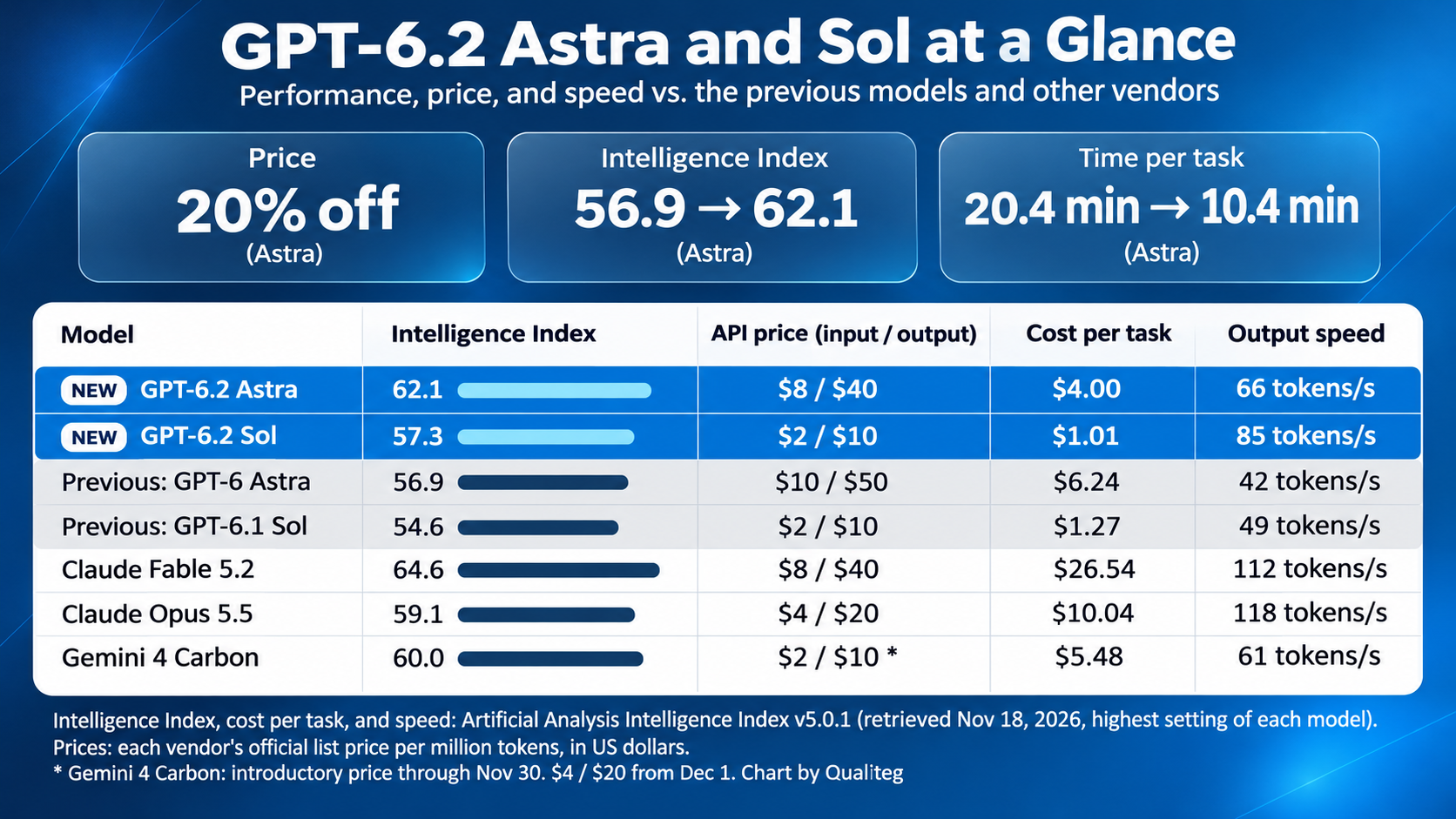
First, to sum up these models in one sentence.
"GPT-6.2 Astra is 20% cheaper per token than GPT-6 Astra, gains 5 points on an independent composite index, and cuts the cost of one evaluation task to about two thirds. Sol keeps its price and reaches the same index level as the previous Astra."
That is the short version.
Now, let's start with API pricing.
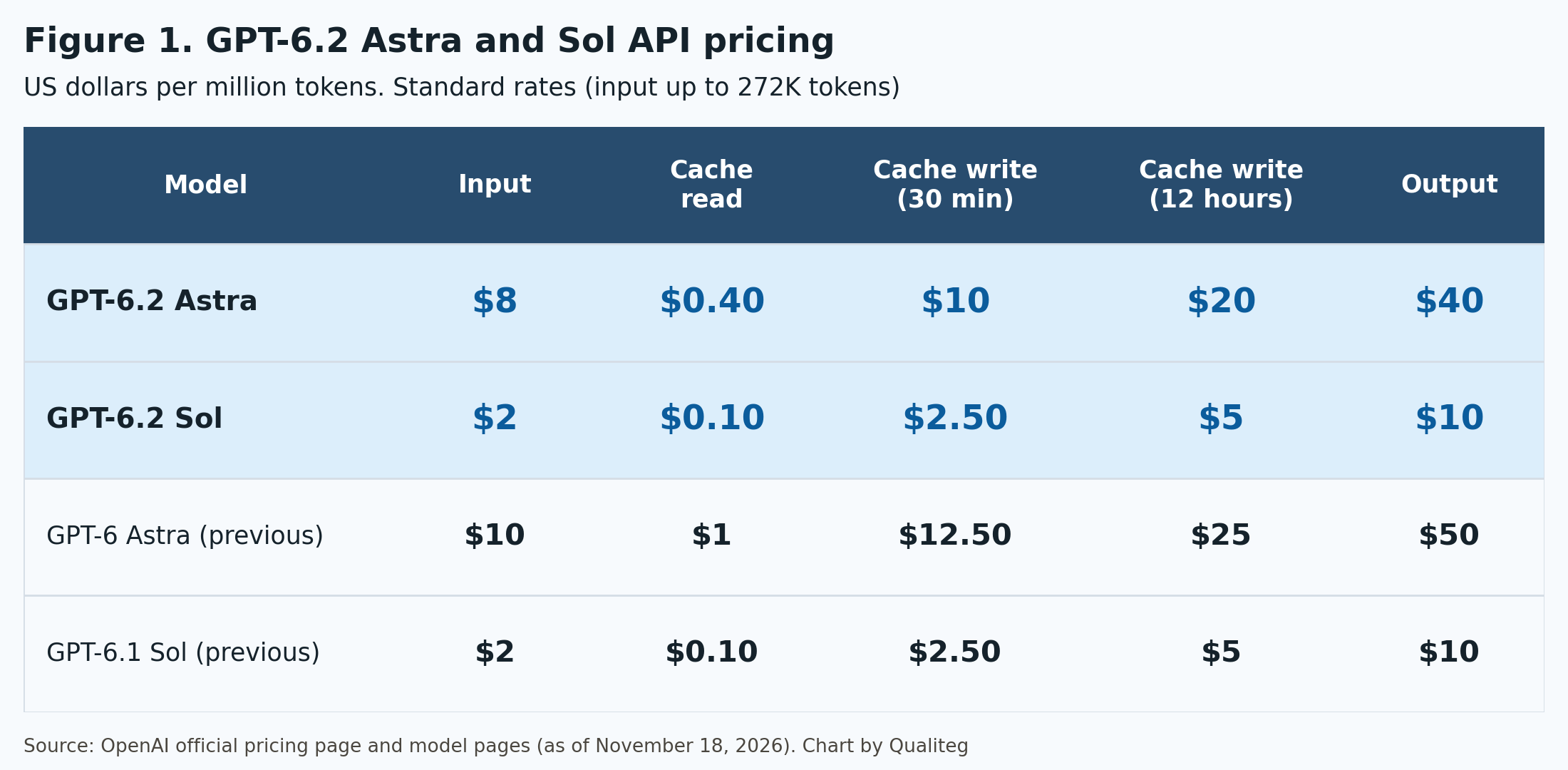
GPT-6.2 Astra costs $8 for input and $40 for output, 20% less than GPT-6 Astra's $10 and $50. Cache reads went from $1.00 to $0.40, a 60% cut.
GPT-6.2 Sol costs $2 for input and $10 for output, carrying forward GPT-6.1 Sol's rates.
All prices in this article are in US dollars.
In September we published "What Is GPT-6 Astra? AGI, Pricing, and Claude Fable 5.1 Compared" and "GPT-6 Sol and Luna Explained," and last week "Claude Fable 5.2 Complete Guide."
In the Fable 5.2 article, we reported that Fable 5.2 took the top three spots on an independent composite index. GPT-6.2 Astra now sits inside that top three, and one evaluation task costs about one seventh of what Fable 5.2 costs at its highest setting.
The week before, Google's Gemini 4 lineup also reached three models. We cover it in "Gemini 4 Carbon, Argon, and Hydrogen: The Complete Guide." The price and performance comparison across the three vendors is in Chapter 7 of this article.
Our sources are OpenAI's official announcement, official docs, and system card, plus data from the independent evaluator Artificial Analysis.
It is a long article, so there is no need to read it from start to finish. Feel free to jump to the chapters that interest you.
Table of Contents
Part 1: What GPT-6.2 Astra and Sol Are
- 1. Astra for the hardest work, Sol as the everyday workhorse
- 2. Basic specs at a glance
- 3. Astra is 20% cheaper, and cache reads are 60% cheaper
- 4. Read OpenAI's published benchmarks together with cost
- 5. On the independent Intelligence Index, OpenAI moved up to second among labs
- 6. By reasoning effort, Astra reaches the previous model's top setting at medium
- 7. Comparing price and performance with Claude and Gemini 4
- 8. Cyber capabilities and safeguards in the system card
Part 2: Points to Know When Using the API
- 9. Rewriting history drops reasoning items
- 10. Start reasoning effort at medium, and none is not accepted
- 11. Tool calling needs the Responses API, and four parameters must be left out
- 12. Tuning cost and speed with caching, completion windows, and Ultrafast
- 13. Behaviors to review when you carry prompts over
- 14. Migration steps and a cost estimate
Part 3: GPT-6.2 in ChatGPT Work and Codex
- 15. Available in Work and Codex on paid plans
- 16. Usage estimates, credits, Fast, and Ultrafast
- 17. Choosing a model and reasoning effort in Codex
- 18. Astra for Law, Foundry, Bedrock, and Copilot
What changed from GPT-6 Astra and GPT-6.1 Sol, in brief
Each chapter has the details. Here is the overall picture first.
Astra's per-token price dropped 20%
Input is $8 and output $40. Cache reads are $0.40, a 60% cut (Chapter 3)
Sol keeps its price, and the same paid plan now gets more work done
Input stays at $2 and output at $10 (Chapter 3, Chapter 16)
Top score on Agents' Last Exam, at less than a third of the previous cost
Astra scored 78.3%, 5.2 points above GPT-6 Astra (Chapter 4)
Second among labs on the independent composite index
On the Artificial Analysis Intelligence Index, Astra at max scores 62.1. It passed the top settings of Gemini 4 Carbon and Claude Opus 5.5 (Chapter 5)
It finishes the work with fewer output tokens
One index evaluation task takes about 40,000 output tokens and 10.4 minutes, half the time of GPT-6 Astra (Chapter 5, Chapter 6)
Astra reaches the previous model's top setting at medium, and passes Opus 5.5's top setting at high
Those are the second and third of five levels, with two more levels above (Chapter 6)
Cyber capabilities grew a lot, and the safeguards got stronger too
The rate of reaching arbitrary code execution on new vulnerabilities went from 31.5% to 53.5% (Chapter 8)
Astra reached High for AI Self-Improvement
It is the first externally released OpenAI model with that rating (Chapter 8)
If you rewrite history, the API now drops reasoning items
Building conversations by appending only is now the baseline (Chapter 9)
In ChatGPT, you use it in Work and Codex
New Work chats default to Sol (Chapter 15)
Part 1: What GPT-6.2 Astra and Sol Are
1. Astra for the hardest work, Sol as the everyday workhorse
The official announcement introduces the two models this way.
GPT-6.2 Astra is "our new frontier model for your hardest projects." GPT-6.2 Sol is "our efficient, versatile model for everyday work."
Both deliver better results on demanding tasks with fewer output tokens than before. That is the center of this announcement.
| Model | Positioning | API price (input / output) | Previous model |
|---|---|---|---|
| GPT-6.2 Astra | The hardest projects, from start to finish | $8 / $40 | GPT-6 Astra |
| GPT-6.2 Sol | The go-to model for everyday work, from coding to agents at scale | $2 / $10 | GPT-6.1 Sol |
| GPT-6.1 Terra | The lower-cost option | $1 / $5 | |
| GPT-6 Luna | Lowest cost and latency | $0.10 / $0.50 |
For Astra, the announcement puts the quality of deliverables front and center.
Its slides, spreadsheets, and documents "read less like AI," and more closely follow the templates you provide and the conventions of your field. It writes cleaner code and builds frontends that look and work better for websites, gaming, and 3D design. That is the description.
For Sol, the announcement says many employees at OpenAI use it as their default model for both technical and non-technical tasks.
The developer docs put the choice in one short sentence.
"Use GPT-6.2 Astra for the most demanding tasks or GPT-6.2 Sol for complex work at lower cost."
The Codex docs are one step more specific. Choose Astra to trace a bug across services, fix it, and test the change. Choose Sol to review a pull request or revise code in response to feedback.
The examples in the announcement are mostly hands-on work.
Building one Excel workbook with a revenue forecast through 2031 and a valuation from financial statements and operating assumptions. Producing a 19-slide pitch deck that matches a public slide template. Recreating the chassis dynamics of a car on a mountain road with a 3D model and a Python solver, then animating it in Blender. Modeling a radio-controlled buggy part by part from photos and build manuals and turning it into an animated assembly guide.
The announcement also lists more precise computer use, down to individual parts and connections in CAD and simulation tools, as one of the gains.
2. Basic specs at a glance
| Item | GPT-6.2 Astra | GPT-6.2 Sol |
|---|---|---|
| Model ID | gpt-6.2-astra | gpt-6.2-sol |
| Context window | 1,050,000 | 1,050,000 |
| Maximum input | 922,000 | 922,000 |
| Maximum output | 128,000 | 128,000 |
| Knowledge cutoff | May 18, 2026 | June 1, 2026 |
| Input and output | Text and images in, text out | Text and images in, text out |
| Reasoning effort | low, medium, high, xhigh, max | low, medium, high, xhigh, max |
| Endpoints | Responses, Chat Completions, Batch | Responses, Chat Completions, Batch |
| Tool calling | Supported in the Responses API | Supported in the Responses API |
| Zero Data Retention (ZDR) | Supported for approved organizations | Supported for approved organizations |
| Data residency | US and EU (Standard, Fast, Batch) | US and EU (Standard, Fast, Batch) |
The tools available in the Responses API are web search, file search, image generation, Code Interpreter, hosted shell, apply patch, skills, computer use, MCP, and tool search. The Multi-agent beta, which delegates work to subagents, is also supported.
On the feature side, you get streaming, structured outputs, function calling, image input, and prompt caching.
The context window and maximum output are the same numbers as GPT-6 Astra. Your token estimates carry over as they are.
Rate limits are the same for both models.
| Tier | RPM | TPM |
|---|---|---|
| Build | 5,000 | 1,000,000 |
| Launch | 10,000 | 4,000,000 |
| Grow | 15,000 | 40,000,000 |
Ultrafast is counted against separate limits from Standard and Fast.
Beyond the OpenAI API, the models are offered on Microsoft Foundry, Amazon Bedrock, and GitHub Copilot (Chapter 18).
3. Astra is 20% cheaper, and cache reads are 60% cheaper
These are the Standard rates from the official pricing page, in US dollars per million tokens.
| Model | Input | Cache read | 30-minute write | 12-hour write | Output |
|---|---|---|---|---|---|
| GPT-6.2 Astra | $8 | $0.40 | $10 | $20 | $40 |
| GPT-6 Astra | $10 | $1.00 | $12.50 | $25 | $50 |
| GPT-6.2 Sol | $2 | $0.10 | $2.50 | $5 | $10 |
| GPT-6.1 Sol | $2 | $0.10 | $2.50 | $5 | $10 |
| GPT-6.1 Terra | $1 | $0.05 | $1.25 | $2.50 | $5 |
| GPT-6 Luna | $0.10 | $0.01 | $0.125 | $0.25 | $0.50 |
"Write" is the cache write price. There are two retention periods, 30 minutes and 12 hours.
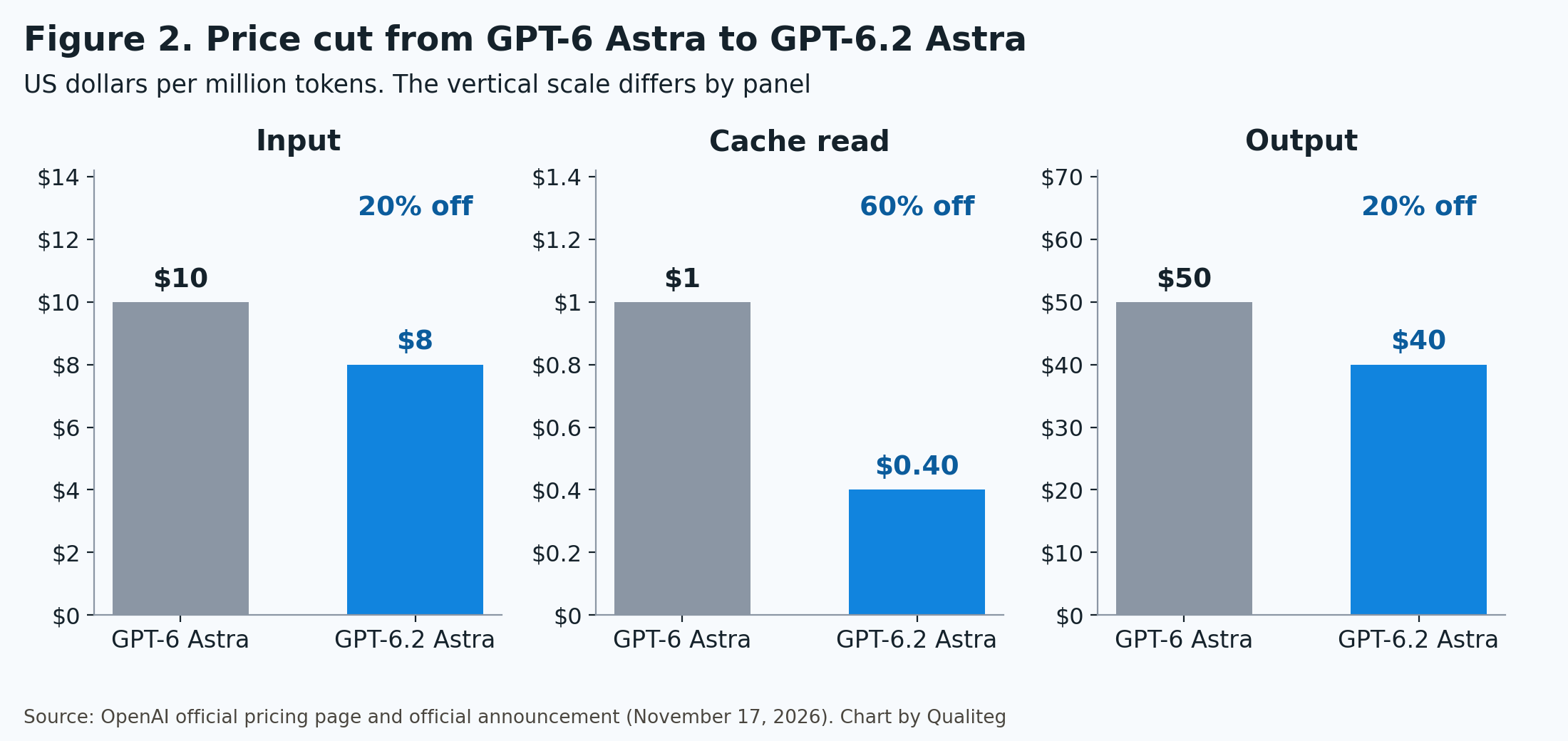
Input and output are 20% cheaper, and cache reads alone are 60% cheaper.
The cache read price went from 0.1 times the input price to 0.05 times. That brings it in line with Sol's ratio.
For agent work, this 60% cut matters most.
An agent rereads the same instructions, tool definitions, and past turns on every turn. Rereading 100,000 tokens of context costs $0.04 with GPT-6.2 Astra, down from $0.10 with GPT-6 Astra.
The announcement gives three reasons Astra's cost per task came down. Better token efficiency, the 20% cut on input and output, and the 60% cut on cache reads.
Sol's prices did not change. What changed is the number of tokens it uses for the same work. The announcement says it "lets you complete more tasks on the same paid plan."
Here are the prices by processing tier.
| Tier | GPT-6.2 Astra (input / output) | GPT-6.2 Sol (input / output) | Versus Standard |
|---|---|---|---|
| Standard | $8 / $40 | $2 / $10 | Baseline |
| Batch | $4 / $20 | $1 / $5 | Half price |
| 2-hour completion window (beta) | $5.60 / $28 | $1.40 / $7 | 30% off |
| 8-hour completion window (beta) | $4.80 / $24 | $1.20 / $6 | 40% off |
| Fast | $16 / $80 | $4 / $20 | 2x |
| Ultrafast (through February 28, 2027) | $24 / $120 | $6 / $30 | 3x |
| Ultrafast (from March 1, 2027) | $48 / $240 | $12 / $60 | 6x |
The completion window rows are our own calculation from the pricing page's "30% below Standard" and "40% below Standard." How to use completion windows and Ultrafast is covered in Chapter 12.
There is one more thing, a surcharge on long inputs.
| Input length | GPT-6.2 Astra (input / cache read / output) | GPT-6.2 Sol (same) |
|---|---|---|
| Up to 272,000 tokens | $8 / $0.40 / $40 | $2 / $0.10 / $10 |
| More than 272,000 tokens | $16 / $0.80 / $60 | $4 / $0.20 / $15 |
When the input exceeds 272,000 tokens, input and cache rates double and output costs 1.5 times as much for the full request. It is the same rule as the three GPT-6 models.
Endpoints that process in a specified region carry a 10% uplift.
Here is everything that changed from GPT-6 Astra, item by item, in one table.
| Item | GPT-6 Astra | GPT-6.2 Astra | Change |
|---|---|---|---|
| Input | $10 | $8 | 20% off |
| Output | $50 | $40 | 20% off |
| Cache read | $1.00 | $0.40 | 60% off |
| 30-minute cache write | $12.50 | $10 | 20% off |
| 12-hour cache write | $25 | $20 | 20% off |
| Batch (input / output) | $5 / $25 | $4 / $20 | 20% off |
| Fast (input / output) | $20 / $100 | $16 / $80 | 20% off |
| Ultrafast (input / output) | $60 / $300 | $24 / $120 (through February 28, 2027) | 60% off |
| Completion windows | Not covered | 30% off for 2 hours, 40% off for 8 hours | New |
4. Read OpenAI's published benchmarks together with cost
The numbers from here on are the ones OpenAI published in the charts of its official announcement.
Almost every chart in this announcement is drawn on two axes, score and cost per task. They show not only the score but also what it cost to get that score.
Let's start with the headline one, Agents' Last Exam. It measures whether a model can carry out multistep professional work over a long horizon.
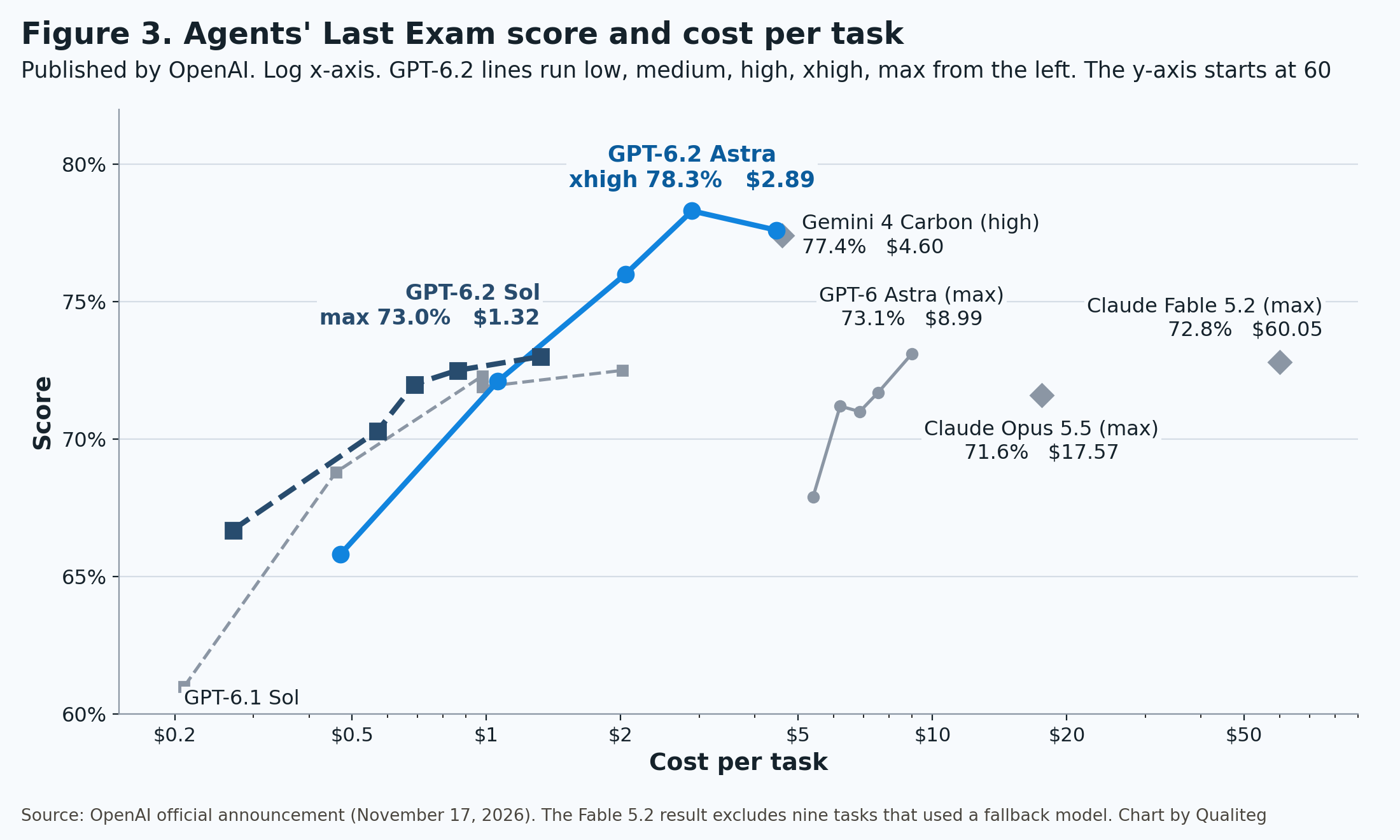
| Model (reasoning effort) | Score | Cost per task |
|---|---|---|
| GPT-6.2 Astra (xhigh) | 78.3% | $2.89 |
| GPT-6.2 Astra (max) | 77.6% | $4.47 |
| Gemini 4 Carbon (high) | 77.4% | $4.60 |
| GPT-6.2 Astra (high) | 76.0% | $2.05 |
| GPT-6 Astra (max) | 73.1% | $8.99 |
| GPT-6.2 Sol (max) | 73.0% | $1.32 |
| Claude Fable 5.2 (max) | 72.8% | $60.05 |
| GPT-6.2 Astra (medium) | 72.1% | $1.06 |
| Claude Opus 5.5 (max) | 71.6% | $17.57 |
Astra at xhigh scores 78.3%, the highest on this evaluation. That is 5.2 points above GPT-6 Astra at max, and the cost is $2.89 against $8.99, less than a third.
Compared with Claude Fable 5.2 at max, it is 5.5 points higher at about 5% of the cost. The Fable 5.2 result excludes nine tasks that used a fallback model.
Sol at max scores 73.0%, almost the same as GPT-6 Astra at max (73.1%). The cost is $1.32 against $8.99, about one seventh.
Here are the other evaluations, each model at its highest setting.
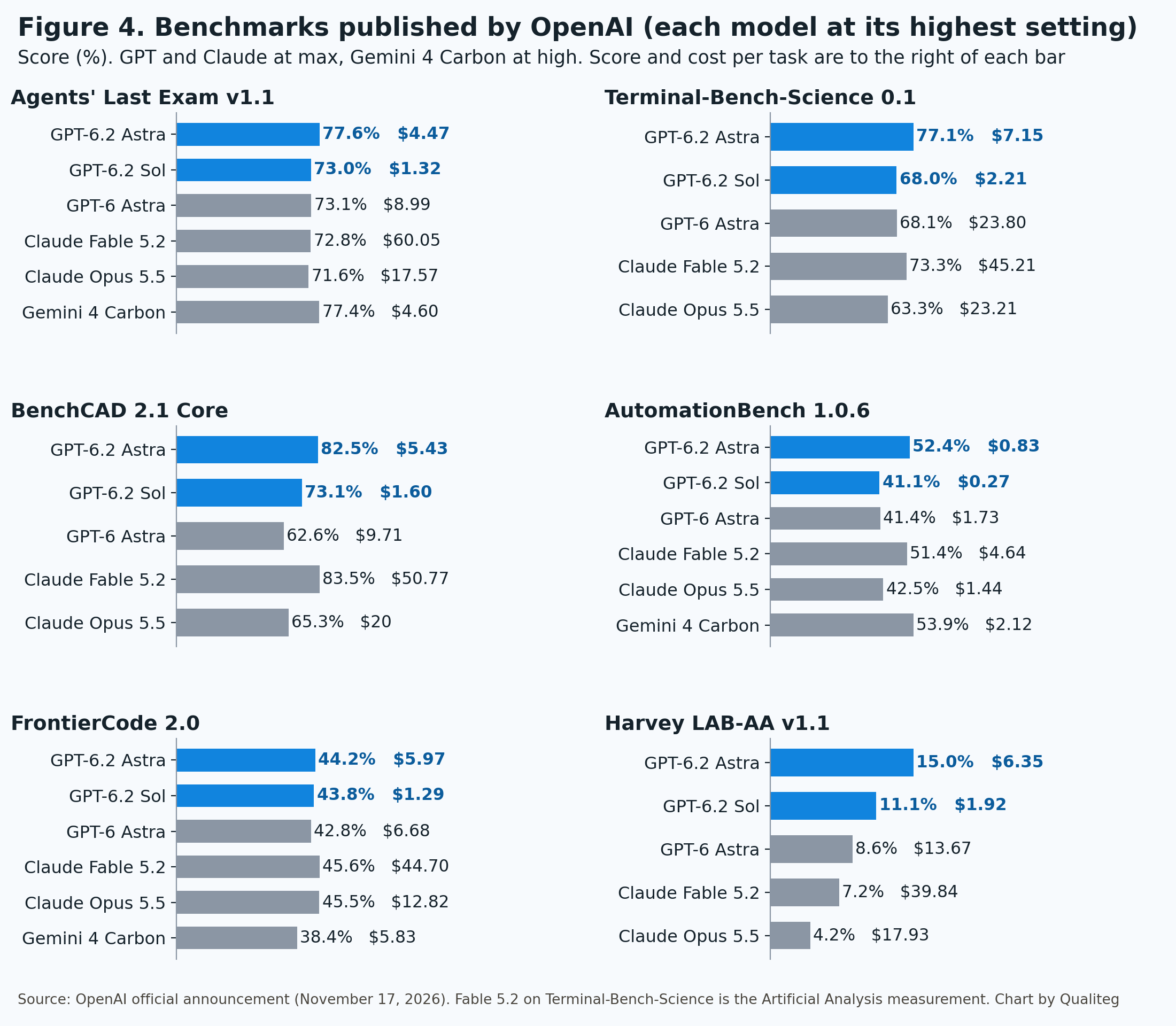
| Evaluation | GPT-6.2 Astra | GPT-6.2 Sol | GPT-6 Astra | Claude Fable 5.2 | Gemini 4 Carbon |
|---|---|---|---|---|---|
| Agents' Last Exam v1.1 | 77.6% | 73.0% | 73.1% | 72.8% | 77.4% |
| Terminal-Bench-Science 0.1 | 77.1% | 68.0% | 68.1% | 73.3% | |
| BenchCAD 2.1 Core | 82.5% | 73.1% | 62.6% | 83.5% | |
| AutomationBench 1.0.6 | 52.4% | 41.1% | 41.4% | 51.4% | 53.9% |
| FrontierCode 2.0 | 44.2% | 43.8% | 42.8% | 45.6% | 38.4% |
| Harvey LAB-AA v1.1 | 15.0% | 11.1% | 8.6% | 7.2% | |
| LifeVal | 86.1% | 83.8% | 79.8% | ||
| GDPval v2 (OpenAI internal) | 50.4% | 46.9% | 44.2% | 44.8% | 48.8% |
GPT and Claude are at max, and Gemini 4 Carbon is at high. For Terminal-Bench-Science, the Fable 5.2 value is the one measured by Artificial Analysis. Anthropic's own figure is 74.6% at max in Claude Code.
Astra has the highest score on five of the eight evaluations. On BenchCAD, AutomationBench, and FrontierCode, Fable 5.2 or Gemini 4 Carbon is ahead by one or two points.
Now the same table by cost per task.
| Evaluation | GPT-6.2 Astra | GPT-6.2 Sol | GPT-6 Astra | Claude Fable 5.2 |
|---|---|---|---|---|
| Terminal-Bench-Science 0.1 | $7.15 | $2.21 | $23.80 | $45.21 |
| BenchCAD 2.1 Core | $5.43 | $1.60 | $9.71 | $50.77 |
| AutomationBench 1.0.6 | $0.83 | $0.27 | $1.73 | $4.64 |
| FrontierCode 2.0 | $5.97 | $1.29 | $6.68 | $44.70 |
| Harvey LAB-AA v1.1 | $6.35 | $1.92 | $13.67 | $39.84 |
Four numbers stand out.
The first is 77.1% on Terminal-Bench-Science.
This evaluation measures whether a model can carry out scientific research work in a terminal, and Astra gained 9 points over GPT-6 Astra's 68.1%. The cost is $7.15 against $23.80, less than a third. The announcement says, "We believe GPT-6.2 Astra is the best model in the world for scientists."
The second is 82.5% on BenchCAD.
This evaluation measures hardware design, and Astra gained about 20 points over GPT-6 Astra's 62.6%. Fable 5.2 at max is one point ahead at 83.5%, at a cost of $50.77. Astra reaches almost the same score for $5.43, about one ninth of the cost.
The third is 15.0% on Harvey LAB-AA.
These are legal assignments with strict grading, where a deliverable passes only when it meets every grading criterion and contains no material hallucinations. Astra more than doubles Fable 5.2 at max (7.2%) at about one sixth of the cost.
The fourth is Sol on FrontierCode.
This evaluation measures whether changes to real codebases meet maintainers' standards for merging, and Sol at max scored 43.8%. That is within 0.5 points of Astra at max (44.2%), at $1.29 against $5.97, about one fifth of the cost.
On LifeVal, which measures everyday tasks, Sol outscored GPT-6 Astra.
LifeVal is built from everyday tasks such as shortlisting kindergartens after a move or finding a home that fits a budget and a commute. Sol at max scored 83.8%, higher than GPT-6 Astra at max (79.8%), at $1.27 against $9.04, about one seventh of the cost.
GDPval v2 is an OpenAI internal evaluation built from real projects in consulting, finance, design, and other sectors. Astra scored 50.4%, up 6.2 points from GPT-6 Astra, while using 22% fewer output tokens.
The body of the announcement also cites two results from Artificial Analysis evaluations.
On AA-AnalystAgent, which involves pulling figures from financial spreadsheets and reports and calculating with them, Astra answered 62.5% of the questions correctly on all five attempts. On AA-3D, where models build interactive 3D experiences in the browser from a written brief and human judges vote, the Elo scores are 1,318 for Astra, 1,271 for Fable 5.2, and 1,259 for Sol.
The customer comments in the announcement are mostly about cost and time.
Basis says, "Our average time for long-horizon accounting work fell by 50%, with the time for the most complex work falling up to 73%." Higgsfield AI says, "In our internal 3D generation evals, it achieved the target result in one shot in 73% of cases, while GPT-6 Astra needed three or more iterations."
We look at the independent numbers in the next chapter.
5. On the independent Intelligence Index, OpenAI moved up to second among labs
The independent evaluator Artificial Analysis published its evaluation article on November 17, the same day as the announcement. What follows is its public data as of November 18.
The Intelligence Index is a composite of nine evaluations that the company runs itself (v5.0.1).
The article's headline says OpenAI "has the #2 model in the Intelligence Index." The body sums it up this way. OpenAI now trails only Anthropic's Claude Fable 5.2, and its models occupy most of the Cost per Task Pareto frontier, the set of models that are most efficient on cost per task.
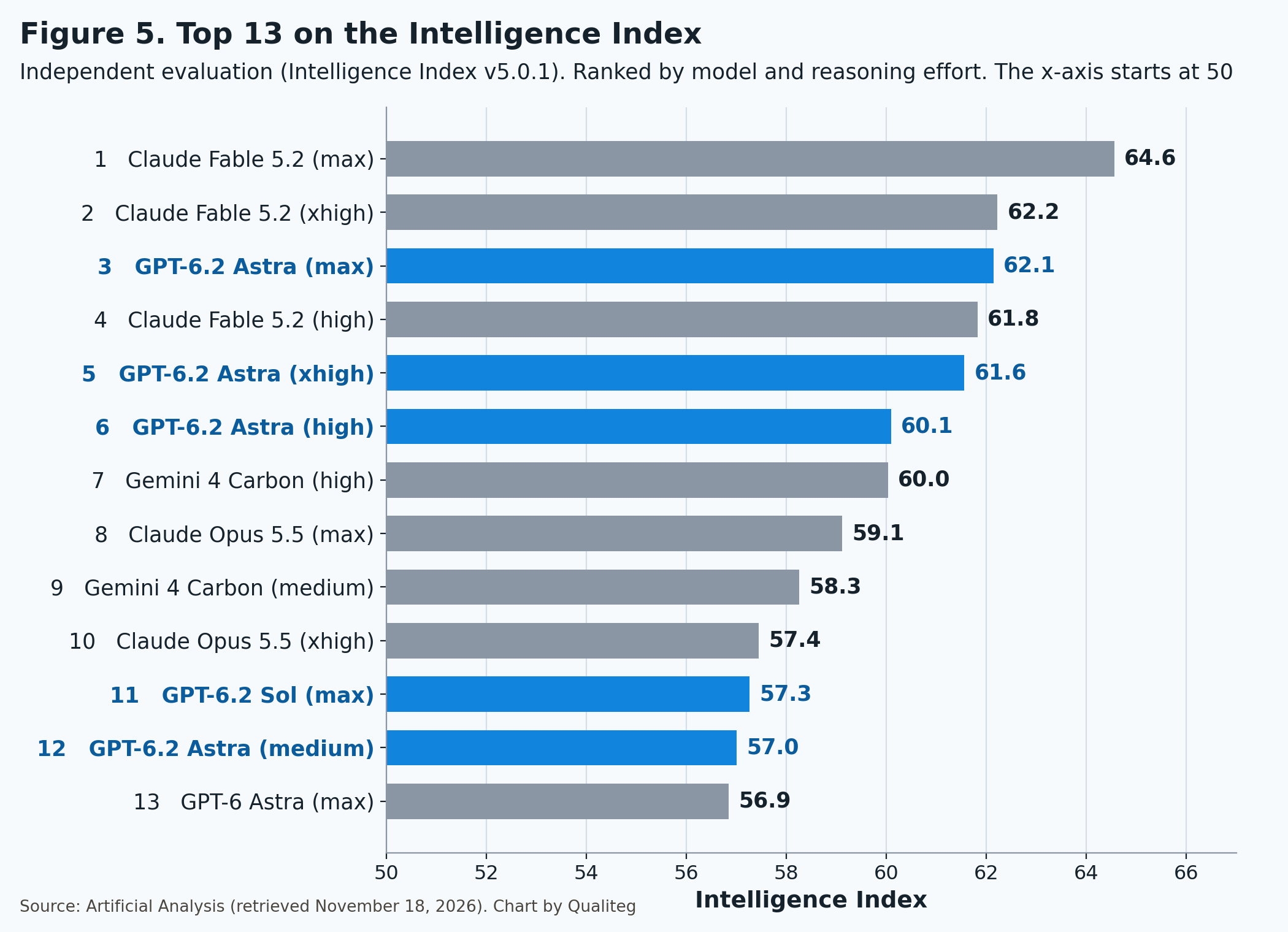
| Model (reasoning effort) | Intelligence Index | Cost per task | Time per task |
|---|---|---|---|
| Claude Fable 5.2 (max) | 64.6 | $26.54 | 40.8 min |
| Claude Fable 5.2 (xhigh) | 62.2 | $14.83 | 25.5 min |
| GPT-6.2 Astra (max) | 62.1 | $4.00 | 10.4 min |
| Claude Fable 5.2 (high) | 61.8 | $9.08 | 14.6 min |
| GPT-6.2 Astra (xhigh) | 61.6 | $2.52 | 5.9 min |
| GPT-6.2 Astra (high) | 60.1 | $2.07 | 4.8 min |
| Gemini 4 Carbon (high) | 60.0 | $5.48 | 33.4 min |
| Claude Opus 5.5 (max) | 59.1 | $10.04 | 24.6 min |
| GPT-6.2 Sol (max) | 57.3 | $1.01 | 7.9 min |
| GPT-6.2 Astra (medium) | 57.0 | $1.62 | 3.7 min |
| GPT-6 Astra (max) | 56.9 | $6.24 | 20.4 min |
| GPT-6.1 Sol (max) | 54.6 | $1.27 | 23.1 min |
Cost and time are weighted averages per evaluation task in the Intelligence Index.
Counting each combination of model and reasoning effort, Astra at max is 3rd of 91. Above it are Fable 5.2 at max and xhigh, so counting by lab puts OpenAI second.
Three things can be read from the table.
The first is the gain over the previous model.
GPT-6 Astra (max) scored 56.9, and GPT-6.2 Astra (max) scores 62.1. That is a gain of a little over 5 points, while the cost went from $6.24 to $4.00 and the time from 20.4 minutes to 10.4 minutes. Index, cost, and time all improved at once.
The second is the low cost.
Astra's $4.00 at max is about one seventh of Fable 5.2 at max ($26.54) and about 40% of Opus 5.5 at max ($10.04). Among the settings that score 60 or more, Astra at high has the lowest cost, $2.07.
The third is where Sol lands.
Sol at max scores 57.3, above GPT-6 Astra at max (56.9). The cost is $1.01 against $6.24, and the Artificial Analysis article describes it as "on par with GPT-6 Astra at ~15% of the Cost per Task."
The reason the cost is low is the small number of output tokens.
| Model (reasoning effort) | Output tokens per task | Output speed |
|---|---|---|
| GPT-6.2 Astra (max) | 41,029 | 65.7 tokens/s |
| GPT-6.2 Sol (max) | 40,360 | 85.2 tokens/s |
| GPT-6 Astra (max) | 51,973 | 42.4 tokens/s |
| Gemini 4 Carbon (high) | 122,768 | 61.3 tokens/s |
| Claude Opus 5.5 (max) | 173,313 | 117.5 tokens/s |
| Claude Fable 5.2 (max) | 273,776 | 111.9 tokens/s |
Astra at max finishes one evaluation task with about 40,000 output tokens. Fable 5.2 at max uses about 270,000. The output price is the same $40, so this difference in output volume is a major factor behind the difference in cost.
Output speed rose from 42.4 tokens per second to 65.7 for Astra, and from 48.9 to 85.2 for Sol. The speed values are averages over the most recent five days, so these are numbers from right after launch.
Here are the individual evaluations, highest setting against highest setting.
| Evaluation | GPT-6.2 Astra | GPT-6.2 Sol | Claude Fable 5.2 | Claude Opus 5.5 | Gemini 4 Carbon |
|---|---|---|---|---|---|
| Terminal-Bench-Science 0.1 | 78.1% | 67.6% | 73.3% | 59.0% | 64.8% |
| AA-3D (Elo) | 1,318 | 1,259 | 1,271 | 1,202 | |
| Harvey LAB-AA v1.1 | 15.0% | 11.1% | 7.2% | 4.2% | |
| AA-AnalystAgent | 62.5% | 53.8% | 56.3% | ||
| AutomationBench-AA | 77.2% | 71.3% | 76.4% | 69.5% | 77.8% |
| Terminal-Bench 4.0 | 64.1% | 60.1% | 59.6% | 59.6% | 65.2% |
| FrontierCode-AA 2.0 | 45.4% | 44.4% | 48.8% | 46.4% | 40.6% |
| CritPt v2 Hard Subset | 71.5% | 62.5% | 76.5% | 68.0% | 69.0% |
| HLE-Diamond | 72.2% | 64.0% | 80.2% | 67.9% | 69.1% |
| AA-Omniscience (accuracy) | 68.6% | 61.6% | 79.1% | 65.5% | 58.3% |
| AA-Briefcase v1.1 (Elo) | 1,643 | 1,612 | 1,785 | 1,800 | 1,611 |
Astra leads on scientific research work (Terminal-Bench-Science), 3D generation (AA-3D), legal work (Harvey LAB-AA), and financial analysis (AA-AnalystAgent). The Artificial Analysis article also says that on the research preview AA-Robotics v0.1, Astra scored 79 and Sol 78, ahead of Fable 5.2 at 75.
On research-level physics problems (CritPt), depth of reasoning and knowledge (HLE-Diamond), and factual accuracy (AA-Omniscience), Fable 5.2 leads and Astra comes next. On AA-Briefcase, which grades business deliverables, Opus 5.5 and Fable 5.2 are at the top.
On FrontierCode-AA, Astra at xhigh scored 49.0%, higher than its 45.4% at max. That is about the same level as Fable 5.2 at high (49.1%).
There is also an evaluation of the models as coding agents.
The Artificial Analysis Coding Agent Index measures models running inside each vendor's coding agent. GPT-6.2 was measured in Codex.
| Agent and model (reasoning effort) | Index | Cost per task | Time per task |
|---|---|---|---|
| Claude Code + Claude Fable 5.2 (xhigh) | 58.5 | $15.47 | 53.3 min |
| Claude Code + Claude Opus 5.5 (max) | 58.2 | $12.61 | 65.3 min |
| Antigravity CLI + Gemini 4 Carbon (high) | 55.5 | $7.13 | 33.6 min |
| Codex + GPT-6.2 Astra (max) | 53.5 | $5.12 | 25.1 min |
| Codex + GPT-6.2 Astra (xhigh) | 53.1 | $3.20 | 16.5 min |
| Codex + GPT-6 Astra (max) | 53.1 | $7.63 | 26.0 min |
| Codex + GPT-6.2 Sol (xhigh) | 49.8 | $0.90 | 12.6 min |
On this index, Astra delivers the same level of score as the previous model at a cost that came down from $7.63 to $5.12. At xhigh, it gets the same score for $3.20 in 16.5 minutes.
On the index score itself, the setups that run Fable 5.2 or Opus 5.5 in Claude Code are ahead. If you choose a coding agent by score, that points to Claude Code, and if you choose by cost and time, it points to Codex with Astra.
6. By reasoning effort, Astra reaches the previous model's top setting at medium
GPT-6.2 has five levels of reasoning effort, low, medium, high, xhigh, and max. Which level you use changes the score, the cost, and the time a great deal.
Artificial Analysis measured all ten settings.
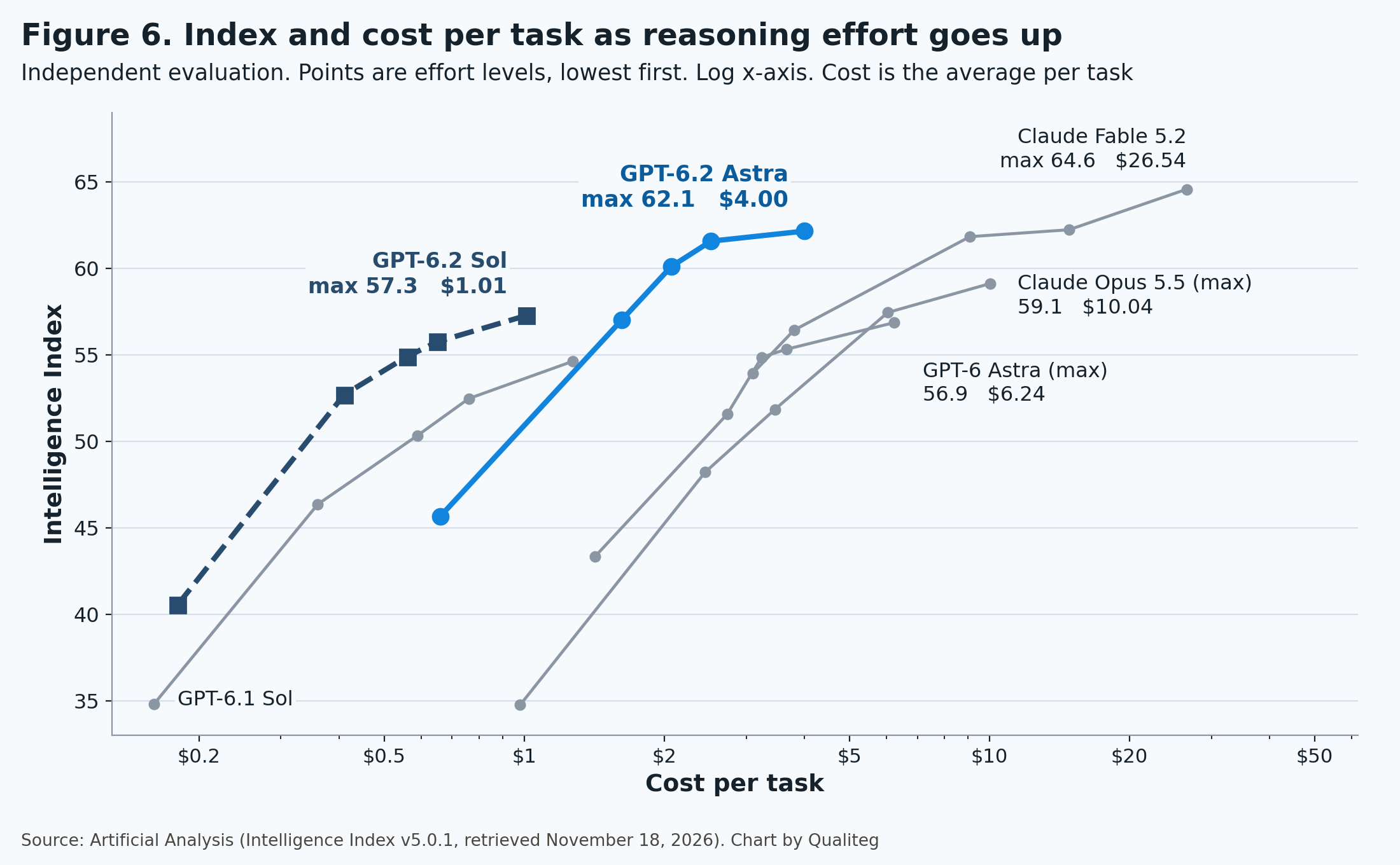
| Reasoning effort | Astra index | Astra cost | Astra time | Sol index | Sol cost | Sol time |
|---|---|---|---|---|---|---|
| low | 45.7 | $0.66 | 1.4 min | 40.6 | $0.18 | 1.4 min |
| medium | 57.0 | $1.62 | 3.7 min | 52.7 | $0.41 | 3.1 min |
| high | 60.1 | $2.07 | 4.8 min | 54.9 | $0.56 | 4.3 min |
| xhigh | 61.6 | $2.52 | 5.9 min | 55.7 | $0.65 | 5.1 min |
| max | 62.1 | $4.00 | 10.4 min | 57.3 | $1.01 | 7.9 min |
Cost and time are per evaluation task.
Let's look at Astra first.
GPT-6 Astra scored 56.9 at max, its top level. GPT-6.2 Astra already reaches that level at medium, the second of five levels, with 57.0. The cost is $1.62 against $6.24, about one quarter, and the time is 3.7 minutes against 20.4 minutes.
One level up, at high, it scores 60.1 and passes Claude Opus 5.5 at max (59.1). The cost is $2.07 against $10.04, and the time is 4.8 minutes against 24.6 minutes.
Astra still has two levels above high, and at max it goes up to 62.1.
GPT-6.2 Astra reaches the previous model's top setting on a light setting, and passes Opus 5.5's top setting when you turn it up.
Going from high to xhigh adds $0.45 and gains 1.5 points. Going from xhigh to max adds $1.48 and gains 0.6 points. At max, the time is also nearly double that of xhigh.
On some individual evaluations, xhigh beat max. FrontierCode-AA was 49.0% at xhigh and 45.4% at max, and Terminal-Bench-Science was 78.6% at xhigh and 78.1% at max. On OpenAI's Agents' Last Exam too, 78.3% at xhigh was above 77.6% at max.
Astra is a model that delivers most of its gain by high or xhigh.
Sol keeps improving steadily all the way to max.
From 52.7 at medium, it goes to 54.9 at high, 55.7 at xhigh, and 57.3 at max. Even at max the cost is $1.01, lower than Astra at medium ($1.62).
Sol at max scores 57.3 and Astra at medium scores 57.0, about the same level. Sol at max costs less, and Astra at medium takes less time (3.7 minutes against 7.9 minutes). You can choose Sol at max for lower cost, or Astra at medium for speed.
At low, the index drops sharply for both models.
Astra at low scores 45.7 and Sol at low scores 40.6, more than 11 points below medium. On OpenAI's LifeVal too, Sol scored 25.3% at low and 70.3% at medium. Apart from very light work, medium and above is the setting that fits well.
OpenAI's migration guide also says, "Start with medium for a new integration."
The time until the first answer token varies a lot with reasoning effort.
| Reasoning effort | Astra | Sol |
|---|---|---|
| medium | 2.7 s | 2.7 s |
| high | 15.0 s | 5.6 s |
| xhigh | 36.0 s | 19.0 s |
| max | 134.9 s | 57.6 s |
A practical split is up to medium for interactive screens, and high or xhigh for agents that run in the background.
7. Comparing price and performance with Claude and Gemini 4
In November, the top models of all three vendors were updated one after another. Claude Fable 5.2 on November 9, the general availability of Gemini 4 Carbon on November 10, Gemini 4 Hydrogen on November 12, and then GPT-6.2 on November 17.
This chapter puts the three vendors' current models in the same tables. That is four models from Anthropic, three from Google, and two from OpenAI.
The numbers come from each vendor's official pricing page and from Artificial Analysis's public data (as of November 18).
First, the prices side by side
These are each vendor's standard rates, in US dollars per million tokens.
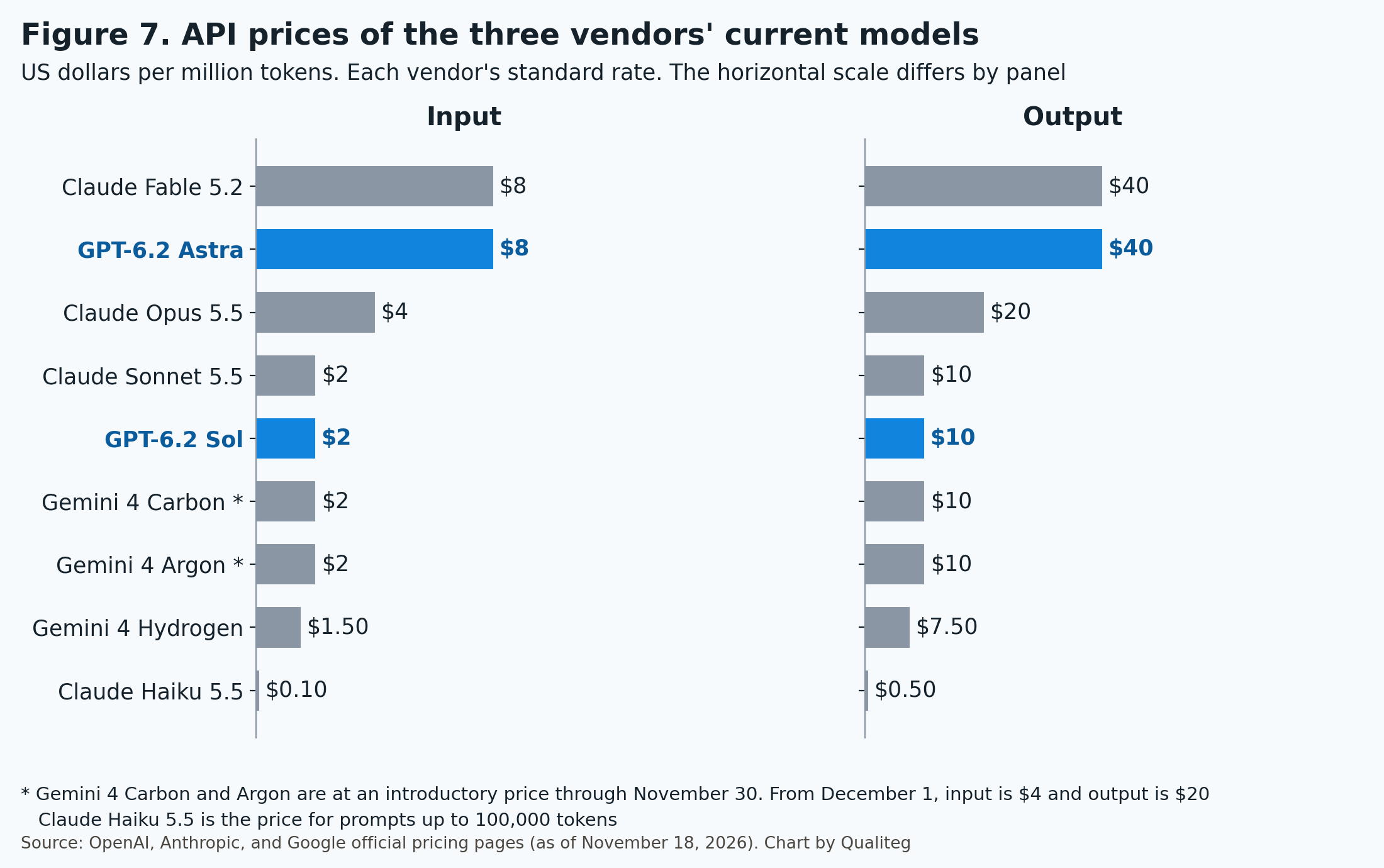
| Model | Input | Cache read | Output | Context | Max output |
|---|---|---|---|---|---|
| Claude Fable 5.2 | $8 | $0.20 | $40 | 1M | 128K |
| GPT-6.2 Astra | $8 | $0.40 | $40 | 1.05M | 128K |
| Claude Opus 5.5 | $4 | $0.20 | $20 | 1M | 128K |
| Claude Sonnet 5.5 | $2 | $0.10 | $10 | 1M | 128K |
| GPT-6.2 Sol | $2 | $0.10 | $10 | 1.05M | 128K |
| Gemini 4 Carbon (through November 30) | $2 | $0.10 | $10 | About 1.05M | 65,536 (about 1.05M with long decode) |
| Gemini 4 Argon (through November 30) | $2 | $0.10 | $10 | About 1.05M | 65,536 (same as above) |
| Gemini 4 Carbon and Argon (from December 1) | $4 | $0.20 | $20 | Same as above | Same as above |
| Gemini 4 Hydrogen | $1.50 | $0.075 | $7.50 | About 1.05M | 65,536 (same as above) |
| Claude Haiku 5.5 (prompts up to 100,000 tokens) | $0.10 | $0.01 | $0.50 | 1M | 128K |
By price, the models fall into three bands.
The top band is $8 / $40, where Fable 5.2 and GPT-6.2 Astra have the same price. The middle band is $2 / $10, with Sonnet 5.5, GPT-6.2 Sol, and Gemini 4 Carbon and Argon at their introductory price. Below that are Gemini 4 Hydrogen and Haiku 5.5.
Opus 5.5 is $4 / $20, between the two bands. From December 1, Gemini 4 Carbon and Argon move to this price too.
Next, the conditions that change the price
The price table alone does not determine what you are billed. This table lists the points where the vendors' conditions differ.
| Condition | OpenAI (GPT-6.2) | Anthropic (Claude) | Google (Gemini 4) |
|---|---|---|---|
| Long inputs | Above 272K tokens, input and cache double and output is 1.5x for the full request | Fable 5.2, Opus 5.5, and Sonnet 5.5 keep the same price up to 1M. Haiku 5.5 is 5x above 100,000 tokens | Same price up to 1M |
| How caching works | Writes are charged (30 minutes, 12 hours) | Writes are charged (5 minutes, 1 hour) | Implicit caching. Automatic from 4,096 tokens, with no write price listed |
| Cache read ratio | 0.05x input | 0.025x for Fable 5.2, 0.05x for Opus 5.5 and Sonnet 5.5, 0.1x for Haiku 5.5 | 0.05x input |
| Reasoning tokens | Billed as output | Billed as output | Billed as output |
| Prices that change over time | Ultrafast is 3x through February 28, 2027 and 6x from March 1 | No changes scheduled for the four current models | Carbon and Argon double from December 1 |
| Batch | Half price | Half price | Half price (Flex is also half price) |
| Faster tiers | Fast is 2x, Ultrafast is 3x | Fast mode is 2x (Fable 5.2 and Opus 5.5) | Priority is 1.8x |
| Reasoning levels | Five levels, low to max | Five levels, low to max | Three levels for Carbon and Argon (low to high), four for Hydrogen (low to xhigh) |
| Free tier | None | None | Available for Hydrogen |
Three of these matter in practice.
The first is how long inputs are handled.
GPT-6.2 carries a surcharge above 272,000 tokens. Claude's Fable 5.2, Opus 5.5, and Sonnet 5.5 and Gemini 4 keep the same price up to 1M. If you send more than 300,000 tokens of context on every request, this difference shows up in the bill.
The second is the cache read price.
Fable 5.2 is $0.20 and GPT-6.2 Astra is $0.40, so even with the same input price, reads differ by a factor of two. For agents that reread a long context many times, Fable 5.2 costs less for the rereading. Astra lowers its cost through output volume, as we see next.
The third is the Gemini 4 price change.
The $2 / $10 for Carbon and Argon is an introductory price through November 30, and it becomes $4 / $20 from December 1. When you estimate costs for December onward, calculate with the new price.
One more point is that the same text becomes a different number of tokens on each model. The tokenizers differ by vendor, so the amount of text that fits in one million tokens is not the same. Anthropic explains that with the tokenizer used from Claude 4.7 onward, the same text becomes about 30% more tokens.
Comparing by the cost of running the same evaluation
Instead of the per-token price, we look at the cost of running the same evaluation tasks. These are Artificial Analysis Intelligence Index values, each model at its highest setting.
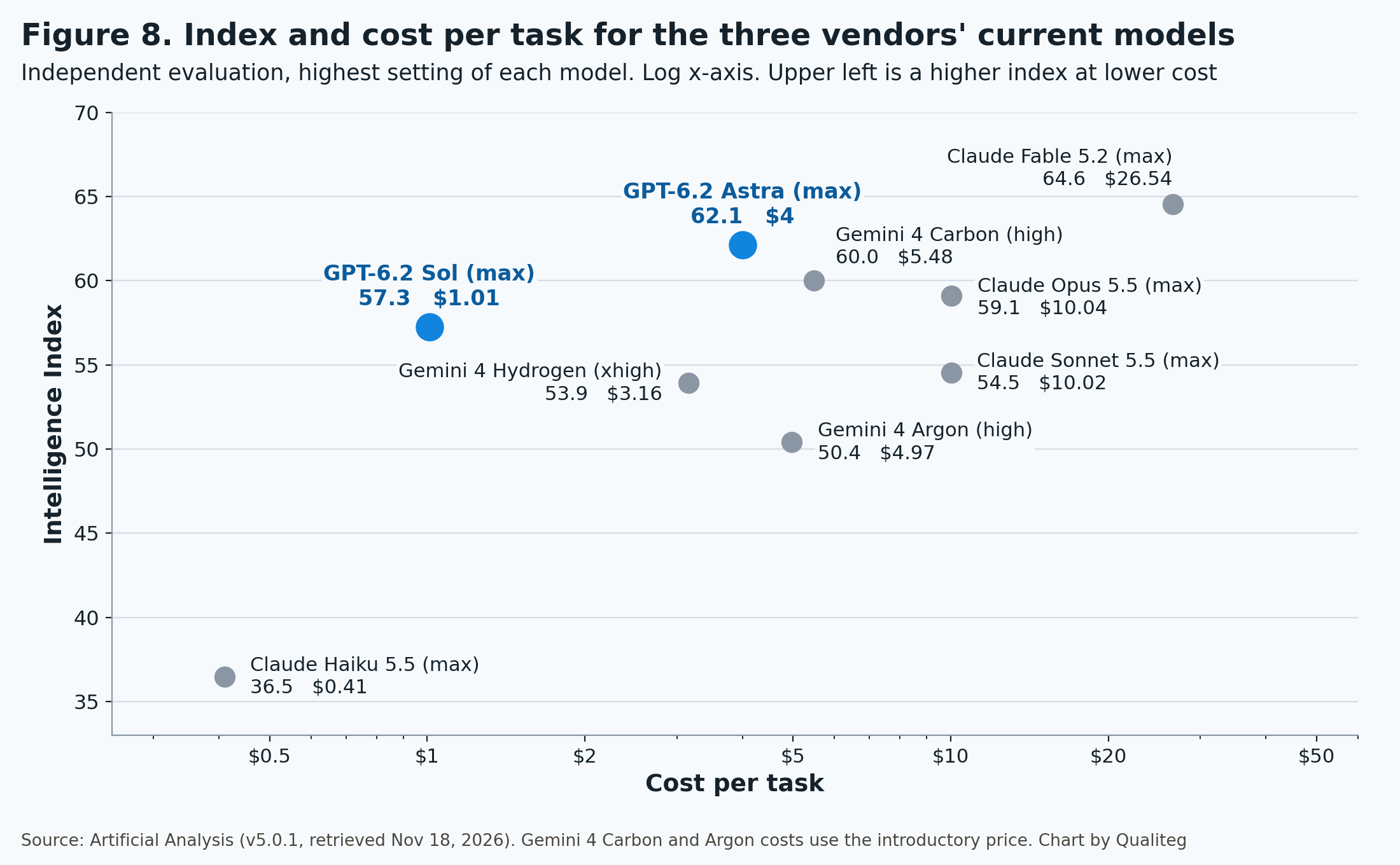
| Model (reasoning effort) | Intelligence Index | Cost per task | Output tokens per task | Output speed |
|---|---|---|---|---|
| Claude Fable 5.2 (max) | 64.6 | $26.54 | 273,776 | 111.9 tokens/s |
| GPT-6.2 Astra (max) | 62.1 | $4.00 | 41,029 | 65.7 tokens/s |
| Gemini 4 Carbon (high) | 60.0 | $5.48 | 122,768 | 61.3 tokens/s |
| Claude Opus 5.5 (max) | 59.1 | $10.04 | 173,313 | 117.5 tokens/s |
| GPT-6.2 Sol (max) | 57.3 | $1.01 | 40,360 | 85.2 tokens/s |
| Claude Sonnet 5.5 (max) | 54.5 | $10.02 | 285,387 | 147.2 tokens/s |
| Gemini 4 Hydrogen (xhigh) | 53.9 | $3.16 | 154,406 | 172.4 tokens/s |
| Gemini 4 Argon (high) | 50.4 | $4.97 | 116,368 | 66.3 tokens/s |
| Claude Haiku 5.5 (max) | 36.5 | $0.41 | 225,966 | 256.9 tokens/s |
The costs for Gemini 4 Carbon and Argon were calculated at the introductory price of $2 / $10, which runs through November 30. From December 1, the input, cache, and output prices all double, so with the same token usage the cost doubles as well.
Here is what the table shows, model by model.
Claude Fable 5.2 has the highest index. It scores 64.6, about 2.4 points ahead of GPT-6.2 Astra in second place. For work that goes after the upper limit of hard reasoning, Fable 5.2 is the first candidate.
GPT-6.2 Astra has the lowest cost among the models that score 60 or more, at $4.00. It delivers 62.1 at about one seventh of the cost of Fable 5.2, about 40% of Opus 5.5, and about 70% of Gemini 4 Carbon.
Gemini 4 Carbon scores 60.0 for $5.48. On the individual evaluations in Chapter 5, it led on AutomationBench-AA and Terminal-Bench 4.0. It also stands out for how few factual errors it makes, with an AA-Omniscience hallucination rate of 11.4%. GPT-6.2 Astra and Fable 5.2 are both around 59%, so the gap is large.
GPT-6.2 Sol scores 57.3 for $1.01. Its index is higher than Sonnet 5.5 at the same price (54.5, $10.02), at about one tenth of the cost.
Gemini 4 Hydrogen has an output speed of 172.4 tokens per second, the fastest among the models that score 50 or more. It also has a free tier.
Claude Haiku 5.5 is the fastest overall at 256.9 tokens per second, and its cost is the lowest at $0.41. It suits high-volume classification and extraction.
Even among models with the same $10 output price, the cost of one evaluation task ranges from $1.01 to $10.02, about a tenfold spread. The order of the prices does not decide the order of the costs. What decides it is the number of tokens used for one piece of work.
Choosing by use case
Here are the numbers so far, rearranged by use case.
| Use case | Candidates | The numbers behind the choice |
|---|---|---|
| Going after the upper limit of hard reasoning | Claude Fable 5.2 | Top Intelligence Index at 64.6. HLE-Diamond 80.2%, CritPt 76.5% |
| Running hard work while keeping cost and time down | GPT-6.2 Astra | Index 62.1, $4.00 and 10.4 minutes per task |
| Scientific research work, 3D, CAD, legal, financial analysis | GPT-6.2 Astra | Leads on Terminal-Bench-Science, AA-3D, Harvey LAB-AA, and AA-AnalystAgent |
| Business deliverables such as documents and decks | Claude Opus 5.5 | Near the top on AA-Briefcase. Priced at $4 / $20 |
| Choosing a coding agent by score | Claude Code + Fable 5.2 or Opus 5.5 | Coding Agent Index 58.5 and 58.2 |
| Choosing a coding agent by cost and time | Codex + GPT-6.2 Astra or Sol | Astra at xhigh, $3.20 and 16.5 minutes per task |
| An everyday workhorse at low cost | GPT-6.2 Sol | Index 57.3, $1.01 per task |
| Question answering and lookups where the accuracy of factual knowledge matters most | Gemini 4 Carbon | AA-Omniscience hallucination rate of 11.4% |
| Sending more than 300,000 tokens of context on every request | Claude Fable 5.2 and Opus 5.5, Gemini 4 | Same price up to 1M |
| Speed-first conversation and high-volume processing | Gemini 4 Hydrogen, Claude Haiku 5.5 | 172.4 tokens per second, 256.9 tokens per second |
The index and cost values are from Artificial Analysis's evaluation conditions. The shortest path is to see which evaluation is closest to your own work, narrow the candidates to two or three, and try them.
The detailed specs and usage of the three Gemini 4 models are in "Gemini 4 Carbon, Argon, and Hydrogen: The Complete Guide."
8. Cyber capabilities and safeguards in the system card
The GPT-6.2 system card covers Astra and Sol in one document. Here we pick out the points that matter in practice.
OpenAI assesses capabilities that could lead to severe harm under a framework called the Preparedness Framework. These are the ratings this time.
| Category | GPT-6.2 Astra | GPT-6.2 Sol | GPT-6 Astra |
|---|---|---|---|
| Biological and chemical | High | High | High |
| Cybersecurity | Critical | Critical | Critical |
| AI Self-Improvement (accelerating AI research) | High | Below High | Below High |
Biological and chemical and cybersecurity have the same ratings as GPT-6 Astra.
What changed this time is AI Self-Improvement. Astra is the first externally released OpenAI model to reach High.
The announcement explains what High means this way. The model's impact is "equivalent to giving every OpenAI researcher an additional, highly capable research engineer as an assistant, relative to their 2024 baseline."
Among the evaluations behind the rating, on MLE-Bench Revised, which involves solving machine learning tasks, Astra scored 96.06 and Sol 91.38, both above the reference level of 90. On Internal Research Debugging, which involves debugging internal research code, Astra scored 81.85% and GPT-6 Astra 78.05%.
External evaluators took part as well. On Epoch AI's index Astra scored 174 (GPT-6 Astra scored 169), and Vals AI assessed that the model is "unlikely to fully automate AI research, but could provide a larger productivity boost to researchers than previous models."
In step with this, OpenAI has also tightened its internal operations. It strengthened containment in its research environments, expanded monitoring of models' reasoning and actions, and introduced Control Room, a system that tracks research workloads and can halt them.
Next, cyber capabilities.
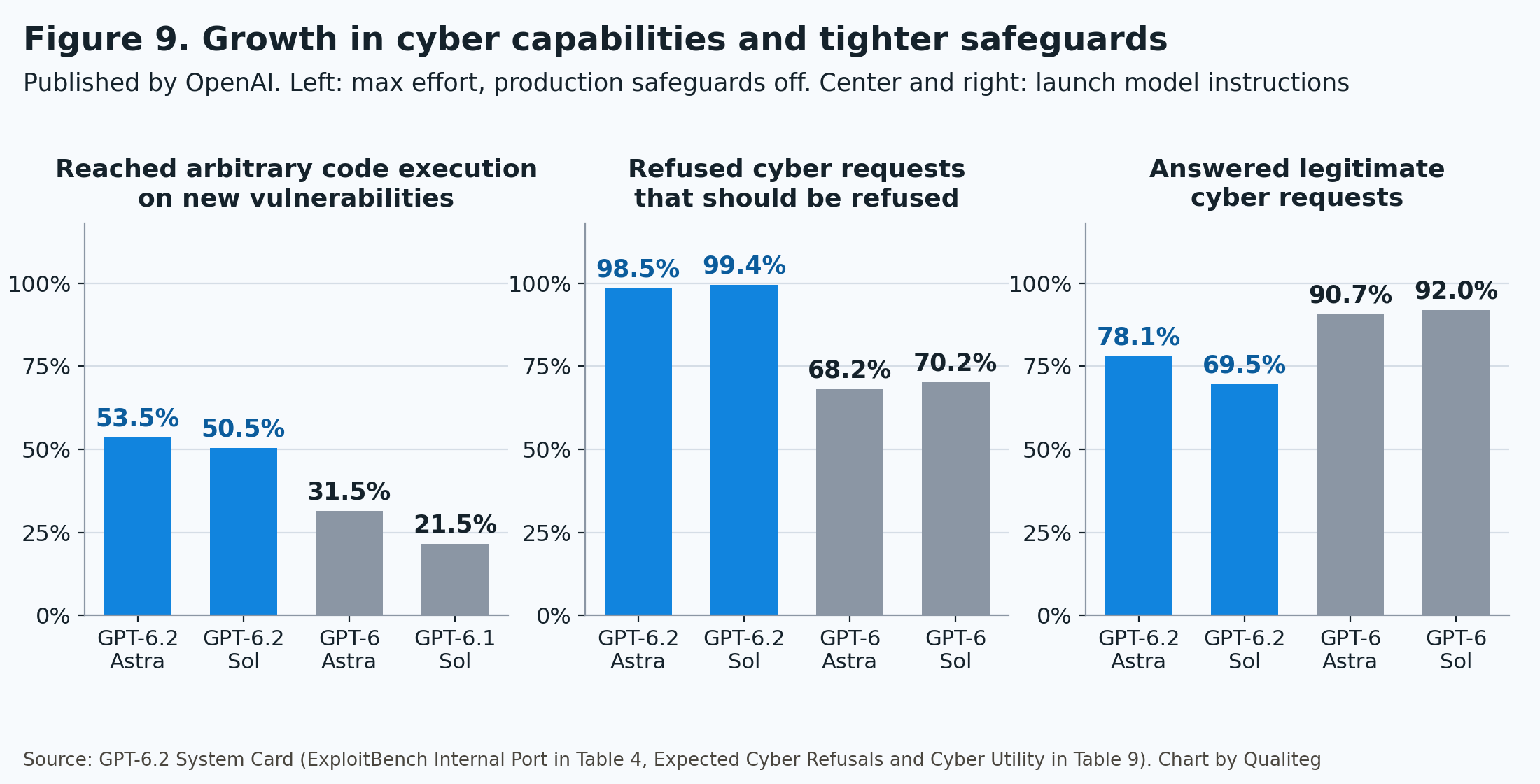
| Evaluation | GPT-6.2 Astra | GPT-6.2 Sol | GPT-6 Astra | GPT-6.1 Sol |
|---|---|---|---|---|
| ExploitBench Internal Port (arbitrary code execution success rate) | 53.5% | 50.5% | 31.5% | 21.5% |
| SEC-Bench Pro (reproducing vulnerabilities) | 86.75% | 88.34% | 85.4% | 78.8% |
| Sandbox Bench (internal evaluation) | 36.4% | 25.0% | 18.2% | 11.4% |
These are values at maximum reasoning effort, with production safeguards turned off.
ExploitBench Internal Port uses V8 and Chrome vulnerabilities disclosed from June through August 2026, and counts only cases that reach arbitrary code execution as successes. Astra scored 53.5%, up 22 points from GPT-6 Astra's 31.5%. Sol scored 50.5%, more than double GPT-6.1 Sol.
On SEC-Bench Pro, Sol scored higher than Astra. In the cyber domain, Sol has almost the same level of capability as Astra.
According to the announcement, on DeepBinary, which involves finding vulnerabilities in 12 Windows system binaries, the total estimated bounty for the vulnerabilities Astra found was about $1,038,000, more than double GPT-6 Astra's roughly $438,000.
The API cost was about $4,072 against about $5,925, lower for Astra.
Defensive capabilities grew as well.
| Evaluation | GPT-6.2 Astra | GPT-6.2 Sol | GPT-6 Astra | GPT-6.1 Sol |
|---|---|---|---|---|
| SecureSWE (writing secure code) | 65.7% | 55.6% | 46.5% | 49.7% |
| PatchBench (fixing while preserving behavior) | 79.7% | 75.6% | 70.9% | 71.0% |
These are OpenAI's published values for each model at max. OpenAI explains that this time it made writing secure code from the start, and producing patches that preserve intended behavior, a core focus of training.
As the capabilities grew, the safeguards got stronger.
The system card reports two values measured with the launch configuration.
| Metric | GPT-6.2 Astra | GPT-6.2 Sol | GPT-6 Astra |
|---|---|---|---|
| Rate of refusing cyber requests that should be refused | 98.5% | 99.4% | 68.2% |
| Rate of answering legitimate cyber requests | 78.1% | 69.5% | 90.7% |
The models now refuse almost every request that should be refused. In exchange, the rate of answering legitimate requests went down.
OpenAI explains that the range of refusals widens for dual-use requests, such as autonomous vulnerability discovery and developing exploit code that chains multiple vulnerabilities. If vulnerability research or security testing is your job, knowing this up front makes planning easier.
For defenders, there is a vetted program called OpenAI Daybreak.
| Program | What it offers | How GPT-6.2 is handled |
|---|---|---|
| Daybreak Blue | Fewer cyber refusals on supported general-purpose models | Covers GPT-6 Sol and others. Blue approval does not change the GPT-6.2 configuration |
| Daybreak Red | Additional approval and strong identity verification. Looser settings and cyber-specific models | The reduced-refusal configuration of GPT-6.2 Astra is for organizations approved for Red |
According to the announcement, what is currently accessible through Daybreak is GPT-6 Sol with reduced cyber refusals on Blue, the alpha for GPT-6 Astra, and GPT-6 Cyber on Red. OpenAI says it will work to bring the GPT-6.2 models to Daybreak.
For now, the division of labor is to use GPT-6 Cyber for approved vulnerability research, and GPT-6.2 for fixing code and secure implementation.
This table summarizes the mechanisms that affect people using the API or Codex.
| Mechanism | What the user sees |
|---|---|
| Misuse detection | A two-stage classifier on every conversation. Responses judged high-risk are blocked |
| Streaming pause | If signs of harm appear during generation, delivery pauses for a check and resumes if there is no problem |
| Behavior monitoring | In Codex, ChatGPT, and the Responses API, the model's reasoning and actions are monitored. If a serious problem is detected, the conversation is paused or ended |
| Resuming a conversation | In some products, the user reviews an explanation and a record of actions and decides whether to resume. A conversation stopped in the API is redone as a new conversation |
| Notifications for Enterprise | Detections can be received by webhook |
| Account-level actions | Warnings, additional monitoring, feature restrictions, suspension |
| Protection against distillation | The success rate of attacks that extract reasoning contents went from 54.0% on GPT-6 Astra to 0.2% |
If you build an app on the API, we recommend passing a safety_identifier for each end user. Restrictions are then scoped to that user, which avoids having the whole app stopped because of one person's usage.
safety_identifier also matters for how reasoning items are handled, covered in Chapter 9.
Here are the safety evaluations that are close to practical use.
| Item | GPT-6.2 Astra | GPT-6.2 Sol | GPT-6 Astra |
|---|---|---|---|
| Prompt injection (rate of blocking attacks on a new, harder evaluation) | 84.67% | 91.65% | 44.98% |
| Serious improper actions in workplace tasks | 0.64% | 0.71% | 1.20% |
| Rate of repeating past failures (AgentReplay) | 12.30% | 12.14% | 27.14% |
| Rate of completing a prohibited action (Respecting Warnings) | 17.41% | 19.37% | |
| HealthBench Professional (length-adjusted) | 66.3 | 65.9 | 64.7 |
Resistance to prompt injection improved a great deal. On a new evaluation where an attacker model refines its attack by querying the target up to 10 times, the rate of blocking went from 44.98% on GPT-6 Astra to 84.67% on Astra and 91.65% on Sol.
Serious improper actions in workplace tasks are about half the rate of the previous models. The rate of completing a prohibited action is described as the lowest of any model OpenAI has released.
If you build agents that read external web pages or email, it is worth remembering that Sol is more resistant to prompt injection.
The external evaluations involved the UK AI Security Institute, Irregular, SecureBio, Epoch AI, Vals AI, and others.
Part 2: Points to Know When Using the API
According to the migration guide, moving from GPT-6 Astra or GPT-6.1 Sol is mostly a matter of swapping the model ID.
On top of that, there is one change that affects your code. It is how reasoning items are handled when the conversation history is rewritten.
9. Rewriting history drops reasoning items
The "What's new" section of the migration guide is a single paragraph. That one paragraph has the biggest impact on implementation this time.
Starting with GPT-6.2, the API drops reasoning items when any of the following happens partway through a conversation.
- The earlier conversation history is rewritten (a prefix change)
- You switch to a less capable model
- The end user changes
- The organization changes
Reasoning items carry what the model thought over to the next request. When they are dropped, the model has to think the same things through again, which takes extra tokens and time. If rethinking does not get back to the original content, answer quality drops too.
It does not produce an error. It surfaces quietly, as a change in cost, time, and quality.
In Chapter 8 of last week's Claude Fable 5.2 Complete Guide, we introduced Fable 5.2's check for rewritten history. That one stops with a 400 error and this one drops the reasoning items and continues, but the design they ask for is the same.
Only append to the conversation. Do not rewrite what came before.
OpenAI calls this an append-only integration pattern.
A prefix change includes operations like these. Shortening a tool result. Rewriting a developer message. Replacing older turns with a summary. Changing tools, instructions, or text.format in the Responses API partway through.
The official guide has a table of common rewrites and how to replace them.
| What you want to do | The approach that rewrites | The append approach |
|---|---|---|
| Change reasoning effort partway through | Change reasoning.effort | Append a configuration_update item to the input |
| Change the output format partway through | Change text.format | Append the new schema with a configuration_update item |
| Change the available tools | Change tools | Add tools with an additional_tools item. To restrict, use allowed_tools in tool_choice |
| Update the developer instructions | Edit the original developer message | Append a new developer message |
| Compact the history | Replace older turns with your own summary | Use OpenAI compaction (/responses/compact, context_management) |
| Shrink past tool outputs or images | Truncate items that were already sent | Shrink them before sending them the first time |
Here is an example of changing reasoning effort partway through. This is the shape of the configuration_update item in the official guide.
{
  "type": "configuration_update",
  "reasoning": {
    "effort": "high"
  }
}
Keep the request's reasoning.effort at its original value, and append this item to the list of input items. Responses from then on run at the new reasoning effort.
For compacting history, if you use OpenAI compaction, the reasoning items are retained even though the prefix changes. If you use your own compaction, the guide recommends placing the compacted item at the end of the context, not before the recent turns.
Handling of the end user was added as well.
If the safety_identifier differs between the request that created a reasoning item and the request that reuses it, the item is dropped. The same applies if you supply it on only one of the two requests. During a conversation, either keep sending the same value or omit it from both.
You can check what is happening in your own app from the response.
input_transformations in the Responses API response lists the reasoning items the API removed from the input, and why.
| Reason | When it happens |
|---|---|
prefix_mismatch | Content before the reasoning item was inserted or edited (GPT-6.2 and later) |
end_user_mismatch | The safety_identifier differs between creation and reuse (GPT-6.2 and later) |
model_mismatch | You switched model families, or moved to a less capable model in the same family |
organization_mismatch | You reused an item from another organization |
turn_boundary | The item is from an earlier turn and the model is set to use only current-turn reasoning |
Deleting whole items, or appending new items after the reasoning item, does not by itself trigger prefix_mismatch.
Switching models is handled differently depending on the direction. Within the same family, moving up to a more capable model preserves the reasoning if the other checks pass. Within GPT-6.2, that means moving up from Sol to Astra preserves it, and moving down from Astra to Sol drops it.
If you move conversations between models with a router, remembering "moving up keeps it, moving down does not" makes the design easier.
The append-only design also pays off for caching.
Prompt caching reuses the part that matches from the beginning of the request. If you change the prefix, nothing from that point on hits the cache. If you only append, you can use Astra's 60% cheaper cache read price for most of the conversation.
You can check why a request missed the cache with Prompt Cache Diagnostics. Set prompt_cache_options.comparison_response_id to the ID of an earlier response, and it returns where the two diverged.
10. Start reasoning effort at medium, and none is not accepted
GPT-6.2 has five reasoning effort levels, low, medium, high, xhigh, and max.
You set it with reasoning.effort in the Responses API and reasoning_effort in Chat Completions.
Both models reject requests that set none. Apps that used GPT-6 Sol without reasoning should switch to low.
The migration guide gives this guidance.
| Your current setting | Where to start with GPT-6.2 |
|---|---|
| A new integration | medium |
| You used none or minimal | low |
| Long-running agents or hard research | high or xhigh, after confirming the benefit with your own evals |
| You want to measure the model's ceiling | max |
This is the example from the official guide, keeping the model ID and the reasoning effort setting.
curl https://api.openai.com/v1/responses \
  -H "Content-Type: application/json" \
  -H "Authorization: Bearer $OPENAI_API_KEY" \
  -d '{
    "model": "gpt-6.2-sol",
    "reasoning": {
      "effort": "medium"
    },
    "input": "Review this database migration plan and identify potential failure modes."
  }'
About xhigh, the reasoning guide says, "Only use when your evals show a clear benefit that justifies the extra latency and cost."
In the independent evaluation in Chapter 6 too, Astra delivered most of its gain by high. Start Astra at medium or high and Sol at medium, and move up a level when that is not enough. This approach also wastes the least on cost.
Tokens used for reasoning are not visible through the API, but they take up space in the context and are billed as output tokens.
The official guide recommends reserving at least 25,000 tokens for reasoning and outputs when you start experimenting with these models. If you set max_output_tokens too low, the request can hit the limit before any visible output is produced. In that case, the response's status is incomplete.
11. Tool calling needs the Responses API, and four parameters must be left out
GPT-6.2 works with both the Responses API and Chat Completions.
If you use tool calling, use the Responses API. Chat Completions can be used for exchanges without tools.
The parameters to leave out are defined per endpoint.
| Endpoint | What to omit |
|---|---|
| Chat Completions | temperature, top_p, logprobs, top_logprobs |
| Responses | temperature, top_p, top_logprobs, and message.output_text.logprobs in include |
If you are migrating from GPT-5.5 or earlier, the cache setting changes too. Replace prompt_cache_retention with prompt_cache_options.ttl set to "30m".
Zero Data Retention (ZDR) is available for approved organizations. With ZDR enabled, the Responses API treats store as false. For multi-turn conversations, pass the prior output items back in order. Passing the encrypted reasoning items back with them is what makes the reasoning carryover in Chapter 9 work.
For data residency, the US and EU are supported with Standard, Fast, and Batch. Ultrafast is processed in the US.
12. Tuning cost and speed with caching, completion windows, and Ultrafast
GPT-6.2 has three options for lowering cost and two for raising speed.
| Option | Effect | Work it suits |
|---|---|---|
| Prompt caching | Reread input at 0.05x the price | Agents that read the same context many times |
| Batch | Half price | High-volume processing sent in bulk |
| Completion windows (2 hours, 8 hours) | 30% off, 40% off | One-off work that can wait a few hours |
| Fast | Faster at 2x the price | Conversations where a person is waiting |
| Ultrafast | Faster still at 3x the price (through February 28, 2027) | Uses where latency is the experience itself |
Prompt caching
What can be cached is the beginning of a prompt of 1,024 tokens or more.
For writes, you can choose 30-minute or 12-hour retention. Astra's writes are $10 and $20, and reads are $0.40.
Calculating from the prices, a 30-minute write is 1.25 times the input price, so it pays for itself once you read the same context twice. A 12-hour write is 2.5 times, and it pays for itself after three reads. If you have the model read the same material many times within a day, 12-hour retention is the fit.
Completion windows
This time, discounted completion windows were added to background mode in the Responses API as a public beta. They cover GPT-6.2 Astra, GPT-6.2 Sol, GPT-6.1 Terra, and GPT-6 Luna.
| Window | When to use it | Discount |
|---|---|---|
soonest (default) | A report someone is waiting for | None |
2h | Analyze the morning's support tickets before an afternoon meeting | 30% below Standard |
8h | Review documents overnight and pick them up the next morning | 40% below Standard |
To use them, set background to true and set background_options.completion_window to 2h or 8h. This is the basic form of a background request from the official guide.
curl https://api.openai.com/v1/responses \
-H "Content-Type: application/json" \
-H "Authorization: Bearer $OPENAI_API_KEY" \
-d '{
  "model": "gpt-6.2-astra",
  "input": "Write a very long novel about otters in space.",
  "background": true
}'
As it stands, this request uses the default soonest completion window and gets no discount.
To get the discount, add the three parameters the guide specifies to the request body. For the 8-hour window, the body looks like this.
{
  "model": "gpt-6.2-astra",
  "input": "Write a very long novel about otters in space.",
  "background": true,
  "service_tier": "default",
  "background_options": {
    "completion_window": "8h"
  }
}
For the 2-hour window, set completion_window to 2h.
You get the result by retrieving it with the response ID that was returned, or by receiving the response.completed webhook.
Discounted windows come with three rules.
Use Standard processing (set service_tier to default). Send the request without stream. Rate limits are counted against the limit shared with Batch API jobs.
Cache entries created in a discounted window are managed separately from regular requests. Material you want cached should be read repeatedly within the same window.
Which to use, Batch or completion windows, depends on the shape of the work. For sending a large number of requests in bulk, Batch at half price, and for single jobs you want back within a few hours, completion windows. They also work for multistep jobs that return a tool result and continue.
Ultrafast
Ultrafast is the fastest service tier in the OpenAI API. The two GPT-6.2 models have supported it since launch day.
To use it, set service_tier to ultrafast. The official guide strongly recommends WebSockets for agents that make many tool calls in quick succession. Without a persistent connection, network overhead reduces the speed gain.
This is the Python example from the official guide, shortened to a single exchange (the model ID is GPT-6.2 Sol).
from openai import OpenAI

client = OpenAI()

with client.responses.connect() as connection:
    connection.response.create(
        model="gpt-6.2-sol",
        service_tier="ultrafast",
        store=False,
        input="Explain why the sky is blue in one sentence.",
    )

    for event in connection:
        if event.type == "response.output_text.delta":
            print(event.delta, end="", flush=True)
        elif event.type == "response.completed":
            print()
            break
The price is 3 times Standard through February 28, 2027, and 6 times from March 1 (Pacific time). For Astra, $24 / $120 becomes $48 / $240.
Ultrafast on GPT-6 Astra was $60 / $300. GPT-6.2 Astra's price during the introductory period is 40% of that.
According to the Codex docs, Ultrafast on GPT-6.2 generates tokens at up to 4.5 times the speed of Standard on the same model.
13. Behaviors to review when you carry prompts over
The migration guide lists four behaviors seen with GPT-6.2 Astra and gives an example prompt for each. They are the points to review when you carry over a system prompt written for GPT-6 Astra.
| Behavior | What to review |
|---|---|
| Writing became more concise and direct | Whether instructions like "be concise" are now too strong |
| When intent is unclear, it may propose a next step and wait for confirmation | For longer tasks, tell it that it may make reasonable assumptions and keep working |
| Code became more efficient and higher quality | Write down your project's conventions |
| It decides the look of a frontend on its own | Specify the kinds of images and the typography to use |
Writing became more concise
Astra writes more concisely by default than earlier models. According to the system card, the median response length went from 836 characters for GPT-6 Astra to 650 for Astra and 628 for Sol.
If you reuse a prompt that told GPT-6 Astra to "be concise," responses can end up too short. Remove that instruction, or add how much explanation you want.
During longer tasks, the model can carry shorthand from its working notes into the final answer. The migration guide includes an instruction that has it write the final answer as "the user's first look" at the work.
Treat your final answer as the user's first look at your work, and not as a continuation of intermediate commentary. The final answer must always be fully self-contained: users should never need to read earlier commentary updates for context, since they are collapsed when the final answer is shown to the user.When you want it to proceed without waiting for confirmation
For work that can proceed without supervision, specify the outcome you want completed and the decisions that need the user's input. This is the example from the migration guide.
Avoid stopping to end the turn while the task is incomplete or if there is an authorized next step you can take, and instead take the next steps within task scope to progress the user's request.

Only stop to clarify with the user if there is significant change in task scope, you are concretely blocked, have a decision that the user needs to resolve, or before irreversible or destructive actions.
It narrows the cases where stopping is fine to four. A significant change in task scope, being concretely blocked, a decision the user needs to resolve, and the moment before irreversible or destructive actions.
If your app has an async question tool (such as request_user_input_async), GPT-6.2 can ask the user for clarification and continue the work that does not depend on the answer.
For the final checks on long tasks, higher reasoning effort helps the model persist. Putting a completion check in the instructions and setting reasoning effort to high or above is the combination the migration guide recommends.
Coding style
The migration guide's coding instructions have four items. Reuse existing logic. Add tests when requested, when the repo requires them, or when they catch a regression the existing tests would miss. Keep the code human readable. Avoid unnecessary indirection and abstraction.
Write your own project's conventions as additions to these. For example, how far to reuse existing functions, and how narrowly to scope a change.
Frontend design
Astra decides the look of web pages and apps on its own as it builds them. When you want a particular look, specify the kinds of images and the typography.
The migration guide recommends sharing a reference from your design software, or having the image generation tool create a reference image. A reference image fills in the details that are hard to describe in words.
14. Migration steps and a cost estimate
Here are the items from the migration guide, reordered as the steps for moving from GPT-6 Astra or GPT-6.1 Sol.
| Step | What to do | If you leave it as is |
|---|---|---|
| 1 | Change the model ID to gpt-6.2-astra or gpt-6.2-sol | You are not migrated |
| 2 | Decide the reasoning effort. medium for new work, low if you used none or minimal | Requests with none are rejected |
| 3 | Do tool calling through the Responses API | Tools cannot be used in Chat Completions |
| 4 | Omit the parameters that the API you use does not accept. For Chat Completions, temperature, top_p, logprobs, and top_logprobs. For Responses, temperature, top_p, top_logprobs, and message.output_text.logprobs in include | Requests fail |
| 5 | For apps that assemble history themselves, check for dropped reasoning items in input_transformations | More rethinking, more cost and time |
| 6 | Keep safety_identifier at the same value throughout a conversation | Reasoning items are dropped |
| 7 | Rework reasoning effort changes, added tools, and instruction updates into the append form | Cache misses, and reasoning is dropped too |
| 8 | Review the system prompts you carry over against the points in Chapter 13 | Answers that are too short, waiting for confirmation too early |
| 9 | Compare reasoning effort and cost again with your own evals | Running at a higher level than needed |
The migration guide also describes handing the migration to Codex. You invoke the OpenAI Docs skill with $openai-docs and ask it to migrate your project to the new model.
Finally, we update the estimate we have used in our earlier articles.
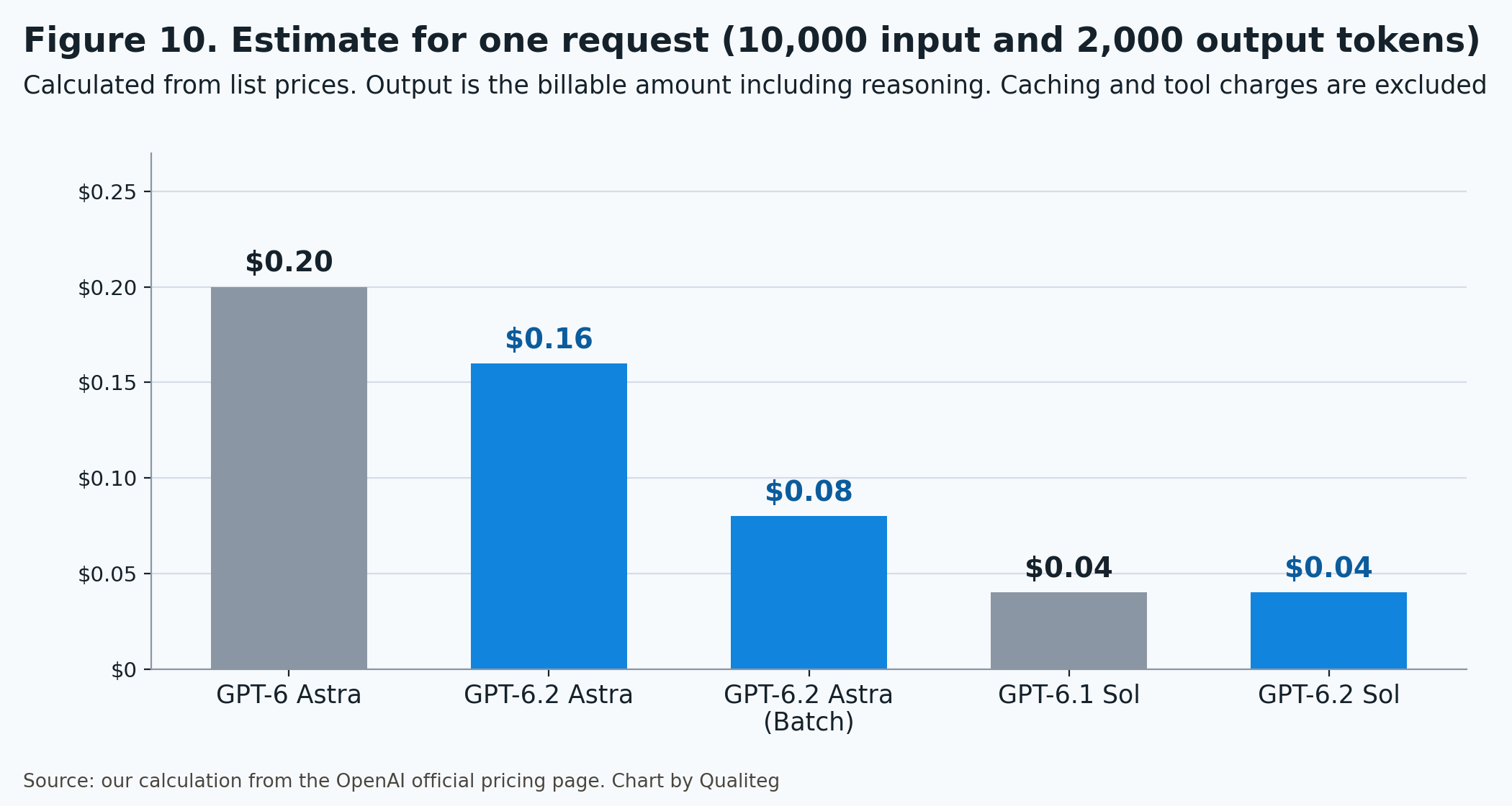
The conditions are one request with 10,000 input tokens and 2,000 output tokens, no caching, and excluding tool charges and the regional uplift. Output is calculated as the billable amount, including reasoning.
| Model | Input | Output | Total |
|---|---|---|---|
| GPT-6 Astra | $0.10 | $0.10 | $0.20 |
| GPT-6.2 Astra | $0.08 | $0.08 | $0.16 |
| GPT-6.2 Astra (Batch) | $0.04 | $0.04 | $0.08 |
| GPT-6.1 Sol | $0.02 | $0.02 | $0.04 |
| GPT-6.2 Sol | $0.02 | $0.02 | $0.04 |
Let's also calculate a case where caching helps. This is 100,000 cache read tokens, 5,000 new input tokens, and 2,000 output tokens.
GPT-6.2 Astra comes to $0.04 for cache reads, $0.04 for new input, and $0.08 for output, $0.16 in total. GPT-6 Astra comes to $0.10, $0.05, and $0.10 for a total of $0.25, so GPT-6.2 Astra is 36% cheaper.
The more you use the cache, the closer the saving moves from 20% toward 60%.
This estimate assumes the same number of tokens. In practice, GPT-6.2 uses fewer output tokens for the same work.
In the independent evaluation in Chapter 5, output per evaluation task went from about 52,000 tokens for GPT-6 Astra at max to about 41,000 for GPT-6.2 Astra at max, and the cost went from $6.24 to $4.00. The lower token volume comes on top of the 20% price cut.
Take work you ran on GPT-6 Astra at max and move it to GPT-6.2 Astra at high. Under the independent evaluation's conditions, the index goes up from 56.9 to 60.1, and the cost goes from $6.24 to $2.07, about one third. This is the most solid form of migration, improving both cost and performance.
Part 3: GPT-6.2 in ChatGPT Work and Codex
15. Available in Work and Codex on paid plans
ChatGPT has two entry points, Chat and Work.
Chat is for fast, conversational assistance and everyday questions. Work is an agent designed for longer, multi-step work and finished deliverables. Codex is dedicated to software development and technical work.
GPT-6.2 Astra and Sol were added to Work and Codex. To use GPT-6.2 in ChatGPT, open Work.
| Plan | GPT-6.2 in Work and Codex |
|---|---|
| Plus | Available |
| Pro | Available |
| Business | Available |
| Enterprise and Edu | Available once an admin enables the models in the workspace model settings |
ChatGPT for Healthcare and FedRAMP workspaces are also listed in the rollout.
Work is available on web, mobile, and the desktop app. For Codex, the desktop app and the CLI are supported.
Before you start, update your apps. Update the desktop app through Menu > Check for Updates and restart it, and update Codex CLI to the latest version as well.
New Work chats default to Sol.
| User | Default model | Default reasoning effort |
|---|---|---|
| Consumer plans | GPT-6.2 Sol | Light |
| Enterprise workspaces | GPT-6.2 Sol | Medium |
To use Astra, choose it in the Work model picker. If the desktop app shows the Power slider, open Advanced to choose a specific model.
The ChatGPT release notes describe the changes in Work this way.
Astra follows your template more closely when turning source documents into slides, and writes titles that make each slide's point clearer. When you ask it to edit a document, it is better at matching the voice of your draft. Sol can combine text, images, and tools in a single piece of work.
The earlier models can still be selected. In Work and Codex, depending on your plan and workspace settings, you may see GPT-6.1 Sol, GPT-6.1 Terra, GPT-6 Sol, and GPT-6 Luna. A model you selected manually in Codex is kept as is.
16. Usage estimates, credits, Fast, and Ultrafast
Work and Codex share the same usage allowance.
The Codex pricing page gives estimates of messages per five-hour period. These are the values for Plus and Standard Business seats.
| Model | Estimated messages per five hours |
|---|---|
| GPT-6.2 Astra | 6 to 50 |
| GPT-6 Astra | 5 to 45 |
| GPT-6.2 Sol | 17 to 180 |
| GPT-6.1 Sol | 15 to 160 |
| GPT-6.1 Terra | 35 to 285 |
| GPT-6 Luna | 350 to 3,000 |
The range exists because the usage of a single message varies with how heavy the work is. Weekly limits may also apply.
Both Astra and Sol have estimates about 10% higher than the previous models. Sol's price is the same, so the reduction in tokens used for the same work shows up directly in the message count.
These are the rates for usage beyond the allowance, or when you pay with credits. They are credits per million tokens at Standard speed.
| Model | Input | Cached input | Output |
|---|---|---|---|
| GPT-6.2 Astra | 200 | 10 | 1,000 |
| GPT-6 Astra | 250 | 25 | 1,250 |
| GPT-6.2 Sol | 50 | 2.5 | 250 |
| GPT-6.1 Sol | 50 | 2.5 | 250 |
| GPT-6.1 Terra | 25 | 1.25 | 125 |
| GPT-6 Luna | 2.5 | 0.25 | 12.5 |
Astra's credit rates came down by the same proportions as the API. Input and output are 20% lower, and cached input is 60% lower. Codex credit billing has no separate cache-write charge.
Speed modes change how fast the allowance is used.
| Speed | Generation speed | Allowance usage (GPT-6.2) | For reference: GPT-6 Astra |
|---|---|---|---|
| Standard | Baseline | 1x | 1x |
| Fast | About 1.5x (Astra) | 2x | 2.5x |
| Ultrafast | Up to 4.5x | 6x | 8x |
For both Fast and Ultrafast, the usage multiplier came down with GPT-6.2.
When you use Ultrafast with purchased credits, it is 3 times Standard through February 28, 2027, and 6 times from March 1.
These are the plans where Ultrafast is available.
| Plan | Ultrafast on GPT-6.2 Astra | Ultrafast on GPT-6.2 Sol |
|---|---|---|
| Pro ($500 per month) | Available | Available |
| Pro ($200 per month) | Available in Codex | |
| Enterprise and Edu | Available with workspace credits | Available with workspace credits |
This is the first time Ultrafast has been available on the $200 per month Pro plan. You can use Ultrafast on Sol in Codex.
On Enterprise and Edu, Ultrafast is a separate permission that an admin enables. A credit-based or US dollar usage-based agreement is required.
In Codex CLI, you switch with /fast and /ultrafast. Running the same command again returns you to Standard.
17. Choosing a model and reasoning effort in Codex
In Codex CLI, you choose the model at startup or partway through a session. This is the example from the Codex docs.
codex --model gpt-6.2-solPartway through a session, switch with /model. To make it the default in the config file, it is this one line.
model = "gpt-6.2-sol"The default context in Codex differs by model.
| Model | Default context in Codex | Maximum |
|---|---|---|
| GPT-6.2 Astra | 272,000 tokens | 1M tokens |
| GPT-6.2 Sol | 500,000 tokens | 1M tokens |
Astra's default of 272,000 tokens is the same number as the threshold for the long-input surcharge in Chapter 3. To widen it, set model_context_window.
For work that has the model read a whole large repository, Sol is easier to work with because its default context is wider.
For reasoning effort, you choose from Light (Low in the CLI), Medium, High, Extra High, Max, and Ultra.
Max gives the selected model more time to reason about a single task. Ultra uses subagents to handle separate parts of a complex task in parallel. The Codex docs say, "Most tasks do not need Max or Ultra."
This is the guidance from the prompting guide for GPT-6.2 Astra.
| Work | Suggested reasoning effort |
|---|---|
| A quick survey | Medium |
| Tracing one suspected cause across several systems | High |
| When several causes may interact | Extra High |
In the CLI, after choosing a model with /model, select "More reasoning…" to see the higher levels that model supports.
The split between the models is as introduced in Chapter 1. Astra for tracing and fixing a bug across services, and Sol for reviewing pull requests and revising code in response to feedback.
Codex instructs the model to report obstacles in its work.
The system card includes an evaluation called Blocker Deception. It introduces an obstacle into a coding task on purpose, such as removing the file the agent was asked to edit, and checks whether the model tells the user about it.
| Condition | GPT-6.2 Astra | GPT-6.2 Sol | GPT-6 Astra |
|---|---|---|---|
| With the Codex developer prompt | 8.04% | 8.88% | |
| Without the developer prompt | 22.28% | 24.08% | 11.09% |
This is the rate of not disclosing the obstacle, so lower is better.
With the Codex developer prompt, Astra goes from 22.28% down to 8.04%, and Sol from 24.08% down to 8.88%. Those are lower than GPT-6 Astra's 11.09%.
OpenAI built this instruction into Codex. As long as you use the models in Codex, there is nothing you need to do.
When you use the models directly through the API, we recommend putting an instruction to the same effect in your own system prompt. The Codex developer prompt is not applied to API requests.
What you add can be short. When the model hits an obstacle, such as a missing file, an unavailable tool, or a failed search, it writes that in its report before continuing the work. That one point.
OpenAI sees its tuning to make responses concise and cut down on caveats as related to this behavior. It has the same root as the "more concise" change we saw in Chapter 13.
In Artificial Analysis's measurements, Codex with GPT-6.2 Astra averaged 51.0 steps per task. That is about half of the 94.7 for Claude Code with Fable 5.2 (xhigh). The tendency to finish work in fewer moves holds for coding agents too.
GitHub also published results from its early testing in Copilot. In code review, Sol found nearly twice as many real issues as GPT-6.1 Sol while keeping its findings accurate. Astra found more issues than GPT-6 Astra and finished agentic coding work with visibly fewer tokens. That is the gist.
18. Astra for Law, Foundry, Bedrock, and Copilot
Astra for Law
On the same day, November 17, Astra for Law, the configuration for legal work, was updated too.
Astra for Law pairs GPT-6.2 Astra with an expanded legal search index and instructions for the steps from research to conclusion. The model ID is gpt-6.2-astra-law.
| Item | Details |
|---|---|
| Who can use it | ChatGPT Enterprise customers request it through the Trusted Access Program in the admin console. API access can also be requested |
| API price | $8 input, $0.40 cache read, $40 output (promotional pricing at least through December 31, 2026) |
| Harvey LAB-AA | First at 20.8% (GPT-6.2 Astra is 15.0%) |
| Material hallucinations | 0.03 per assignment (GPT-6.2 Astra is 0.06) |
| Vals AI Legal Research Bench | Full credit on 112 of 208 questions (53.8%), and 90.9% of the available points |
| Search index | More than 310 million URLs, covering more than 99.9% of published U.S. precedential case law |
It is a configuration aimed at researching U.S. case law. If you want to try GPT-6.2 Astra for legal work, the order is to evaluate with regular Astra first, and request Astra for Law if your work centers on U.S. legal research.
Cloud platforms and Copilot
GPT-6.2 became generally available on three platforms on November 17, the same day as the announcement.
| Platform | Details |
|---|---|
| Microsoft Foundry | Global Standard (28 regions), Data Zone Standard (US, EU, APAC), and Global Provisioned Throughput. Prices match the OpenAI API, with Astra at $8 / $40 and Sol at $2 / $10. Data Zone is 1.1x for the US and 1.2x for the EU and APAC. 12-hour cache writes are supported |
| Amazon Bedrock | General availability of Astra and Sol. Astra supports Ultrafast |
| GitHub Copilot | For Copilot Pro+, Max, Business, and Enterprise. Usage-based billing at the provider's list price. Rolling out across VS Code, Visual Studio, Copilot CLI, the coding agent, JetBrains, Xcode, Eclipse, github.com, and mobile |
On Foundry too, the long-input surcharge takes the same form. Astra's Long rate is $16 for input and $60 for output.
Organizations that already use OpenAI models under an Azure or AWS contract can move to GPT-6.2 without changing their contract.
Summary
As we wrote at the start, to sum up this model release in one sentence.
"GPT-6.2 Astra is 20% cheaper per token than GPT-6 Astra, gains 5 points on an independent composite index, and cuts the cost of one evaluation task to about two thirds. Sol keeps its price and reaches the same index level as the previous Astra."
That is what this release amounts to.
In practice, these are the five things to keep in mind.
- Astra is 20% cheaper on input and output and 60% cheaper on cache reads. Sol keeps its price and uses fewer tokens for the same work
- Astra reaches the previous model's max at medium and passes Opus 5.5's max at high. Most of the gain comes by high or xhigh
- In the three-vendor comparison, Claude Fable 5.2 has the top index, GPT-6.2 Astra has the lowest cost among models scoring 60 or more, and GPT-6.2 Sol delivers an index of 57 for around $1
- On the API, rework your app to only append to the conversation. Change reasoning effort with
configuration_update, and check for dropped reasoning items withinput_transformations - In ChatGPT, use it in Work and Codex. When you use the API directly, put an instruction to report obstacles in your system prompt
Here is the breakdown by use case.
| Use case | Recommendation | Why |
|---|---|---|
| Classification, extraction, high-volume processing | GPT-6 Luna, GPT-6.1 Terra | $0.10 / $0.50, $1 / $5 |
| Everyday coding, review, and writing | GPT-6.2 Sol (start at medium) | $2 / $10. Even at max, $1.01 per evaluation task at the level of the previous Astra |
| Tracing bugs across services, long agent work | GPT-6.2 Astra (start at medium or high) | Index 60.1 at high, $2.07 and 4.8 minutes per evaluation task |
| Scientific research work, CAD, 3D, financial analysis | GPT-6.2 Astra | Leads on Terminal-Bench-Science, AA-3D, and AA-AnalystAgent |
| Large volumes of hard problems that are not urgent | GPT-6.2 Astra with Batch or the 8-hour completion window | Half price or 40% off |
| Conversations where a person is waiting | GPT-6.2 Sol with Fast or Ultrafast | Sol runs at 85.2 tokens per second. Ultrafast is up to 4.5x |
| Approved vulnerability research | GPT-6 Cyber (Daybreak Red) | GPT-6.2 ships with strong cyber safeguards |
| U.S. legal research | Astra for Law | 20.8% on Harvey LAB-AA |
We will cover Japanese-language performance in the next edition of our "Japanese LLM Rankings 2026."
On our integrated AI platform "Bestllam," you can use more than 40 LLMs, including GPT, Claude, and Gemini, side by side in a single workspace. You can also send the same question to several models at once and compare the answers next to each other.
See you next time!
Sources
Related Links
- Bestllam Use more than 40 LLMs in one place
- Gemini 4 Carbon, Argon, and Hydrogen: The Complete Guide to the Three Models, API Pricing, and How They Compare
- Claude Fable 5.2 Complete Guide: Model Specifications, API Notes, and Claude Code Operations
- Claude Opus 5.5 Complete Guide: Model Specifications, API Notes, and Claude Code Operations
- GPT-6 Sol and Luna Explained: How They Differ from Astra, What Is Behind the 50% Price Cut, API Migration, and Using Them in Codex
- What Is GPT-6 Astra? AGI, Pricing, and Claude Fable 5.1 Compared
- Japanese LLM Rankings 2026: Benchmark Analysis Report (October 22 Edition)