Ubuntu's Automatic Updates Bumped the Kernel Alone, and the GPU Vanished After a Reboot: Why the NVIDIA Module Gets Left Behind, and Three Ways to Prevent It
Reboot an Ubuntu 24.04 GPU server and nvidia-smi stops working. The cause: unattended-upgrades updated the kernel alone and skipped the NVIDIA module over a dependency it could not resolve. How we traced it in the logs, recovered with one install, and compared three fixes including apt-mark hold.

Hello!
You reboot an Ubuntu GPU server, and nvidia-smi no longer works. modprobe nvidia says "Module nvidia not found". Two GPUs that were perfectly visible yesterday are gone, and all you did was reboot.
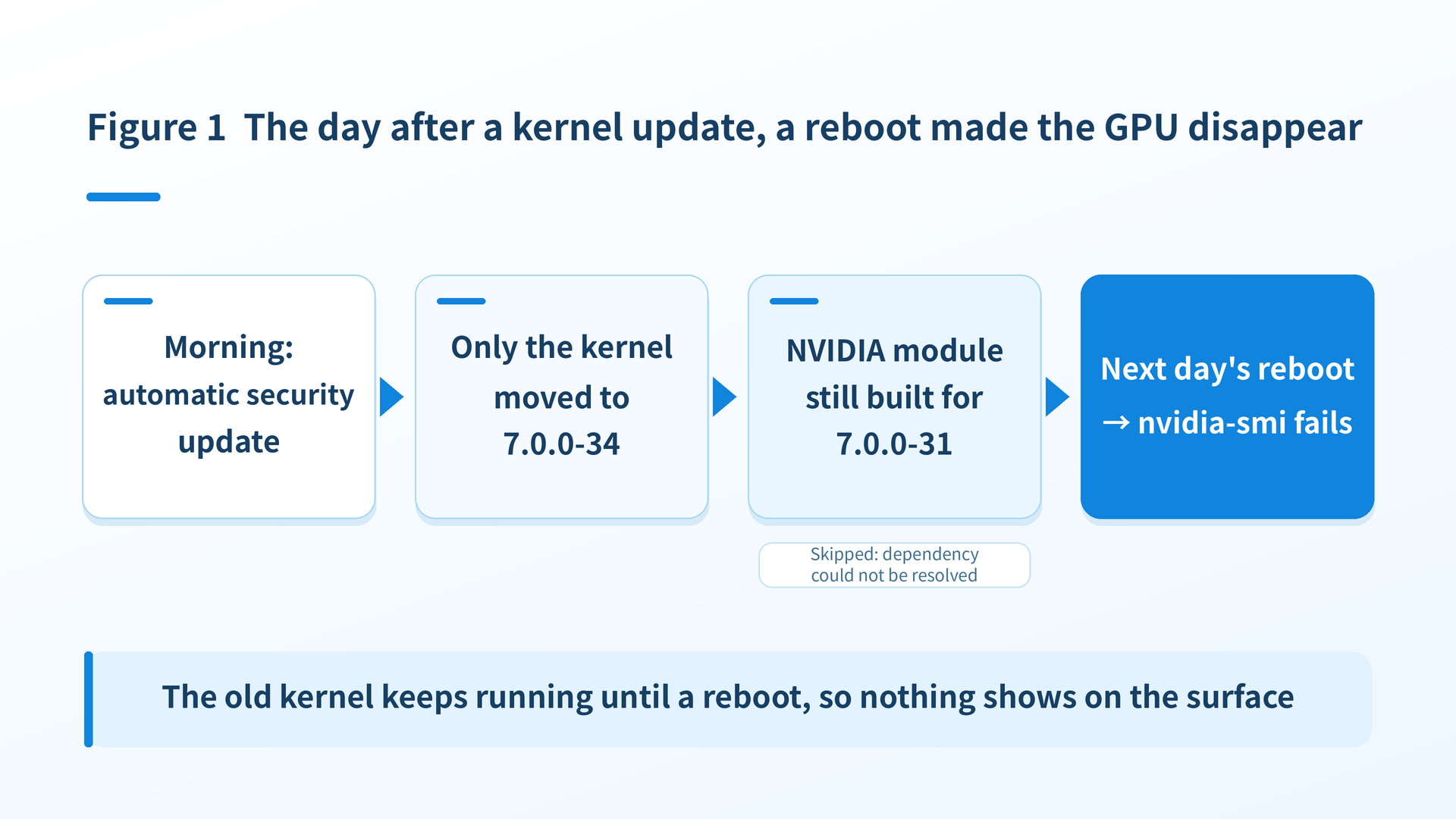
This happened recently on one of our in-house GPU machines (Ubuntu 24.04.4 LTS, two RTX A5000 cards). The short version: the culprit was Ubuntu's automatic security updates (unattended-upgrades). Only the kernel was bumped to a new version, the NVIDIA module for that kernel was left behind, and the machine was rebooted in that state.
In this article I walk through the whole thing with excerpts from the actual logs: confirming the symptom, pinning down the cause, recovering on the spot, and comparing three ways to keep it from happening again, including which one we chose. This is for people who install Ubuntu's own NVIDIA driver packages (the nvidia-driver-5xx family) with apt. If you use NVIDIA's official .run installer, the mechanics are different and out of scope here.
1. The symptom: a plain reboot makes the GPU disappear
Nothing was wrong before the reboot. We power-cycled the machine as a startup test before putting a GPU worker on it, and the driver did not come up.
$ sudo modprobe nvidia
Module nvidia not found in /lib/modules/7.0.0-34-generic
The thing to look at here is the directory name. /lib/modules/7.0.0-34-generic. The running kernel is 7.0.0-34. According to our records, this machine was set up on 7.0.0-28 and had since moved through -29, -30, and -31 via automatic updates. -34 was new. When did it arrive?
$ uname -r
7.0.0-34-generic

$ ls /lib/modules/
7.0.0-28-generic  7.0.0-29-generic  7.0.0-30-generic  7.0.0-31-generic  7.0.0-34-generic  kernel
Kernel -34 is installed and is the one being booted. But -34's module directory has no NVIDIA module in it. The previous kernel, -31, does.
$ ls /lib/modules/7.0.0-31-generic/kernel/ | grep nvidia
nvidia-595-open
Run the same command against -34 at this point and nothing comes back. That is exactly what the modprobe error is telling you (after recovery, -34 also shows nvidia-595-open).
As for why ls /lib/modules/ still lists directories for older versions: removing a kernel package leaves the index files behind. -28 through -30 had already been removed by automatic updates, both the kernel itself (linux-image-7.0.0-XX-generic) and the NVIDIA module (linux-modules-nvidia-595-open-7.0.0-XX-generic), and dpkg -l shows both as rc (package removed, only configuration files remaining). The kernels actually installed at this point were the two that dpkg -l lists as ii: -31 and -34.
That explains the symptom. The kernel is new, but the NVIDIA module for that kernel is not installed.
2. Ubuntu's NVIDIA driver works as a kernel-and-module pair
Before getting into the cause, let's start with the basics.
Ubuntu's own NVIDIA driver is made of two large parts. One is the user-space set headed by nvidia-driver-595-open (libraries, utilities, nvidia-smi, and so on). The other is the kernel module, which comes as linux-modules-nvidia-595-open-7.0.0-34-generic, that is, a separate package for each kernel version. The kernel module is built specifically for that kernel, so when the kernel moves to -34, you need the module package for -34.
The metapackage that automatically tracks these per-version modules is linux-modules-nvidia-595-open-generic-hwe-24.04. The kernel side has a metapackage with the same role, linux-image-generic-hwe-24.04, and normally these two are updated together, so a new kernel and its new module arrive as a pair.
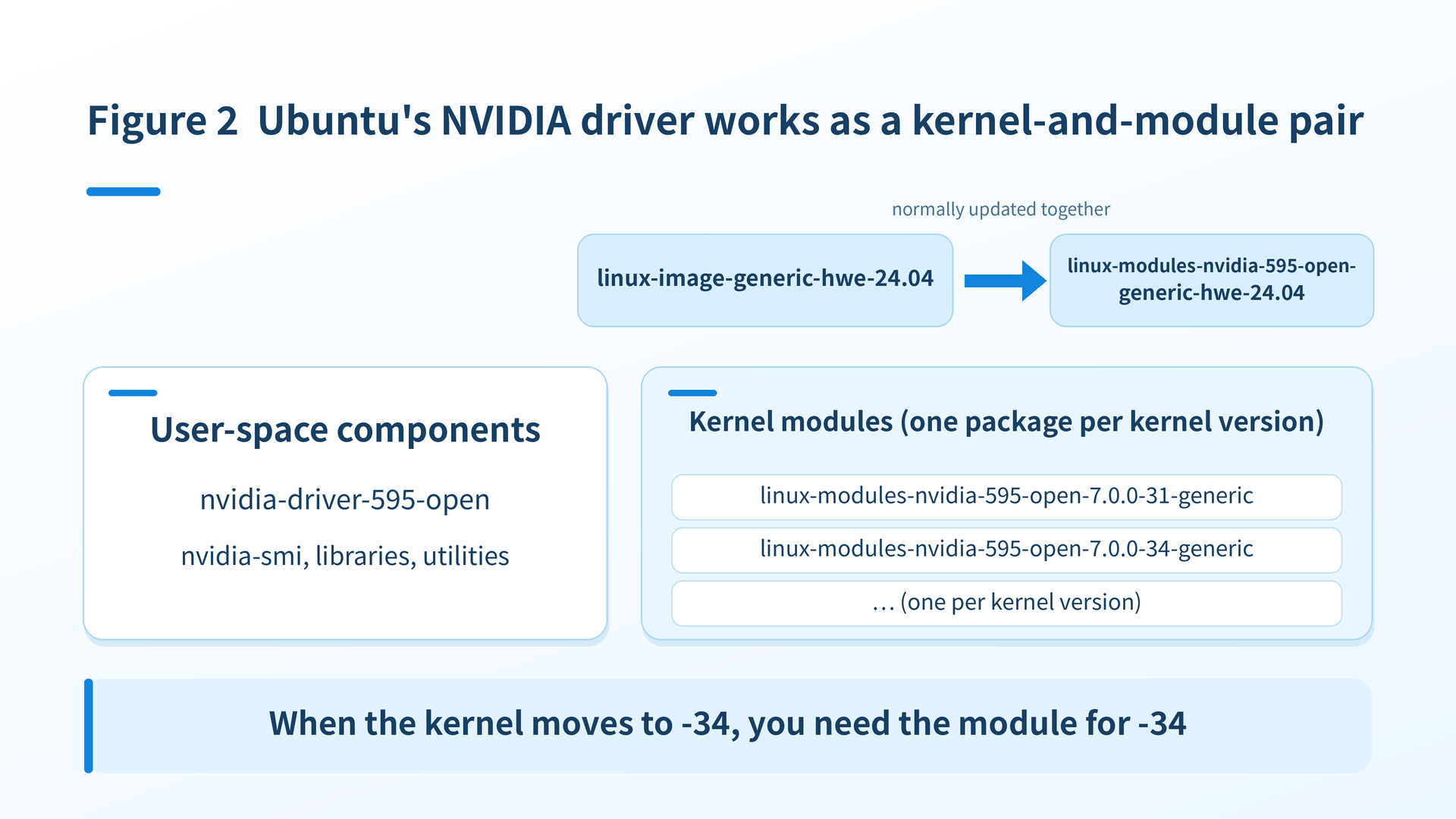
This time, the pair broke.
3. The cause: automatic updates bumped the kernel and skipped the module
Everything that was installed, and when, is in /var/log/dpkg.log. Here are the install times of the kernel and the module for the last four automatic update runs (dates omitted, times only).
# three runs ago
06:50:26 install linux-image-7.0.0-29-generic
06:50:42 install linux-modules-nvidia-595-open-7.0.0-29-generic
# two runs ago
06:18:15 install linux-image-7.0.0-30-generic
06:18:31 install linux-modules-nvidia-595-open-7.0.0-30-generic
# previous run
06:08:41 install linux-image-7.0.0-31-generic
06:08:41 install linux-modules-nvidia-595-open-7.0.0-31-generic
# this run
06:41:57 install linux-image-7.0.0-34-generic
(the module for -34 was not installed here)-29, -30, and -31, the kernel and the module were installed together within the same minute. -34 is the only one where the kernel came alone.
So what happened at 06:41 on the morning this update ran? Let's look at the unattended-upgrades log.
06:41:53 INFO Starting unattended upgrades script
06:41:53 INFO Allowed origins are: o=Ubuntu,a=noble, o=Ubuntu,a=noble-security, ...
06:41:55 WARNING package linux-modules-nvidia-595-open-generic-hwe-24.04 upgradable but fails to be marked
         for upgrade (E:Unable to correct problems, you have held broken packages.)
06:41:56 INFO Packages that will be upgraded: linux-generic-hwe-24.04 linux-headers-generic-hwe-24.04
         linux-image-generic-hwe-24.04 linux-libc-dev linux-tools-common
06:42:13 INFO All upgrades installed
06:42:23 INFO Package linux-modules-nvidia-595-open-generic-hwe-24.04 is kept back because
         a related package is kept back or due to local apt_preferences(5).
It says so plainly. The NVIDIA module metapackage is "upgradable but fails to be marked for upgrade" because its dependencies cannot be resolved, and then only the kernel metapackage is upgraded. From unattended-upgrades' point of view, the module cannot be installed, the kernel can, so it installed the one it could.
Why couldn't the module's dependencies be resolved? The package dependencies tell the story.
$ apt-cache show linux-modules-nvidia-595-open-7.0.0-34-generic | grep -E "^(Version|Depends)"
Version: 7.0.0-34.34~24.04.1+1
Depends: linux-image-7.0.0-34-generic | linux-image-unsigned-7.0.0-34-generic,
         nvidia-kernel-common-595 (<= 595.91.07-1), nvidia-kernel-common-595 (>= 595.91.07)

$ apt-cache policy nvidia-kernel-common-595
     595.91.07-0ubuntu0.24.04.1 500
        500 http://jp.archive.ubuntu.com/ubuntu noble-updates/multiverse amd64 Packages
     595.84-0ubuntu0.24.04.1 500
        500 http://security.ubuntu.com/ubuntu noble-security/multiverse amd64 Packages
This is the key point.
-34The NVIDIA module for nvidia-kernel-common-595 requires 595.91.07 or newer and 595.91.07-1 or older. But 595.91.07 exists only in noble-updates; noble-security goes no further than 595.84.
nvidia-kernel-common-595 is the shared kernel-side component of the driver suite, and it ships at the same version as the driver proper (nvidia-driver-595-open). This machine had 595.84, which could not satisfy the required 595.91.07.
That it was 595.84 is confirmed by the recovery entry in dpkg.log: upgrade nvidia-kernel-common-595 595.84-0ubuntu0.24.04.1 595.91.07-0ubuntu0.24.04.1. Kernel -34, on the other hand, was also published in noble-security.
$ apt-cache policy linux-image-7.0.0-34-generic
 *** 7.0.0-34.34~24.04.1 500
        500 http://jp.archive.ubuntu.com/ubuntu noble-updates/main amd64 Packages
        500 http://security.ubuntu.com/ubuntu noble-security/main amd64 Packages
        100 /var/lib/dpkg/status
Our GPU machines run with "install only security updates automatically" (close to the unattended-upgrades default). That is why noble-updates is absent from the "Allowed origins" line in the log. Kernel -34 was in noble-security, so it goes in. But the -34 module requires nvidia-kernel-common-595 595.91.07, which exists only in noble-updates, so the dependency cannot be satisfied within the allowed origins. Matching this machine's log against the dependencies, that appears to be what "fails to be marked for upgrade" means here. The result is that only the kernel moved forward.
Note that the E:Unable to correct problems, you have held broken packages. in the log is apt's generic message for a failed dependency resolution. The wording alone does not prove that the cause is "a dependency outside the allowed origins". In this case it is consistent with the fact that the candidate version of the dependency was not available from the allowed origins, and that is how I read it.
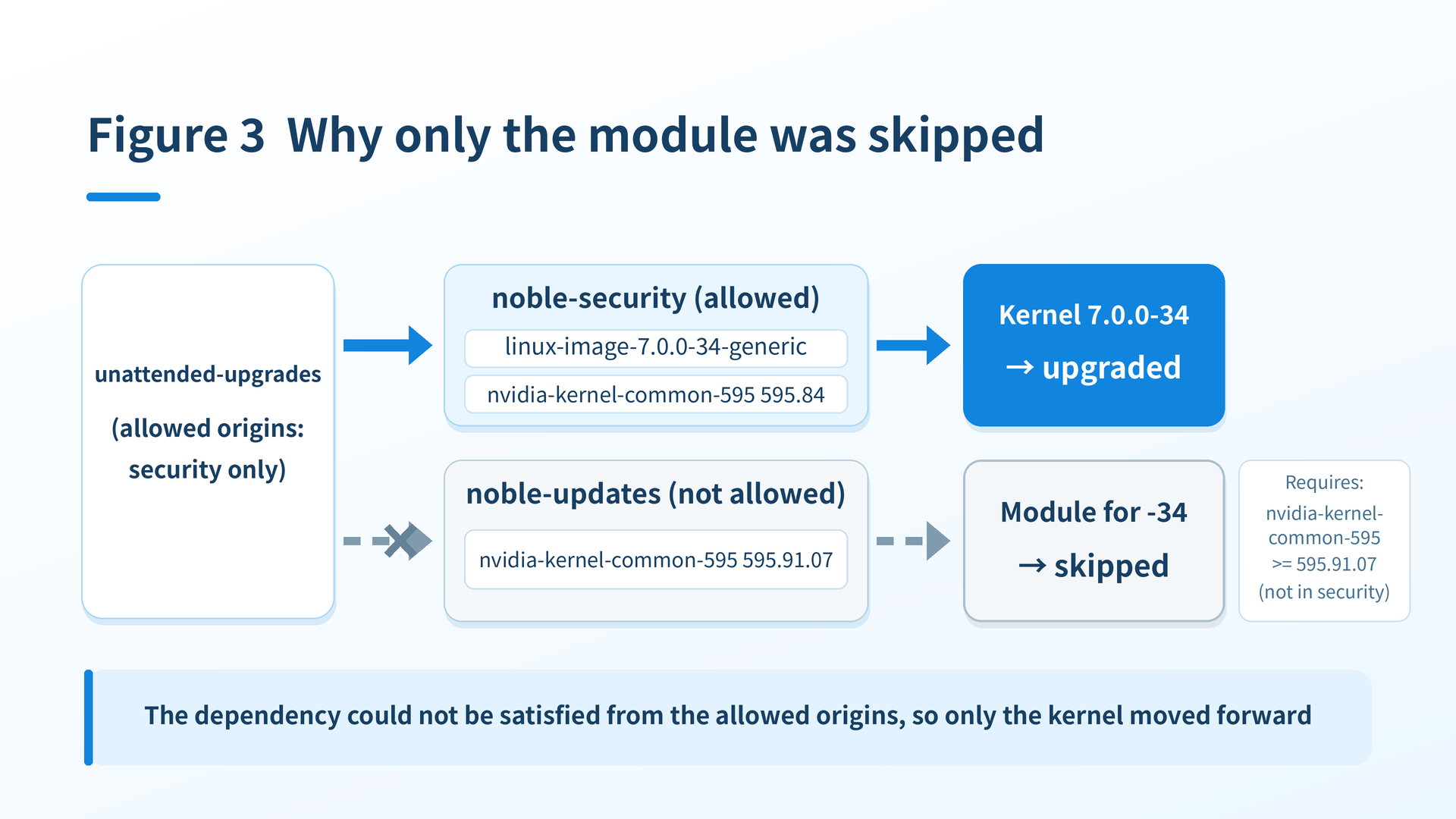
Putting it in order, the chain of events looks like this.
| Step | What happened | Where to confirm it |
|---|---|---|
| 1 | Kernel 7.0.0-34 was published as a security update | apt-cache policy linux-image-7.0.0-34-generic points at noble-security |
| 2 | The NVIDIA module for -34 was built to require nvidia-kernel-common-595 595.91.07 | The Depends line from apt-cache show |
| 3 | nvidia-kernel-common-595 595.91.07 exists only in noble-updates | apt-cache policy nvidia-kernel-common-595 |
| 4 | unattended-upgrades, allowed to use security only, skipped the module as "dependencies cannot be resolved" and upgraded the kernel alone | The WARNING and "Packages that will be upgraded" lines in unattended-upgrades.log |
| 5 | The old kernel keeps running until a reboot, so nothing shows on the surface | uname -r stays at -31 until the reboot |
| 6 | The next day's reboot brought up -34, and with no module the GPU disappeared | Module not found from modprobe nvidia |
For -29 through -31, by contrast, the module had been built to require nvidia-kernel-common-595 595.84, and 595.84 was available in noble-security, so the two could be installed together.-34 is the release where "the module rebuild became tied to a newer driver version", and that appears to be why it broke only this time. I have not found an official explanation of why the tie-in changed at that particular point (unconfirmed).
Incidentally, this machine does not have automatic reboots enabled (Automatic-Reboot "false"). That is deliberate, so that GPU jobs are never killed by a surprise reboot. This time it worked in the direction of "the kernel-only state does not show until a reboot". The setting itself is not wrong, but the machine kept running in a state where the GPU would vanish the moment it was next rebooted.
4. Recovery: install the missing module. No reboot was needed this time
Once the cause is known, recovery is not hard. Install the missing module metapackage by hand and load the module. A manual apt-get install is not bound by the allowed-origins restriction, so the driver suite including nvidia-kernel-common-595 moves up to 595.91.07 along with it.
$ sudo apt-get install linux-modules-nvidia-595-open-generic-hwe-24.04
(nvidia-driver-595-open and the rest of the driver suite go from 595.84 to 595.91.07,
  and linux-modules-nvidia-595-open-7.0.0-34-generic is newly installed)

$ sudo modprobe nvidia
$ nvidia-smi --query-gpu=name,driver_version --format=csv,noheader
NVIDIA RTX A5000, 595.91.07
NVIDIA RTX A5000, 595.91.07
This time the module loaded straight away with modprobe after it was installed, so the GPUs came back without a reboot. The incident itself was over in about ten minutes.
The real problem starts here. The same thing can happen at the next kernel update.
5. Two issues: the scope of automatic updates, and checking before a reboot
Breaking this incident down, there are two separate issues.
The first is that automatic updates are able to treat the kernel and the NVIDIA module separately. Two things that must move as a pair are allowed to be updated one at a time. That gap has to be closed somehow.
The second is that nobody checked, before rebooting, whether the kernel about to boot had an NVIDIA module. What automatic updates installed is not in the head of the person pressing the reboot button. Without a check in the procedure, no matter how good the countermeasure is, you will eventually fall into the same hole for some other reason.
The second issue is solved by adding one line to the procedure, which I cover later. For the first, there were three options.
6. Comparing three ways to prevent a recurrence
These are the three we considered.
| Option | What you do | Upside | Concern |
|---|---|---|---|
| (1) Take the kernel and the module out of automatic updates | Pin the kernel and module metapackages with apt-mark hold, and have a person upgrade them as a pair during maintenance | Closes the path where the two move separately. Predictable behavior. One line to set, reversible at any time | Kernel security updates stop too. Maintenance has to be scheduled so they are not forgotten |
| (2) Add noble-updates to the automatic update origins | Add noble-updates to the allowed origins of unattended-upgrades so the driver the module depends on is installed automatically too | Keeps tracking with no manual work. Given the candidate versions and dependencies at the time, this very likely would have prevented the incident | Widens what automatic updates touch, so more changes happen without you. Does not help if the module is published later than the kernel |
| (3) Switch to DKMS | Use nvidia-dkms-595-open so the module is built on the machine whenever a new kernel is installed | No longer depends on when Ubuntu publishes prebuilt modules | Changes how the driver is installed, so it needs migration work and re-verification. With Secure Boot enabled, module signing and key enrollment are required too. Build failures are a separate risk |
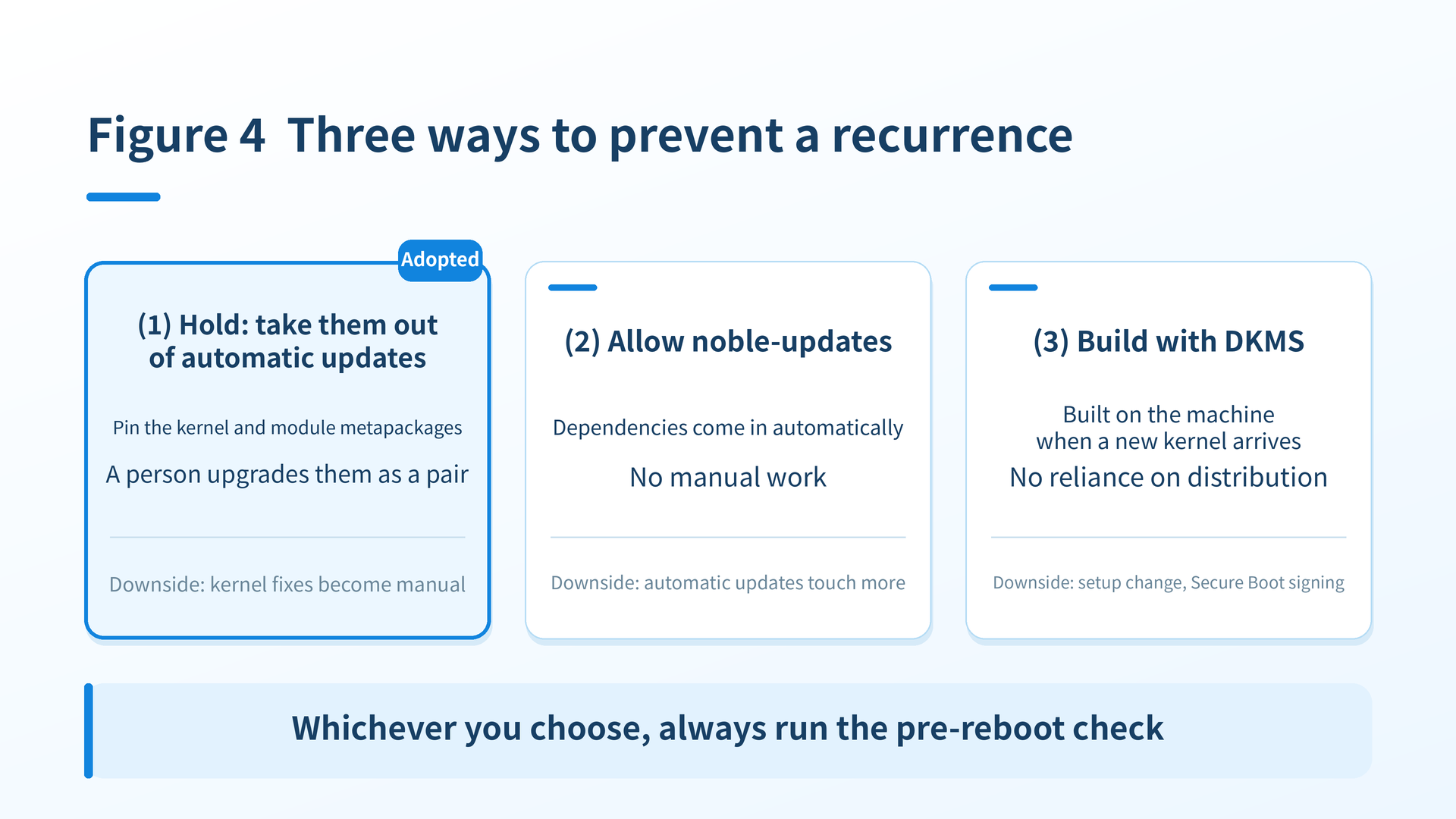
Let me dig into each one a little further.
The point of (1) is buying a state where you know what will happen
A hold is a mark that tells apt not to upgrade that package. unattended-upgrades respects holds, so if you mark both the kernel metapackage and the module metapackage, neither moves on its own. When you do upgrade, a person upgrades both together, which closes the path where only one side moves ahead, as happened this time. Keep in mind that what gets pinned is these two metapackages; this is not a blanket freeze of every kernel- or NVIDIA-related package.
The trade-off is that kernel security updates no longer arrive automatically. Whether that matters depends on the machine. For a server directly exposed to the internet it is a serious minus. Our GPU machines sit on an internal LAN and cannot be reached from outside, so we judged the impact to be small. Every other update still comes in automatically as before.
The point of (2) is whether to widen the scope of automatic updates
For this particular case, if noble-updates had been allowed, nvidia-kernel-common-595 595.91.07 would have been a candidate too, and the module would very likely have gone in with it. In that sense it is the most direct answer to the cause.
But allowing noble-updates widens automatic updates to non-security changes as well (libraries, tools, the whole driver suite). On a GPU server, drivers and libraries changing without your knowledge is its own source of trouble. And this approach still does not cover the pattern where the kernel is published first and the module follows days later. It would have been fine this time only because both happened to be published together; it is not a mechanism that structurally guarantees the pair.
The point of (3) is building it yourself instead of relying on distribution
DKMS builds the module from source on the machine whenever a new kernel is installed. It stops depending on when Ubuntu publishes prebuilt modules, so it tracks kernel updates best of the three.
On the other hand, it means migrating from the linux-modules-nvidia family currently installed to the nvidia-dkms family. Changing the driver setup also calls for verification that involves reboots. Building needs headers and a compiler, and a kernel change breaking the build is not a zero risk. On top of that, with Secure Boot enabled you have to sign the locally built module and enroll a key (MOK enrollment). This machine has Secure Boot enabled (mokutil --sb-state reports SecureBoot enabled) and is running on Ubuntu's signed prebuilt modules, so there was no reason to disturb that. For a machine in stable production, the surgery felt far too large for the problem being fixed.
7. We chose (1)
Two things drove the decision: for a GPU machine, staying up is the top priority, and it is not exposed to the outside. So we chose (1), where kernel updates happen as a pair, when a person intends them.
$ sudo apt-mark hold linux-image-generic-hwe-24.04 linux-modules-nvidia-595-open-generic-hwe-24.04

$ apt-mark showhold
containerd.io
docker-buildx-plugin
docker-ce
docker-ce-cli
docker-compose-plugin
linux-image-generic-hwe-24.04
linux-modules-nvidia-595-open-generic-hwe-24.04
The Docker packages were already on hold because our standard configuration pins their versions; that is unrelated to this story.
When a person upgrades the held metapackages, remove the holds, run a -s (simulation) first to see what would be upgraded, then upgrade both together and put the holds back. We do this alongside planned downtime or configuration changes on the machine. Even on an internal LAN, delayed kernel fixes are still a real trade-off, so it is on our maintenance checklist to keep the interval from growing too long.
$ sudo apt-mark unhold linux-image-generic-hwe-24.04 linux-modules-nvidia-595-open-generic-hwe-24.04
$ sudo apt-get update
$ sudo apt-get install -s linux-image-generic-hwe-24.04 linux-modules-nvidia-595-open-generic-hwe-24.04   # review what would be upgraded
$ sudo apt-get install linux-image-generic-hwe-24.04 linux-modules-nvidia-595-open-generic-hwe-24.04
$ sudo apt-mark hold linux-image-generic-hwe-24.04 linux-modules-nvidia-595-open-generic-hwe-24.04
Now for the second issue, the check before rebooting. We added this regardless of which option was chosen. There is exactly one thing to look at: whether the kernel that will boot next has an NVIDIA module in a loadable location.
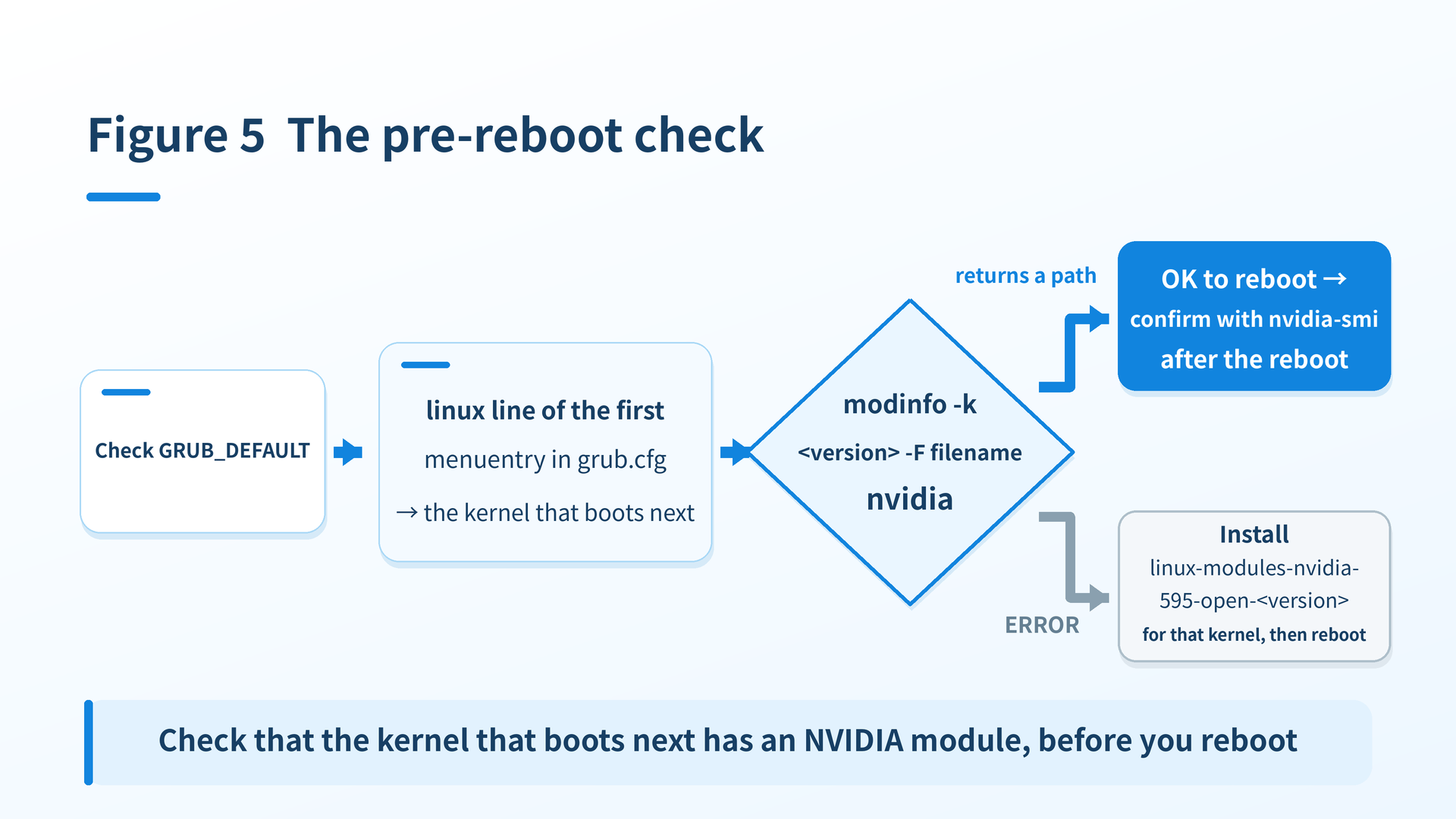
"The kernel that will boot next" is decided by GRUB's default entry. Ubuntu's default is GRUB_DEFAULT=0, which boots the first entry in the generated menu. To see which kernel the first entry points at, read the grub.cfg line in the first menuentry of linux. We do not use the "newest version on disk" approach, because there is no guarantee it matches the first entry.
$ grep ^GRUB_DEFAULT /etc/default/grub
GRUB_DEFAULT=0

$ sudo awk '/^menuentry/{c++} c==1 && /^[[:space:]]*linux[[:space:]]/ {print $2; exit}' /boot/grub/grub.cfg
/boot/vmlinuz-7.0.0-34-generic

$ target=7.0.0-34-generic          # take the version from the output above
$ modinfo -k "$target" -F filename nvidia
/lib/modules/7.0.0-34-generic/kernel/nvidia-595-open/nvidia.ko
GRUB_DEFAULT=saved to remember the last choice, use the entry that grub-editenv list's saved_entry points at. If a one-time boot entry has been set with grub-reboot, that takes precedence (it shows up in grub-editenv list as next_entry), so use that entry instead.
modinfo -k actually goes looking for the module for the specified kernel version. If it returns a path, that confirms the nvidia module for that kernel is where it should be. It does not guarantee the module will load, so the procedure runs through to nvidia-smi after the reboot. If the module is missing, you get this.
$ modinfo -k 7.0.0-28-generic -F filename nvidia
modinfo: ERROR: Module nvidia not found.
The -28 in this example is, as mentioned in section 1, a kernel whose image and NVIDIA module were both removed by automatic updates (both rc), leaving only index files in the directory. It is naturally missing because it was removed, but the appearance, "the directory exists yet the module does not", is the same as -34 was during the incident.
If you get ERROR, install the module package for that kernel version, linux-modules-nvidia-595-open-<target version>, and then reboot. If the target is the newest kernel, installing the HWE metapackage as in section 4 amounts to the same thing. After the reboot, confirm with nvidia-smi that the GPUs are visible. We made this check a mandatory step in the reboot procedure for our GPU machines.
If you would rather track new kernels automatically, there is also the combination of skipping the hold, choosing (2), and still always running the pre-reboot check. Whichever you choose, the pre-reboot check is the last line of defense.
Summary: before rebooting a GPU machine after a kernel update, check for the module first
Here is a table of where to look and what to do, by situation.
| Situation | Where to look | What to do |
|---|---|---|
nvidia-smi does not work after a reboot | The kernel version in the modprobe nvidia error, and ls /lib/modules/<version>/kernel/ | grep nvidia | If it is missing, install linux-modules-nvidia-<ver>-open-<kernel version> for that version (or the …-generic-hwe-24.04 metapackage if it is the newest kernel) and load it with modprobe nvidia |
| You want to know why only one side was upgraded | The WARNING and "Packages that will be upgraded" lines in /var/log/unattended-upgrades/unattended-upgrades.log | Match the Depends line from apt-cache show for the skipped package against apt-cache policy for its dependency. If the only candidates are outside the allowed origins, it is the same pattern as this incident |
| You are about to reboot | modinfo -k <version> -F filename nvidia against the kernel version that the linux line of the first menuentry in grub.cfg points at | Reboot only after it returns a path, and confirm with nvidia-smi after the reboot. On ERROR, install linux-modules-nvidia-595-open-<version> for that version |
Automatic updates are convenient, but it is worth keeping in the back of your mind that they can sometimes handle "things that work as a pair" one at a time. I hope this saves some time for anyone burning hours on the same symptom.
See you next time!
Sources and references
- unattended-upgrade(8) manual page (Ubuntu Manpage)
- Automatic security updates on Ubuntu (Ubuntu Community Help Wiki)
- apt-mark(8) manual page (Ubuntu Manpage)
- NVIDIA drivers installation guide for Ubuntu Server (Ubuntu official documentation)
Related articles
- Building a GPU PC, Part 17: Software – Installing the NVIDIA Display Driver on Ubuntu
- The "Unknown Error" Problem on Production PyTorch + CUDA Servers and How to Address It
- NCCL error: unhandled cuda error — Getting Stuck (and Unstuck) with WSL2 + Multi-GPU + vLLM
- Is That Workload Secretly Running on the CPU Instead of the GPU? — ONNX Runtime's cuDNN Warning and How to Fix It