
Why Did Enterprise Security Become So Complex? From the AD + Proxy Era to the Modern Cloud



Hello!
Now that generative AI services like ChatGPT and Claude are making their way into everyday work,
"the risk of sending confidential information to AI"
has emerged as a new security challenge.
As we grappled with this challenge, we found ourselves looking back at how enterprise security architecture has evolved over the years.
And a question came to mind.
"Wait—why did this get so complicated?"
If you are responsible for corporate security, you have probably wondered the same thing at least once.
Products with three- and four-letter acronyms multiply, each with subtly overlapping features; configuration grows ever more complex, and costs keep swelling.
We at Qualiteg offer AI security products, and we came to feel that understanding this history matters when thinking about security in the AI era as well.
In this article, we look back at how enterprise network security has evolved and try to make sense of "how we got here."
Chapter 1: The Era When Observation Points Could Be Consolidated — On-Prem AD + Proxy (Through the Early 2010s)
A Model That Was Easy to Control
Once upon a time, "controlling the internet egress" of a corporate network was comparatively simple.
Of course, various security products existed back then too: perimeter firewalls, IDS/IPS, mail gateways, antivirus, and so on.
But
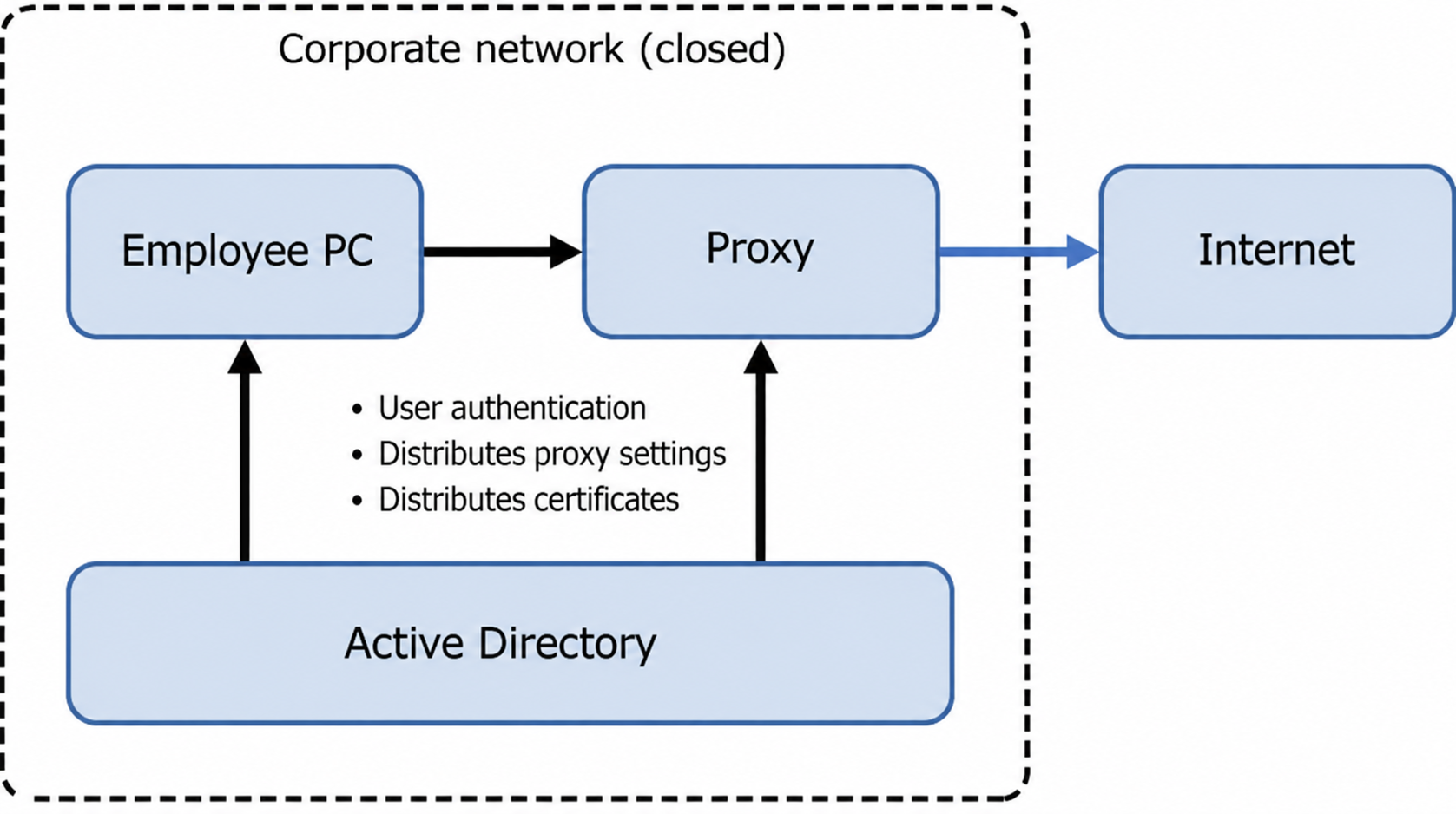
being able to consolidate all internet egress into the Proxy
made for a remarkably sound architecture from the standpoint of controlling web traffic.
As the figure above shows, at companies running Windows PCs, Active Directory (hereafter AD) centrally manages user authentication, certificate distribution, Proxy server settings, and more.
Why This Model Was Easy to Control
The reasons this model worked so well boil down to the following three points.
| Characteristic | Description |
|---|---|
| A single traffic path | The only route from an employee's PC to the internet was the Proxy. No other route physically existed |
| Integrated authentication | Integrated AD-Proxy authentication let the Proxy determine "whose traffic is this?" |
| Consolidated observation points | All traffic passed through the Proxy, so monitoring and control could be concentrated in one place |
On the single traffic path
The corporate network was designed as a "closed network."
The only exit to the internet was the Proxy server; communicating with the outside without going through the Proxy was, by construction, impossible.
On integrated authentication
Now consider user authentication.
With every user (logically) exiting to the internet through a single Proxy, the company could—if it chose to—see what its employees were communicating.
And companies running Windows PCs had a mechanism called Integrated Windows Authentication. Using it, the Proxy server could perform "user identification"—determining who was behind each connection.
That said, the Proxy can identify the user only when the Proxy demands authentication (Proxy-Auth) and can pin down the user via Kerberos/NTLM (Integrated Windows Authentication).
Having AD alone does not identify users automatically; it only works when the integrated authentication settings on both the Proxy side and the browser side mesh correctly.
In actual operation, getting this integrated authentication configured right was a quiet source of headaches.
But once configured correctly, users could be authenticated without having to do anything consciously.
Incidentally, AD is still very much in service at security-conscious large enterprises today, and we cover AD and AI-era security in this ongoing series.
On consolidated observation points
And when the two above came together, companies could grasp
"who", "when", and "what".
And if you wanted to implement DLP (Data Loss Prevention) for web traffic, the Proxy was the efficient place to do it—since everything interacting with the outside world passed through the Proxy anyway.
That said, the web is not the only way data leaves. Email, file servers, USB devices—multiple channels existed back then too, and DLP products monitor and track those as well. The Proxy was powerful, but it is worth recognizing that it was never all-powerful.
MITM as a Data Leakage Countermeasure
Now, in the modern era, most traffic is encrypted with HTTPS.
So how was the content of encrypted traffic inspected?
The answer is "SSL/TLS inspection"—in effect, a MITM (Man-in-the-Middle) mechanism.
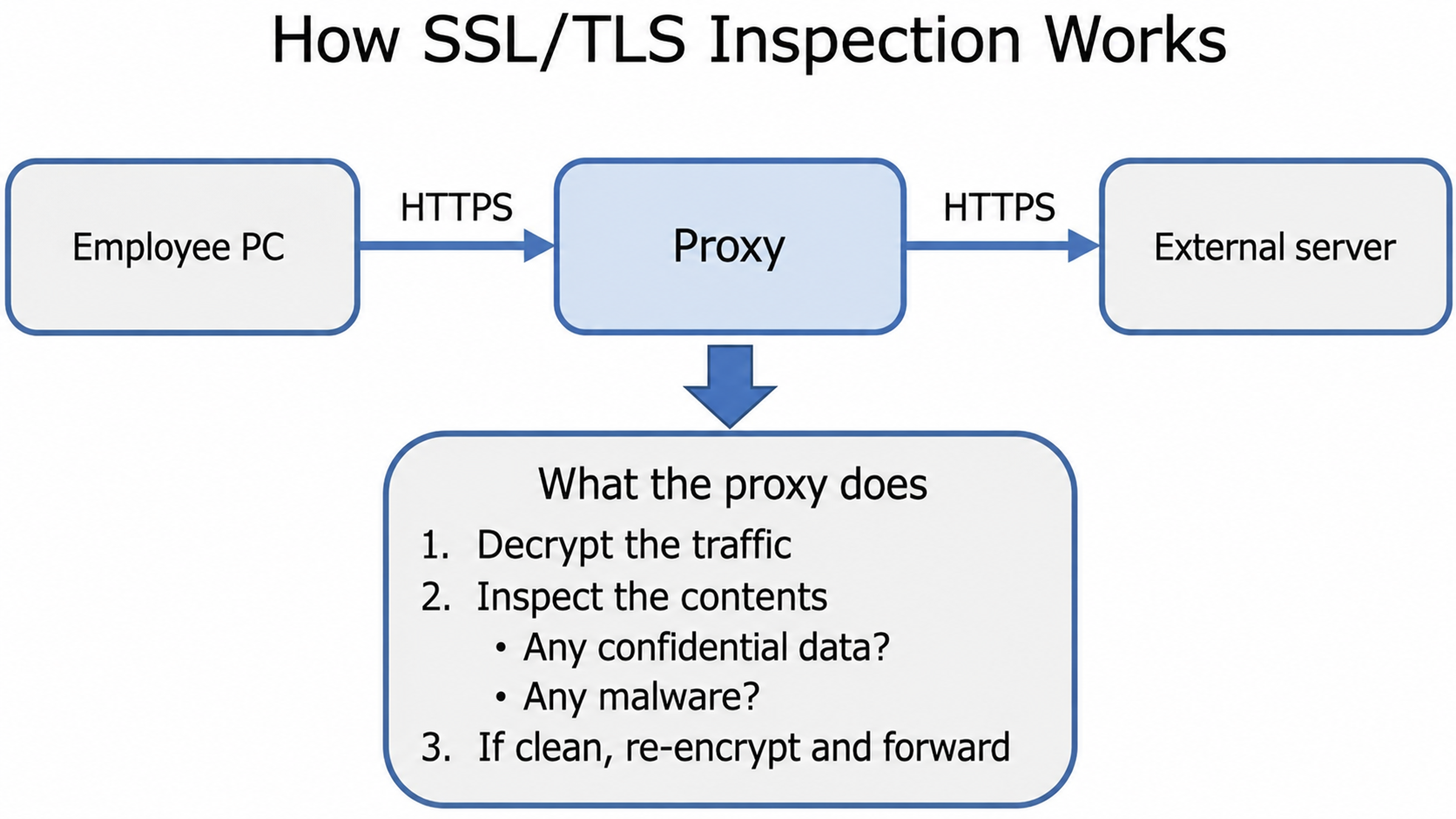
In other words, the Proxy temporarily decrypts the encrypted traffic and inspects it. If nothing is wrong, it passes the connection on to the internet side.
For this to work, the users' browsers must first trust the Proxy, which means installing the company's own root CA certificate (attesting "the in-house Proxy is not suspicious") on every employee's PC.
"Install a certificate on every employee's PC? Sounds tedious?" you may think—but that is exactly what AD is for.
In an AD domain environment, root certificates could be distributed automatically via Group Policy (GPO), which made control easy on this front as well.
What AD Distributed
AD was more than an authentication platform; it also served to push out all kinds of settings in bulk.
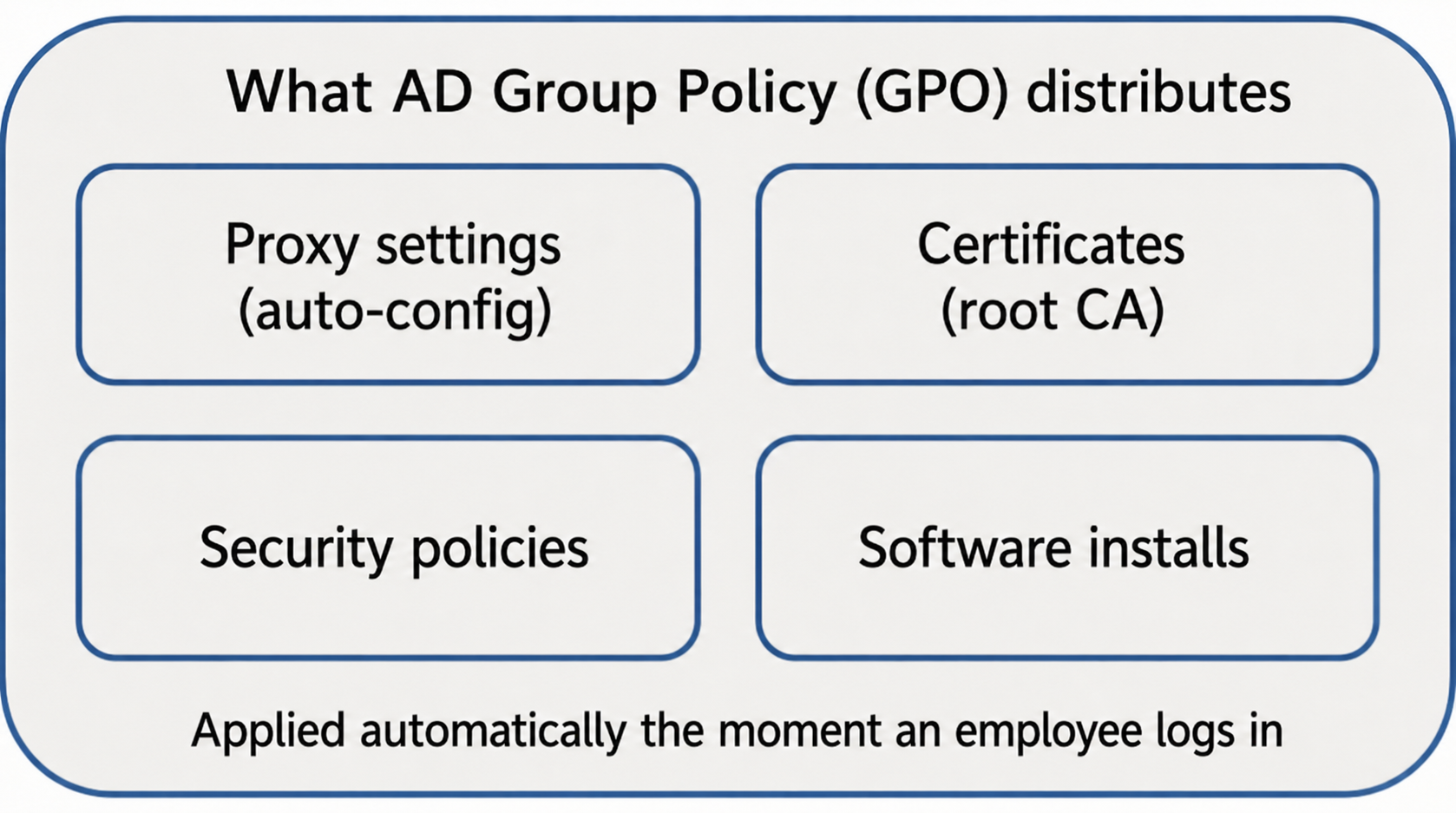
Employees never had to think about any of it. Just log in to the domain, and every necessary setting was applied automatically.
Proxy settings could be distributed too, so when you wanted to switch employees' PCs from an ordinary Proxy to a DLP Proxy, the change propagated automatically to every PC via AD. For those managing the workforce, AD made life very easy.
This Era in Summary
| Aspect | Assessment |
|---|---|
| Simplicity | ◎ Observation points consolidated; fault isolation relatively easy |
| Web traffic monitoring | ◎ Controllable via the Proxy |
| Cost | ◎ Centered on the AD server and Proxy server |
| Operational burden | ○ Config changes pushed in bulk via GPO (though integrated authentication settings need care) |
| Convenience | △ You could not work unless you were in the office |
"Security and convenience are a trade-off," as the saying goes—but this was, it is fair to say, an era in which
control came easily, because as long as everyone was inside the office, the observation points could be consolidated into one place
.
Chapter 2: The Beginning of Change — The Rise of Cloud and Mobile (Mid-2010s Onward)
A Changing Business Environment
From the mid-2010s, the environment surrounding companies changed dramatically.
Two changes stand out.
First, the age of cloud computing arrived: SaaS spread, and application after application moved to the cloud, used through the web.
Second, the iPhone ushered in the smartphone era, and with it the demand to work from anywhere on a phone.
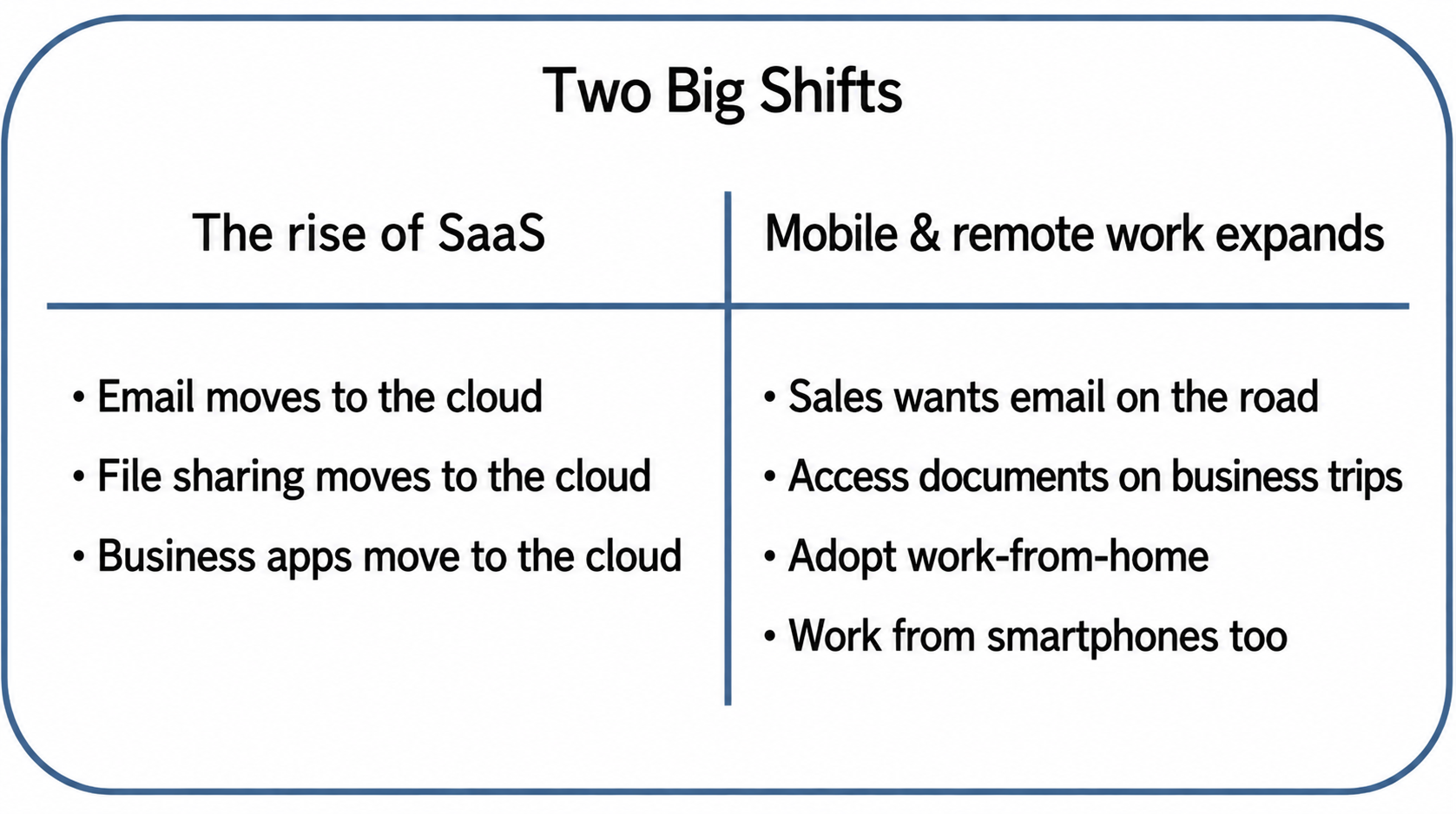
These changes began to erode the premise that "you cannot work unless you are physically on the corporate network."
The Limits of the Closed-Network Model
To work from outside under the traditional model, you had to connect to the corporate network using a VPN (Virtual Private Network).
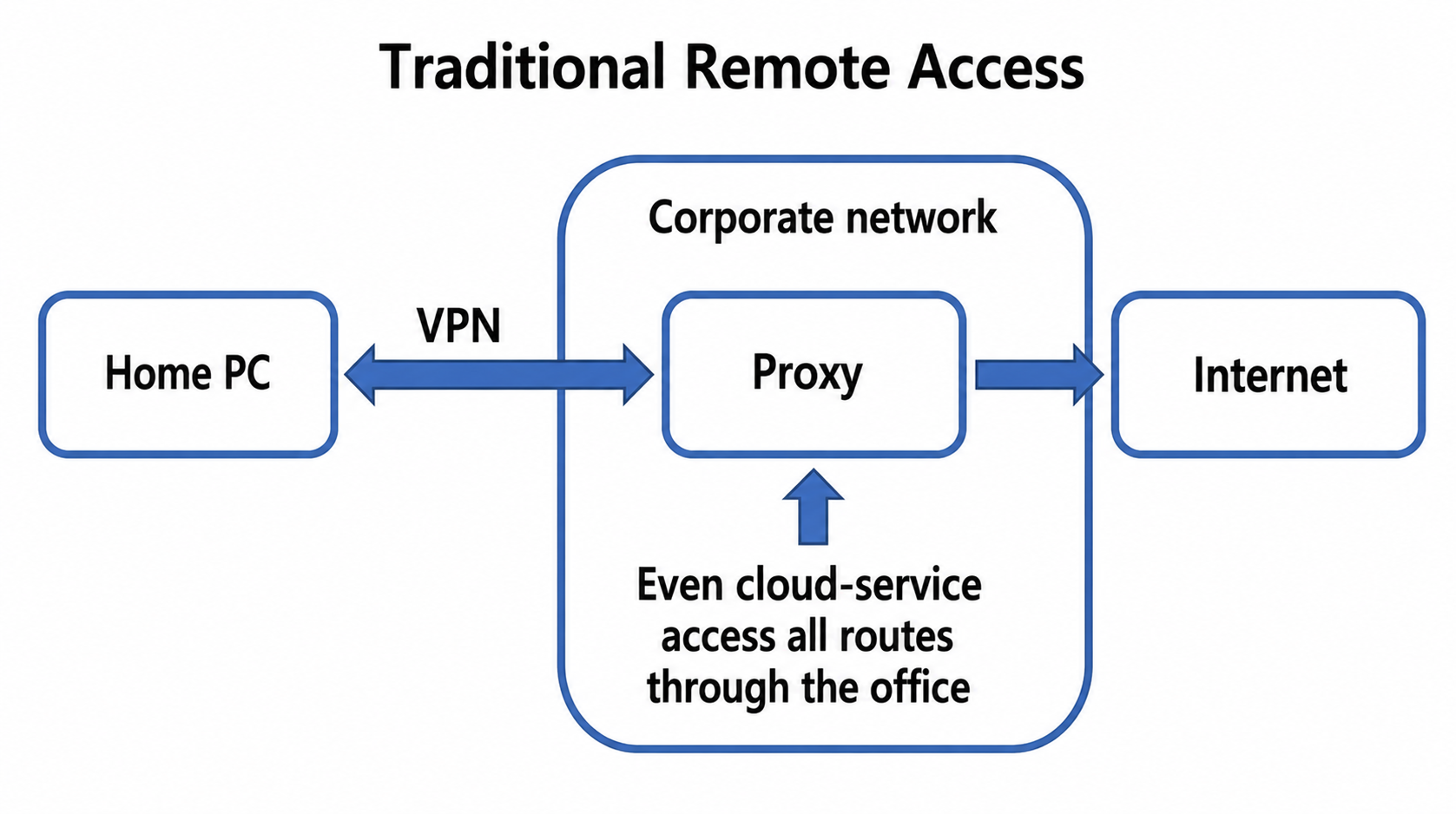
This approach had its own problems.
| Problem | Details |
|---|---|
| Bandwidth bottleneck | With everyone on VPN, the lines get congested |
| Inefficient routing | Traffic detours through the office just to reach a cloud service |
| Availability | If the VPN drops, work stops completely |
| Scalability | The model breaks down as remote workers multiply |
Remote access into the corporate network like this is still common today, but as cloud service usage grew, the inefficiency of
"accessing the cloud via the office network even though you are not in the office"
became increasingly conspicuous.
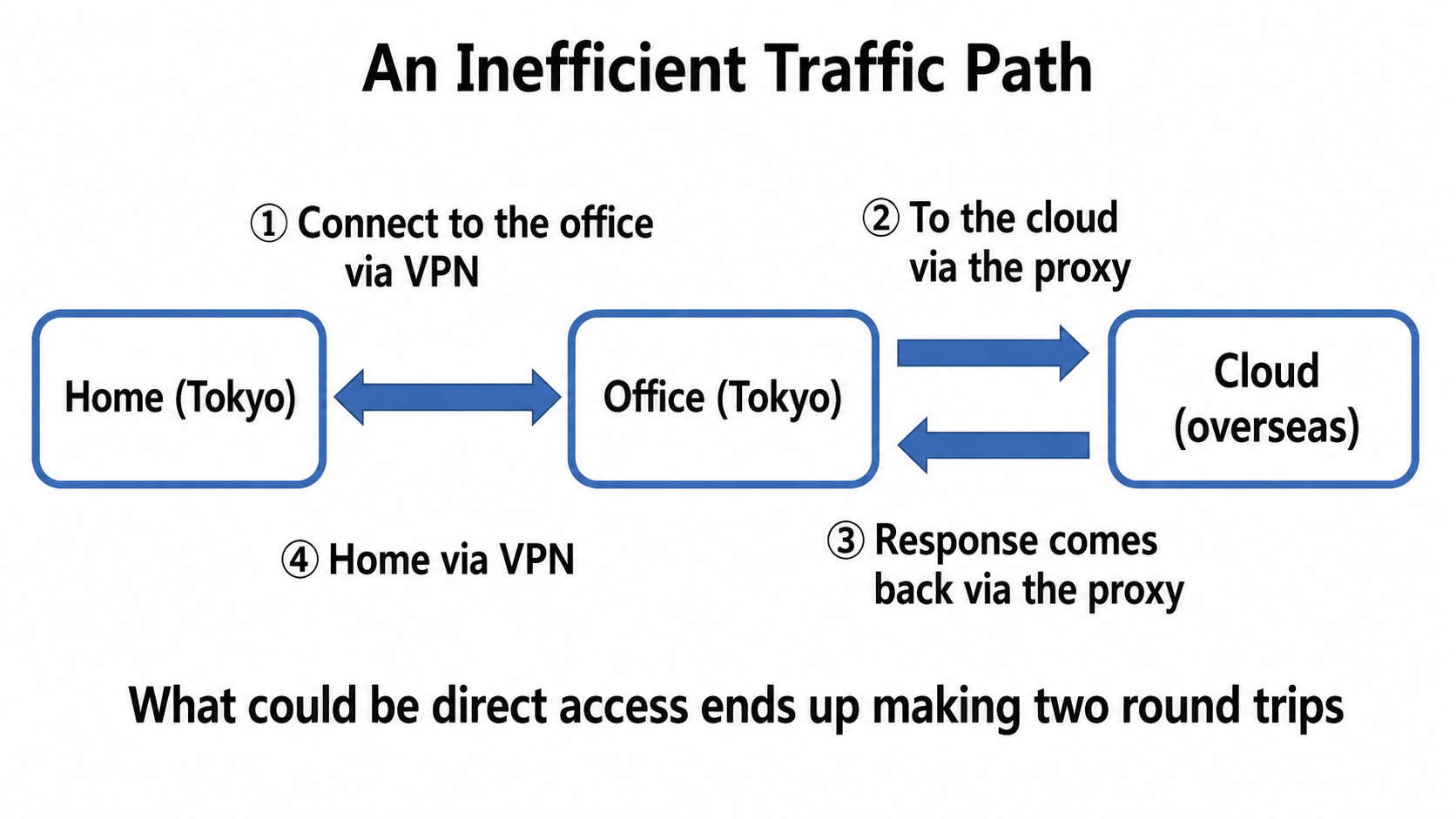
Wanting to eliminate this inefficiency in a smarter way,
companies began exploring new approaches.
Chapter 3: The Arrival of Cloud Identity Platforms (Late 2010s Onward)
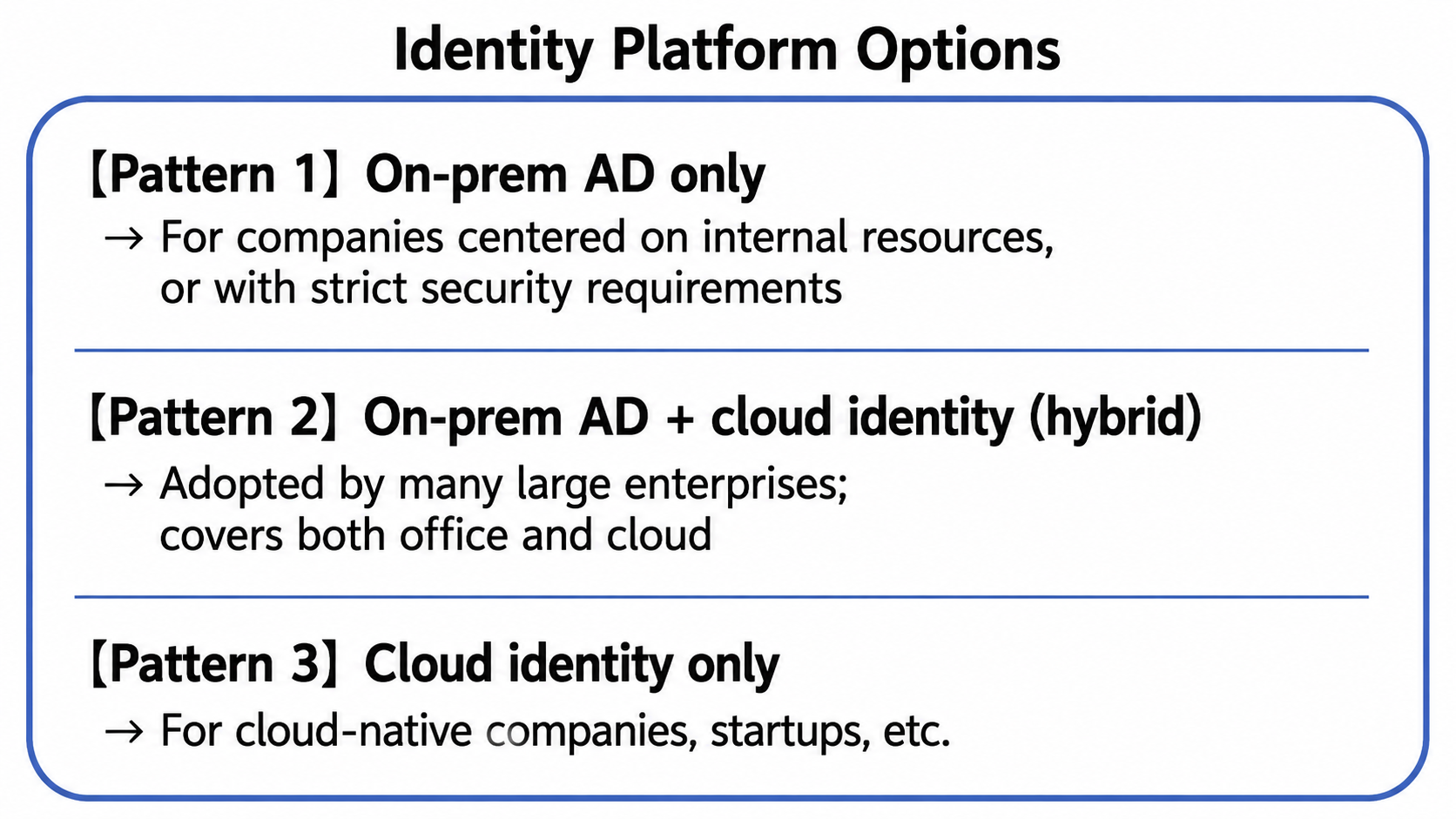
On-Prem AD Is Still in Service—But the Options Multiplied
Working on a smartphone from anywhere, with SaaS everywhere, became fairly normal in the cloud era. The important point here, though, is that on-premises Active Directory did not become "obsolete".
Even now, at many large enterprises, on-prem AD runs at the core of the authentication infrastructure.
Especially in environments with in-house file servers and legacy applications, or with strict security requirements, on-prem AD continues to play an important role.
As cloud services spread, the authentication layer began moving to the cloud as well. On top of traditional on-premises AD, more and more companies adopted cloud identity platforms (IDaaS).
The best-known example is Microsoft Entra ID (formerly Azure AD). Flexible configurations became possible—synchronized with on-premises Active Directory in a hybrid setup, or operated cloud-only.
Why Cloud Identity Platforms Get Chosen
Microsoft Entra ID (formerly Azure AD) and other cloud identity platforms (IDaaS) are increasingly adopted—often alongside existing AD—for reasons like the following.
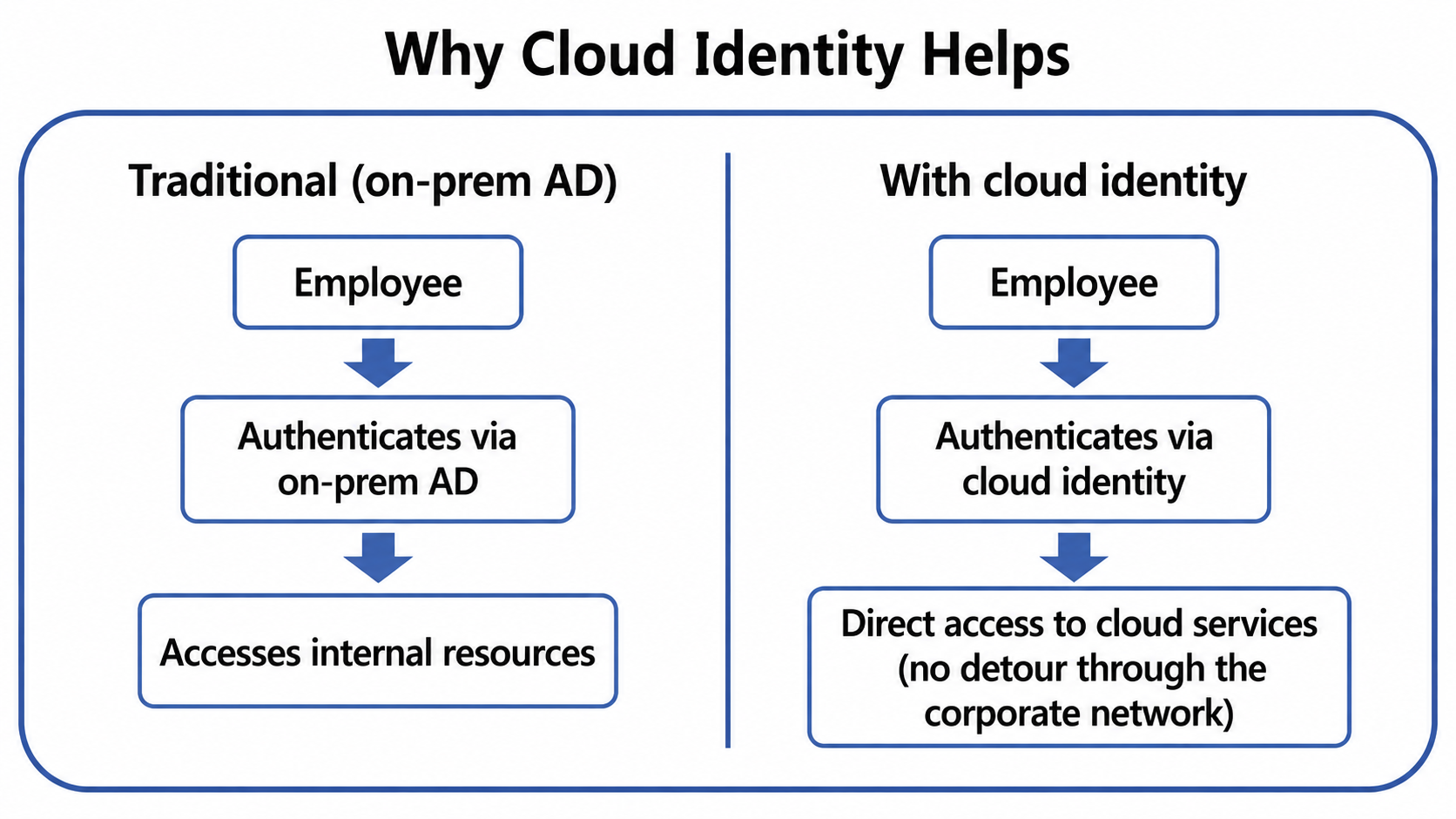
As a result, users could now access cloud services without going through the corporate network.
What Was Gained, and the New Challenges
With cloud identity platforms in place, convenience certainly improved.
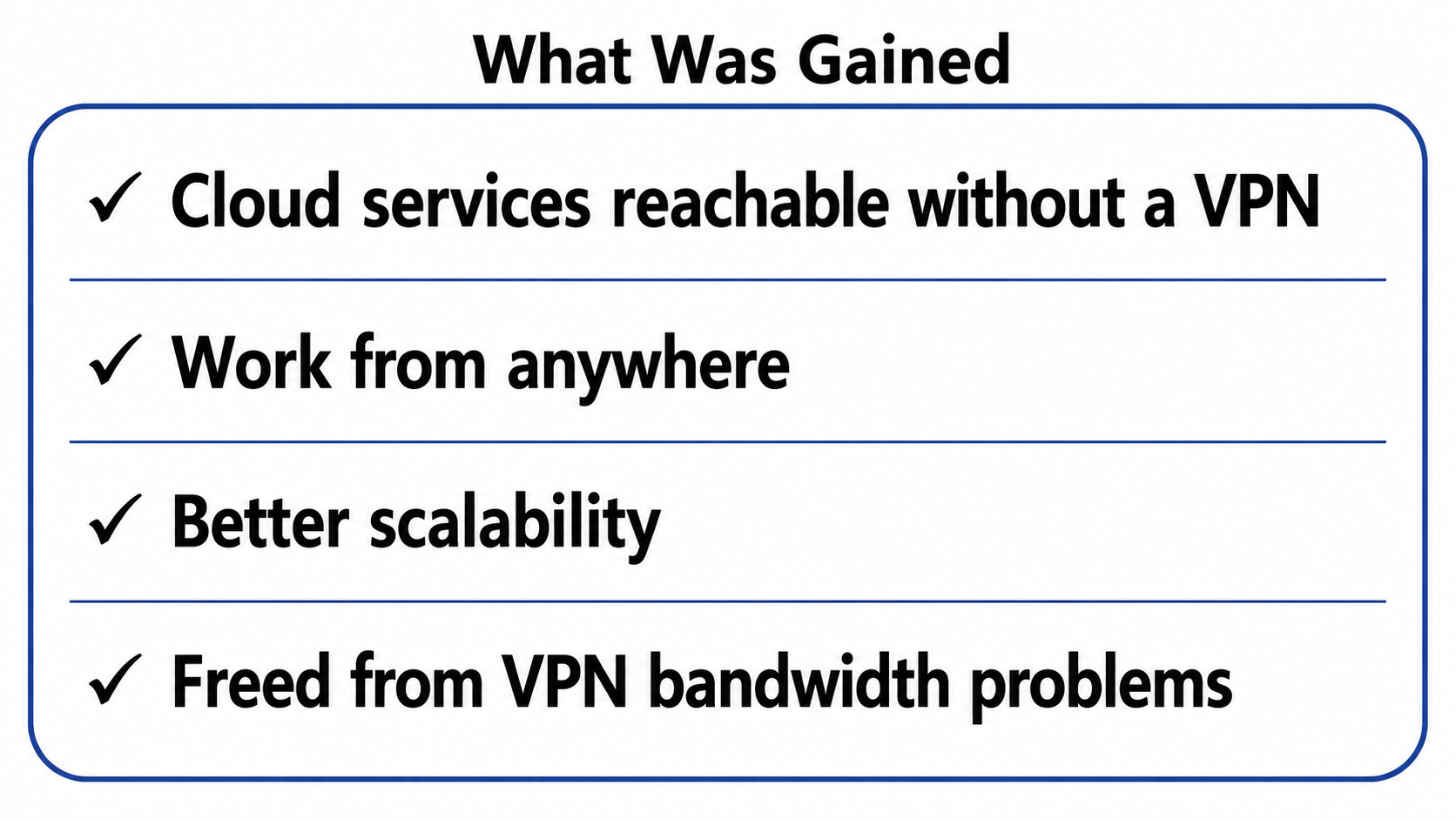
However, from a security standpoint, new challenges have emerged.
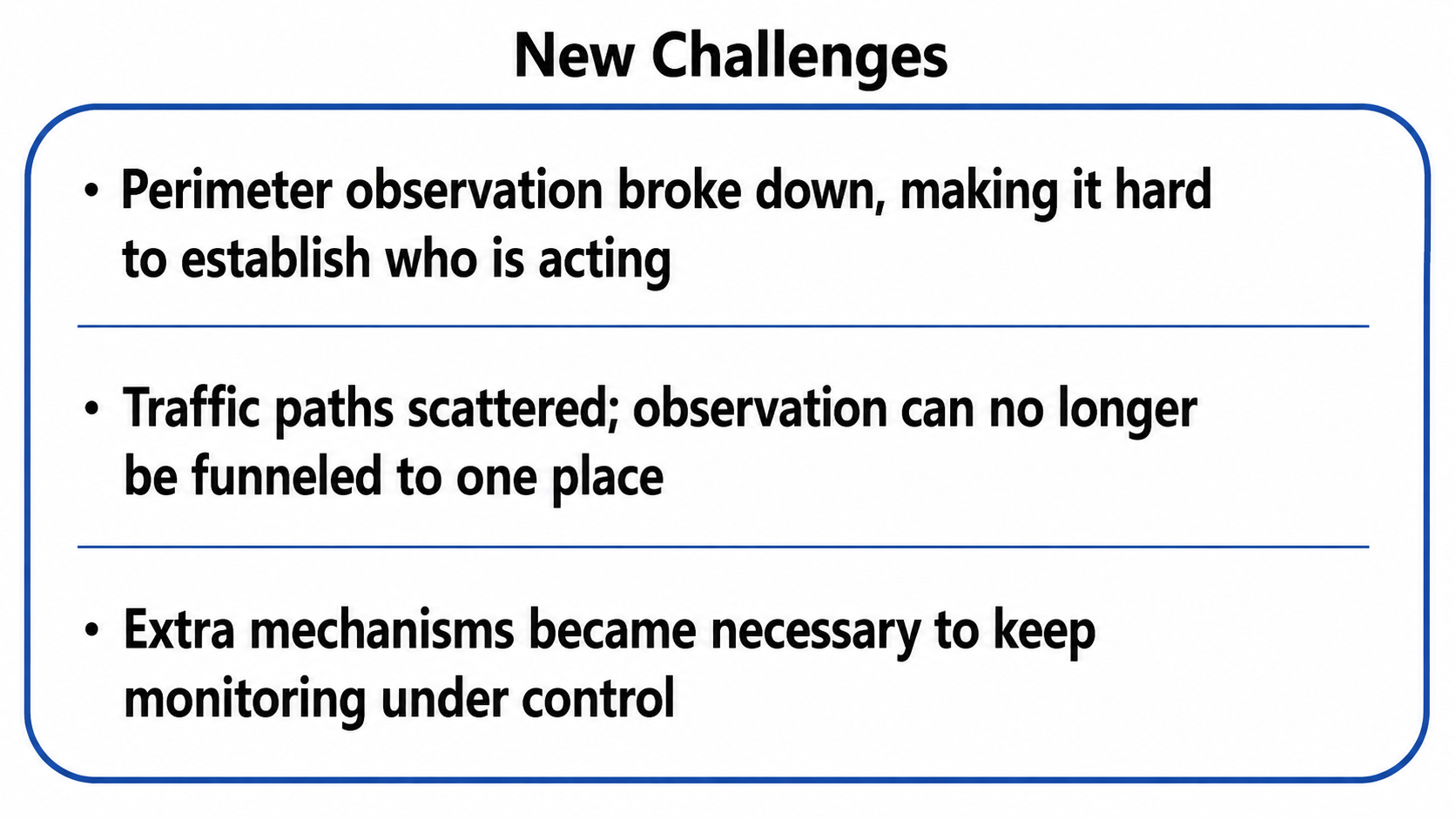
Why Identifying "Who" Became Difficult
Earlier we noted that with AD and the Proxy working together, Integrated Windows Authentication makes it possible to observe "who" is doing "what kind of communication." So why has identifying "who" become difficult these days?
The key point is
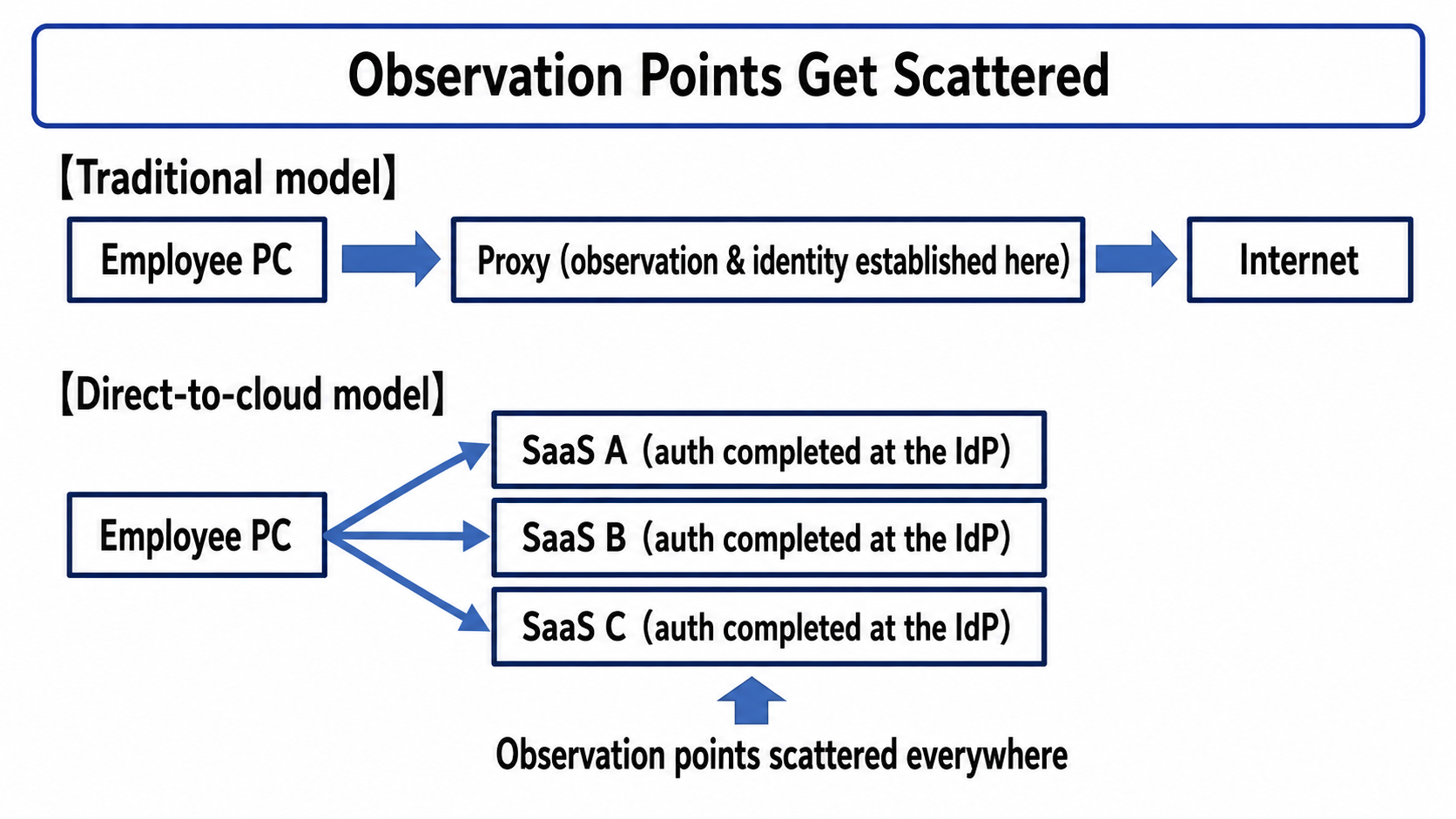
not so much "because the authentication method changed" as "because the paths and observation points became distributed"
.
| Item | On-prem AD + Proxy | Cloud identity + direct access |
|---|---|---|
| Traffic path | Unified through the internal Proxy | Device connects directly to SaaS |
| Where authentication happens | On the corporate network | Distributed across each SaaS/IdP |
| Identifying the principal at the boundary | Possible via Proxy authentication | Difficult—traffic never crosses the boundary |
Cloud authentication (SAML/OIDC/OAuth) is a mechanism in which "authentication completes on the application (SaaS) side."
And once devices go straight to SaaS without passing through the corporate network, the traditional model of "observe everything at the egress Proxy" starts to break down.
That said,
cloud authentication does not mean the Proxy can never know who the user is.
If you still force device traffic through a SWG/Proxy and have the Proxy authenticate users (IdP integration, device certificates, Kerberos/NTLM, and so on), the Proxy can identify users. Modern SWG/SSE products do exactly this, and it is also why SASE, discussed below, is described as "identity/context-based."
However, that requires a separate mechanism that reliably steers device traffic to the Proxy/SWG.
It feels a bit roundabout, but the upshot is: with effort, you can bring the traffic back to the Proxy—it just "requires an additional solution."
Chapter 4: The Many Approaches to Re-Consolidating Observation Points
A movement arose to somehow re-consolidate the observation points that direct-to-cloud access had scattered.
And so a variety of "complementary solutions" appeared, all rooted in the same challenge: how to bundle the scattered observation points back together.
You could sum it up as: the world evolved and everything got complicated, but we still want to observe "who is doing what"—so let's think of every way to get that back.
Approach 1: Deploy Agents on the Endpoints
The first is the idea: "if you cannot observe at the boundary, observe on the device itself."
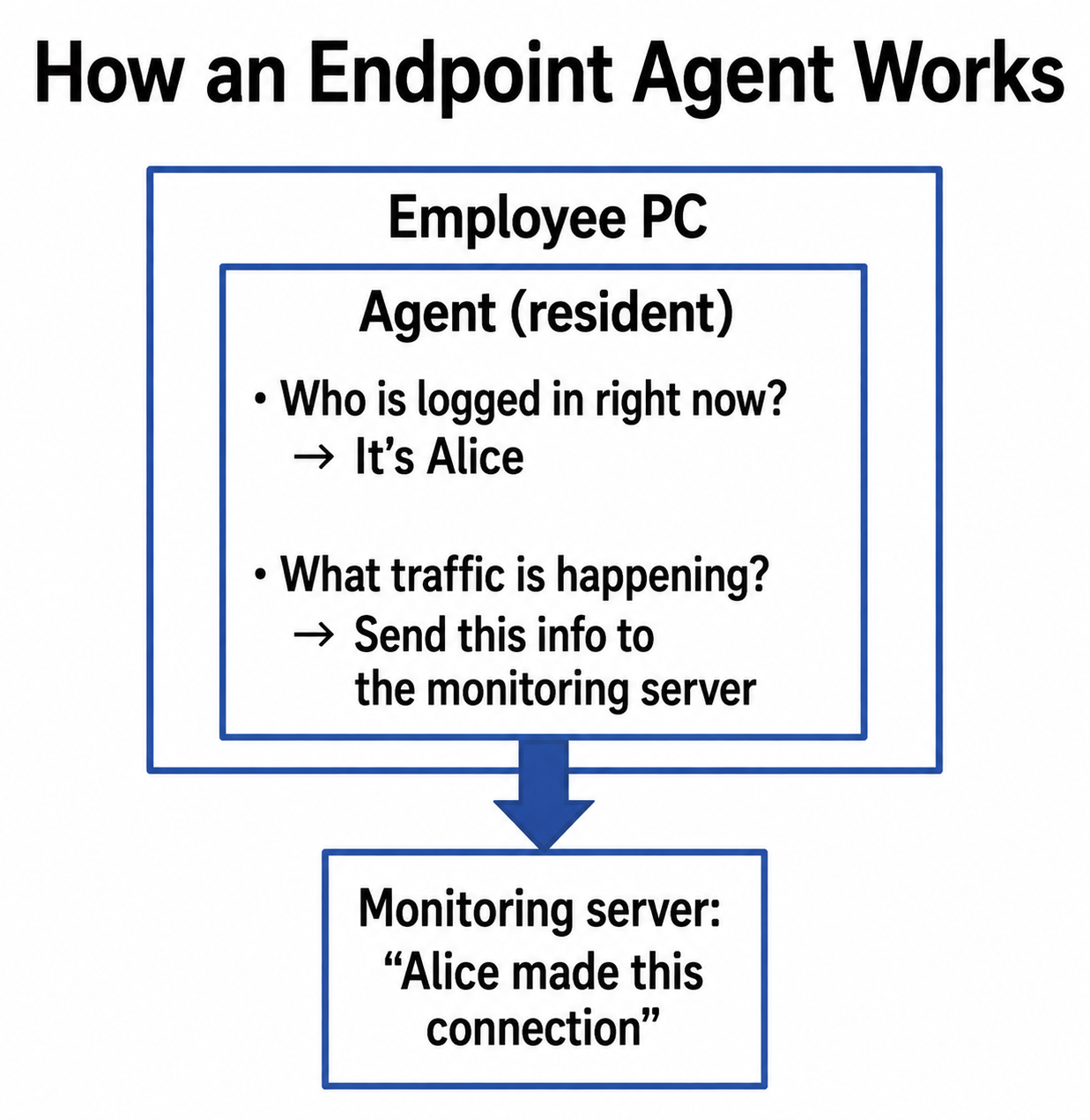
In essence, this means installing a monitoring app on the PC. The agent installed on the PC (in reality, just a PC application) knows "who is logged in to this PC right now," ties that to the traffic data, and sends it to a monitoring server.
Considerations
| Item | Details |
|---|---|
| Coverage | Devices without the agent installed cannot be monitored |
| Personal devices | Installing agents on personally owned devices can be difficult |
| Operational burden | Distributing, updating, and troubleshooting agents takes ongoing effort |
Approach 2: Integrate with a Device Management Platform (MDM)
To distribute agents reliably, more companies adopted device management platforms known as MDM (Mobile Device Management).
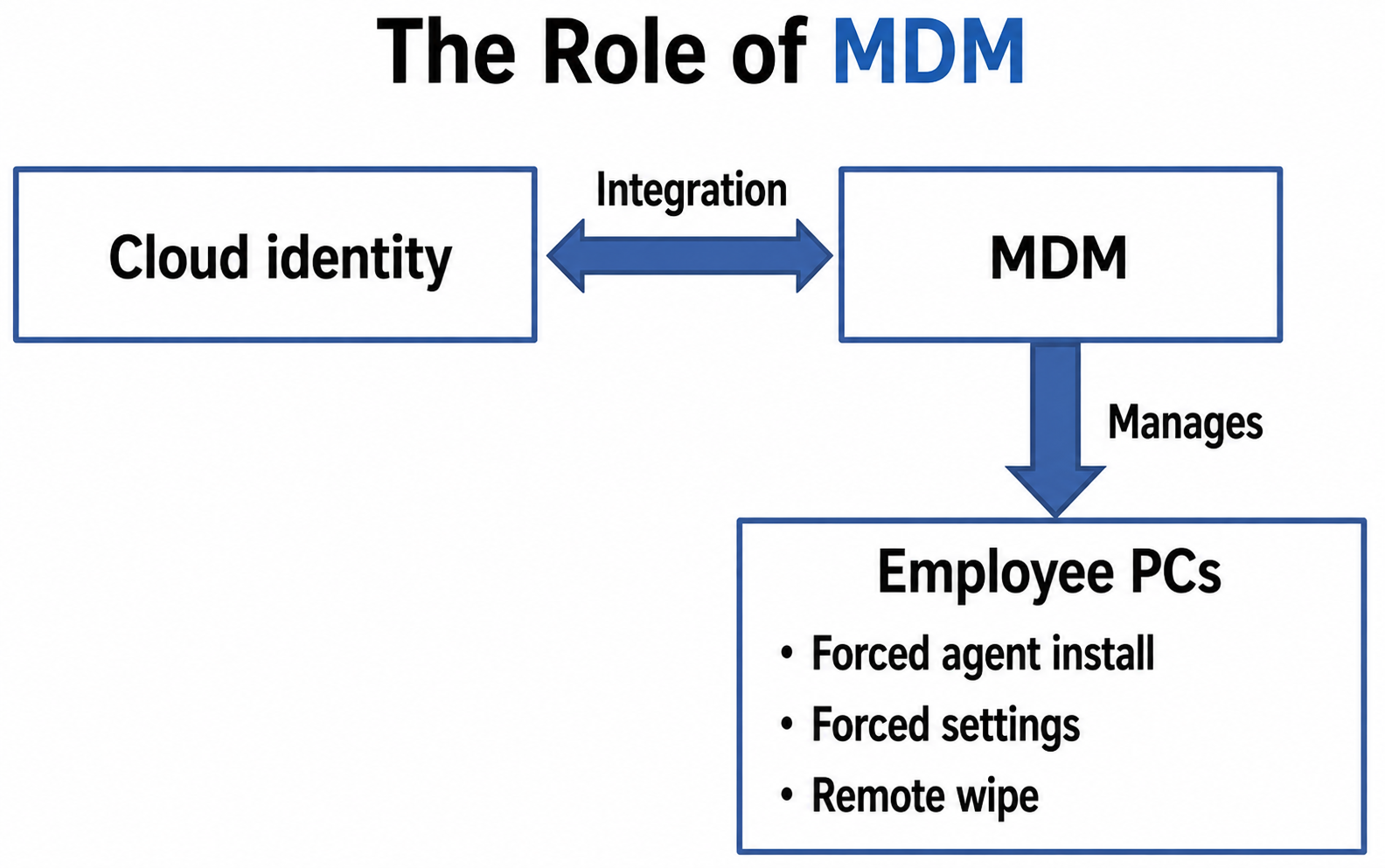
With company-issued PCs, you can build a setup where the device auto-enrolls in MDM at first boot and the required agents are installed automatically.
Considerations
| Item | Details |
|---|---|
| Covered devices | Auto-enrollment mainly works for pre-registered, company-issued devices |
| Personal devices | Handled as "if you want access to company resources, enroll in MDM" |
| Growing complexity | Identity platform, MDM, agents... the components to manage keep multiplying |
Approach 3: Adopt a Cloud Access Monitoring Platform (CASB)
Born from the idea "if you cannot observe on the network path, observe on the cloud service side" is the CASB (Cloud Access Security Broker).
CASBs come mainly in API-integration and proxy varieties, plus a hybrid type combining the two.
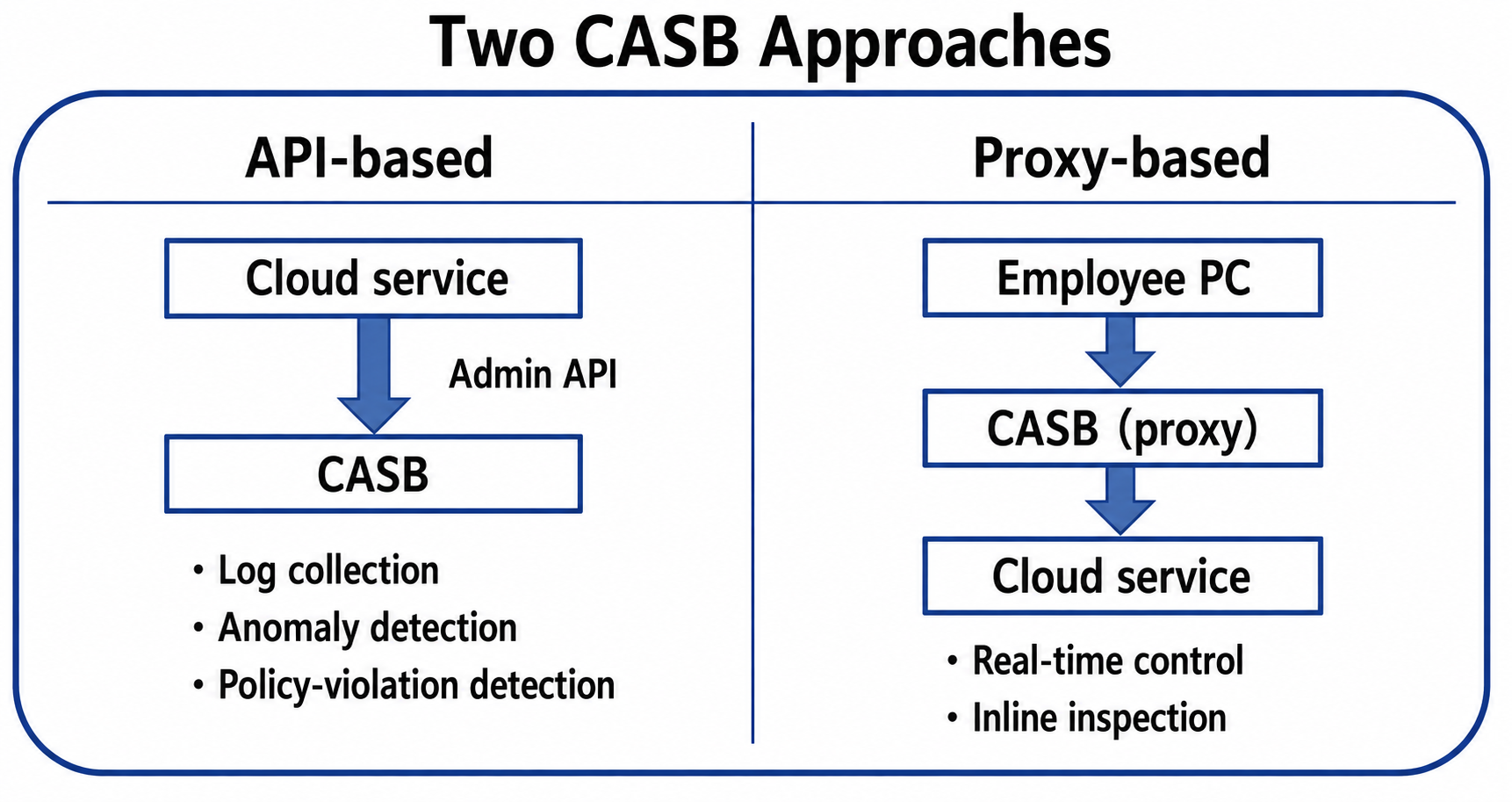
CASBs are commonly described in terms of four pillars—visibility, data security, threat protection, and compliance—and play an important role in governing cloud usage.
Considerations
| Item | Details |
|---|---|
| API-integration type | Limited to cloud services that expose management APIs. Real-time control can be difficult |
| Proxy type | Requires a mechanism to steer traffic to the proxy. May not work with apps that use certificate pinning |
Approach 4: Move the Whole Network to the Cloud (SASE/SSE/ZTNA)
Born from the philosophy of "re-consolidating the scattered observation points as a cloud service" is SASE (Secure Access Service Edge).
SASE is a cloud service that integrates networking functions (such as SD-WAN) with security functions (SWG/CASB/ZTNA/DLP and so on). When referring to the security functions alone, the term SSE (Security Service Edge) is sometimes used—a bit confusingly close to HTTP's Server-Sent Events, admittedly.
Meanwhile, ZTNA (Zero Trust Network Access) is an approach that drops the very notion of a "corporate network," brokering access per application based on identity and context.
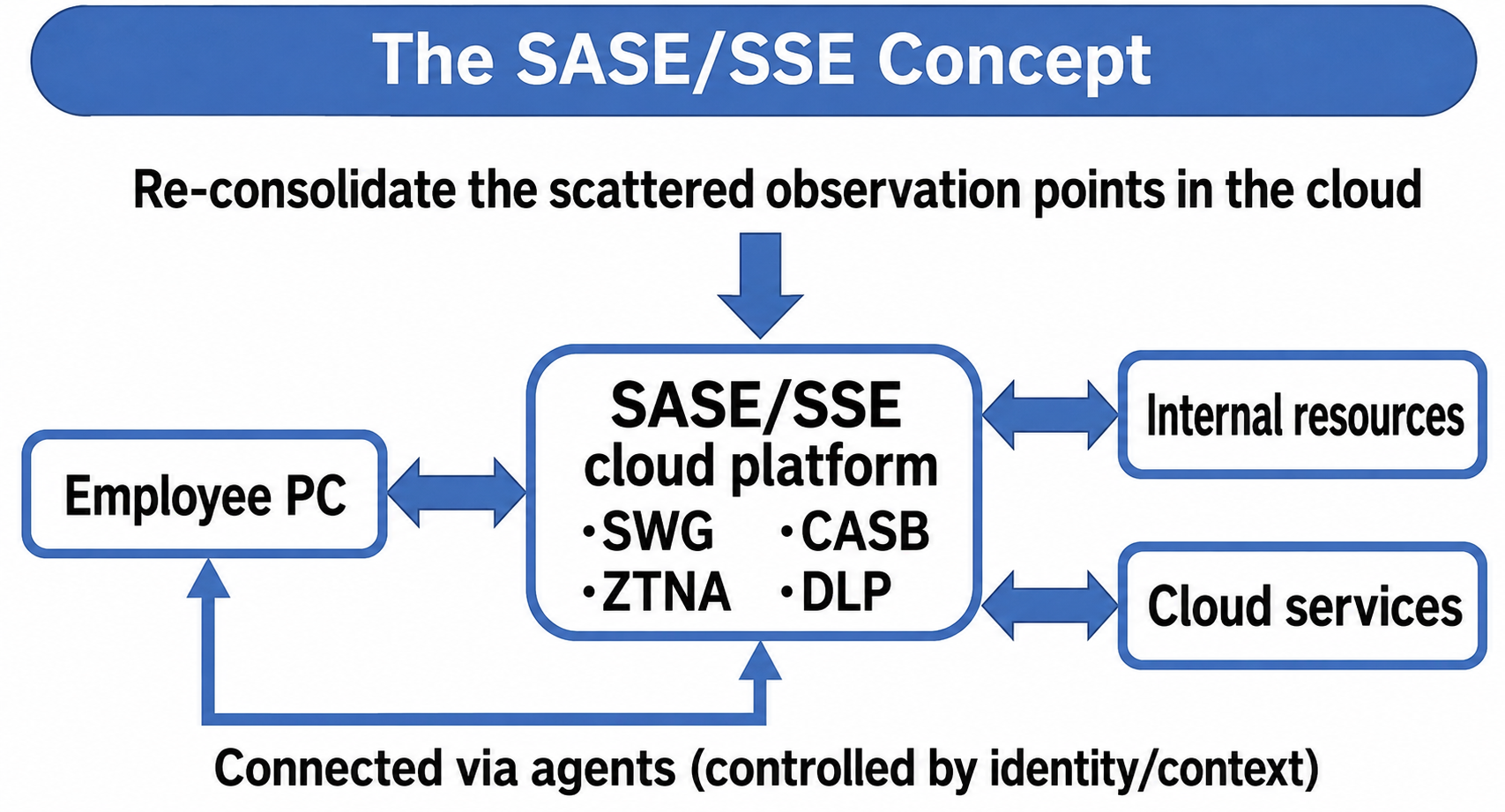
Under this approach, all access passes through a security platform in the cloud. The distinction between "inside" and "outside" disappears, and access from anywhere is verified the same way.
Considerations
| Item | Details |
|---|---|
| Agents | An agent must be installed on each PC to steer its traffic |
| Understanding the architecture | You need to understand the difference between SASE (including SD-WAN) and SSE (security-centric) |
| Cost | As a comprehensive service, the bill can grow large |
Chapter 6: Looking Back — The Value of Simplicity
Comparing the Two Approaches
We have covered a lot of ground.
Let us now compare the two approaches side by side: the AD-based approach, and the cloud-era approach that pieces things together without AD.
An important premise: this is not an "old vs. new" contest.
The closed-network-centric approach is still in active service at many companies, and in environments with strict security requirements it remains a powerful, valid choice.
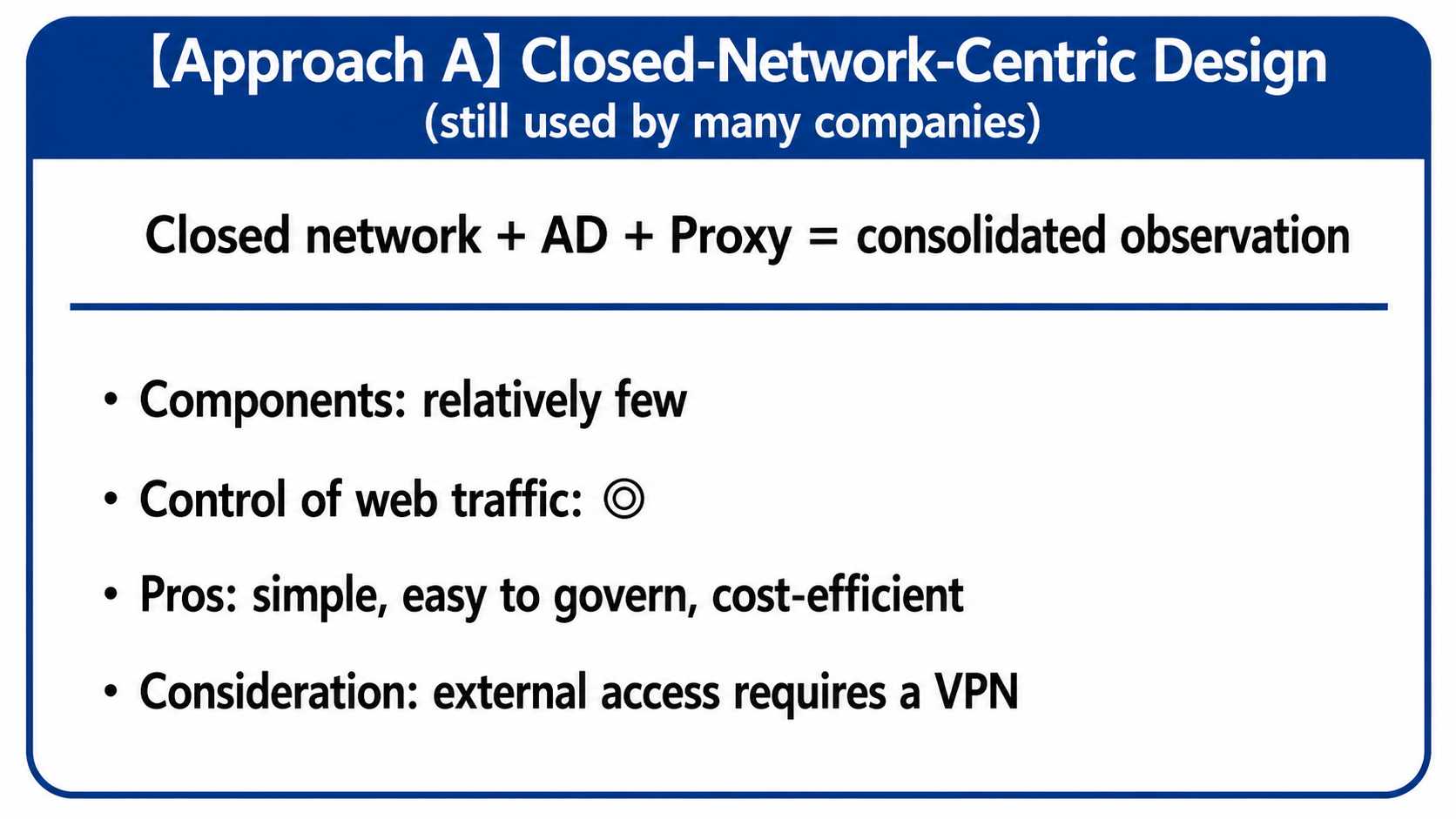
Whether to extend the architecture for the cloud comes down entirely to each company's business requirements.
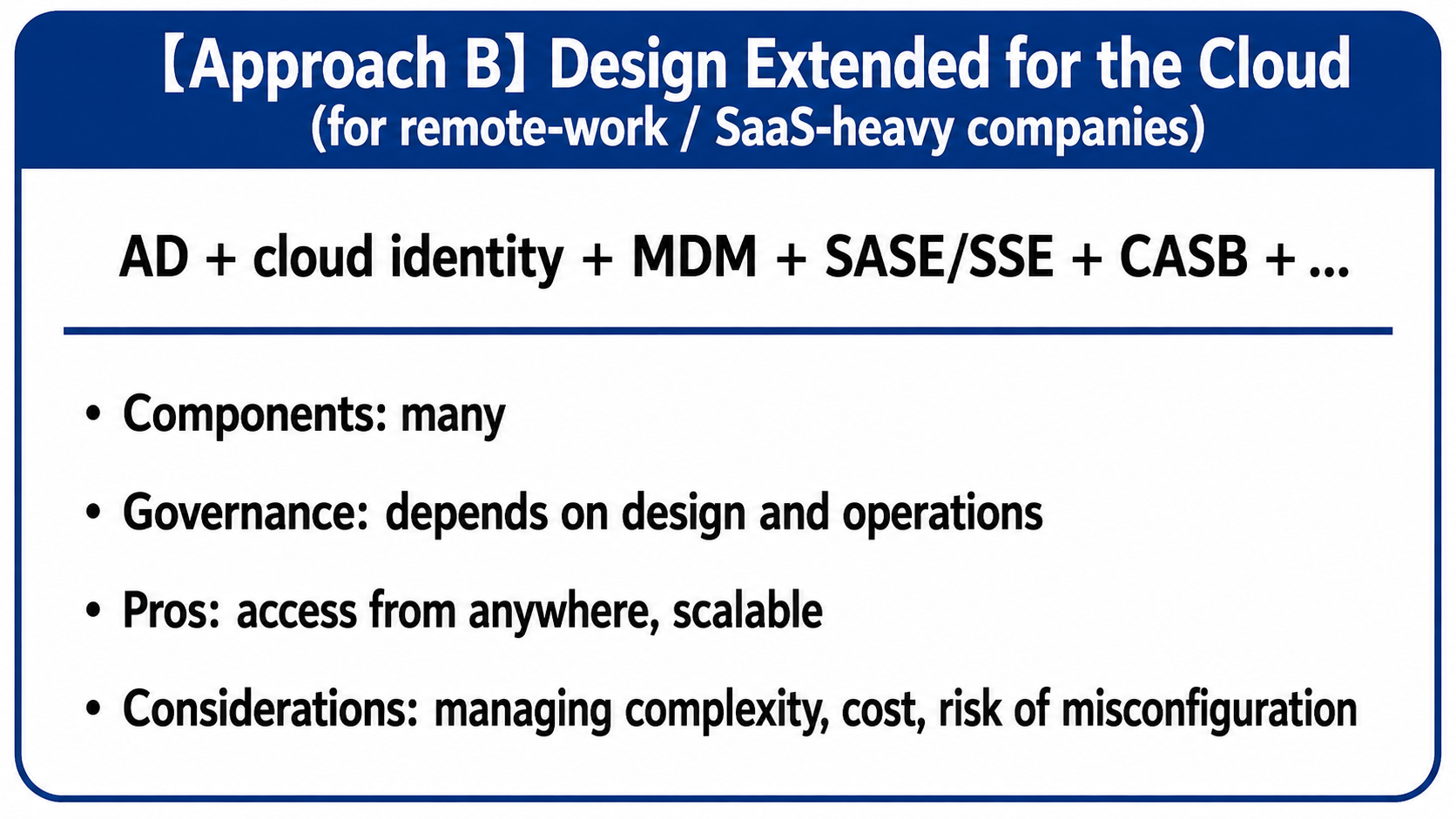
The more complex things become, the harder they are to operate.The value of a simple architecture has not changed.
Why Architectures Kept Expanding
Behind the expansion of architectures at so many companies lies—as this article has touched on repeatedly—the change in business requirements.
As ways of working evolve along with technology, demands rise from the field—for efficiency, for less friction, for easier ways to get things done.
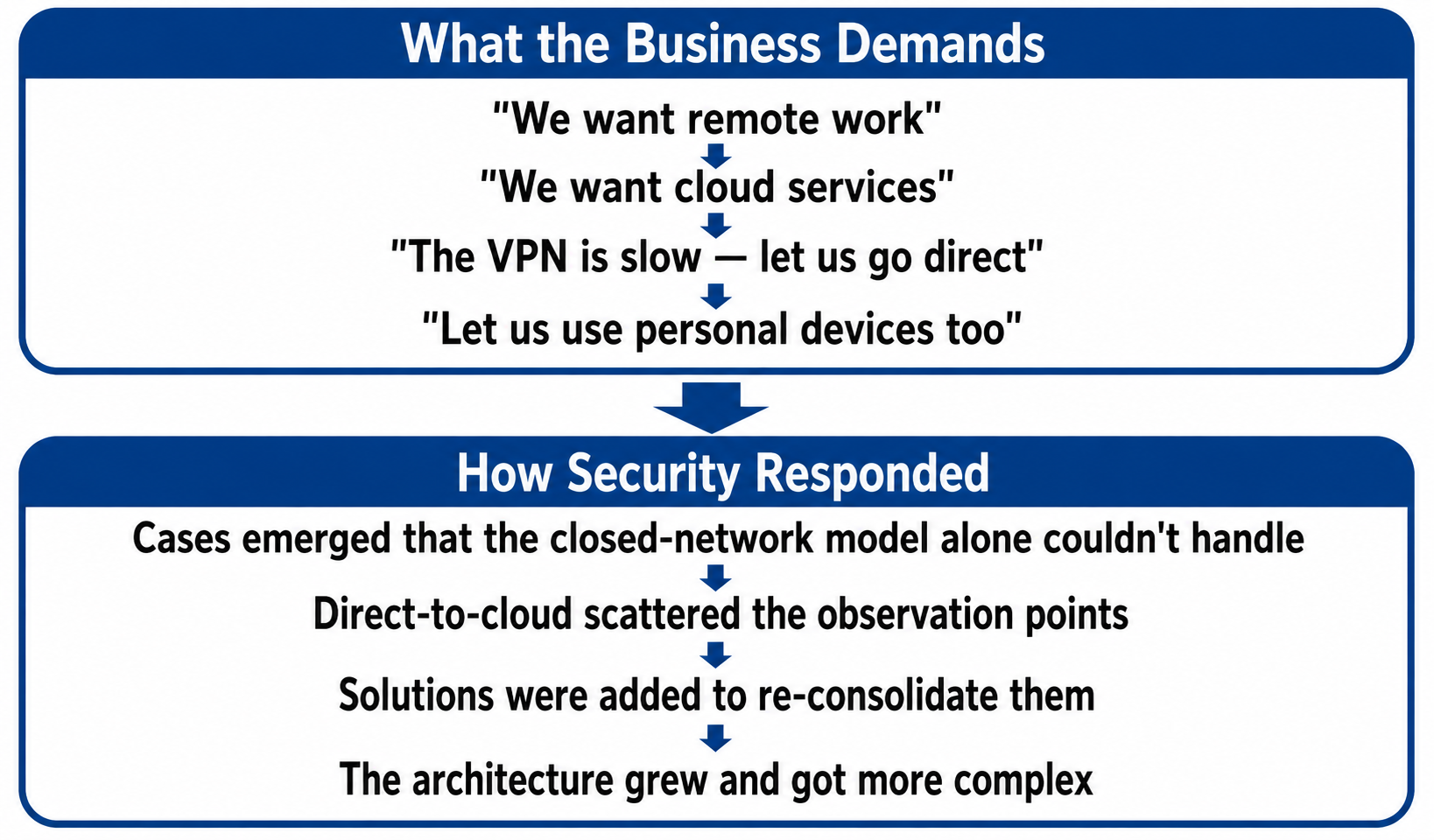
Security teams then face the dilemma of meeting those demands as fully as possible while keeping security tight—and that dilemma may be exactly what led to today's complexity.
Conclusion: Never Forget the Value of Simplicity
Whichever approach you choose, the following is worth keeping in mind.
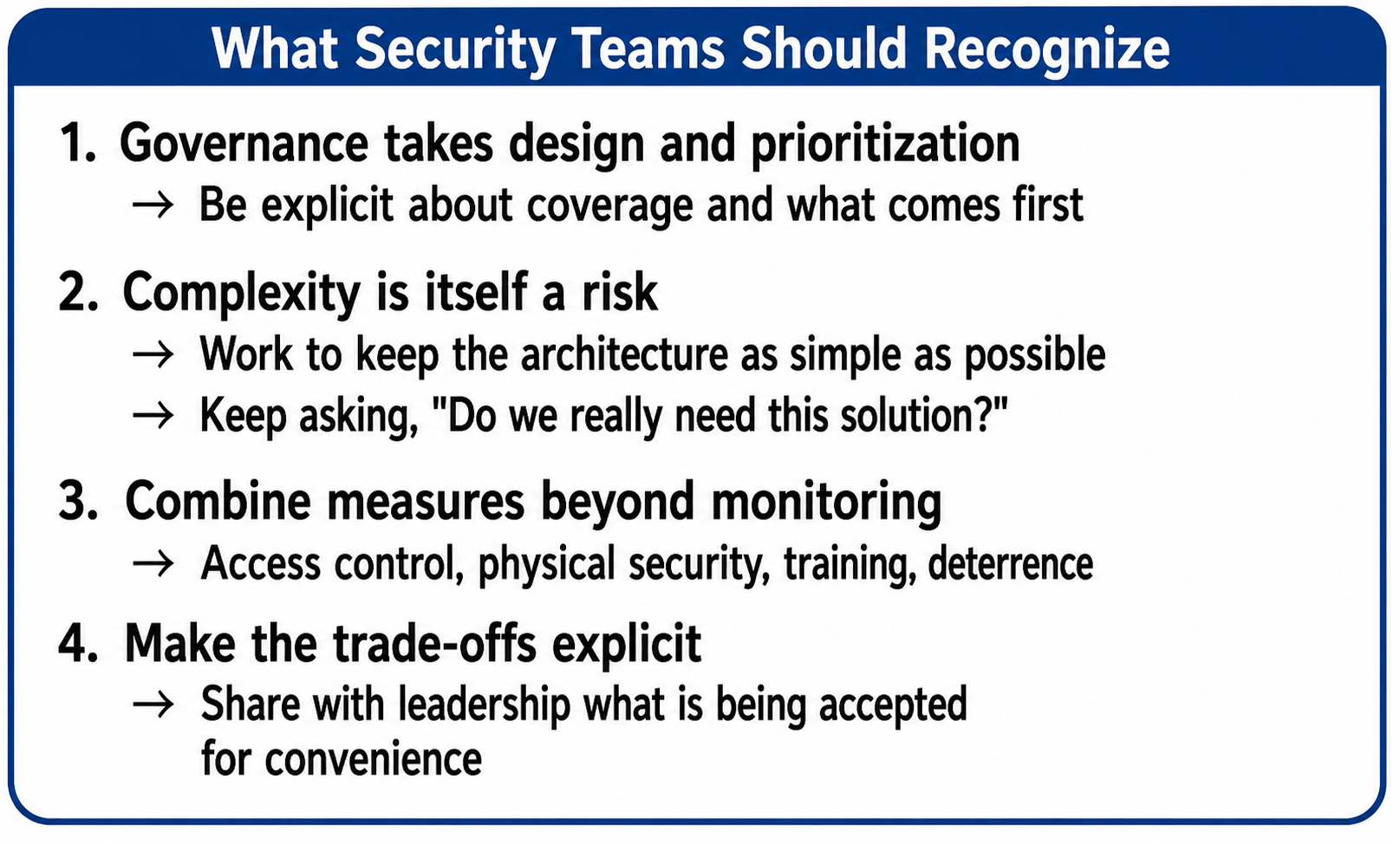
In the world of security, simplicity is value.
Complex systems are hard to operate, prone to misconfiguration, and expensive.
Closed network + AD + Proxy—the architectural soundness this configuration demonstrates, the ability to consolidate observation points, remains a valid approach today.
Even when extending an architecture for the cloud, we want to keep that soundness as the reference point and hold the complexity to the necessary minimum.
In Closing: Security in the LLM Era
We have now walked through the history of enterprise security—and in fact, we at Qualiteg approach LLM-era security while holding on to exactly these values: "simplicity" and "consolidated observation points."
In that context, as a countermeasure against information leakage to generative AI services such as ChatGPT and Claude, we develop and provide LLM-Audit. This LLM-Audit lets you choose the very AD+ MITM approach (proxy type) introduced in this article. (Other integration methods are available too.)
AD + Proxy Makes Deployment Simple
With an AD + Proxy architecture—one that can consolidate observation points—implementing this kind of AI security is at its simplest, with fewer gaps and greater strength. Avoiding the complexity of distributing agents to every device, monitoring traffic through the Proxy lets you know "who" sent "what" to the AI.
Where the Proxy Approach Works, and Where It Does Not
As this article has shown, the proxy (MITM) approach has its conditions of applicability. Summarizing, partly as a recap of this article:
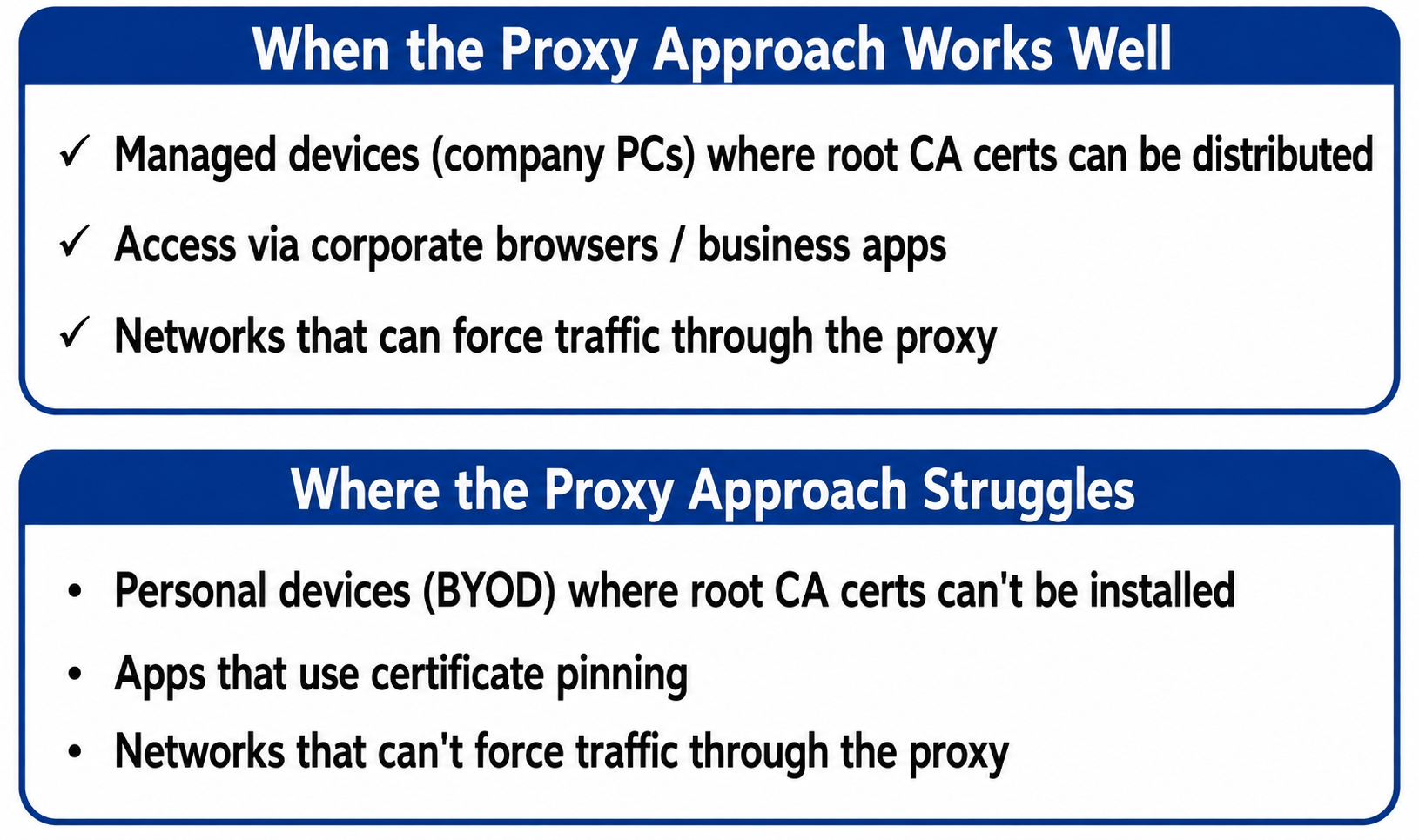
That is exactly why designing your priorities matters. Rather than "monitor everything," what counts is setting a realistic scope—"reliably control LLM access from the managed devices used for work."
The integration of Active Directory and the Proxy described in this article is covered in more depth on our technical blog; reading those posts should deepen your understanding of the proxy approach.
 Qualiteg コンサルティング
 Qualiteg AIセキュリティチーム
 Qualiteg AIセキュリティチーム
 Qualiteg AIセキュリティチーム
And finally—
we close this article with a word of encouragement to every security professional out there who keeps fighting the good fight against complexity. We hope you found it useful.



