
Google Gemini 1.5 API: Features, Characteristics, Pricing, and How to Use It

Hello! This is the Qualiteg Tech Blog.
[Updated July 2, 2024]
Today we will cover the features and pricing of the Google Gemini 1.5 Pro / Gemini 1.5 Flash models, and how to generate text with them using Python.
What is Google Gemini?
Google Gemini is a generative AI platform provided by Google. It offers APIs for high-quality text generation, enabling natural language generation in a wide range of applications. Gemini is used across many industries and supports a broad set of use cases, including content creation, customer support, chatbots, marketing, and education.
How to Obtain an API Key
To use Google Gemini, you need an API key. You can obtain one with the following steps.
Go to Google AI Studio, follow the instructions, and create an API key via Get API key.
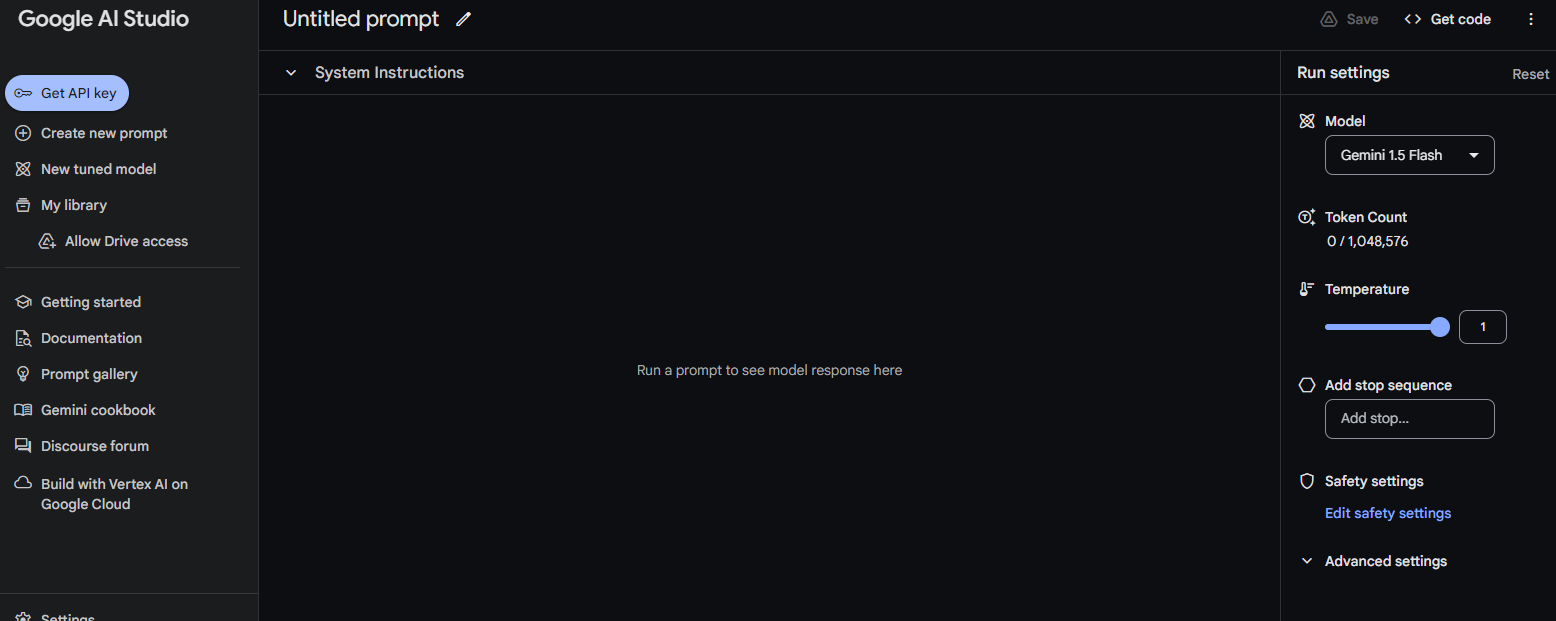
Copy the generated API key and store it in a safe place.
Installing the Package
A Python package for Google Gemini is available on PyPI, so let's install it as follows.
pip install google-generativeaiModel Types and Characteristics
The latest language model (as of July 2024) is Gemini 1.5, available in two variants: Gemini 1.5 Pro and Gemini 1.5 Flash.
Gemini 1.5 Flash is a smaller, lighter model than Gemini 1.5 Pro, created by distilling 1.5 Pro. What stands out is that Flash delivers performance approaching Pro at one-tenth the price. Pro is the choice for tasks demanding high accuracy; if cost-effectiveness is the priority, Flash is the option.
| Gemini 1.5 Flash | Gemini 1.5 Pro | |
| Processing speed | Very fast (sub-second responses) | Slower than Flash |
| Cost efficiency | Highly cost-effective | 10x more expensive than Gemini 1.5 Flash |
| Context window | Up to 1 million tokens | Up to 2 million tokens |
| Multimodal capability | Can process text, images, audio, and video | Can process text, images, audio, and video |
| Primary use | General tasks that require high speed | General tasks that require high accuracy |
| Performance | Below Pro, but on par with Gemini 1.0 Ultra. | Slightly higher than Flash |
| Input capacity | 1 hour of video, 11 hours of audio | 1 hour of video, 11 hours of audio |
| Architecture | Made lighter through distillation from Pro | Larger-scale model |
https://ai.google.dev/gemini-api/docs/models/gemini?hl=ja
Pricing
Pricing is summarized below.
| Item | Input price | Output price | ||
|---|---|---|---|---|
| Gemini 1.5 Flash gemini-1.5-flash-001 |
$0.35 (up to 128,000 tokens) |
$0.70 (beyond 128,000) |
$1.05 (up to 128,000 tokens) |
$2.10 (beyond 128,000) |
| Gemini 1.5 Pro gemini-1.5-pro-001 |
$3.50 (up to 128,000 tokens) |
$7.00 (beyond 128,000) |
$10.50 (up to 128,000 tokens) |
$21.00 (beyond 128,000) |
The pricing has the following characteristics:
- Gemini 1.5 Flash is significantly cheaper than Gemini 1.5 Pro.
- For both models, the price doubles beyond 128,000 tokens.
- Output prices are set at three times the input prices.
- Gemini 1.5 Pro is priced at 10 times Gemini 1.5 Flash.
This pricing indicates that while Gemini 1.5 Pro offers more advanced capabilities and performance, Gemini 1.5 Flash is positioned as the efficient and economical option. Users can choose the appropriate model according to the features they need and their budget.
About Gemini 1.5 Pro
https://ai.google.dev/gemini-api/docs/models/gemini?hl=ja#gemini-1.5-pro
About Gemini 1.5 Flash
https://ai.google.dev/gemini-api/docs/models/gemini?hl=ja#gemini-1.5-flash-expandable
Version Names and Stable Versions
Gemini model names follow the formats below.
| Type | Description | Model name format | Example |
|---|---|---|---|
| Latest | The most recent version of the specified generation and variation. The underlying model is updated periodically and may be a preview version. For exploratory testing and prototyping. | <model>-<generation>-<variation>-latest | gemini-1.0-pro-latest |
| Latest stable | The most recent stable version of the specified generation and variation. | <model>-<generation>-<variation> | gemini-1.0-pro |
| Stable | A specific stable model. Does not change. Used by most production applications. | <model>-<generation>-<variation>-<version> | gemini-1.0-pro-001 |
List of Generation Parameters
Below is the list of generation parameters that can be specified as in the following code.
# Generation parameter settings
generation_config = {
    "max_output_tokens": 8192,  # Maximum number of tokens to generate
    "temperature": 1,  # Temperature parameter controlling the diversity of generation
    "top_p": 0.98,  # Probability threshold used for token selection
}| Parameter name | Description | Type |
|---|---|---|
| temperature | Controls the randomness of predictions | Optional: float |
| top_p | If specified, uses nucleus sampling | Optional: float |
| top_k | If specified, uses top-k sampling | Optional: float |
| candidate_count | Number of candidates to generate | Optional: int |
| max_output_tokens | Maximum number of output tokens to generate per message | Optional: int |
| stop_sequences | Stop sequences | Optional: List[string] |
| presence_penalty | Presence penalty | Optional: float |
| frequency_penalty | Frequency penalty | Optional: float |
Source Code
Let's call Google Gemini using Python.
Gemini in particular allows fine-grained SafetySettings, so we have included that part in the source code in detail.
import google.generativeai as genai
from google.generativeai.types import HarmCategory, HarmBlockThreshold

API_KEY = "YOUR_API_KEY"
genai.configure(api_key=API_KEY)

model_id = "gemini-1.5-flash-001"  # input 0.35/MTokens - output 1.05/MTokens

# Initialize the model
model = genai.GenerativeModel(
    model_id,
)

# Generation parameter settings
generation_config = {
    "max_output_tokens": 8192,
    "temperature": 1,
}
safety_settings = {
    HarmCategory.HARM_CATEGORY_HARASSMENT: HarmBlockThreshold.BLOCK_LOW_AND_ABOVE,  # Content containing harassment
    HarmCategory.HARM_CATEGORY_HATE_SPEECH: HarmBlockThreshold.BLOCK_LOW_AND_ABOVE,  # Malicious expressions or content
    HarmCategory.HARM_CATEGORY_SEXUALLY_EXPLICIT: HarmBlockThreshold.BLOCK_LOW_AND_ABOVE,  # Sexually explicit content
    HarmCategory.HARM_CATEGORY_DANGEROUS_CONTENT: HarmBlockThreshold.BLOCK_LOW_AND_ABOVE,  # Dangerous content
}

response = model.generate_content(
    ["""浅草のオススメスポットは?"""],  # Japanese prompt: "What are the recommended spots in Asakusa?"
    generation_config=generation_config,
    safety_settings=safety_settings,
    stream=False,
)

print(response.text)
Example output
(Since the prompt was in Japanese, the model answered in Japanese. The raw output is shown first, followed by an English translation.)
浅草は、東京で最も古いエリアの一つで、歴史的な建造物、伝統的な文化、活気に満ちた雰囲気を楽しむことができます。おすすめのスポットはたくさんありますが、いくつか例を挙げますね!
定番スポット:
- 浅草寺: 東京最古の寺院で、雷門、五重塔など見どころ満載です。境内でのおみくじやお守りの購入もおすすめです。
- 仲見世通り: 浅草寺へ向かう参道にある、伝統的なお土産屋さんや食べ歩きのお店が立ち並ぶ賑やかな通りです。
- 東京スカイツリー: 浅草から少し離れますが、展望台から浅草の街並みを一望できます。
ちょっとディープな浅草:
- 浅草演芸ホール: 昔懐かしい寄席を楽しむことができます。
- 浅草花やしき: レトロな遊園地で、大人も子供も楽しめます。
- 隅田川: 舟遊びや屋形船で、風情ある景色を満喫できます。
- 浅草文化観光センター: 浅草の歴史や文化について学べます。
美味しいもの:
- 人形焼き: 浅草寺周辺には、様々な種類の人形焼きのお店があります。
- 天ぷら: 揚げたての天ぷらは格別です。
- 蕎麦: 老舗の蕎麦屋で、伝統的な蕎麦の味を堪能できます。
- もんじゃ焼き: 熱々の鉄板で自分で焼きながら食べる、浅草名物です。
その他:
- 浅草ROX: 映画館やレストランなどが入った複合施設です。
- 浅草ビューホテル: 浅草寺やスカイツリーを一望できるホテルです。
時期によっておすすめも変わります:
- 春: 桜の季節には、隅田川沿いが美しく、お花見を楽しむことができます。
- 夏: 隅田川花火大会は、夏の風物詩です。
- 秋: 紅葉シーズンには、浅草寺周辺が美しく色づきます。
- 冬: 浅草寺では、年末年始のイベントが開催されます。
さらに、あなたの興味に合わせておすすめを提案できます。
- 歴史に興味があるなら: 浅草寺、浅草文化観光センター、隅田川
- 伝統芸能に興味があるなら: 浅草演芸ホール
- ショッピングに興味があるなら: 仲見世通り、浅草ROX
- グルメに興味があるなら: 人形焼き、天ぷら、蕎麦、もんじゃ焼き
ぜひ、あなたの興味に合わせて浅草を満喫してください!
English translation of the output above:
Asakusa is one of the oldest areas in Tokyo, where you can enjoy historic buildings, traditional culture, and a lively atmosphere. There are many recommended spots, but here are a few examples!
Classic spots:
- Senso-ji Temple: Tokyo's oldest temple, full of highlights such as the Kaminarimon Gate and the five-story pagoda. Drawing an omikuji fortune or buying an amulet on the grounds is also recommended.
- Nakamise Street: A bustling street on the approach to Senso-ji, lined with traditional souvenir shops and street-food stalls.
- Tokyo Skytree: A little away from Asakusa, but you can take in a panoramic view of the Asakusa townscape from the observation deck.
A deeper side of Asakusa:
- Asakusa Engei Hall: Enjoy nostalgic yose (traditional variety theater).
- Asakusa Hanayashiki: A retro amusement park that adults and children alike can enjoy.
- Sumida River: Take in the scenery on a boat ride or a yakatabune houseboat.
- Asakusa Culture Tourist Information Center: Learn about the history and culture of Asakusa.
Good food:
- Ningyo-yaki: There are shops selling many kinds of ningyo-yaki (small sponge cakes) around Senso-ji.
- Tempura: Freshly fried tempura is exceptional.
- Soba: Savor traditional soba at long-established soba restaurants.
- Monjayaki: An Asakusa specialty you cook yourself on a hot griddle.
Others:
- Asakusa ROX: A complex containing a movie theater, restaurants, and more.
- Asakusa View Hotel: A hotel with panoramic views of Senso-ji and the Skytree.
Recommendations also change with the season:
- Spring: During cherry blossom season, the banks of the Sumida River are beautiful and perfect for hanami.
- Summer: The Sumida River Fireworks Festival is a summer tradition.
- Autumn: In the fall foliage season, the area around Senso-ji turns beautiful colors.
- Winter: Senso-ji hosts year-end and New Year events.
I can also tailor recommendations to your interests.
- If you are interested in history: Senso-ji, Asakusa Culture Tourist Information Center, Sumida River
- If you are interested in traditional performing arts: Asakusa Engei Hall
- If you are interested in shopping: Nakamise Street, Asakusa ROX
- If you are interested in food: Ningyo-yaki, tempura, soba, monjayaki
Enjoy Asakusa in whatever way suits your interests!
Definition of SafetySettings
The Safety Settings of the Google Gemini API are a feature for controlling the AI model's output and restricting inappropriate content.
This feature is important for generating safe and appropriate AI content, and it is not yet fully implemented in other LLM APIs.
Safety Settings can be configured for the following categories:
Available categories
| Enum | |
| HARM_CATEGORY_UNSPECIFIED | Category not specified |
| HARM_CATEGORY_HARASSMENT | Harassment content |
| HARM_CATEGORY_HATE_SPEECH | Malicious expressions or content |
| HARM_CATEGORY_SEXUALLY_EXPLICIT | Sexually explicit content |
| HARM_CATEGORY_DANGEROUS_CONTENT | Dangerous content |
Available filtering levels
For each category, you can set one of the following four filtering levels:
- HIGH
- MEDIUM
- LOW
- NEGLIGIBLE
The API blocks content based on the probability that it is harmful.
The actual values are as follows.
| Threshold | Summary | Details |
| BLOCK_NONE | Block none | Always show, regardless of the probability of unsafe content |
| BLOCK_ONLY_HIGH | Block few | Block when there is a high probability of unsafe content |
| BLOCK_MEDIUM_AND_ABOVE | Block some | Block when there is a medium or high probability of unsafe content |
| BLOCK_LOW_AND_ABOVE | Block most | Block when there is a low, medium, or high probability of unsafe content |
| HARM_BLOCK_THRESHOLD_UNSPECIFIED | None | Threshold not specified. Blocks using the default threshold |
Naturally, certain severe harms (such as content that endangers child safety) are always blocked and cannot be adjusted. In other words, a minimum level of protection remains in place even if you loosen the SafetySettings.
How to Receive Responses via Streaming
Earlier we saw how to retrieve the result in a single call; now let's look at how to receive it via streaming.
Streaming reception is possible simply by setting stream=True, as shown below.
response = model.generate_content(
    ["""こんにちは"""],  # Japanese prompt: "Hello"
    generation_config=generation_config,
    safety_settings=safety_settings,
    stream=True,
)
for chunk in response:
    print(chunk)
Each chunk received through the generator has the following structure:
GenerateContentResponse(
    done=True,
    iterator=None,
    result=protos.GenerateContentResponse({
      "candidates": [
        {
          "content": {
            "parts": [
              {
                "text": "\u3053\u3093\u306b\u3061\u306f"
              }
            ],
            "role": "model"
          },
          "finish_reason": "STOP",
          "index": 0
        }
      ],
      "usage_metadata": {
        "prompt_token_count": 2,
        "candidates_token_count": 1,
        "total_token_count": 3
      }
    }),
)
With this structure in mind, let's retrieve the various properties in each chunk.
import google.generativeai as genai
from google.generativeai.types import HarmCategory, HarmBlockThreshold

API_KEY = "YOUR_API_KEY"
genai.configure(api_key=API_KEY)

model_id = "gemini-1.5-flash-001"  # input 0.35/MTokens - output 1.05/MTokens

# Initialize the model
model = genai.GenerativeModel(
    model_id,
)

# Generation parameter settings
generation_config = {
    "max_output_tokens": 8192,
    "temperature": 1,
}
safety_settings = {
    HarmCategory.HARM_CATEGORY_HARASSMENT: HarmBlockThreshold.BLOCK_LOW_AND_ABOVE,  # Content containing harassment
    HarmCategory.HARM_CATEGORY_HATE_SPEECH: HarmBlockThreshold.BLOCK_LOW_AND_ABOVE,  # Malicious expressions or content
    HarmCategory.HARM_CATEGORY_SEXUALLY_EXPLICIT: HarmBlockThreshold.BLOCK_LOW_AND_ABOVE,  # Sexually explicit content
    HarmCategory.HARM_CATEGORY_DANGEROUS_CONTENT: HarmBlockThreshold.BLOCK_LOW_AND_ABOVE,  # Dangerous content
}

response = model.generate_content(
    ["""こんにちは"""],  # Japanese prompt: "Hello"
    generation_config=generation_config,
    safety_settings=safety_settings,
    stream=True,
)
for chunk in response:

    candidates = chunk.candidates
    usage_metadata = chunk.usage_metadata

    for candidate in candidates:
        content = candidate.content
        content_parts = content.parts
        role = content.role
        finish_reason = candidate.finish_reason
        index = candidate.index
        safety_ratings = candidate.safety_ratings

        for part in content_parts:
            text = part.text

            # Store each property in a variable
            candidate_content_text = text
            candidate_content_role = role
            candidate_finish_reason = finish_reason
            candidate_index = index
            candidate_safety_ratings = safety_ratings
            usage_prompt_token_count = usage_metadata.prompt_token_count
            usage_candidates_token_count = usage_metadata.candidates_token_count
            usage_total_token_count = usage_metadata.total_token_count

            # Print the variables
            print(f"Text: {candidate_content_text}")
            print(f"Role: {candidate_content_role}")
            print(f"Finish Reason: {candidate_finish_reason}")
            print(f"Index: {candidate_index}")
            print(f"Safety Ratings: {candidate_safety_ratings}")
            print(f"Prompt Token Count: {usage_prompt_token_count}")
            print(f"Candidates Token Count: {usage_candidates_token_count}")
            print(f"Total Token Count: {usage_total_token_count}")
            print("----------")
Running the code above produces output like the following (the model replied in Japanese: "こんにちは! 何かお手伝いできますか?" = "Hello! How can I help you?").
Text: こんにちは
Role: model
Finish Reason: 1
Index: 0
Safety Ratings: []
Prompt Token Count: 2
Candidates Token Count: 1
Total Token Count: 3
----------
Text: ! 何かお手伝いできますか?

Role: model
Finish Reason: 1
Index: 0
Safety Ratings: [category: HARM_CATEGORY_SEXUALLY_EXPLICIT
probability: NEGLIGIBLE
, category: HARM_CATEGORY_HATE_SPEECH
probability: NEGLIGIBLE
, category: HARM_CATEGORY_HARASSMENT
probability: NEGLIGIBLE
, category: HARM_CATEGORY_DANGEROUS_CONTENT
probability: NEGLIGIBLE
]
Prompt Token Count: 2
Candidates Token Count: 10
Total Token Count: 12
----------
Other Features
Support for JSON-format responses
https://ai.google.dev/gemini-api/docs/api-overview?hl=ja#json
Fine-tuning
https://ai.google.dev/gemini-api/docs/model-tuning?hl=ja
Context caching
https://ai.google.dev/gemini-api/docs/caching?hl=ja&lang=python
Summary
We hope you found this useful. We have looked at an overview of Gemini 1.5, Google's latest LLM API, and how to implement it in source code.
Qualiteg offers ChatStream, an SDK and toolkit for building full-fledged chatbots and LLM services using the Gemini API on extremely short timelines, along with related consulting services.
If you are considering building a commercial LLM application or service, please feel free to contact us through the inquiry form here.
Our LLM Spot Consulting Is Well Received
We also offer spot consulting, available casually from as little as one hour, covering both business and technical aspects such as LLM service development, the market environment, and GPU technology. Please feel free to take advantage of it.

(Please note that we may be unable to accept requests during busy periods or depending on the nature of the inquiry.)



