KV Cache Offloading Strategies and a Practical Understanding of GQA



Hello!
Welcome to a special extra installment of our LLM Inference Infrastructure Provisioning Course!
Part 3, "Estimating Inference-Time Memory Consumption for Your Model", we introduced the two major consumers of GPU memory, the model footprint and the KV cache, and explained how to calculate the KV cache size per token.
Then, in Part 4, "Selecting an Inference Engine", we compared the characteristics of inference engines such as vLLM and DeepSpeed, and in Part 5 we walked through optimization strategies based on quantization and parallelization.
But the KV cache still has plenty of topics worth digging into.
- What happens if you offload the KV cache from GPU VRAM to CPU RAM or disk? How much slower does it get?
- Why do HuggingFace Transformers and vLLM take fundamentally different approaches to KV cache management?
- And what exactly is GQA (Grouped-Query Attention), the technique that rewrites the attention structure itself, which is the root cause of KV cache growth? Along a different axis from the quantization introduced in Part 5, it shrinks the KV cache dramatically.
In this article, we explore these themes with real PCIe bandwidth numbers and concrete calculations for various model sizes. If you have the KV cache fundamentals from Part 3, you should be able to follow along smoothly.
LLM Inference Infrastructure Provisioning Course: Article Index
- Part 1: Basic Concepts and Inference Speed
- Part 2: Estimating Request Volume for an LLM Service
- Part 3: Estimating Inference-Time Memory Consumption for Your Model
- Part 4: Selecting an Inference Engine
- Part 5: From GPU Node Configuration to Load Testing in Practice
A Quick Review of the KV Cache
We covered this in Part 3, but let's briefly review how the KV cache works.
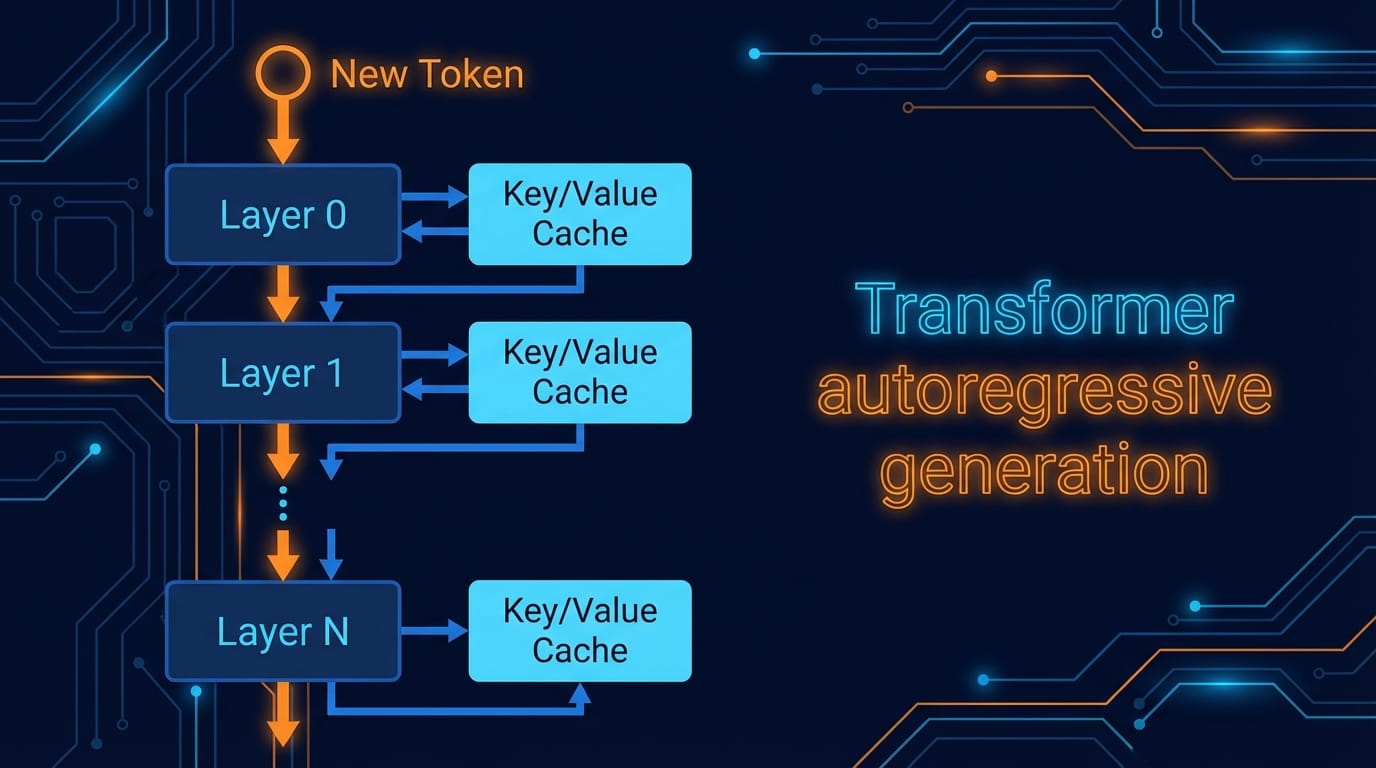
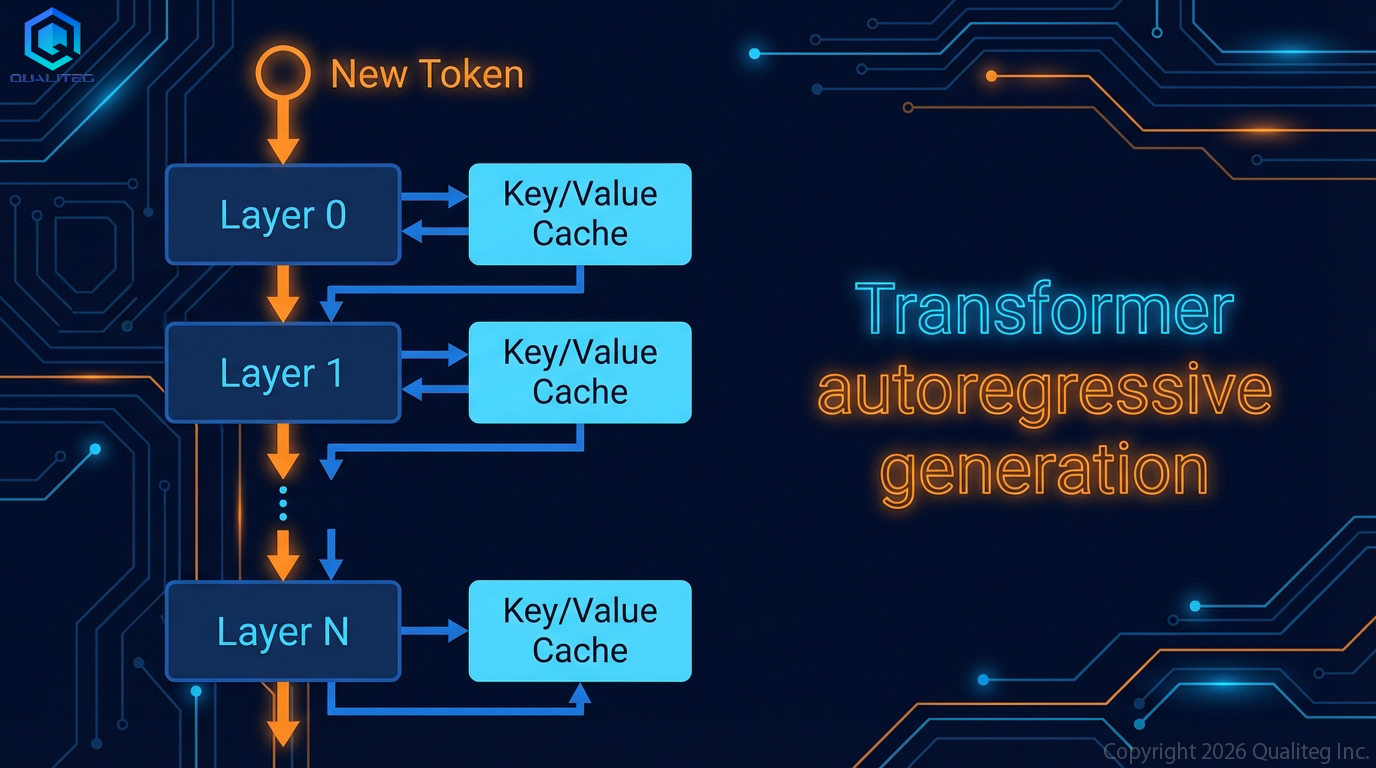
In a Transformer's autoregressive generation (inference that produces one token at a time), every new token requires a pass through all layers in order.
In other words, generating a single token means computing through every layer of the model. In principle, at least.
The processing flow is as follows.
- The new token's embedding enters Layer 0
- Layer 0 combines the new input with that layer's past Key and Value tensors to compute attention
- Its output passes to Layer 1
- Layer 1 likewise references its KV to compute attention, and so on
- This repeats through the final layer
- The next token is predicted from the final layer's output
The important point here is that
the Keys and Values computed for past tokens come out the same every time
.
Recomputing them for every token would be wasteful, so
we cache the Keys and Values once they have been computed.
This is the KV cache.
The catch with this KV cache is that
it grows as the context gets longer, steadily eating into VRAM.
How Big Does the KV Cache Get?
Let's calculate concretely how much memory it consumes, using Llama 2 7B as an example (an older model, but a convenient one).
Model configuration: 32 layers, 32 heads, head dimension 128, FP16
First, the KV cache required by a single layer to process one token is as follows
K: 32 heads × 128 dims × 2 bytes (FP16) = 8 KB
V: likewise 8 KB
Total: ~16 KB per token per layer
So roughly 16 KB of KV cache accumulates per layer for every token.
Now consider a user who has input and generated a total of 2,048 tokens
Per layer: 16 KB × 2,048 tokens = ~32 MB
All 32 layers: 32 MB × 32 layers = ~1 GB
Since the "2,048 tokens" part varies with context length, the KV cache grows in proportion to context length.
With an 8K-token context, roughly 4 GB is consumed as KV cache; with 32K tokens, roughly 16 GB.
In short, when users feed in large amounts of text or generate long outputs, the KV cache keeps growing.
This comes on top of the model weights (about 14 GB for 7B FP16), so the burden on VRAM is far from negligible.
Moving the KV Cache to CPU RAM or Disk
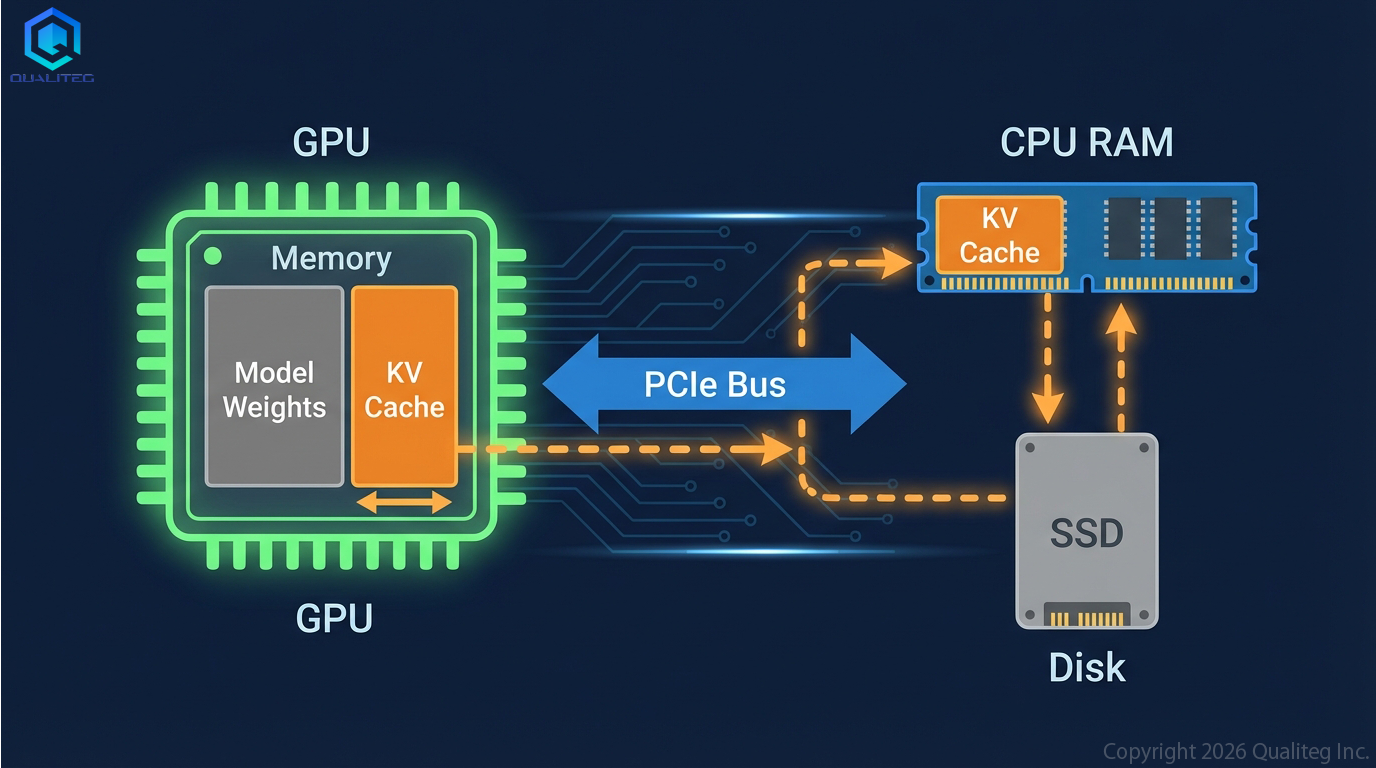
A popular idea lately, driven by the desire to minimize consumption of expensive GPU RAM (VRAM), is to move the KV cache out to CPU-side memory or to disk such as an SSD.
The short answer: yes, you can.
For example, HuggingFace Transformers lets you offload the KV cache from GPU VRAM to CPU RAM or disk.
The simple approach
The KV cache is really just PyTorch tensors, so .to("cpu") makes it easy to evacuate them to CPU RAM.
# Move to CPU RAM
cpu_cache = tuple(
    tuple(t.to("cpu") for t in layer)
    for layer in past_key_values
)

# Move back to GPU when needed
gpu_cache = tuple(
    tuple(t.to("cuda") for t in layer)
    for layer in cpu_cache
)
To save to disk, use torch.save.
import torch
torch.save(past_key_values, "kv_cache.pt")
past_key_values = torch.load("kv_cache.pt", map_location="cuda")
HuggingFace's OffloadedCache
Transformers 4.36 and later introduce the Cache class, and using OffloadedCache gives you automatic per-layer CPU offloading.
output = model.generate(
    input_ids,
    cache_implementation="offloaded",
    max_new_tokens=100,
)
Internally, while Layer N is being computed, Layer N+1's KV cache is prefetched asynchronously, which softens the transfer overhead.
The Offloading Bottleneck: PCIe Transfer Speed
So it is technically possible to push the KV cache out of the GPU, that is, to offload it. The first problem you run into, though, is the read/write speed when moving the KV cache out of the GPU and reading it back.
Data transfer between CPU and GPU goes over the PCIe bus.
And that speed, in other words the bandwidth, is determined by the PCIe generation and the number of lanes available.
| PCIe Generation | x16 One-Way Bandwidth | Effective Throughput |
|---|---|---|
| PCIe 3.0 | ~16 GB/s | ~12-13 GB/s |
| PCIe 4.0 | ~32 GB/s | ~25 GB/s |
| PCIe 5.0 | ~64 GB/s | ~50 GB/s |
Note: PCIe speeds and lane counts are covered in detail in this article ("[PC Build Diary 1] Understanding Modern Custom PC Architecture").
How Much Slower Does It Actually Get?
It's a bit dated, but let's estimate using Llama 2 7B (32 layers, FP16) with a 2,048-token context.
As explained earlier, generating each token requires passing through every layer, so each layer's KV cache goes through a cycle of transfer to GPU, compute, then return to CPU.
For the 2,048-token workload above, that is roughly 32 MB per layer × 32 layers = about 1 GB of transfer volume, which takes roughly 40 ms one way on PCIe 4.0 (25 GB/s effective).
| Scenario | Speed |
|---|---|
| GPU only (entirely in VRAM) | ~15 ms/token |
| Offloading (no prefetch) | ~80+ ms/token |
| Offloading (with prefetch) | ~40-50 ms/token |
Compared with keeping everything on the GPU, that works out to roughly 3-5x slower.
PCIe transfer alone costs you that much.
That said, since layers are processed in order, pipelining is possible: transfer Layer N+1 asynchronously while computing Layer N. When compute time exceeds transfer time, the transfer cost can be hidden.
Conversely, with long contexts the per-layer transfer volume grows, exceeds the compute time, and becomes the bottleneck.
Context Length vs. Transfer Cost
| Context Length | KV Size per Layer | Total Transfer (All Layers) | Transfer Time (PCIe 4.0) |
|---|---|---|---|
| 2K | 32 MB | ~1 GB | ~40 ms |
| 8K | 128 MB | ~4 GB | ~160 ms |
| 32K | 512 MB | ~16 GB | ~640 ms |
At a 32K context, generating a single token takes over 0.6 seconds, which makes real-time use quite difficult.
Even moving to PCIe 5.0, roughly twice as fast as 4.0, does not make real-time use comfortable.
Saving to disk (SSD) is slower still: 3-7 GB/s on NVMe SSDs and about 0.5 GB/s on SATA SSDs.
The reality is that this is unsuitable for real-time inference and is limited to uses such as reusing caches across sessions.
A Different Design Philosophy: vLLM
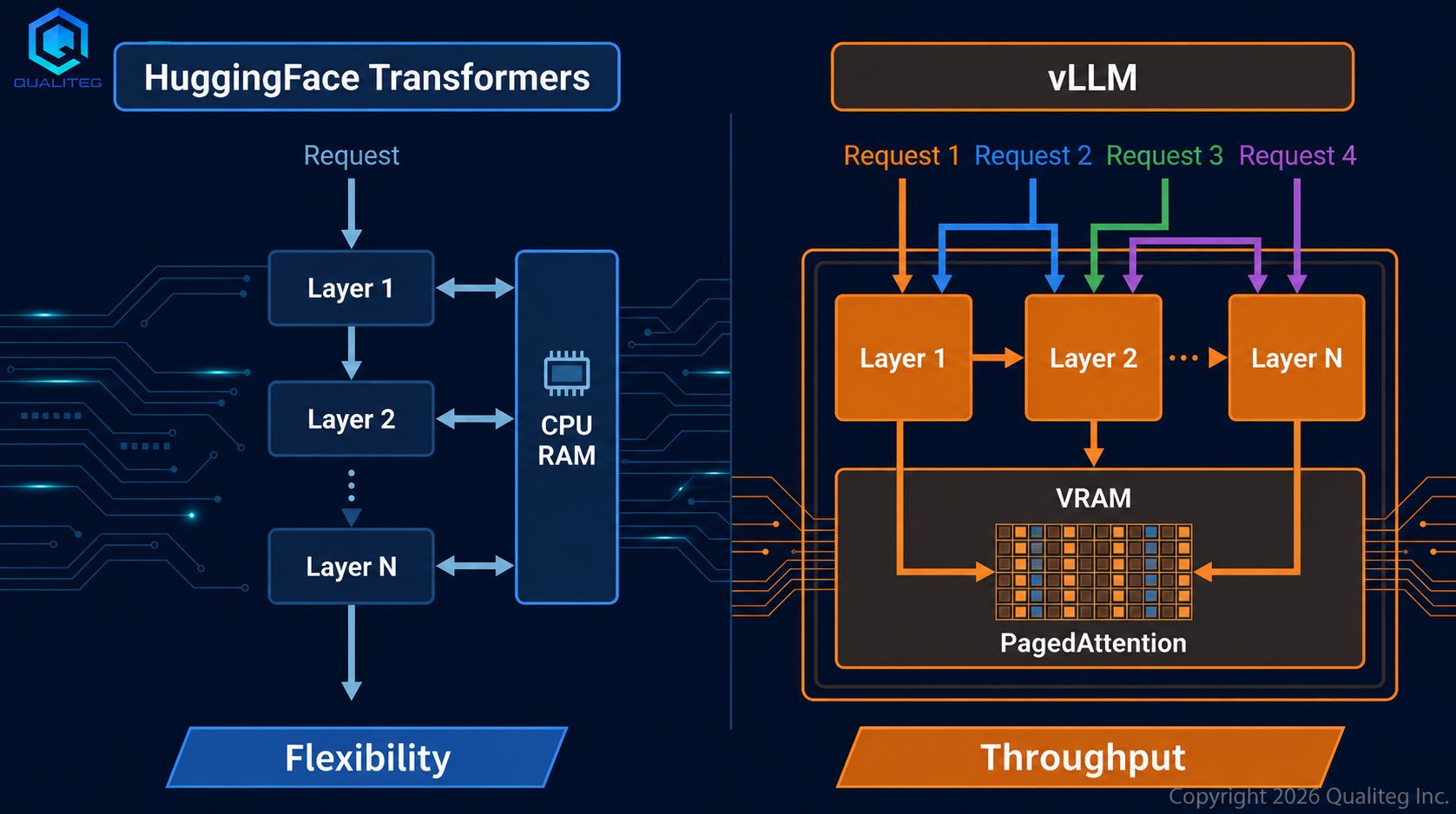
We introduced the differences between vLLM and HuggingFace Transformers (QCT) in Part 4; here, let's dig a little deeper from the perspective of KV cache management.
With HuggingFace Transformers or our in-house QCT, the architecture is simple and offloading the KV cache is relatively easy; with vLLM, KV cache offloading is considerably harder.
That is because, even though both manage the same KV cache, the two take completely different approaches.
HuggingFace Transformers
- Processes layers one at a time in a simple for loop
- Each layer's KV cache can be moved in and out whenever you like
- Processing is basically one request at a time, sequentially
- Well suited to batch processing and prototyping
vLLM
- PagedAttention splits the KV cache into fixed-size blocks and manages them efficiently inside VRAM
- Continuous batching processes multiple requests concurrently
- Fundamentally designed on the assumption that everything fits in VRAM.
- Handles dozens of concurrent requests, achieving throughput of several hundred to 1000+ tokens/sec
vLLM does have a CPU swap feature for the KV cache, but rather than transferring on every token during inference, it evacuates a request's KV blocks to CPU when the request is preempted (interrupted) and restores them on resume. It is used as part of scheduling.
| HF OffloadedCache | vLLM | |
|---|---|---|
| Purpose | Evacuate KV that won't fit in VRAM | Temporary evacuation as part of scheduling |
| Timing | Every token, per layer | On request preemption/resume |
| Latency impact | Always slower | Only evacuated requests are delayed |
Why does this difference arise?
Precisely because HuggingFace Transformers is a simple single-request inference loop, offloading can be achieved just by inserting .to("cpu") / .to("cuda") at each layer. vLLM, on the other hand, processes multiple requests concurrently with continuous batching, so waiting on a PCIe transfer at every layer would clog the entire pipeline.
This is the classic flexibility vs. throughput trade-off.
If you want to run a large model on your own machine, HF's offloading is the way; for serving multiple users, the standard move is vLLM with a configuration that fits in VRAM.
Moreover, vLLM bakes in optimizations for each model architecture throughout; the price of that throughput is that casual, real-time KV cache offloading becomes quite difficult.
Concurrent Processing with HuggingFace Transformers
Let's also look at concurrency.
On its own, HuggingFace Transformers basically processes one request at a time.model.generate() is synchronous and blocking, with no built-in concurrency mechanism.
That said, if you wrap it with FastAPI or similar and call model.generate() from multiple threads, two or three requests can run concurrently if VRAM allows, because PyTorch's CUDA can execute multiple kernels on the same GPU with some degree of parallelism.
| Method | Concurrency | Notes |
|---|---|---|
| Plain HF | 1 | — |
| Multithreading + FastAPI | 2-3 | Depends on VRAM |
| Multiple processes on multiple GPUs | One per GPU | Memory × N |
| HF TGI | Dozens and up | Design closer to vLLM |
Even so, each request performs attention computation independently, so there is no batching benefit and VRAM efficiency is poor. The throughput gap with vLLM is literally an order of magnitude.
For Batch Processing, HF Shines
On the other hand, for offline batch processing, HuggingFace Transformers is a fine choice.
- Real-time performance is not required, so offloading latency is acceptable
- Items can simply be processed one by one, avoiding the complexity of concurrency
- The code is simple, and pre/post-processing is freely customizable
- The KV cache can be saved to disk and reused
For bulk document summarization, dataset labeling, overnight batch inference, and other "as long as it's done by morning" workloads, it is perfectly practical.
Running Big Models on Small GPUs
KV cache offloading alone is not enough: if the model weights don't fit in VRAM, nothing runs in the first place.
What GPU VRAM must hold
| Item | 7B FP16 | 70B FP16 |
|---|---|---|
| Model weights | ~14 GB | ~140 GB |
| KV cache | 1 to several GB | 10+ GB |
| Activations | Hundreds of MB | Several GB |
Automatic placement with device_map="auto"
With HuggingFace Transformers' device_map="auto", layers that fit go to the GPU, the rest to CPU RAM, and anything still left over is automatically placed on disk.
model = AutoModelForCausalLM.from_pretrained(
    "meta-llama/Llama-2-70b-hf",
    device_map="auto",
    offload_folder="offload",
)
This lets a 70B model run, after a fashion, even on an 8GB GPU. But speed drops dramatically.
| Configuration | Approx. 70B Speed |
|---|---|
| All GPU (A100 80GB × 2) | ~30 tokens/sec |
| GPU + CPU offload | ~2-5 tokens/sec |
| GPU + disk offload | ~0.1-0.5 tokens/sec |
Combining with Quantization
The most realistic approach is to combine offloading with the quantization covered in Part 5: shrink the model first, then offload.
model = AutoModelForCausalLM.from_pretrained(
    "meta-llama/Llama-2-70b-hf",
    load_in_4bit=True,          # 140GB → ~35GB
    device_map="auto",          # the rest goes to CPU
)
Model sizes that fit on a single 24GB GPU (with 4-bit quantization)
| Model | 4-bit Size | Fits in 24GB? |
|---|---|---|
| 7B | ~4 GB | Easily |
| 13B | ~7 GB | Easily |
| 30B | ~17 GB | Just barely |
| 70B | ~35 GB | Does not fit |
A 4-bit 70B model (about 35GB) does not fit in 24GB of VRAM.device_map="auto" can place roughly half of it in CPU RAM to get it running, but the CPU-resident layers are slow. If you want a single-GPU setup, you need 24GB × 2 (48GB), or an A6000 (48GB) or A100 (80GB).
Scenarios Where CPU Offloading of the KV Cache Pays Off
Reading this far, you may be thinking that offloading only makes things slower. The situation where evacuating only the KV cache to CPU makes sense is when the model weights fit on the GPU but a long context overflows VRAM with KV cache.
A concrete example: 30B model × 24GB GPU
Loading a 30B model at 4-bit quantization (about 17GB) on a 24GB GPU leaves roughly 9GB for the KV cache.
For a GQA model (8 KV heads), the KV cache size per token is as follows:
K + V: 64 layers × 8 heads × 128 dims × 2 bytes × 2 (K and V) = 256 KB/token
9GB can hold about 36,000 tokens' worth of KV cache. With full attention (64 KV heads), it fills up at about 4,500 tokens.
| KV Head Configuration | Tokens That Fit in 9GB |
|---|---|
| GQA (8 KV heads) | ~36K |
| MQA (1 KV head) | ~288K |
| Full attention (64 heads) | ~4.5K |
As the table shows, the same 9GB holds a vastly different number of tokens depending on the attention scheme. We cover GQA in detail in the next section.
Effective use cases
- Batch analysis of long documents — Feed in entire papers or contracts for summarization. It's batch processing, so slow is fine
- Feeding many RAG chunks at once — Useful when you want to skip retrieval filtering and put everything into the context to boost accuracy
- KV cache reuse — Keep the prefill result of a shared system prompt (thousands of tokens) in CPU RAM and transfer it to the GPU per request. For long prompts, there is a crossover point where the PCIe transfer beats recomputing the prefill every time
GQA/MQA: Attacking the KV Cache Problem at Its Root
So far we have looked at how to operate the KV cache; but the reason KV caches get large in the first place lies in the number of attention heads. GQA (Grouped-Query Attention) and MQA (Multi-Query Attention) solve this structurally.
Part 5 introduced quantization as a way to shrink the model footprint; GQA works along a different axis: a technique that changes the attention structure itself to dramatically shrink the KV cache.
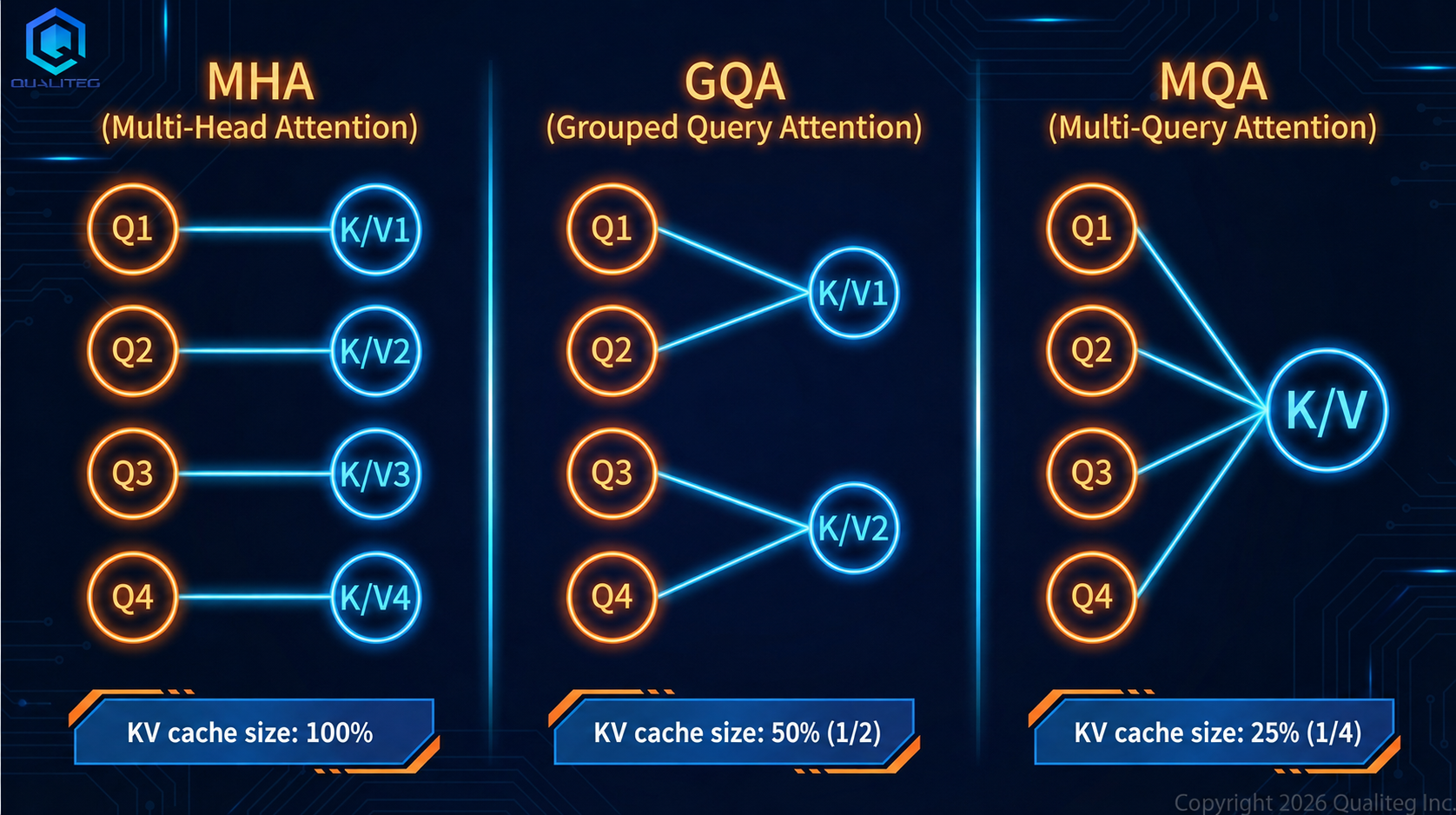
MHA (Multi-Head Attention): the traditional scheme
Query, Key, and Value each have the same number of heads.
Q: 64 heads
K: 64 heads  ← all independent
V: 64 heads  ← all independent
MQA (Multi-Query Attention): extreme sharing
Proposed in 2019 by Google's Noam Shazeer in the paper "Fast Transformer Decoding: One Write-Head is All You Need." K and V are shared across all heads.
Q: 64 heads
K: 1 head   ← shared by all Q heads
V: 1 head
The KV cache shrinks to 1/64. Inference speed improves dramatically, but the drawback was a slight drop in quality.
GQA (Grouped-Query Attention): the balanced middle ground
Proposed in May 2023 by Google's Joshua Ainslie and colleagues in "GQA: Training Generalized Multi-Query Transformer Models from Multi-Head Checkpoints" (arXiv:2305.13245). Q heads are divided into groups, and each group shares one K and V.
Q: 64 heads (8 groups × 8 heads)
K: 8 heads   ← one per group
V: 8 heads
The KV cache shrinks to 1/8, with an excellent balance of quality and efficiency.
A visual picture
MHA:  Q₁→K₁  Q₂→K₂  Q₃→K₃  Q₄→K₄  (each has its own)
GQA:  Q₁→K₁  Q₂→K₁  Q₃→K₂  Q₄→K₂  (shared within a group)
MQA:  Q₁→K₁  Q₂→K₁  Q₃→K₁  Q₄→K₁  (everyone shares one)
The motivation behind GQA
Reducing the KV cache is one major motivation, but not the only one. The bottleneck of autoregressive generation is not compute but memory bandwidth.
Every token requires reading a huge KV cache out of VRAM.
In other words, the goal is to improve both the KV cache's size (a VRAM capacity problem) and its read bandwidth (a speed problem) at the same time. It is more accurate to say that KV cache reduction came along naturally in the course of removing the memory bandwidth bottleneck of inference.
The GQA adoption timeline
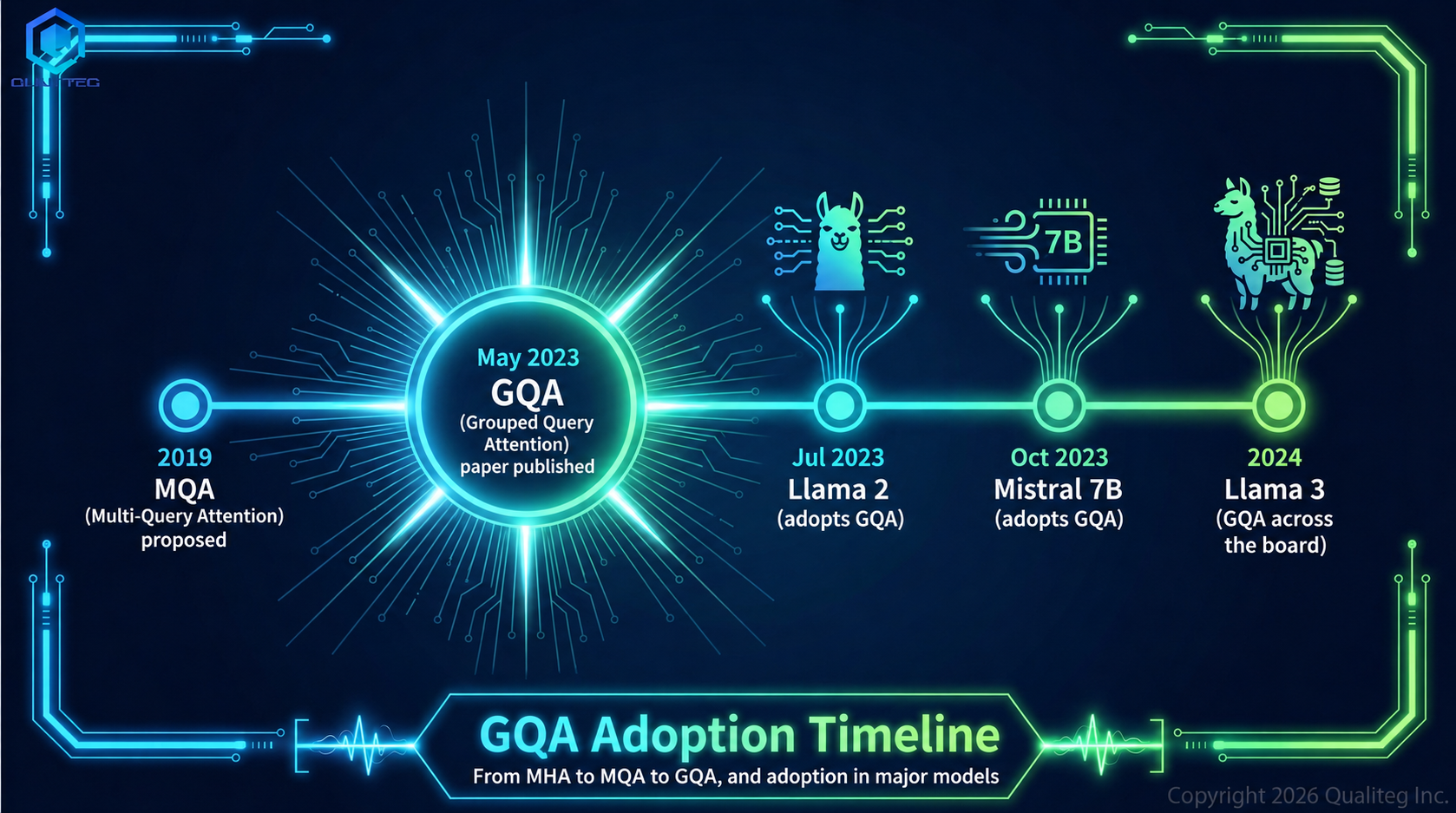
Adoption of GQA into real models after the paper's publication was remarkably fast: major industry models picked it up within just two months. Below is a timeline verified against multiple sources.
| When | Model | Scheme | Notes |
|---|---|---|---|
| 2019 | MQA paper (Shazeer) | MQA proposed | "Fast Transformer Decoding" |
| April 2022 | PaLM (Google) | MQA | First large-scale model to adopt MQA |
| May 2023 | GQA paper (Ainslie et al.) | GQA proposed | arXiv:2305.13245 |
| Around May 2023 | Falcon 7B / 40B | MQA / GQA | 7B uses 1 group (effectively MQA); 40B and 175B use 8 groups |
| July 2023 | Llama 2 | GQA (8 groups) | 70B only; 7B and 13B remained MHA |
| October 2023 | Mistral 7B | GQA (8 groups) | GQA adopted even in a small model |
| December 2023 | Mixtral 8x7B | GQA (8 groups) | GQA even in an MoE architecture |
| April 2024 onward | Llama 3, all sizes | GQA (8 groups) | GQA across all sizes from 8B to 405B |
| Since then | Nearly all new models | GQA | Adopted by Gemma, Qwen, OLMo, and others |
What deserves attention is that Llama 2's 7B and 13B kept full-attention MHA, and only the 70B adopted GQA. The judgment at the time was that KV cache is less of a problem for smaller models, but from Llama 3 onward, GQA became standard across all sizes.
Also, while the GQA paper's formal conference presentation was at EMNLP in December 2023 (Singapore), companies moved to adopt it immediately after the arXiv preprint appeared in May 2023, which speaks to just how pressing a problem the KV cache was across the industry.
Summary: A Practical Decision Flow
Finally, let's organize everything above into a practical decision flow.
When selecting a model: Choose a GQA-capable model. Nearly all recent models (Llama 3 and later, Mistral, and so on) support GQA, making the KV cache dramatically smaller.
When VRAM is insufficient
- First, compress the model with quantization (4-bit/8-bit)
- If it still doesn't fit, use
device_map="auto"to offload to CPU RAM - If only the KV cache overflows, use
cache_implementation="offloaded". - For serving, choose quantization + vLLM in a configuration that fits in VRAM
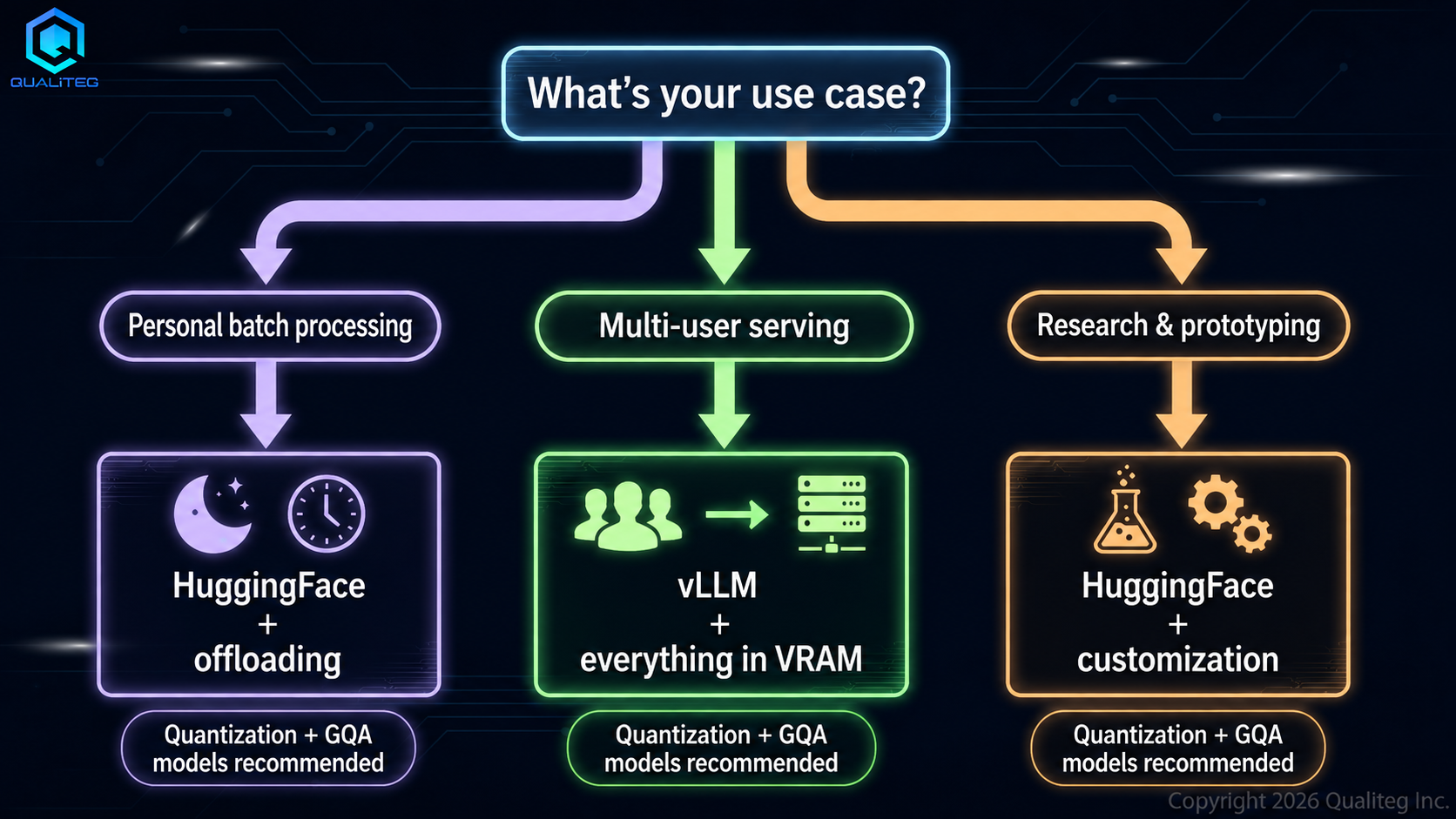
Match the tool to the job
- Personal batch processing → HuggingFace Transformers + offloading. Slow is fine as long as it runs
- Serving multiple users → vLLM or TGI. A configuration that fits in VRAM is a prerequisite
- Prototyping and research → HuggingFace Transformers. Simple code, easy to customize
The KV cache tends to be dismissed as an "invisible VRAM consumer," but with today's ever-longer contexts, managing it has become a decisive factor in inference performance. The spread of GQA has improved the situation considerably, yet for ultra-long contexts like 128K tokens, KV cache handling still holds the key.
Choosing a strategy that matches your use case and hardware is the shortest path to comfortable LLM inference.
From KV cache and memory optimization to inference algorithm design.
Optimizations like KV cache offloading and GQA only pay off with a real understanding of models and inference.
We build and operate our own LLM products. From inference optimization and model evaluation to implementation in PyTorch, our support is grounded in hands-on engineering experience, not armchair theory.
Explore our generative AI and model development consulting →See you in the next article!
Qualiteg: Your Partner for LLM and AI Security
We at Qualiteg have an engineering team that has actually designed LLM inference and serving infrastructure. Rather than treating inference engines as mere black boxes, we provide local LLM support grounded in deep knowledge of attention computation, KV cache behavior, and more. From core technology to AI market analysis — "What configuration fits in VRAM?", "vLLM or Hugging Face: what are the decision criteria?", "What is the shortest path to adapting an existing model to our domain?", "How should we split usage between open and commercial LLMs?", "What does a secure local LLM configuration look like?", "How do we choose local LLMs and GPUs?", "GPU data center demand and market forecasts", "AI market forecasts" — feel free to consult us.