LLM Inference Infrastructure Provisioning Course, Part 3: Estimating Inference-Time Memory Consumption for Your Model


Hello! Last time we covered how to estimate the request volume for an LLM service. This time we dig into the third of the seven steps: estimating the memory your model consumes during inference.
LLM Inference Infrastructure Provisioning Course: Series Index
- Part 1: Basic Concepts and Inference Speed
- Part 2: Estimating Request Volume for an LLM Service
- Part 3: Estimating Inference-Time Memory Consumption for Your Model
- Part 4: Selecting an Inference Engine
- Part 5: A Practical Process from GPU Node Configuration to Load Testing
- Bonus: KV Cache Offloading Strategies and GQA
GPU Memory Determines Request-Handling Capacity
When building an LLM service, the number of requests a GPU can process simultaneously is constrained by GPU memory consumption.
In other words, the amount of available GPU memory almost entirely determines how many requests can be processed at the same time.
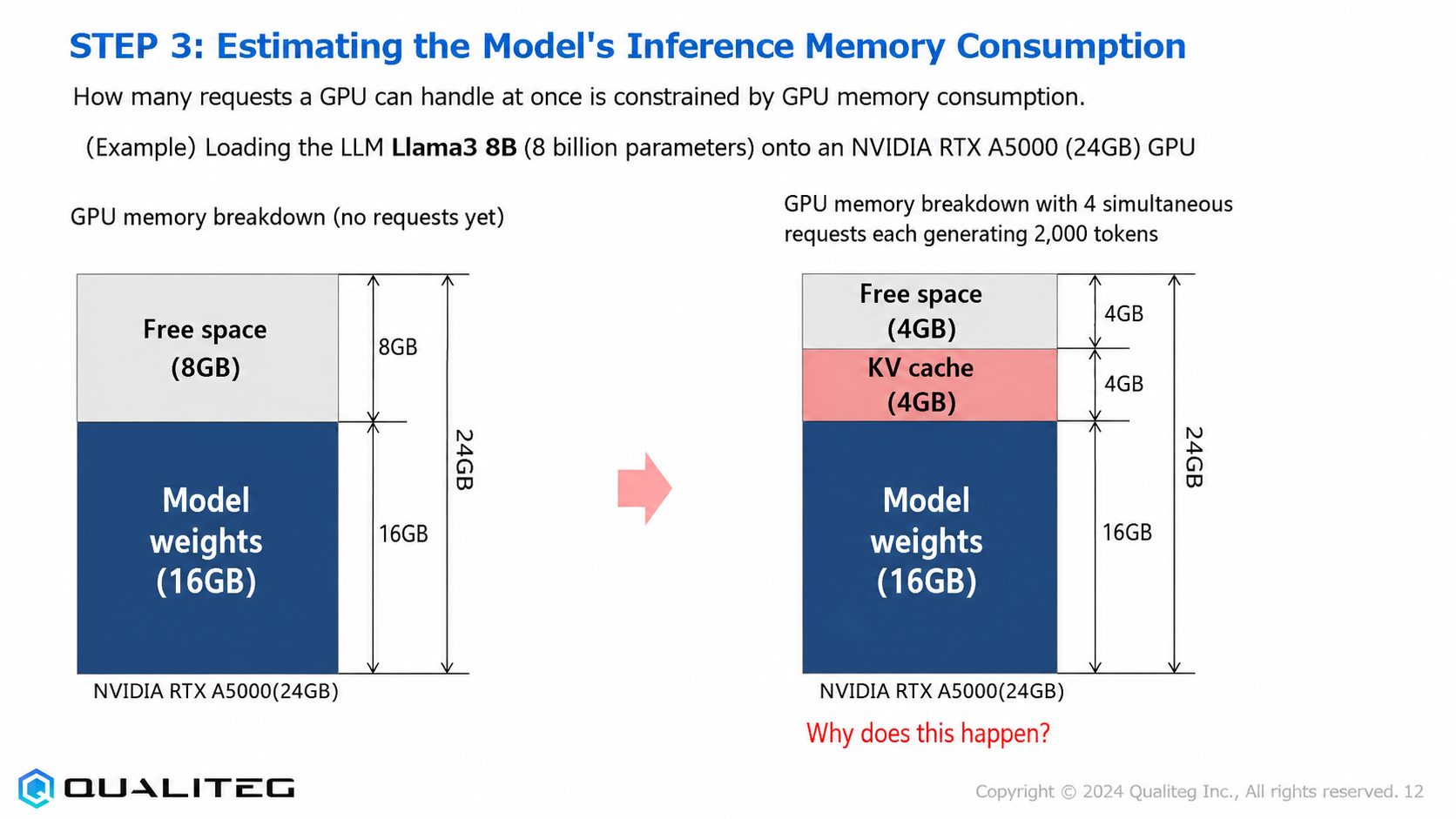
As a concrete example, let's consider loading the Llama3 8B model (8 billion parameters) onto an NVIDIA RTX A5000 (24GB).
This GPU has 24GB of memory, but not all of it is available for request processing. The model itself consumes a certain amount of memory first, and the remaining space is what actually handles requests.
The Two Main Components of GPU Memory Consumption
GPU memory consumption is determined mainly by the following two components
- Model footprint
The memory consumed up front when the LLM is loaded onto the GPU - Total KV cache
The temporary memory needed while processing requests
By estimating these two accurately, you can calculate how many requests a single GPU can process concurrently.
3-1 What Is the Footprint?
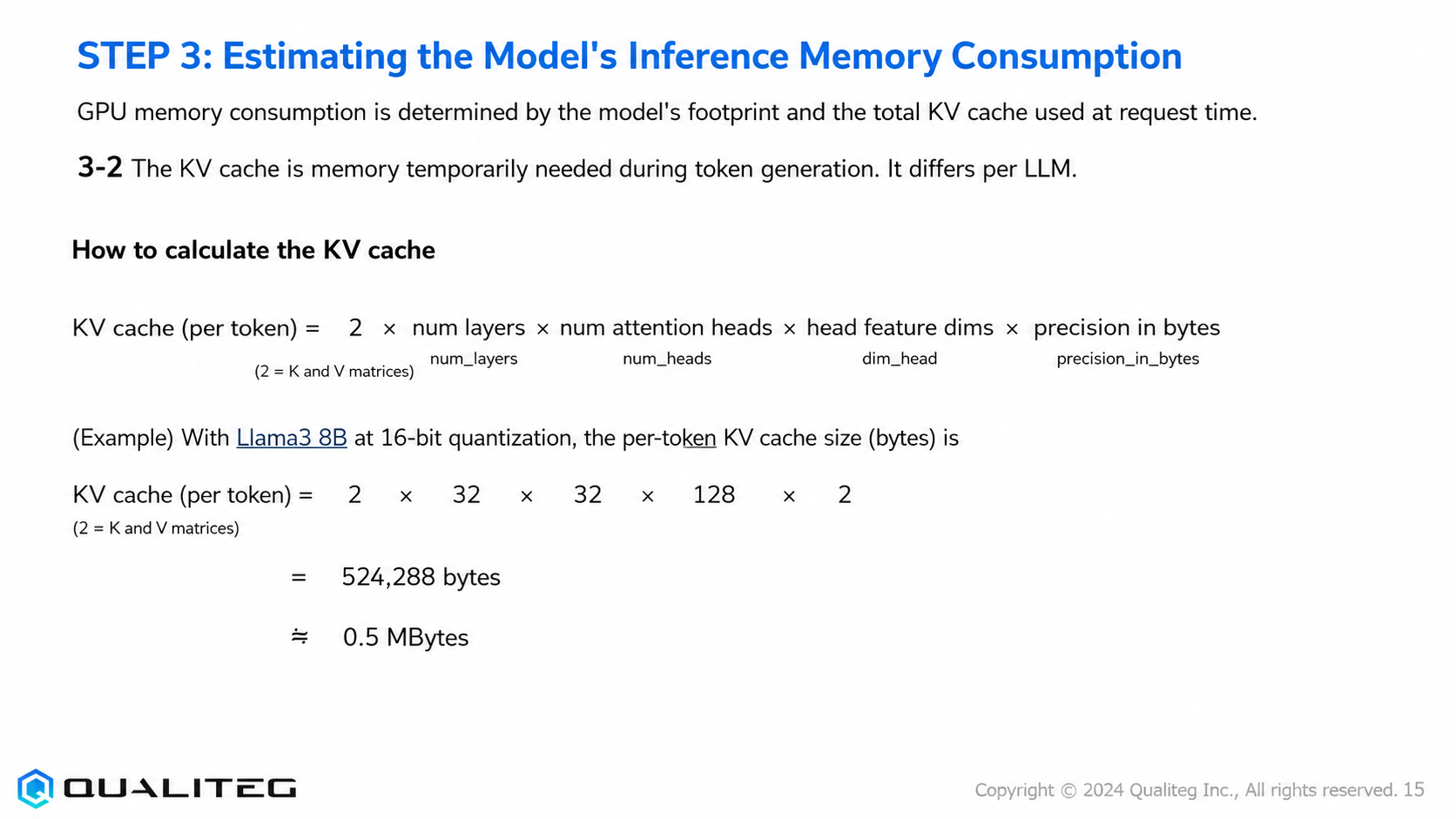
The footprint is the amount of GPU memory consumed when the LLM is loaded onto the GPU. It is the fixed memory usage needed to store the model's weight parameters and related data.
How to calculate the footprint
The footprint can be calculated with the following formula
Footprint (GB) = model size (B) × precision in bytes
Here, "precision in bytes" is a value determined by the model's quantization bit width
| Quantization bits | Format | Precision (bytes) | Notes |
|---|---|---|---|
| 32-bit | FP32 | 4 | Training precision; standard use |
| 16-bit | FP16, BF16 | 2 | Standard (half-precision) use |
| 8-bit | INT8, FP8 | 1 | Used when you want to reduce memory usage, at the cost of accuracy |
| 4-bit | INT4, FP4 | 0.5 | Used when you want to minimize memory usage, at the cost of accuracy |
For example, when using the Llama3 8B model (8B = 8 billion parameters) at 16-bit (half) precision
Footprint = 8 × 2 = 16GB
. This 16GB is the fixed amount of memory used the moment the model is loaded.
Llama3 8B model specifications
Now, let's review the detailed specifications of the Llama3 8B model
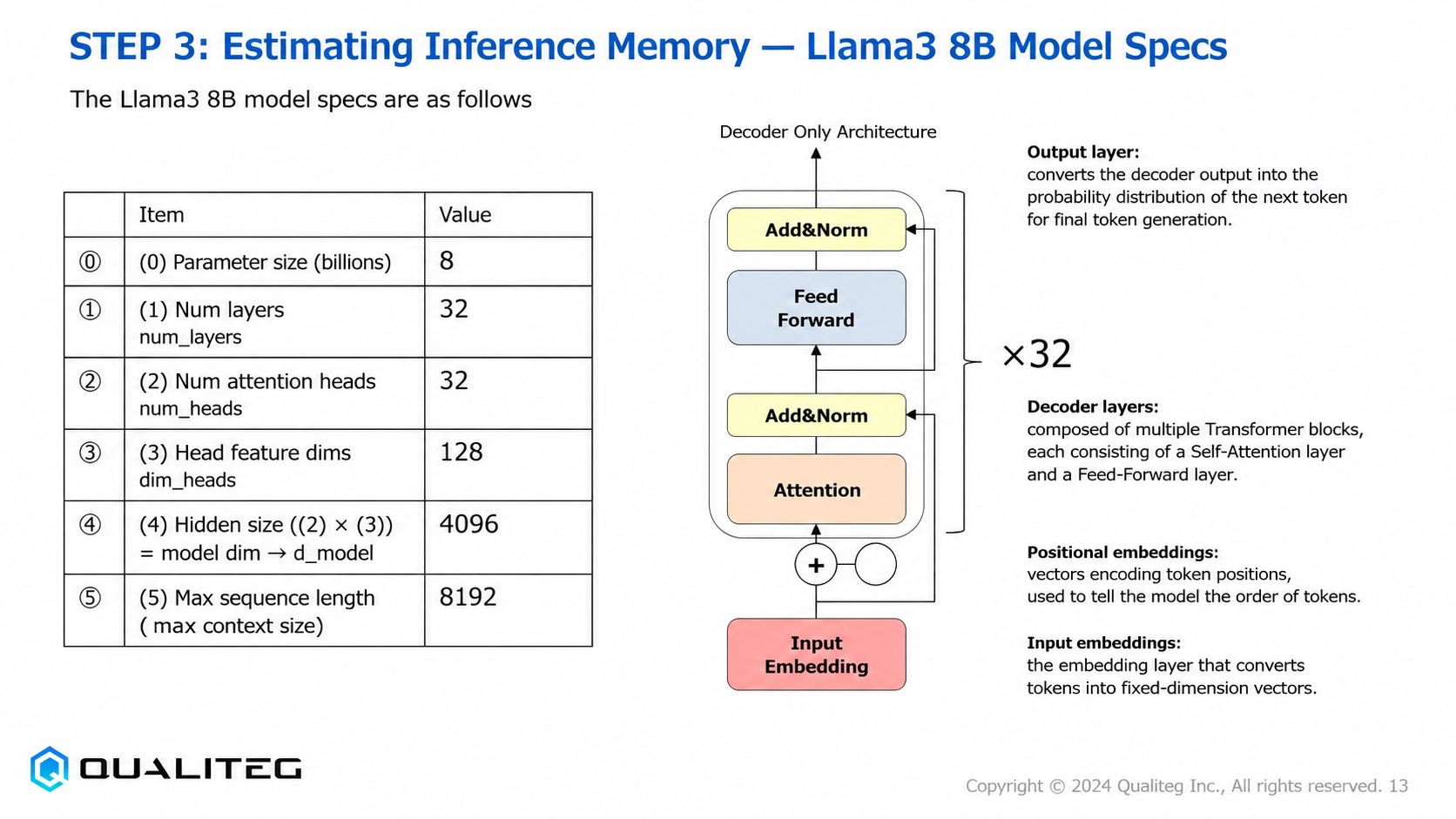
| Item | Value |
|---|---|
| Parameter count (billions) | 8 |
| Number of layers (num_layers) | 32 |
| Number of attention heads (num_heads) | 32 |
| Feature dimension per head (dim_heads) | 128 |
| Hidden size (② × ③) = model dimension d_model | 4096 |
| Maximum sequence length (maximum context size) | 8192 |
This model uses what is called a decoder-only architecture: each of its 32 layers contains a self-attention layer and a feed-forward layer, with normalization (Add & Norm) applied between layers.
The output layer is responsible for converting the decoder layers' output into a probability distribution over the next token for final token generation. Other important components include the positional embeddings, which encode the position of each input token, and the input embeddings, which convert tokens into fixed-dimension vectors.
For now, it is enough to understand that an LLM has these kinds of parameters.
3-2 What Is the KV Cache?
The KV cache is the memory temporarily required during token generation. It consists of the key (K) and value (V) vectors saved during the LLM's inference process so that past computation results can be reused, and its characteristics differ from model to model.
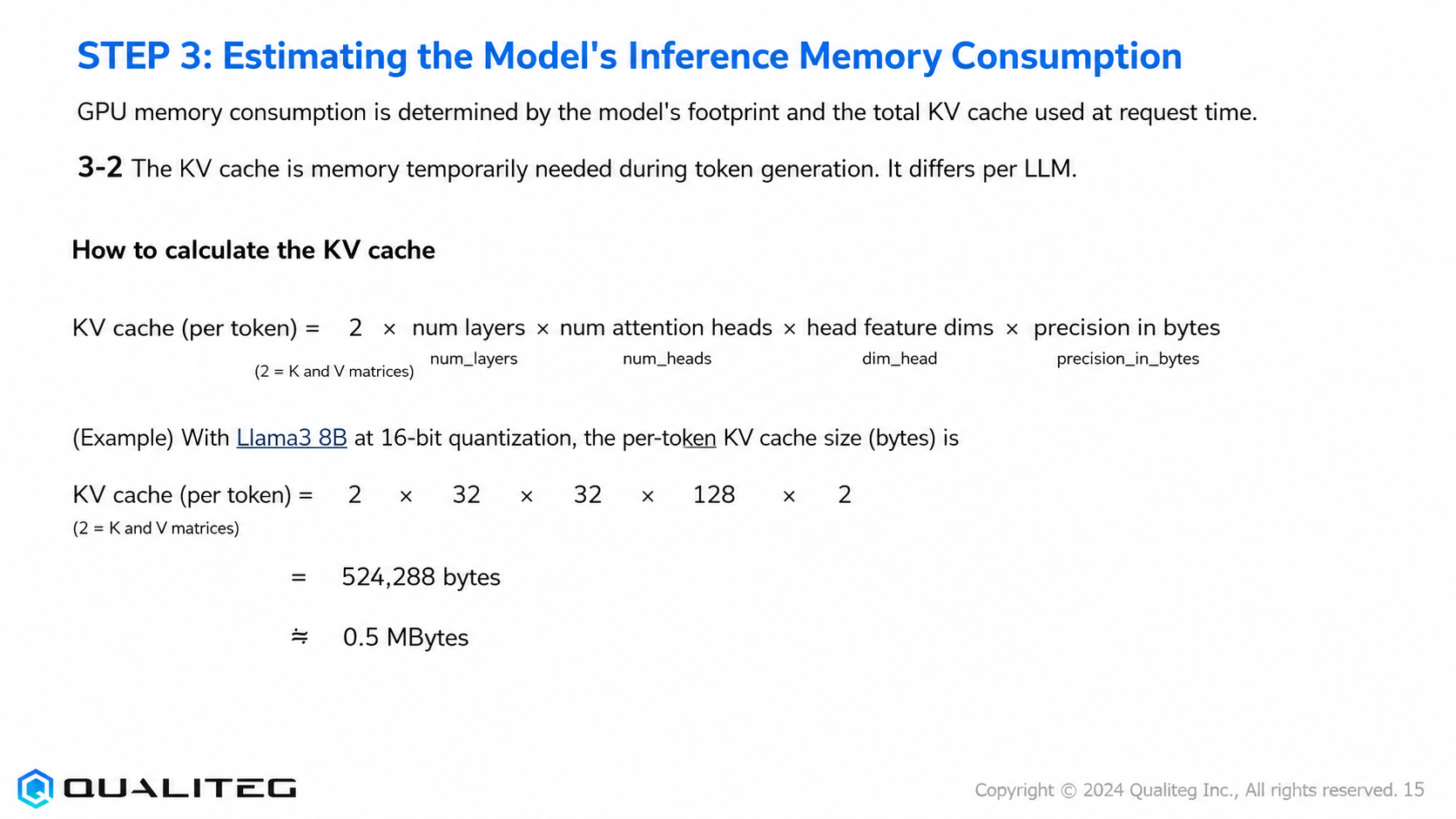
How to calculate the KV cache
The KV cache per token can be calculated with the following formula
KV cache (per token) = 2 × num_layers × num_heads × head feature dimension × precision in bytes
Here, the "2" accounts for the two matrices: keys and values.
Example calculation for the Llama3 8B model at 16-bit precision
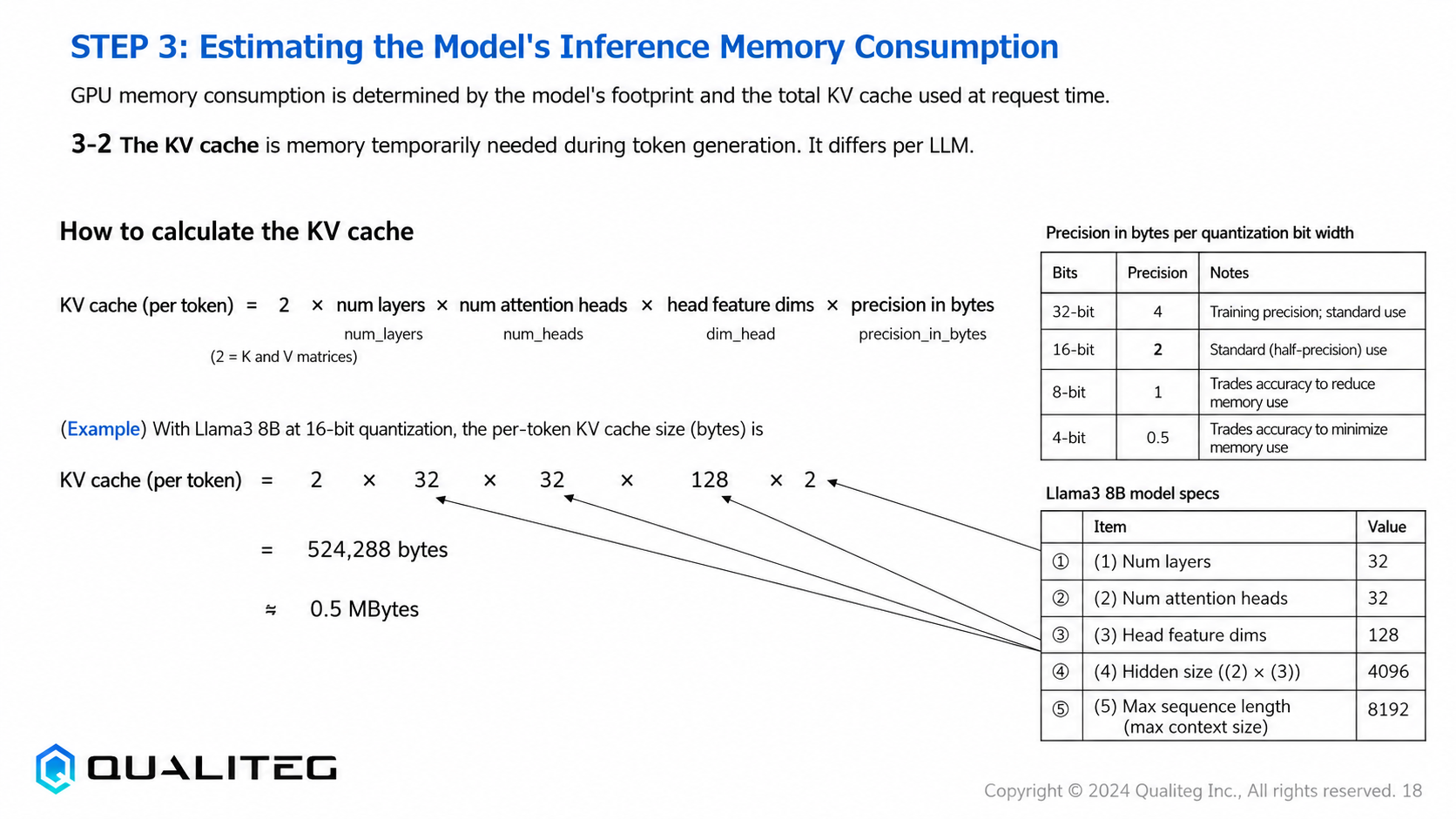
KV cache = 2 × 32 × 32 × 128 × 2 = 524,288 bytes ≈ 0.5 MBytes(per token)
In other words, the Llama3 8B model needs roughly 0.5MB of KV cache per token.
Actual GPU Memory Usage
Consider the initial state after loading Llama3 8B (16-bit precision) onto an NVIDIA RTX A5000 (24GB).
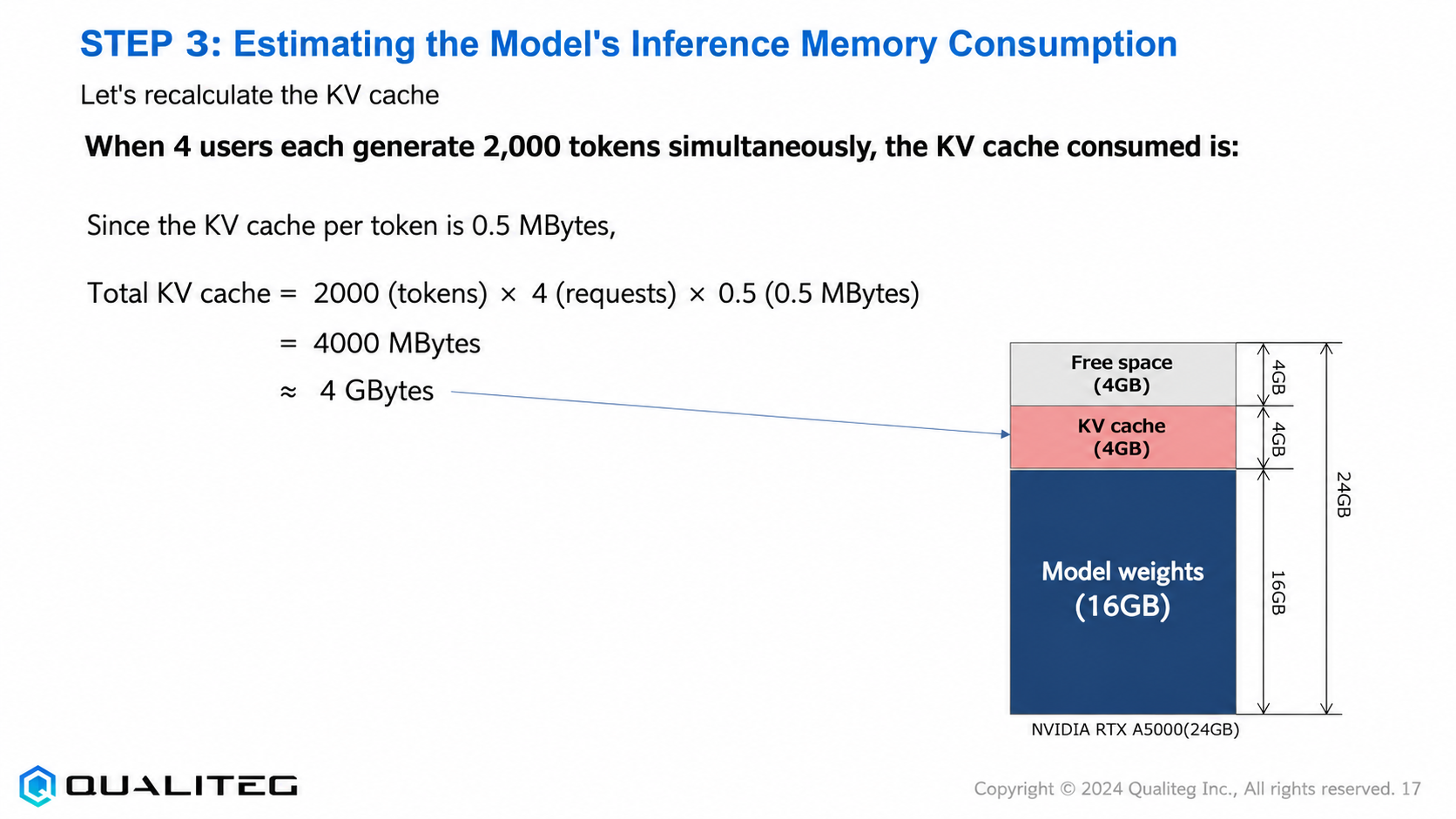
- Model weights: 16GB
- Remaining free space: 8GB
Now suppose four users simultaneously send requests that each generate 2,000 tokens
Total KV cache consumption = 2,000 (tokens) × 4 (requests) × 0.5 (MBytes) = 4,000 MBytes ≈ 4 GBytes
This 4GB of KV cache is added on top of the model weights (16GB), leaving 4GB of free space.
Why KV Cache Estimation Matters
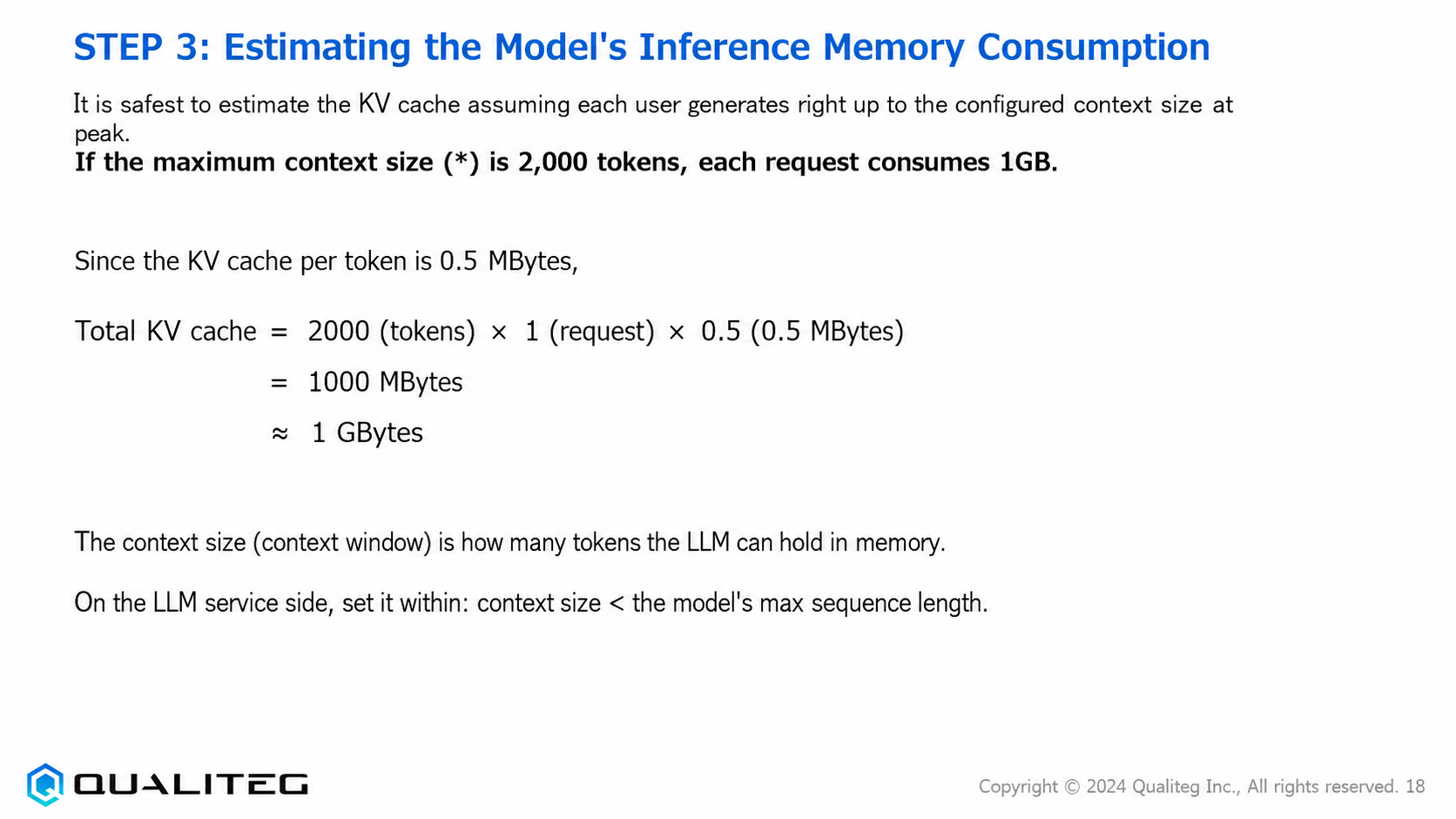
For KV cache estimation, it is safest to calculate using the full context size configured for each user, generated at peak load. For example, with a maximum context size of 2,000 tokens, each request consumes roughly 1GB of memory.
Knowing this accurately tells you the upper limit on the number of concurrent requests a single GPU can handle.
For example, on an RTX A5000 (24GB), after subtracting the model itself (16GB), the remaining 8GB can handle up to eight concurrent requests consuming 1GB each. In practice, though, it is advisable to build in a safety margin and design with some headroom.
The context size (context window) is the capacity of tokens the LLM can remember; on the service side you configure it within the range "context size < the model's maximum sequence length." For Llama3 8B, the maximum sequence length is 8,192 tokens, so the service's context size must be set to something smaller.
Optimization Through Quantization
One technique for using GPU memory efficiently is quantization. For example, quantizing the Llama3 8B model to 8-bit precision (INT8) instead of the standard 16-bit precision (FP16) halves the model footprint from 16GB to 8GB. Quantizing further to 4-bit precision reduces it to 4GB.
The trade-off is that quantization sacrifices some model accuracy. The key is to weigh your service requirements (response quality and speed) against cost efficiency. In general, 16-bit precision is the standard choice, but when memory efficiency is the priority, 8-bit or 4-bit quantization is worth considering.
Summary of This Installment
In this installment we covered how to estimate the GPU memory consumed during LLM inference, focusing on calculating the model footprint and the KV cache.
KV cache calculation as a theoretical value
The KV cache calculation method introduced in this chapter is based on basic theoretical values. Specifically, we estimated the KV cache size with the following formula
KV cache (per token) = 2 × num_layers × num_heads × head feature dimension × precision in bytesIn the Llama3 8B example, the calculation came out to roughly 0.5MB of KV cache per token, and we confirmed that a 2,000-token context consumes roughly 1GB of memory per request.
However, this calculation assumes a "naive implementation with no optimizations." Real production environments do not use such a simple implementation—a variety of memory-efficiency techniques are applied.
Memory-Efficiency Techniques in Modern Inference Engines
Modern LLM inference engines—vLLM, TensorRT-LLM, and DeepSpeed in particular—come packed with memory-efficiency techniques like the following, allowing LLMs to run comfortably in a fraction of the theoretical memory
1. Paged KV cache management
One of vLLM's most innovative features is its "paged" KV cache management. Conventional implementations allocate a contiguous memory block to each request, but vLLM divides memory into small units called "pages" and keeps only the pages it needs. This reduces memory fragmentation and dramatically improves utilization.
For details, see our blog post "PagedAttention for Efficient LLM Serving" (in Japanese)

2. Dynamic KV cache allocation
Rather than pre-allocating fixed-size memory blocks to each request, modern inference engines allocate memory dynamically according to the context length actually used. For chat services dominated by short message exchanges, this greatly improves memory efficiency.
3. Attention mask optimization
With long contexts, not every past token is equally important to the current generation step. Some inference engines optimize the attention mask and employ pruning techniques that release the KV cache of low-importance past context from GPU memory, staging it temporarily on the CPU side.
4. Advances in quantization
Quantization techniques now target not just model parameters but the KV cache itself. For example, dynamically quantizing the KV cache to 8 or 4 bits during generation can substantially reduce memory consumption while largely preserving accuracy.
5. Coordinated GPU-CPU memory management
For very large contexts, a CPU-GPU memory offload approach is also used: part of the KV cache is evacuated to CPU memory and reloaded onto the GPU only when needed.
Realistic GPU Memory Estimates
With these optimizations applied, actual GPU memory consumption can be far lower than the theoretical values calculated in this chapter. For example, with vLLM on the same RTX A5000 (24GB), it is not unusual for a workload that could theoretically handle only 4 concurrent requests to handle 12–20 thanks to these optimizations.
That said, the effect of these optimizations varies greatly with the model, context length, and request patterns, so validation in your actual environment is essential.
A Look at the Next Installment
Treat this installment's KV cache calculation as "a foundation for understanding the underlying principles." Building on it, the next installment—Step 4, "Selecting an Inference Engine"—will compare inference engines such as vLLM, TensorRT-LLM, and DeepSpeed ZeRO-Inference, and discuss the criteria for choosing among them.
Choosing an inference engine calls for a multi-faceted evaluation—not just raw execution speed, but memory efficiency, scalability, supported models, and ease of deployment. We will pay particular attention to how the optimal engine differs depending on the scale and requirements of your service.
See you next time!
Qualiteg: Your Partner for LLM/AI Security
At Qualiteg, our engineering team has hands-on experience designing LLM inference and serving infrastructure. We never treat an inference engine as a black box: our local-LLM consulting is grounded in deep knowledge of attention computation, KV cache behavior, and more. From core technology to AI market analysis—"Which configuration fits in VRAM?" "vLLM or Hugging Face—what criteria should drive the decision?" "What is the shortest path to adapting an existing model to our domain?" "When should we use open LLMs versus commercial LLMs?" "How do we build a secure local LLM setup?" "How do we choose local LLMs and GPUs?" "What about GPU data center demand and market forecasts?" "What about AI market forecasts?"—please feel free to reach out.