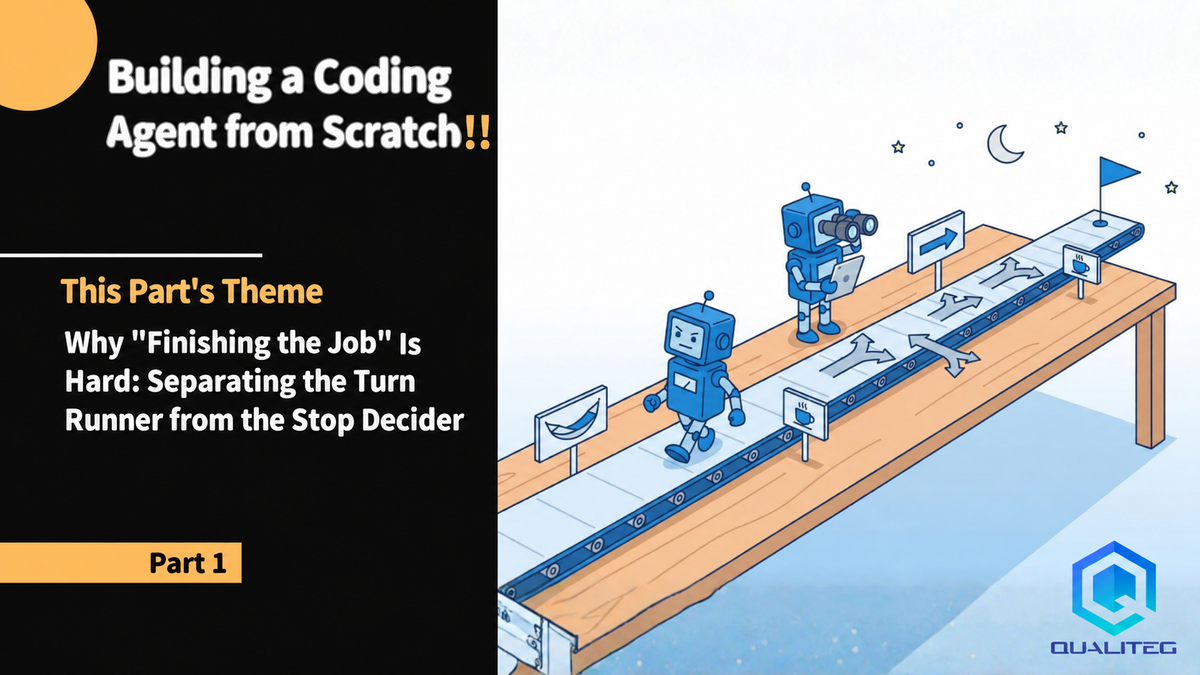
Building a Coding Agent from Scratch, Part 1: Why "Finishing the Job" Is Hard, and Separating the Turn Runner from the Stop Decider
When we built our own coding agent, the hardest part was not running the loop but deciding when to stop. In one run, 234 of 300 turns never called a tool. Starting from that number, we separate the turn runner from the stop decider and fix how pushbacks are sent.

Hello!
With this post we are starting a series that shares what we learned building a coding agent from scratch.
At Qualiteg, a large number of in-house AI agents (our "AI employees") run day-to-day operations, and coding is only one of the areas they cover.
For coding specifically, alongside frontier coding agents such as Claude Code and Codex, we also operate a number of coding agents we built ourselves.
The biggest advantage of building your own is that, combined with a local LLM, you can make a specific domain of coding tasks dramatically more efficient, faster, and higher in quality without spending anything on API costs.
An AI Agent Is Made of an Engine and a Harness
So, what exactly is an agent in the first place?
Not just coding agents but AI agents in general can be roughly divided into two parts:an engine and a harness.
The engine is, needless to say, the LLM.
What we introduce in this series is the design know-how for theharness, the part that sees a coding task through to the end.
Give it a single line of instructions, and it keeps building until the job is done, even after you have walked away from your desk.
That is the kind of tool we mean.
And as mentioned at the start, we managed to refine this coding harness to the point where a small local LLM alone can carry a coding task through to completion.
We Thought It Would Be Easy...
We started out assuming this would be easy to build. In the first experiment, we handed a local LLM the specification for a task-management web app with authentication and let it run for 100 turns.
When we came back, it had stopped after hitting the turn limit.
The server files had been written.
But of the 12 APIs in the specification, the number that actually worked was zero.
We raised the limit to 300 turns and ran two different models. The API count stayed at zero.
At that point I wrote in my notes:
"From here on, this is a question of the model's implementation ability."
The next day, after aggregating the event log from a different angle, I retracted that conclusion. Out of 300 turns, there were234 turns in which the model never called a tool even once. It had not been running. It had merely been spinning, unable to stop.
To put the conclusion first: when you build a coding agent, the genuinely hard part is not getting the model to call tools and running the loop.
It is deciding who determines "may we stop at this turn," on what evidence, and how that decision is fed back to the model
.
Our team had separated this decision from the start into a role distinct from the one that runs the turns. Even so, it spun idly as described above.
But precisely because the two were separated, as we went on to fix 105 defects, the place to fix things was always the same.
This article is Part 1 of the series "Building a Coding Agent from Scratch."
Across the series we build an agent that runs on a local LLM, have it build an entire web system while we grade the results automatically, and write up, in seven parts, the principles that survived fixing 105 defects found on the agent side. This is not an introduction to any particular product. It is a record meant to keep people who build the same thing from falling into the same holes.
| Part | Theme |
|---|---|
| Part 1 (this post) | Why "finishing the job" is hard. Separating the turn runner from the stop decider |
| Part 2 | "Done" means "it runs," not "it's written." The completion gate and how to write a pushback |
| Part 3 | "It didn't stop" is not "it made progress." Count idle turns, and cap them without cutting the thinking |
| Part 4 | Autonomy rules are for when nobody is around. If a human is present, stop and ask |
| Part 5 | Making local LLMs first-class citizens. Getting two 16GB GPUs to build a web system |
| Part 6 | How to build the evaluation. Have it build something that runs, auto-grade it, and doubt the grader itself |
| Part 7 | Logging and regression. Everything is found in the event log. And building with zero dependencies |
Every number here was measured on our own machines. In this article, one pass through the loop, that is, querying the model and executing the tool calls it returns, counts as "one turn." The model used in the experiments was mainly a 35-billion-parameter-class MoE model (4-bit quantized) running locally on two 16GB GPUs. Only the 300-turn story from the introduction comes from earlier runs of 4-billion- and 30-billion-parameter models on a single 24GB card. The hardware setup is covered in detail in Part 5.
1. One Turn of an Agent Is Surprisingly Simple
Let's start from first principles.
Inside a coding agent is the following loop. Append the user's instruction to the history and send it to the model. The model returns tool calls such as "I want to read this file" or "I want to run this command." The agent appends that response to the history, executes the tools, and appends the results to the history. Then it sends everything to the model again.
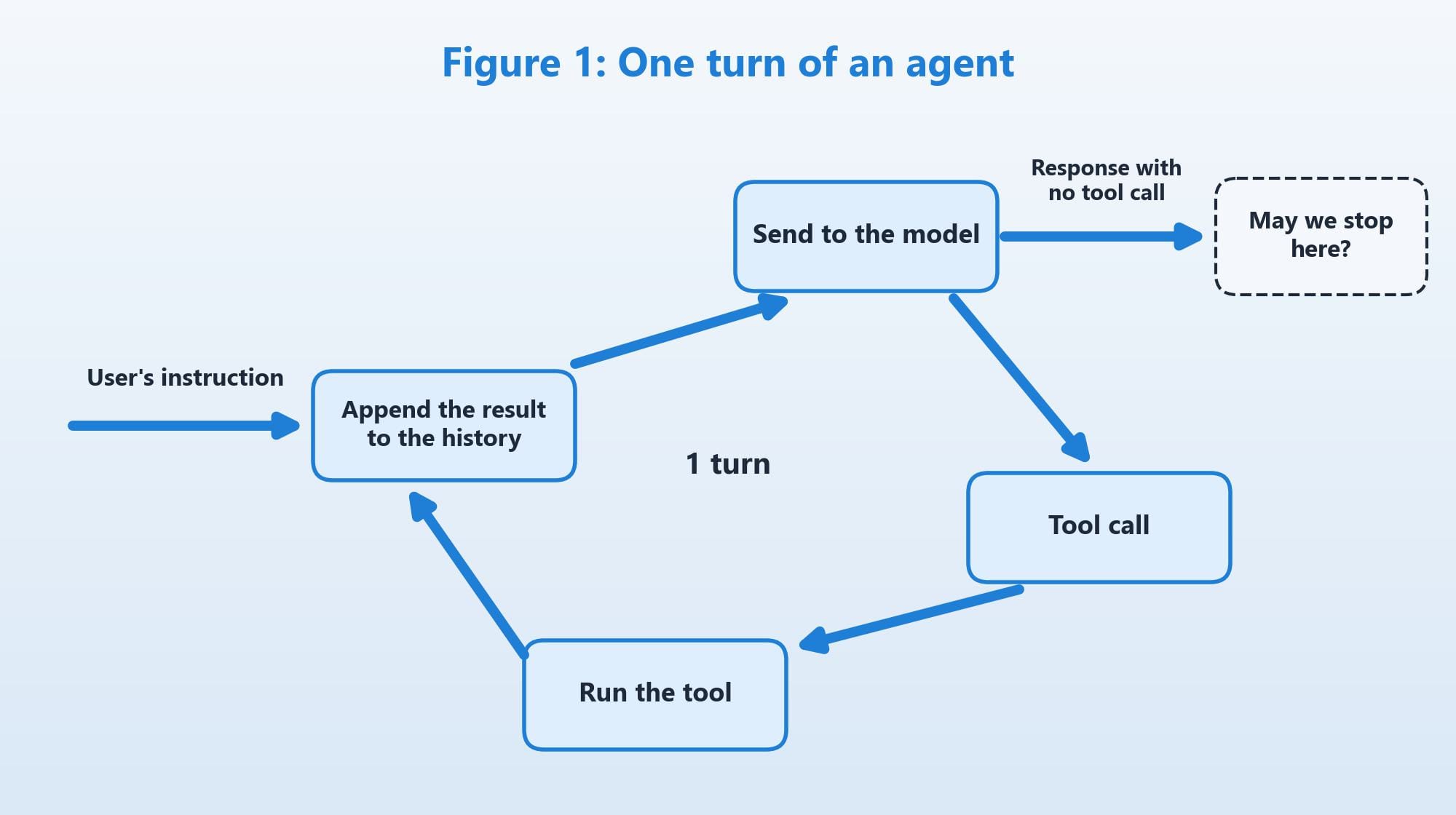
In pseudocode, this is all there is. Management of the IDs that pair tool calls with their results is omitted.
(pseudocode) The one-turn loop
loop:
  response = model.send(history)
  history.append(response)
  if response.tool_calls is empty:
    break                      # <- here is the problem
  for call in response.tool_calls:
    result = tools.run(call)
    history.append(result)
In its minimal form, you can write something that works in about 30 minutes.
The problem is the single line break. Most introductory articles and samples write it as"exit when the model stops calling tools."In the survey we did before designing ours, nearly everything took this form with nothing more than an iteration cap added. That is not wrong as such, but if this line stays as it is, the agent ends the moment the model asks back, "What would you like me to do next?"
2. "It Stopped Calling Tools" Does Not Mean "It Finished"
Pulling from the actual logs, there were four kinds of situations in which a turn ended without a tool call.
The first is when the work is genuinely complete. Stopping here is fine.
The second is when the model asks the user a question. A confirmation such as "Is this approach acceptable?" or a question about what to build. When nobody is around, this must not stop.
The third is when the model says "Done" but has not run anything to verify it. There were runs that reported "verified working" when only a syntax check had passed. In the extreme case, a response that declared "all requirements are satisfied" without a single tool call sailed straight through when we checked with a mock model.
The fourth was the most troublesome: the model keeps returning the same text over and over.
In one run, at turn 64 the model stated "all requirements are satisfied and the tests pass," and then exactly the same text came back until the 300-turn limit. The234 turns without a tool call mentioned at the beginning were this repetition.
The single line break cannot tell these four apart. To distinguish them, you need information beyond "did it call a tool." Are there TODOs left? Did verification run and pass? Does the body of the response contain the language of a question? And is there a person in front of the screen who can answer? If you keep adding these judgments inside the loop with if, the loop body quickly becomes unreadable.
3. Separate the Runner from the Role That Decides Whether to Stop
To keep this judgment out of the loop body, we split the decision off entirely into a separate role from the start.
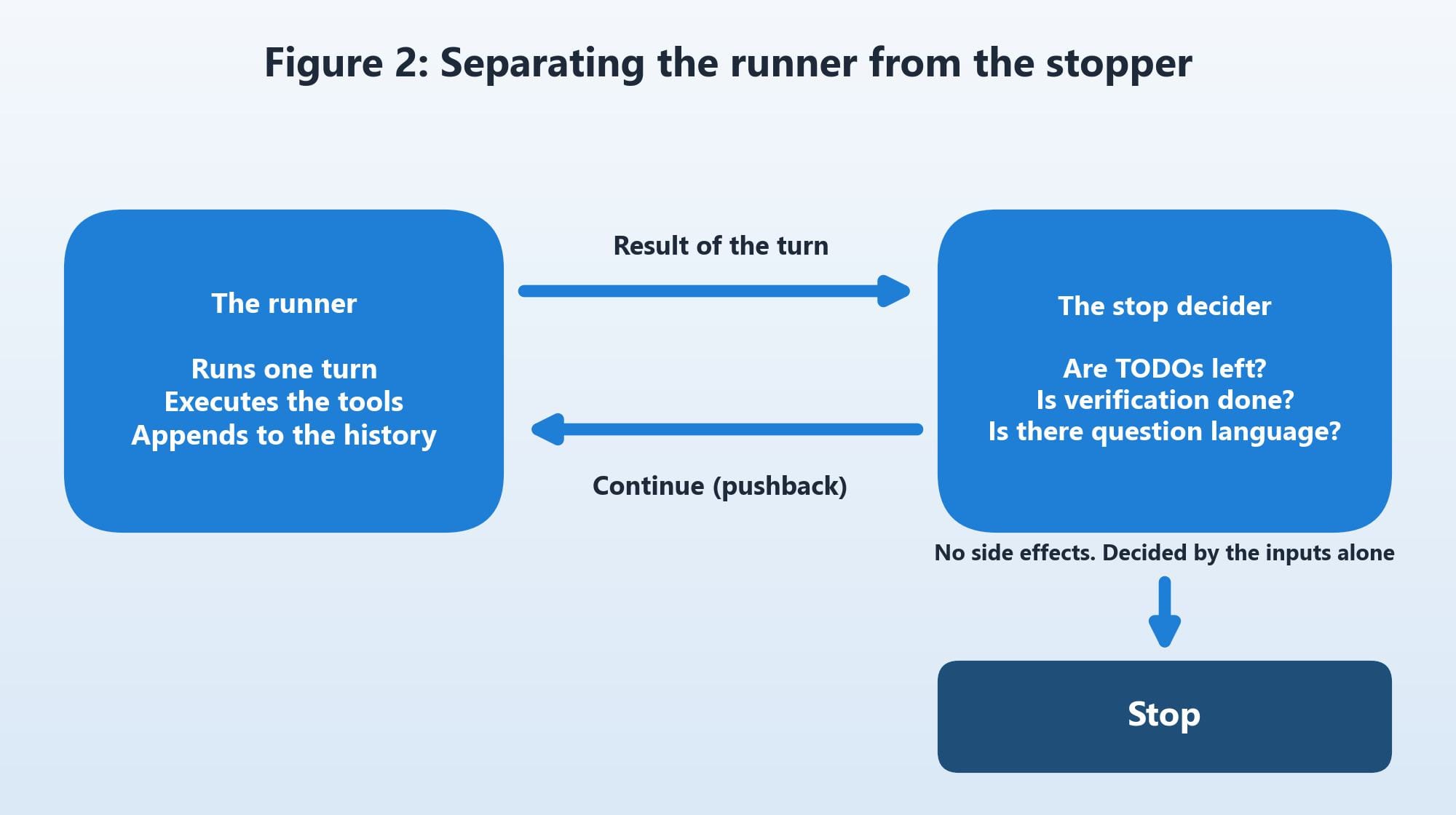
The "runner" just runs one turn, executes the tools, and appends the results to the history. It contains no stopping logic whatsoever.
The "stop decider" receives the result of the turn plus the state at that moment (TODOs, verification, limits, whether a human is present), and isa function that returns nothing more than continue or stop. It writes no files and calls no model. We make it a side-effect-free function whose answer is determined by its inputs alone.
(pseudocode) The stop decider
decide(turn, todos, verification, limits, user_present):
  if limits.exceeded:              return STOP(reason=limit)
  if turn.awaiting_plan_approval:  return STOP(reason=awaiting plan approval)
  if turn.asked_user or turn.text_looks_like_question:
    if user_present:               return STOP(reason=user's answer needed)
    else:                          return CONTINUE(pushback="Don't ask back; make an assumption and proceed")
  if todos.has_unfinished:         return CONTINUE(pushback="Unfinished TODOs remain")
  if not verification.fresh_and_passed:
                                   return CONTINUE(pushback="You haven't run it to verify")
  return STOP(reason=complete)
When it returns "continue," it also returns the text of a pushback. The runner attaches that text temporarily, as a synthesized user utterance, only to the next send, and runs the next turn. It is not appended to the persistent history (the reason is explained in Section 5). From the model's point of view, it looks as though the user has said, "There are still TODOs left."
The three questions written in Figure 2 (Are TODOs left? Is verification done? Is there question language?) correspond to the three CONTINUE statements in this pseudocode. "Hasn't run it to verify" in Section 2 also covers the case where nothing has been written yet.
Why does this split work?
First, because"should it stop in this situation" becomes something you can cover exhaustively with tests. Combine the inputs into a table, line up the expected outputs, and unit tests can check everything. The runner involves model calls, so it cannot be tested without swapping in a substitute model. The decision alone finishes in milliseconds with no model at all.
Second, becausewhen you discover a new "way it gets stuck," the place to fix it is always the same one place. The "idle-turn detection," "completion gate," and "if a human is present, stop and ask" that appear later in this series are all conditions added to this role and to the detectors that build its inputs.
4. Four Reasons It May Stop, Three Signals That Push It Back
Organizing what goes inside the decider, we ended up with this.
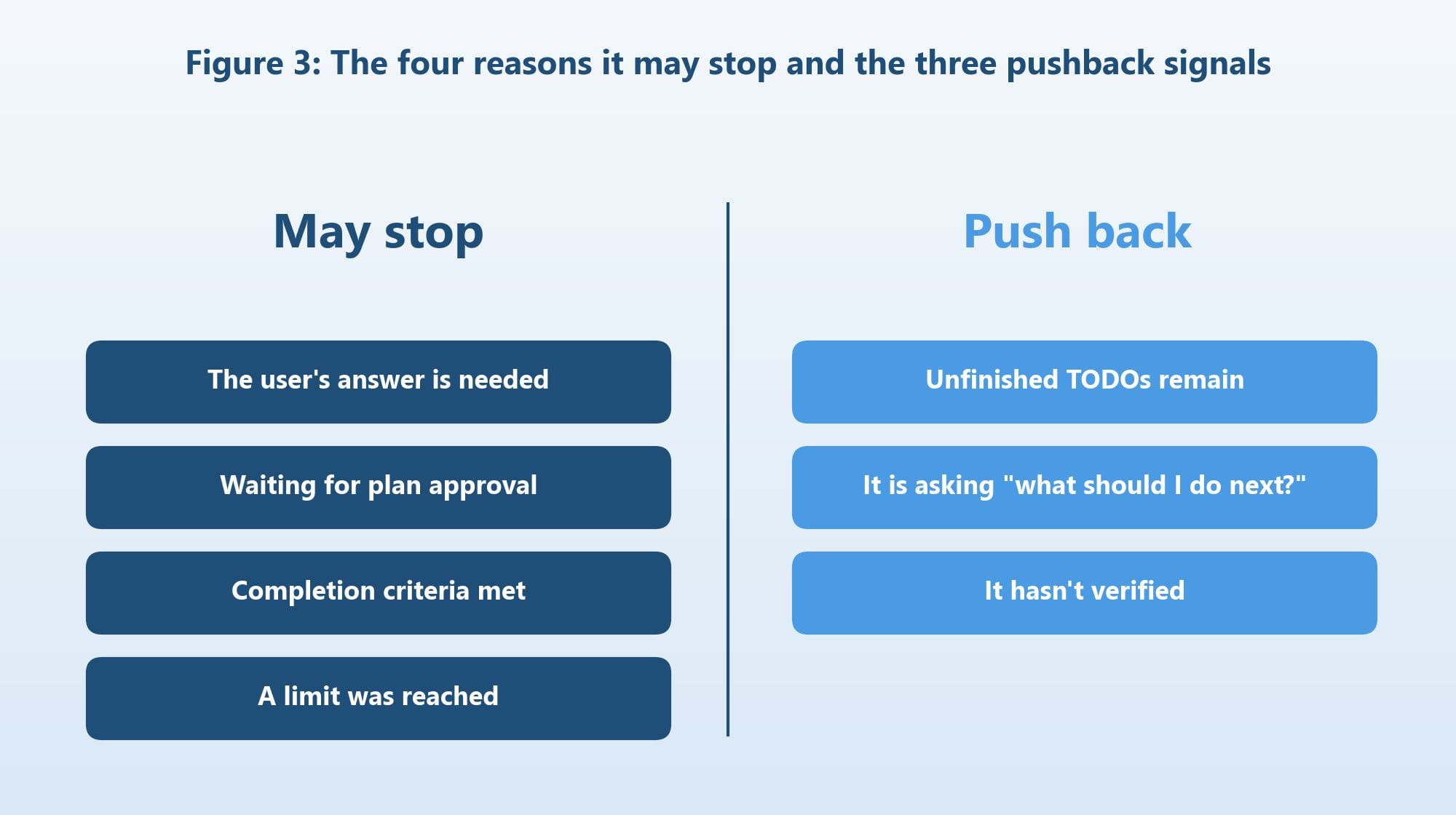
Under normal turn control, it may stop only when the user's answer is needed, when it is waiting for plan approval, when the completion criteria are met, or when a limit is reached. Just these four. Limits include not only the turn count and budget but also "the number of consecutive turns with no forward progress" and "the number of retries against the model endpoint."
It is pushed back when unfinished TODOs remain, when the body of the response has turned into a question such as "What should I do next?", or when it has not run what it wrote to verify it.
One important point here.
Tool failure is not among the reasons to stop.
When a tool fails, the content of the failure is returned to the model as-is, and the model is made to fix it itself. If the model endpoint goes down temporarily, the retry role absorbs it. "An error occurred, so I stopped" is the single most unhelpful behavior when nobody is around.
Configuration problems such as a missing API key or a wrong model name are a different matter. Those concern the preconditions for running at all, so they are handled outside this decision: stop within one turn and hand the problem back to the user. Part 4 covers this.
In the first version, this distinction was sloppy. Stopping on an error, stopping on a question, stopping on "Done." It is tempting to dismiss all of these with a single "don't stop," but each needs its own separate judgment.
5. The Pushback Trap: Send Too Much or Too Little, and It Stalls Either Way
Separating the roles was not enough. The pushback text itself ran wild.
At first, we appended the pushback text to the history every turn. When the model went several turns without acting, the pushbacks piled up. In one run,111 "continue" pushbacks accumulated, and by themselves they ate up the context window. The mechanism meant to manage the context was consuming it.
So we changed it to "don't send a pushback if the same kind repeats consecutively." This time, the history only gained the model's own identical responses, nothing new was added to the input to push the model toward its next action, and the same output kept coming back. This was the true identity of the "same text for 234 turns" mentioned earlier.
Since we were not sending any new information, it was only natural that the same output kept coming back. Before doubting the model, we should have doubted what we ourselves were sending.
The principle we learned is this.What must be stopped is the accumulating, not the sending.Do not keep pushback text in the history; attach only the latest one at send time. Make the wording more specific as the consecutive count rises. This way the input changes slightly every turn and nothing piles up.
It looks like a small detail, but until we fixed this, more than 70% of the 300 turns were idle. How to count idle turns is covered in Part 3.
6. The Result of Separating the Roles, Fixing the Pushback, and Adding the Gates
The two models run on the version before the idle-turn fix both ran to the 300-turn limit with zero working APIs. Counting the contents of the turns, the turns in which a tool was never called came to234 of 300 turns (78%) and 218 of 300 turns (73%).
In the version with the corrected pushback delivery plus the other gates described in this series, idle turns dropped to 1 to 5%. Running the same task (a task-management web app with authentication, 12 APIs, SQLite, a UI, and tests) three times on a 35-billion-parameter-class local model, the turn counts varied at 121, 40, and 144, but the scores lined up at 94.9, 93.8, and 96.5 out of 100. All three produced deliverables that started up, met the completion criteria, and stopped on their own. The grading itself is covered in Part 6.
Because both the model and the hardware changed between before and after, the difference in scores cannot be read directly as the effect of the split. The effect of the split shows up in the fact that every time we found a flaw in how it stopped, both the place to fix it and the place to put the unit test that reproduces the scenario were already determined.
The reason scores line up even though turn counts vary is that what varies is the "path," not the "result." This way of looking at it is also explained in detail in Part 3.
Summary: Design the "Stop Decision" Before the Loop
There is one thing above all that we want to convey this time. If you are building a coding agent,design the role that decides "when it may stop" before you write the loop.
Make that role a side-effect-free function that takes as input only the result of the turn and the state of TODOs, verification, limits, and whether a human is present, and returns continue-or-stop plus the pushback text. Narrow the reasons it may stop to four, and keep tool failure out of them. Do not append pushbacks to the history; send them with slightly different wording each time.
| Situation | Typical behavior | Our separated implementation |
|---|---|---|
| The model asked a question | Exits | Push back if nobody is present (if someone is, stop and ask. Part 4) |
| Said "Done" but did nothing | Exits | Push back until it runs and verifies |
| The same text keeps coming back | An implementation that merely continues runs to the limit | Send pushbacks with changed wording |
| A tool failed | Exits, depending on the implementation | Return the failure and have it fix things itself |
| TODOs remain | Doesn't notice | Push back |
| Genuinely complete | Exits | Exit only after passing the completion gate (Part 2) |
Next time, we turn to this "completion gate." Instead of trusting the model's "Done," we actually start what it built, hit the routes in the specification, and inspect the contents of the tests before closing the gate. We will also describe, with numbers, the five ways things still slipped through.
See you next time!
![[AI×CAD] Part 6: Show What Changed in 3D — Compare and Share STEP and STL Revisions in Your Browser](/content/images/size/w600/2026/10/ai-cad-step-viewer-part6-en-1.png)